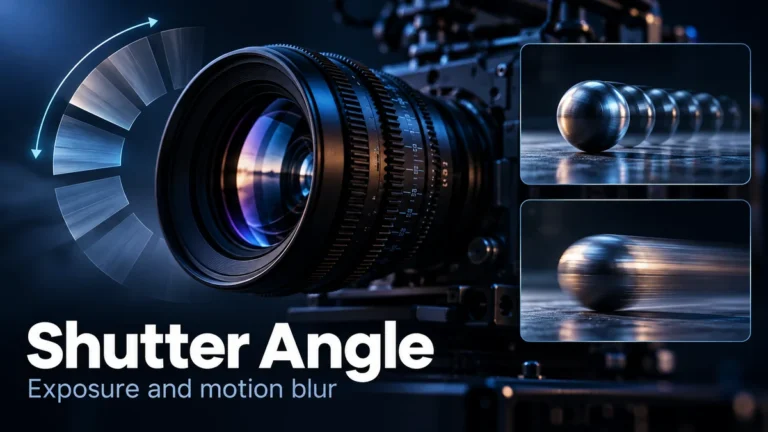
Shutter angle expresses a video exposure as a portion of a frame interval. For ordinary regular capture, a larger angle gives each exposure more time; a smaller angle gives it less. At 25 frames per second, 180 degrees corresponds to 1/50 second. The setting helps explain motion blur, but a sharp or smeared frame cannot, by itself, establish whether a video is camera-captured, edited, or AI-generated.
The useful task is to connect three things that are easily confused: how often a camera samples the scene, how long it integrates light for an exposure, and how the delivered clip plays. This guide provides a calculation worksheet and a source-review process. The numbers below are mathematical examples, not results from a camera experiment or a DetectVideo benchmark.
What shutter angle means in a digital video
The degree terminology comes from rotating shutters used with film. A digital camera can use the angle convention to describe exposure time without having that same physical mechanism. Nikon’s shutter-angle explanation describes the relationship between angle, frame rate, exposure, and motion blur. The convention is a way of specifying time, not evidence that a particular kind of shutter recorded the clip.
Think of one frame period as the full circle in the calculation. An angle of 180 degrees represents half that period; 90 degrees represents a quarter. This is a timing model, not a diagram of where every sensor pixel starts and ends its exposure. The camera’s actual recording mode can have additional constraints. Confirm those constraints before turning a theoretical number into a claimed capture setting.
Shutter speed and shutter angle can describe the same exposure in different ways. A speed display such as 1/100 second specifies a duration directly. An angle display specifies it relative to the capture rate. Keeping the duration fixed while changing the rate therefore changes its equivalent angle. Keeping the angle fixed while changing the rate changes the duration. Neither control is intrinsically more authentic.
Do not assume a camera supports angle control just because a tutorial mentions it. Sony’s ILME-FX3 Shutter Mode help page documents angle and speed modes with model and firmware conditions. It also warns that their settings are stored separately. That example supports checking the actual camera documentation, not promising the same menu or behavior on every device.
Calculate exposure duration from angle and capture rate
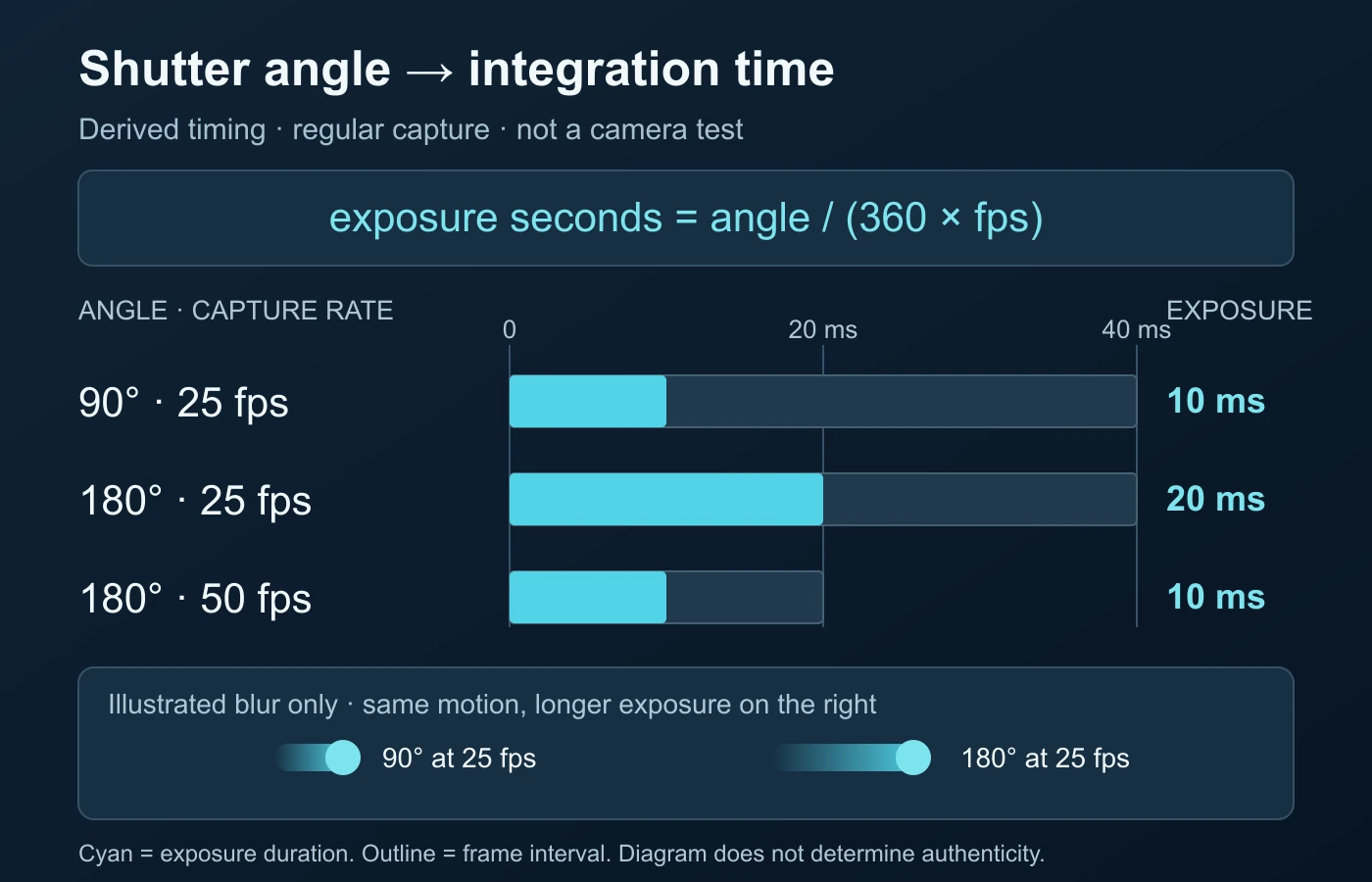
For the ordinary constant-rate model used here, exposure time in seconds equals angle divided by 360, then divided by capture frames per second. Write it as exposure time = angle / (360 × capture fps). The frame interval is 1 divided by the capture rate. Multiplying that interval by the angle’s fraction of a full circle gives the exposure duration.
The inverse is equally useful: equivalent angle = exposure seconds × capture fps × 360. The RED RANGER MONSTRO Exposure/Shutter guide documents these conversions. Its supported ranges and camera limits belong to that product; the examples below are our own arithmetic, not a recommendation to copy its settings.
Keep the units visible. “50” might mean 50 frames per second, a shutter denominator in 1/50 second, or something else on a camera display. They are not interchangeable. Convert a fractional duration before multiplying: 1/100 second is 0.01 second. To express the result in milliseconds, multiply seconds by 1,000. Check which quantity you are calculating before rounding it.
| Capture rate | Angle | Exposure seconds | Approximate duration |
|---|---|---|---|
| 24 fps | 90 degrees | 1/96 | 10.42 ms |
| 24 fps | 180 degrees | 1/48 | 20.83 ms |
| 25 fps | 90 degrees | 1/100 | 10 ms |
| 25 fps | 180 degrees | 1/50 | 20 ms |
| 25 fps | 270 degrees | 3/100 | 30 ms |
| 50 fps | 90 degrees | 1/200 | 5 ms |
| 50 fps | 180 degrees | 1/100 | 10 ms |
These examples assume a known, regular capture rate and ordinary exposures no longer than their frame period. They do not cover every long-exposure mode, multi-exposure processing pipeline, or irregular capture workflow. If the camera uses a special mode, read its documentation rather than forcing its behavior into this table. Mathematical equivalence does not guarantee the camera can implement the requested duration.
Use the worksheet before judging a motion-blur comparison
Exercise one: the angle stays fixed, the rate changes
Suppose a fictional project records one scene at 25 fps and another at 50 fps, both labeled 180 degrees. Divide 180 by 360 to obtain one half. At 25 fps, half the 40-millisecond frame period is 20 milliseconds. At 50 fps, half the 20-millisecond period is 10 milliseconds. The same angle does not mean the same number of milliseconds.
Record that result before discussing the look of the clips. If subject motion and framing were otherwise comparable, exposure duration would be one relevant difference. But a faster subject, a tighter crop, a camera pan, or a different playback speed could change the visible impression too. Do not claim that this calculation predicts a precise blur width without information about motion in the image.
Exercise two: the duration stays fixed, the rate changes
Now suppose the exposure is held at 1/100 second. At 25 fps, the equivalent angle is 0.01 × 25 × 360, or 90 degrees. At 50 fps, it is 0.01 × 50 × 360, or 180 degrees. These two exposures have the same duration even though their angle labels differ. Comparing only the labels would conceal that relationship.
This is a useful audit of a camera-setting explanation. Ask whether someone maintained an angle, a duration, or merely a familiar-looking menu value. If all you have is the finished clip, do not reverse the exercise and assert that you have recovered its exact exposure. Many combinations of capture, motion, optics, processing, and playback can produce similar visible blur.
Exercise three: the supplied rate is a delivery rate
A downloaded file says 25 fps, but its creator says the original was captured at 50 fps and slowed down. Which rate belongs in a capture-exposure calculation? The original capture rate, if that statement can be supported. Substituting the export rate would produce an exposure estimate for a different assumption. Preserve both labels: capture rate as reported, and delivery rate as inspected.
If the capture rate is unknown, stop the numerical inference at that point. You can present a conditional calculation: “If capture was 50 fps at 180 degrees, exposure would be 10 milliseconds under the ordinary model.” The word “if” is doing important work. A clean conditional explanation is more useful than a confident value derived from the wrong stage of the workflow.
Keep precision and uncertainty in the same worksheet
Compare 180 degrees at exactly 24 fps with the same angle at exactly 25 fps. The derived durations are about 20.83 and 20 milliseconds. Their difference is about 0.83 millisecond, not an entirely different capture category. Do not use a rounded display to claim that two source settings were identical, but do not exaggerate a small numerical difference into a visible result either. Whether it matters to a particular moving edge is a separate observation.
Keep unrounded calculations in your private working notes and use sensible precision in the explanation. If the source gives only a rounded rate, say that the exact rate is unavailable. If its capture rate changed during recording, split the calculation into documented intervals rather than presenting one exposure for the entire file. Record who supplied each setting, which segment it applies to, and whether it was observed or reported. Those labels make the worksheet reusable by another reviewer without disguising the gaps as precision.
What a shorter or longer exposure can explain
During an exposure, a moving subject can occupy more than one position in the image. A longer integration period can spread that movement across more of the recorded image; a shorter one samples a briefer part of it. RED’s exposure documentation connects duration with light and motion blur. The setting is only one contributor: movement, framing, and subsequent processing still matter.
Distinguish blur within a frame from motion across frames. A sequence of crisp individual pictures can still feel abrupt during playback. A smeared individual picture can occur in a sequence whose timing is regular. Pause-and-inspect review and normal-speed viewing therefore answer different questions. Write down which observation you made instead of calling both “smoothness.”
For a comparison, choose the same kind of region: the moving object’s edge, a static background edge, or a camera-pan feature. If the background is sharp but the object is smeared, that may guide a question about subject movement. If the whole image is affected, camera movement or another process deserves consideration. These are ways to organize observations, not diagnostic rules that determine the cause.
A common 180-degree convention is a starting point for a look, not a test of truth. Nikon’s manufacturer guide describes deliberate smaller and larger angle choices. An unusual aesthetic can be intentional camera work. Do not mark a sharp sports shot synthetic merely because it differs from a cinematic example, or authenticate a clip because its blur seems familiar.
Separate exposure duration from rolling-shutter readout
Exposure duration concerns how long a pixel integrates light. Rolling shutter concerns the timing relationship across sensor rows. Those are related capture properties but not the same setting. Baumer’s technical exposure explanation describes sequential row exposure and movement-related distortion. Its industrial-camera examples do not supply readout specifications for an unidentified phone or cinema camera.
Keep the questions separate in your notes. “How long was the exposure?” is not “How long did the sensor take to scan the image?” A short exposure can leave relatively crisp local detail while different rows represent different moments. The absence of much smear does not, by itself, settle the readout question. This guide’s angle calculations do not calculate a sensor’s full-frame readout time.
For the same reason, do not assume that choosing a smaller angle cures every bent edge or unstable shape. First describe the observation, then consider the appropriate mechanism. If the issue is across-row geometry rather than within-exposure blur, it needs a separate review. We stop at that distinction here rather than duplicating the rolling-shutter interpretation task or offering model-independent correction settings.
Review the capture conditions without inventing them
Begin with what you know, not what an image seems to imply. If you captured the clip, note the camera and recording mode, actual capture rate, angle or duration setting, lens and framing, and whether automatic exposure was active. If you received it from someone else, request the relevant original or a documented explanation where appropriate. Do not turn a screenshot of settings into proof that those settings applied throughout the recording.
Use a simple source log with separate entries for observed file properties and creator-provided information. A field labeled “50 fps, creator statement” is different from “25 fps, inspected export.” A reported shutter value is different from one stored in a source file. Label unavailable fields unavailable. The video metadata guide covers technical field interpretation without treating a tag as a truth certificate.
If you are planning a new capture, decide what observation the footage needs to preserve. Is readable text on a moving object important, or is the goal the visual flow of the movement? Choose and review settings against that purpose before the important recording. Do not promise that one angle guarantees readability. The actual object speed, camera movement, framing, lighting, and recording mode must be considered together.
Keep comparisons controlled enough to teach something. If you can lawfully record a non-sensitive moving object, hold the framing, motion pattern, lighting, focus, rate, and processing constant while changing the exposure setting. Retain each original and label the change. Our article does not perform this experiment; it gives a procedure you could document. A comparison that changes everything at once cannot isolate exposure as the explanation.
When a camera cannot achieve a setting, record the implemented value rather than just the target. The RED guide, for its documented model, explicitly distinguishes a requested exposure from one the camera can achieve. Do not infer the fallback behavior of other cameras. Read the appropriate manual and inspect the captured result. A theoretical worksheet is not a substitute for confirming a recording mode.
Lighting can also constrain a practical setting, but solving camera-and-light flicker is a separate task. If changing exposure reveals bands or brightness changes, record the conditions and consult the device-specific guidance. Do not use a blanket “cinematic” setting to override an observed problem. Keep that troubleshooting separate from a claim that the motion itself was synthetically generated.
Account for processing before using blur as evidence
The pixels you inspect may not be the pixels the camera recorded. A platform copy can have a different resolution, compression history, playback timing, or enhancement treatment. A still exported from a player may also differ from the highest-quality source. Retain the best available file and a record of how you obtained it. Work on copies rather than overwriting the material you are trying to understand.
Compare the same moment across versions when they are available. Does the earlier copy show detail that disappeared in the repost? Are the edge shapes stable while texture becomes softer? Did the alleged anomaly appear only after a resize or export? The compression-artifact guide owns that delivery-quality question. Do not force every softness observation into a capture-angle explanation.
Do not sharpen a smeared frame and treat the new apparent detail as something you recovered with certainty. Keep any processed view clearly labeled as a derivative. A cleaner-looking representation is not automatically a more faithful record. If the question depends on whether an edge was present in the source, inspect the source, document the limits, and avoid filling the gap with an attractive reconstruction.
Nor can blur determine which generator, editor, or camera made a clip. A look is not a unique software signature. If the real question concerns possible AI generation or manipulation, formulate that question separately and review independent source and technical evidence. The video forensics guide explains the broader evidence structure; this article contributes capture-exposure context, not another general detector checklist.
Write a narrow, reproducible motion-review conclusion
Your final note should distinguish the observation, the calculation, and the explanation. An observation might be “the moving sign is smeared in the inspected frame.” A calculation might be “the stated 25 fps and 180-degree setting correspond to 20 milliseconds.” An explanation might be “that exposure is compatible with some motion blur.” None of those statements alone establishes the source history or the truth of the caption.
Consider three different endings to a review. If a documented source includes known capture settings, you can report their timing relationship and compare it with what you see. If only an export is available, you can describe its visual property while leaving exposure unknown. If two versions disagree, you can identify the difference and request the earlier source. Each conclusion gives the next reviewer something concrete to check.
Use this final checklist: identify the exact copy reviewed; label capture and playback rates separately; retain units and assumptions for every calculation; describe more than one frame when movement matters; keep sensor readout distinct from exposure length; and state whether processing history is known. Then say what remains unresolved. A useful report can end with uncertainty without becoming indecisive about an unsafe or unsupported claim.
Finally, match the decision to the question. For production, the decision may be to re-record a moving label with documented settings. For media review, it may be to find an earlier version before making an allegation. For a consequential authenticity claim, it may be to add source verification and suitable analysis. Shutter angle explains a portion of the capture process; it does not turn visual realism into proof.
Questions about shutter angle and motion blur
Is 180 degrees always the correct shutter angle?
No. It is a common visual convention, not a compulsory recording or authenticity rule. A suitable choice depends on the intended look, movement, recording mode, and practical conditions.
What is 180 degrees at 24 frames per second?
Under the ordinary regular-capture model, 180 / (360 × 24) equals 1/48 second, about 20.83 milliseconds. That is a derived duration, not a measurement of an unknown clip.
Does a fixed angle keep exposure milliseconds fixed?
No. Changing capture rate changes the frame interval. At 180 degrees, 25 fps gives 20 milliseconds, while 50 fps gives 10 milliseconds.
Can I calculate capture angle from a downloaded file’s frame rate?
Not reliably without knowing its actual capture duration and rate. The current file may describe export or playback timing instead. Keep any assumed calculation explicitly conditional.
Does a short exposure remove rolling-shutter distortion?
Not as a universal rule. Exposure integration and the timing across rows are separate. Angle alone does not reveal or control an unidentified camera’s full-frame readout behavior.
Can motion blur prove a video is not AI-generated?
No. Blur is a visual property, not a certificate of camera origin. Assess source, documented capture conditions, processing history, and suitable technical evidence separately.
Sources and calculation limits
- RED RANGER MONSTRO Operation Guide: Exposure/Shutter — integration, angle conversions, and documented model constraints.
- Nikon: How to use shutter angle — digital angle convention and intentional motion-blur choices.
- Sony ILME-FX3 Help Guide: Shutter Mode — model-specific angle/speed modes, firmware conditions, and separately stored settings.
- Baumer: Rolling shutter, global shutter — two principles of exposure — exposure duration distinguished from sequential sensor-row timing.
References checked on 14 October 2026. Worked cases and the diagram are original mathematical and conceptual illustrations, not tests. Camera limits and menu behavior remain device-specific. No calculation authenticates an unidentified recording.
Motion blur needs context, not a quick verdict.
For a video that raises questions, review available analysis signals alongside the source and capture conditions.