
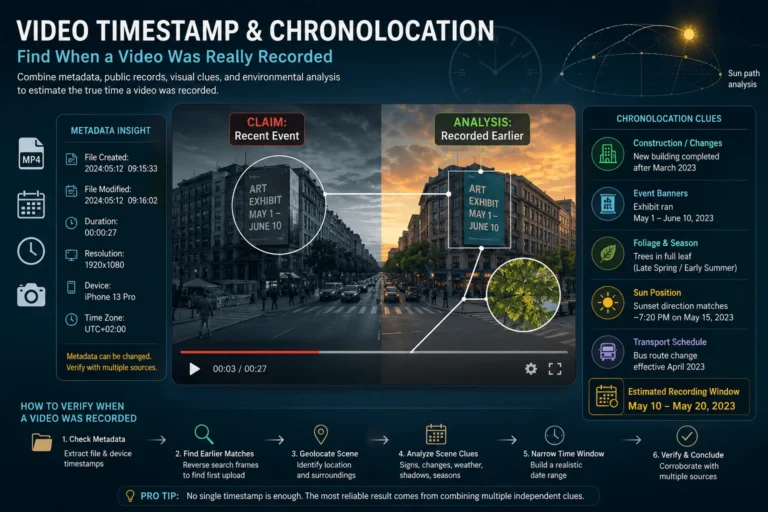
A video timestamp can mean several different things: a playback position, a date stored inside the file, or the time a platform published the video. None of those automatically tells you when the camera actually recorded the scene.
To find when a video was recorded, combine direct time evidence with chronology clues. Start with the best available file, inspect embedded dates and time zones, trace the earliest known public copy, then compare visible details such as clocks, event banners, construction, vegetation, weather, shadows, and changing landmarks. The strongest result is often a defensible date range rather than one exact timestamp.
What Does “Video Timestamp” Mean?
The phrase video timestamp is ambiguous. Before checking one, identify which kind of time you are looking at.
| Timestamp type | Example | What it describes |
|---|---|---|
| Playback timestamp | 00:02:17 | A position inside the video’s timeline |
| Embedded file timestamp | QuickTime CreateDate | A date stored in the video container, track, media, or device metadata |
| File-system timestamp | Created or Modified in Windows/macOS | History of the current file on a storage system |
| Platform timestamp | Published on a social network | When that platform copy became public or available |
| Burned-in timestamp | Date and time visible inside the picture | A visual label rendered into the frames |
| Recording time | The real-world capture moment | When the depicted scene was actually recorded |
Only the last item is the question this article is trying to establish. The others are evidence that may support, constrain, or contradict it.
Recording Time Is a Chronology Problem, Not a Metadata Field
A reliable answer usually comes from reconstructing a timeline.
Imagine a video shared today as footage of today’s storm. The downloaded MP4 says it was created today. That does not settle the question. The platform may have re-encoded an old clip today, producing a new container with a new date.
If the same scene appears in a post from two years earlier, the current-event claim is contradicted even if the downloaded file’s metadata looks recent.
This is why time verification should answer:
- What is the earliest possible recording date?
- What is the latest possible recording date?
- Which evidence narrows the interval?
- Can the exact time be established, or only a range?
The Time Evidence Ladder
Different timing signals have different evidentiary value. Start with evidence closest to capture, then move outward.
The ladder is not an absolute ranking for every case. A visible event banner can sometimes be more decisive than weak metadata. The principle is to understand what each signal actually establishes.
Step 1: Preserve the Best Available Copy
Before examining timestamps, preserve the highest-quality and earliest-generation file you can obtain.
A downloaded social-media copy may have:
- new container timestamps
- stripped camera metadata
- new codec settings
- removed GPS information
- reduced resolution
- platform-specific encoding tags
If the original file exists, keep it unchanged and inspect a copy. If only an online post exists, save the URL, account, caption, stated date, and platform publication information before the post changes or disappears.
Step 2: Check Embedded Video Timestamps
MOV and MP4 files can contain several dates at the movie, track, media, or device level. These fields may be related to recording, export, container creation, or processing.
Apple’s QuickTime specification defines the movie header creation time as the calendar creation date and time for the movie atom, represented from the QuickTime epoch and preferably using UTC. The specification also notes that older QuickTime conventions did not always handle time zones consistently. See Apple’s QuickTime movie header documentation.
That wording matters: a QuickTime creation field is a container-level time value, not a universal guarantee of real-world camera capture time.
Check All Date Fields, Not Just One
ExifTool exposes many QuickTime date families, including movie, track, and media creation and modification fields. Device-specific or location metadata may add more date information.
To inspect all available time-related tags:
exiftool -time:all -a -G1 -s video.mp4The ExifTool QuickTime reference documents fields such as MediaCreateDate and MediaModifyDate and explains how some QuickTime time values can be converted between UTC and local time depending on tool settings. See the ExifTool QuickTime metadata reference.
For a deeper explanation of ordinary file fields, use the video metadata guide.
Step 3: Resolve Time Zones Before Calling a Timestamp Wrong
A three-hour or eight-hour difference is not automatically suspicious. It may be a time-zone interpretation problem.
When comparing timestamps:
- identify the metadata group and field
- check whether the stored value is intended as UTC
- check whether the tool converts it to local time
- identify the claimed recording location
- consider daylight-saving rules for that date and location
- normalize the relevant values before comparing them
Always document the time zone alongside an exact timestamp. “14:32” without a zone can be incomplete evidence.
Step 4: Treat Upload Time as an Upper Bound, Not Capture Time
A normal uploaded video must have been created in some form before it was published, so the publication date can provide a latest possible bound for that copy’s existence.
It does not prove the video was recorded close to the upload time. Someone can publish footage hours, months, or years after recording it.
A genuine livestream can provide a much tighter relationship between transmission and recording time, although investigators should still verify that the content was actually live rather than a rebroadcast, prerecorded insert, or screen capture.
Bellingcat’s chronolocation work makes this distinction explicit: ordinary upload dates cannot guarantee when a video was filmed, while live broadcasts can offer stronger temporal reference points when the live nature of the content is established. See Bellingcat’s chronolocation methodology.
Step 5: Find the Earliest Known Public Appearance
If you are checking whether viral footage is old, the fastest contradiction may come from source tracing rather than metadata.
Extract several distinctive frames from different scenes, then search them. If the same visual appears in an older article, post, or video, you have evidence that the footage existed by that earlier date.
The video frame extractor workflow explains how to choose high-information stills, and the reverse video search guide covers tracing those frames to earlier copies.
Be precise with the conclusion:
“This frame appeared online by March 3” is stronger than saying “the video was recorded on March 3.”
The earlier appearance establishes existence by that date, not necessarily the original capture moment.
Build a Date Range Instead of Chasing One Perfect Timestamp
Chronolocation often works by setting lower and upper bounds.
| Evidence | What it can establish |
|---|---|
| A building opened on June 1 and appears in the video | The video cannot predate that relevant visible state |
| A mural was removed by September 10 but is still visible | The video likely predates the removal |
| The first known upload is September 15 | The recording must have occurred no later than the existence of that uploaded copy |
| An event banner ran only August 20 to September 5 | The scene may be narrowed to that campaign period if the banner timing is independently confirmed |
Combining independent bounds can turn “sometime that year” into “most likely between August 20 and September 5.”
Visible Clocks and Dates Are Useful, but They Need Authentication Too
A scene may contain direct time clues:
- wall clocks
- phone screens
- train or airport displays
- scoreboards
- calendar pages
- news broadcasts
- event posters
- parking meters
- digital signage
These can narrow time significantly, but ask whether the clue itself could be wrong, prerecorded, staged, or unrelated to the recording moment.
A clock in a shop window can be inaccurate. A news program can be replayed. A visible date on a phone can be manually changed. Treat scene clocks as evidence to corroborate, not automatically as ground truth.
Temporary Details Are Often Better Than Permanent Landmarks
For dating a scene, change is useful.
Bellingcat’s chronolocation methodology highlights details that vary over time, including storefronts, construction sites, murals, advertisements, banners, public transport infrastructure, foliage, and seasonal conditions.
Scaffolding, cranes, unfinished facades, demolition, roadworks, and temporary barriers can create narrow date windows.
Store names, advertisements, event posters, menus, and branded signage often change faster than architecture.
Bus routes, station signs, street furniture, road markings, and traffic layouts can be compared across dated references.
Leaf cover, snow, water levels, flowering, crop state, and seasonal light can narrow the period, though rarely to one exact day alone.
Use Historical Reference Imagery to Bracket the Date
Once the location is known, compare the video with images of that place from different dates.
Google Earth supports historical imagery, allowing investigators to inspect how a location changed across available image dates. Google notes that imagery dates have limits and may represent collection ranges rather than an exact moment, so they should be interpreted carefully. See Google’s historical imagery guidance.
You can also use:
- older Street View captures
- local news photographs
- tourism photos
- property listings
- business social accounts
- event footage
- user-uploaded videos from the same street or venue
Do not rely on a single reference image. One image may have been uploaded long after it was taken.
Sun and Shadow Analysis Can Estimate Time, but Only Under the Right Conditions
Shadow analysis is one of the best-known chronolocation techniques, but it is easy to overstate.
The basic idea is that the sun’s position changes predictably with date, time, and location. If you know or can strongly estimate the location and orientation, visible shadows can be compared with expected solar position.
Bellingcat demonstrates using SunCalc to compare sun position and shadow direction for chronolocation and geolocation. The method depends on suitable daylight, visible shadows, and reliable scene geometry. See its guide to using the sun and shadows for verification.
Shadow direction
The direction of a shadow can help estimate the sun’s azimuth. This becomes meaningful only if the scene orientation is known or can be reconstructed.
Shadow length
If the real-world height of an object is known or can be estimated reliably, its shadow length can help constrain solar elevation. Perspective, sloped ground, lens distortion, and uncertain object dimensions can introduce substantial error.
Sun position in the frame
A visible sun, known camera direction, and geolocated scene can further constrain possible times.
In practice, sun and shadow analysis is strongest when used to eliminate impossible times or distinguish between plausible windows rather than pretending to recover a second-by-second capture timestamp.
Weather Can Corroborate a Date, but It Is Rarely Unique
Rain, snow, cloud cover, fog, wind, temperature-related clothing, and wet surfaces can support a timeline when compared with reliable historical records.
The limitation is obvious: many days can have similar weather.
Weather becomes more useful when the video shows a distinctive event such as:
- first snowfall after a known dry period
- an unusual storm
- flooding
- extreme heat-related conditions
- a specific weather front visible across several local recordings
Use it as corroboration, not as a standalone timestamp.
Seasonal Clues Can Narrow Months, Not Minutes
Vegetation and human behavior can provide broad seasonal evidence:
- leaf-on versus leaf-off trees
- flowering plants
- harvested fields
- snow cover
- holiday decorations
- school or sports seasons
- clothing and daylight length
Climate varies by location and year, so these clues should be tied to a geolocated scene before they are interpreted.
Event Calendars Can Turn Visual Clues Into Date Bounds
Temporary event material is especially valuable because it often has documented start and end dates.
If a video shows:
- festival banners
- election posters
- sports branding
- concert advertising
- conference signage
- construction notices
- temporary exhibitions
search for the associated schedule. Then cross-check whether the visual installation actually existed during the full advertised period. Banners can go up early and remain after an event ends.
Old Footage Reused as Current: A Fast Decision Workflow
Example 1: Metadata Says Today, Search Says Three Years Ago
A downloaded MP4 is circulating as footage from today’s event. Its container creation date is today.
Reverse search reveals the same scene in a public post from three years earlier.
The correct interpretation is:
The current file may have been created or re-encoded today, but the visual content existed at least three years earlier. The current-event attribution is therefore contradicted.
The container date described the current copy better than the underlying footage.
Example 2: No Useful Metadata, but a Construction Site Narrows the Window
A reposted clip has almost no useful dates. The scene is geolocated to a known intersection. One building is under renovation.
Historical Street View and local posts show:
- no scaffolding in April
- scaffolding installed by June
- facade completed and scaffolding removed by September
The video can now be placed plausibly within that construction phase, subject to confirming that the reference dates themselves are reliable.
Example 3: A Shadow Helps Distinguish Morning From Afternoon
The exact street is known, building orientation is established, and a tall vertical object casts a clear shadow.
Solar-position comparison shows the visible shadow direction is incompatible with the claimed morning time but consistent with late afternoon during the relevant date range.
That does not automatically provide an exact minute. It can, however, contradict one claimed time of day and support another.
Common Video Timestamp Mistakes
Calling file-system creation time the recording date
Copying or downloading a file can create a new file-system object without changing when the scene was recorded.
Calling upload date the capture date
Upload time proves publication, not necessarily recording.
Ignoring time zones
A correct UTC timestamp can look wrong when compared directly with an unconverted local time.
Assuming a burned-in timestamp cannot be changed
Visible timestamps can be generated by cameras, apps, editors, or overlays. Their origin needs verification.
Using one shadow without geolocating the scene
Solar analysis requires location and orientation. Without them, shadow interpretation can become guesswork.
Treating the earliest search result as the original recording
It is the earliest known occurrence you found, not necessarily the first publication or camera original.
Can a Video Timestamp Be Edited?
Yes. Ordinary metadata timestamps can often be rewritten, removed, or regenerated. FFmpeg, ExifTool, editing software, transcoders, and platform processing can all affect metadata in different ways.
A visible timestamp can also be rendered directly into the image.
This does not make timestamps useless. It means timestamps become stronger when their origin is understood and when they agree with independent evidence.
When C2PA or Signed Provenance Changes the Timestamp Question
Ordinary metadata fields do not normally come with a cryptographic trust chain. Signed provenance systems can add stronger information about who or what made a provenance claim and whether the associated record remains valid.
This does not turn every recorded time into objective truth, but it can improve the evidence chain compared with an isolated editable timestamp.
If the question is broader than date attribution and involves full source and edit history, continue with the video provenance guide.
What DetectVideo AI Can and Cannot Do With Timing Questions
DetectVideo AI can contribute technical analysis when the video itself needs examination for AI generation, manipulation, temporal anomalies, metadata, or other supported forensic signals.
It should not be used as a substitute for chronolocation. A detector cannot know that a storefront changed in August, that a festival banner was installed in October, or that an older public copy predates the claimed event unless that external evidence is part of the investigation.
For high-stakes verification, combine file analysis with source tracing and contextual evidence. The broader workflow is covered in the video verification guide.
How to Write a Precise Time Verdict
A good conclusion explains both the finding and its limit.
| Verdict | Meaning |
|---|---|
| Recording time supported | Multiple independent signals support the claimed capture date and time |
| Recorded before the claimed event | An earlier occurrence or scene evidence contradicts the current-event attribution |
| Date range established | Evidence provides an earliest and latest plausible recording window |
| Publication time known, recording time unknown | The upload or first known appearance is established but capture time is not |
| Timestamp inconsistent | A time field conflicts with other evidence and requires explanation |
| Recording time unverified | The available evidence does not support a defensible date or range |
Key Takeaway
The best answer to “When was this video recorded?” rarely comes from one timestamp.
Start by distinguishing playback time, file dates, publication time, and real recording time. Inspect embedded metadata but understand what each field describes. Find the earliest known public copy. Then build a chronology using temporary scene details, historical imagery, event dates, seasonal change, shadows, and other independent evidence.
When exact timing is impossible, a well-supported range is better than false precision.
FAQ About Video Timestamps and Chronolocation
How can I find when a video was recorded?
Check embedded date fields, time zones, the earliest known upload, source history, visible time clues, and scene-based chronolocation. The strongest answer usually combines several independent signals rather than relying on one creation date.
Is the video creation date the same as the recording date?
Not necessarily. A creation date can refer to the current container or file, especially after export, download, or transcoding. It must be interpreted according to the metadata field and production history.
Can I find the recording date from an MP4 file?
Sometimes. An MP4 may contain useful QuickTime, device, GPS, or other date metadata. In other cases the relevant recording metadata may be absent or replaced by export-related dates.
Does a YouTube or social-media upload date prove when the video was filmed?
No. It proves when that copy was published or made available on the platform. The recording may be much older.
What is chronolocation?
Chronolocation is the process of estimating when an image or video was captured by analyzing time-dependent evidence such as shadows, seasonal conditions, construction, signage, advertisements, historical imagery, and dated reference material.
Can shadows reveal the exact time a video was recorded?
Under good conditions, shadows can help constrain time of day or possible dates, especially when location and scene orientation are known. Perspective and measurement uncertainty usually make it safer to report a range rather than an exact minute.
Can video timestamps be changed?
Yes. Ordinary metadata fields and visible timestamp overlays can be altered or regenerated. A timestamp becomes stronger evidence when its origin is known and it agrees with independent source and scene evidence.
How do I check if viral footage is old?
Extract several distinctive frames and reverse search them. If the same visual appears in a source that predates the claimed current event, you have strong evidence that the footage is being reused.
What if a video has no timestamp metadata?
Use public chronology and scene evidence instead. Earlier uploads, landmarks, construction, event banners, seasonal clues, historical imagery, shadows, and other dated references can still narrow the recording window.