
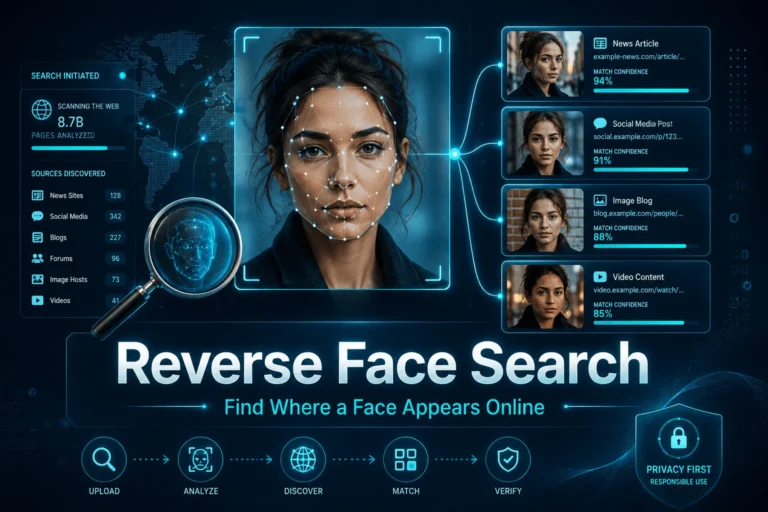
Reverse face search uses a face in a photo as the search query and looks for visually similar appearances of that face in an indexed collection of public web images. Unlike ordinary reverse image search, it is designed to find the same person across different photos, backgrounds, crops, lighting conditions, or camera angles rather than only locating copies of the exact image.
The result is not a confirmed identity. A face search engine typically returns candidate matches and source pages. Those results still need human verification. A visually similar face can belong to a different person, an old image can be attached to a new false profile, and a matching photo does not prove that the biography, account, video, or claim surrounding it is genuine.
Use reverse face search when your goal is to find public pages where the same face may appear in different photos. Start with a clear image, review several candidate matches, open the original source pages, compare identity details and chronology, and corroborate the result with independent context. Treat similarity scores as ranking signals, not identity probabilities. For privacy and safety, use face search only for a legitimate purpose and follow the service terms and applicable biometric-data rules.
What Is Reverse Face Search?
Reverse face search is a visual search method that starts with a face rather than a name, phrase, or exact image file.
The practical question is:
“Where does a visually similar face appear in the public image index searched by this service?”
That wording is more accurate than asking the engine to “identify this person.” A search system may surface pages containing visually similar faces, but the final identity conclusion depends on what those pages actually show.
Reverse face search vs reverse image search
| Method | Primary matching target | Best use |
|---|---|---|
| Reverse face search | Facial similarity across different photos | Find other public appearances of the same or a similar face |
| Reverse image search | The whole image, objects, composition, or near-duplicate visual content | Find copies, crops, source pages, thumbnails, or visually related images |
If you are looking for the original source of an exact screenshot, profile picture, or video frame, start with the reverse image search guide. Use face search when the important feature is the person’s face and the matching photo may be completely different.
What reverse face search can find
Depending on the provider’s index, a search can reveal:
- another public photo of the same face
- news or media pages containing that person
- professional, event, business, or organization pages
- older public images reused in a suspicious profile
- pages where your own image appears without your knowledge
What it cannot guarantee
A face search cannot automatically prove:
- the legal name of the person
- that two similar faces are definitely the same person
- that a profile using the photo belongs to the person depicted
- that the surrounding text is accurate
- that a matching video is authentic
- that no result means the person has no online presence
How Reverse Face Search Works
Modern face matching usually follows a pipeline rather than comparing photographs pixel by pixel.
NIST’s Face Recognition Technology Evaluation measures face-recognition systems using concepts such as false positive identification rate and false negative identification rate. In one-to-many search, a false positive occurs when a search returns a wrong identity as a candidate above the decision threshold. See the NIST FRTE 1:N identification evaluation.
Similarity score is not an identity probability
Commercial tools use different models, indexes, normalization methods, and scoring scales. A score of 80 on one service cannot be assumed to mean the same thing as 80 on another service.
A responsible interpretation is:
“This candidate was ranked as visually similar by this system.”
not:
“There is an 80% probability this is the same person.”
Current face-search guidance from FindFace similarly emphasizes that provider scores are not universal probabilities and that the useful output is the source page and context, not the thumbnail alone. See its technical explanation of reverse face search.
The index is not the whole internet
Reverse face search engines operate against their own indexes. They do not necessarily search every public image, every social network, or every video platform during your query.
Coverage differs substantially by provider. For example, PimEyes currently describes its service as an open-web face search that focuses on publicly accessible websites and says it excludes social media and video platforms from its index. See the PimEyes description of its face search coverage.
A missing result therefore says as much about the index as it does about the person.
The Face Search Evidence Ladder
A useful search result becomes stronger only as you move from similarity toward independent corroboration.
The most common mistake is stopping at level two.
A similar thumbnail is not a verified identity. The source page and independent corroboration are what turn a visual lead into useful evidence.
How to Choose a Good Photo for Reverse Face Search
Query quality has a direct effect on match quality.
Use a face that is large enough to inspect
A tiny face in a group photograph gives the system fewer usable details. If necessary, crop around the person while keeping the face at its original resolution.
Prefer natural lighting
Strong shadows, overexposure, colored stage lighting, or beauty filters can change facial detail and reduce matching quality.
Use frontal or moderate-angle photos first
A straight or three-quarter view generally provides more stable facial information than an extreme profile, a face looking sharply down, or a heavily tilted image.
Avoid heavy occlusion
Large sunglasses, masks, hands across the face, hair covering the eyes, or objects crossing key facial regions can reduce usable information.
Use more than one independent photo when the case matters
If the service permits it, search two or three genuinely different photographs rather than near-duplicates. A candidate that appears consistently from different query images is more useful than one match produced by a single low-quality image.
How to Do a Reverse Face Search Responsibly
- Define the goal before uploading anything.
Are you checking your own online footprint, investigating suspected impersonation, tracing the public source of a face in media, or confirming whether a profile photo was reused? A narrow goal reduces unnecessary biometric processing.
- Try ordinary reverse image search first when the exact photo matters.
If the same profile picture or screenshot may have been copied, a normal image search can solve the problem without identity-based matching.
- Select the clearest lawful query image.
Use a photo you are allowed to process and check the face-search provider’s terms before uploading it.
- Run the face search and review several candidates.
Do not assume rank one is correct. Similar-looking people, poor query photos, twins, and model errors can produce false positives.
- Open the actual source pages.
Record the page URL, publication date, organization, image context, and any name or role attached to the result.
- Compare stable identity context.
Look for consistent names, organizations, career history, event appearances, geography, and other public facts instead of relying only on facial resemblance.
- Search a second query photo if needed.
A second independent face image can help determine whether the same source cluster appears again.
- Corroborate outside the face-search engine.
Use independent public sources to confirm the identity or explain why the same face appears in multiple places.
- Write the narrowest defensible conclusion.
Use language such as “possible match,” “same face strongly supported,” or “source page found” rather than treating a search-engine result as proof.
How to Verify Reverse Face Search Matches
The verification step is more important than the search itself.
| Finding | What it supports | What it does not prove |
|---|---|---|
| Same face appears on several credible pages under the same name | Identity association becomes stronger | That every account using the face is genuine |
| Profile photo matches an older page under another public identity | Possible photo reuse or impersonation | Who controls the suspicious account |
| High similarity score | The engine considers the faces visually similar | A universal probability of identity |
| No face-search result | No useful candidate was found in that index | That the image is synthetic, new, private, or authentic |
| Match to a real person’s public photo | The face may derive from or resemble that person | That a suspicious video of the person is genuine |
False positives matter
A false positive occurs when the system incorrectly treats a different person as a candidate match.
This is not a theoretical edge case. NIST’s ongoing one-to-many evaluations explicitly track false positive identification rates because wrong candidate identities can have serious consequences.
False negatives matter too
A false negative occurs when the same person is present in the index but the search fails to retrieve the correct match above the relevant threshold or ranking position.
Reasons can include:
- poor query image quality
- large pose differences
- age difference
- occlusion
- extreme lighting
- heavy filtering or image degradation
Demographic and image-quality effects should not be ignored
NIST’s demographic evaluations show that false positive and false negative behavior can vary across demographic groups and that image quality is a major factor in false negative differences. This is another reason not to treat a candidate list as definitive identification. See the NIST FRTE demographic effects overview.
Useful Reverse Face Search Scenarios
Check your own digital footprint
Searching your own face can reveal public pages that use your image, old profiles you forgot about, copied photographs, unauthorized reposts, or media appearances you want to review.
This is one of the clearest privacy-positive uses because the person being searched is also the person making the query.
Investigate suspected impersonation
If a suspicious account uses a polished profile photo, face search can sometimes reveal that the same face belongs to a public professional, model, creator, business owner, or another unrelated person.
That does not tell you who the scammer is. It can show that the identity presented by the suspicious account deserves further verification.
If the false identity extends across video, voice, messages, and accounts, use the AI impersonation guide for the broader identity-verification process.
Verify an online relationship without treating video as proof
In suspected romance fraud, a face search may show whether public images associated with one identity are being reused elsewhere. But a real face and a real video call still do not prove that the biography, relationship, or financial request is genuine.
The deepfake romance scam guide covers that higher-risk relationship context.
Trace the public source of a face in a suspicious video
A video frame may contain a face that appears in older public photos. That can help identify likely source material or establish that the face was publicly available before the suspicious clip appeared.
However, finding the same face online does not prove the video is authentic. A real person’s public image can be used as source material for a face swap or other manipulation. The face swap video guide explains how identity reuse and video manipulation should be evaluated separately.
Reverse Face Search for Video Screenshots
If the only image you have comes from a video, choose a frame where the face is sharp and relatively unobstructed.
Before searching, consider whether the background provides more useful evidence than the face. A podium logo, event banner, studio, uniform, or building may lead directly to the original video through ordinary reverse image search.
Use face search when the question is specifically whether the same face appears in other public images.
A useful sequence is:
- save the highest-quality frame available
- search the full frame with ordinary visual search
- crop the face only if identity similarity remains the unresolved question
- run face search with the clearer crop
- open the source pages behind promising candidates
- compare those pages with the video’s claimed identity and context
What If Reverse Face Search Finds Nothing?
No-match results need conservative interpretation.
The face may be absent from that provider’s index
Search engines have different coverage. A public image may exist online without appearing in the provider’s current index.
The relevant account may be private or restricted
Face-search engines cannot be assumed to access private profiles, closed groups, password-protected pages, or every social network.
The query may be too weak
A blurry, filtered, side-profile, occluded, tiny, or compressed face may fail even when better public images exist.
The face may be synthetic
A newly generated AI face may have no earlier public identity. But the absence of a match does not prove that a face was generated.
The person may simply have a small public footprint
Not everyone has publicly indexed photographs. A failed search is not evidence about someone’s honesty or authenticity.
Privacy, Biometrics, and Responsible Use
Face search is more privacy-sensitive than ordinary image lookup because technical processing can create a face representation for automated matching.
Facial photos are not always biometric data, but face matching can make them biometric
The UK Information Commissioner’s Office explains that an ordinary digital photo is not automatically biometric data. It becomes biometric data when specific technical processing creates a template or profile used for automated matching. When biometric recognition is used to uniquely identify a person, UK GDPR treats that information as special category biometric data. See the ICO guidance on biometric recognition.
Rules differ by jurisdiction and use case. Organizations using face matching should obtain appropriate privacy and legal guidance rather than assuming that publicly visible photography is unrestricted biometric input.
Use the least invasive search that answers the question
If an exact-photo reverse image search is enough, there may be no need to perform identity-based face matching.
If face search is necessary, keep the purpose narrow and avoid collecting unrelated personal information.
Do not turn a face match into doxxing
Responsible-use boundary: do not use reverse face search to stalk, harass, threaten, expose private addresses, infer sensitive personal traits, circumvent access controls, or publish unverified identity claims about private individuals.
Search results can be wrong. Even a correct visual match does not justify exposing unrelated private information.
Check provider terms, retention, and opt-out controls
Before uploading a photo, review:
- whether you are allowed to search that image
- how long the query image is retained
- whether uploaded photos are used for training
- how result indexes are built
- whether subjects can opt out or request removal
Those policies can change, so verify them on the provider’s current site rather than relying on an old comparison article.
How Reverse Face Search Fits With Deepfake Verification
Face search and deepfake detection answer different questions.
Reverse face search asks:
Where else does a visually similar face appear in the public index?
Deepfake analysis asks:
Does this video or image contain technical evidence of synthetic generation or manipulation?
A face-search match can be valuable in a deepfake investigation because it may reveal source photos, a real public identity, or earlier authentic appearances. But the match itself does not tell you whether the suspicious media was manipulated.
Where DetectVideo AI Fits
DetectVideo AI can contribute technical analysis when a saved or supported video needs examination for AI generation, face manipulation, temporal inconsistencies, compression, metadata, or related forensic signals.
Reverse face search can help with public-source discovery around the face. DetectVideo AI addresses the media itself.
For investigations that combine identity, source, chronology, context, provenance, and technical media evidence, use the video verification guide.
Use Precise Reverse Face Search Verdicts
| Verdict | Meaning |
|---|---|
| Possible facial match | The engine returned a visually similar candidate, but identity is not independently established |
| Same face strongly supported | Multiple visual matches and independent public context consistently support the same person |
| Source page found | A public page containing the same or strongly similar face has been verified |
| Profile image reuse supported | The same face or photograph appears in an older or unrelated public identity context |
| No useful match | The searched provider returned no candidate strong enough to support further attribution |
| Identity unresolved | Available visual and contextual evidence is insufficient for a reliable identity conclusion |
Key Takeaway
Reverse face search is a discovery tool, not an identity oracle.
It can connect one face to other public images even when the photos are different, making it useful for digital-footprint checks, impersonation research, source tracing, and media verification. Its strongest output is not a similarity score. It is a source page that can be examined and corroborated.
Start with the least invasive search that can answer your question. If face matching is necessary, use a clear photo, review multiple candidates, verify source pages, corroborate identity independently, and keep privacy boundaries in view. A plausible facial match should begin verification, not end it.