
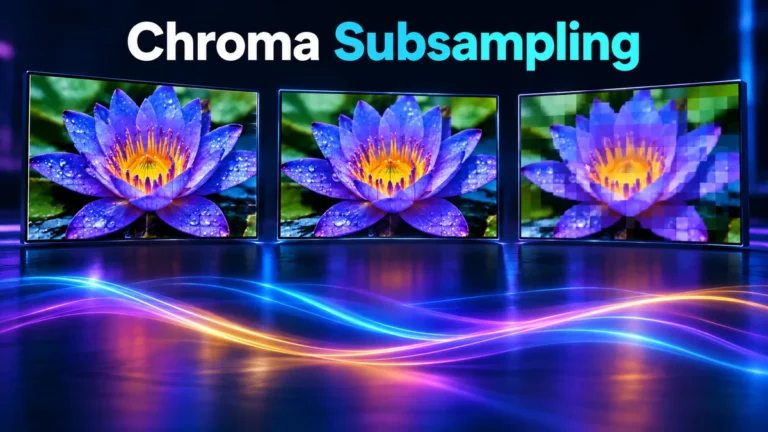
Chroma subsampling reduces the spatial detail stored in a video’s color channels while retaining a separate luma channel. It helps explain why a real recording can have sharp-looking brightness edges but softer colored edges. Compare the sampling pattern, the conversion history and the original clip before treating that difference as evidence of manipulation.
This guide explains the sampling concept, not a universal diagnosis for every video artifact. The small grids and viewing exercise below are original teaching examples, not captured frames or measured detector results. Broader compression problems belong in the existing video compression artifacts guide; here the specific question is what happens when fewer color samples describe the same image area.
Separate luma detail from color detail
A useful mental model is to describe an image with one channel that carries brightness-related structure and two that carry color differences. In common digital video notation these are Y′, Cb and Cr. Y′ is luma, derived from nonlinear color components; it is not a direct physical measurement of scene luminance. Keep that distinction in mind when a simplified illustration labels it “brightness detail.”
In the original Microsoft video-format explanation, 4:4:4 retains full chroma sampling, 4:2:2 halves horizontal chroma resolution, and 4:2:0 halves chroma resolution horizontally and vertically. Those definitions concern channel sampling, not a guaranteed visible quality ranking or an AI-generation test.
Imagine the edge of a bright white card against a dark desk. Much of that distinction can remain visible in luma. Now imagine two equally bright colored cards touching. Their difference may depend much more on the color channels. Reducing those channels’ spatial detail can change the second boundary more visibly than the first, even though both belong to one ordinary recording.
That comparison is a reading aid, not a promise about every shade. Real conversion involves defined color transforms, value ranges and processing choices. Two colors that look equally bright to you are not automatically identical in Y′. A controlled illustration can deliberately hold luma constant; a casual camera scene cannot be assumed to do so.
Also separate spatial sampling from numerical precision. A channel can have fewer sample locations yet use more bits at each location. Conversely, many sample locations do not guarantee that each value has high precision. Writing down both properties prevents “more color” from becoming an ambiguous explanation for several different image changes.
What 4:4:4, 4:2:2 and 4:2:0 describe
The ratio labels are shorthand for a sampling arrangement, not three color values for one pixel. In particular, the zero in 4:2:0 does not mean the image has no color. Color information is represented on a coarser grid and reconstructed for display. The output can still cover every displayed pixel.
For a simple comparison, consider an even-sized region four luma samples wide and two high. It contains eight Y′ locations. At the same eight-bit precision for all three channels, the FFmpeg pixel-format definitions distinguish YUV444P, YUV422P and YUV420P by the corresponding chroma sampling. The table counts channel samples in that illustrative region, not encoded file bytes.
| Arrangement | Y′ samples | Cb samples | Cr samples | Total channel samples |
|---|---|---|---|---|
| 4:4:4 | 8 | 8 | 8 | 24 |
| 4:2:2 | 8 | 4 | 4 | 16 |
| 4:2:0 | 8 | 2 | 2 | 12 |
The totals follow directly from the defined grids: eight plus eight plus eight; eight plus four plus four; and eight plus two plus two. They are not compression ratios for a finished video. Headers, padding, bit depth, prediction, quantization and other encoding choices make actual file size a separate question.
Each color-difference channel matters independently. Saying “two color samples” in the 4:2:0 row means two Cb and two Cr samples in this region, not two values shared by both channels. Keeping the channels separate makes the arithmetic understandable and avoids a misleading picture in which one colored dot represents the entire video pixel.
This exercise deliberately uses even dimensions. A real format also needs conventions for boundaries, storage and chroma location. Do not derive a decoder’s complete behavior from these counts. The counts answer how densely the channels are sampled; they do not specify every filter used to create or reconstruct those samples.
Read a magnified color-edge example carefully
For the conceptual edge illustration, start with two color regions and an independently defined luma grid. Keep the Y′ values unchanged between the panels. Change only how finely color differences are represented. This isolates the idea of reduced color detail without claiming to simulate a particular camera, codec or platform.
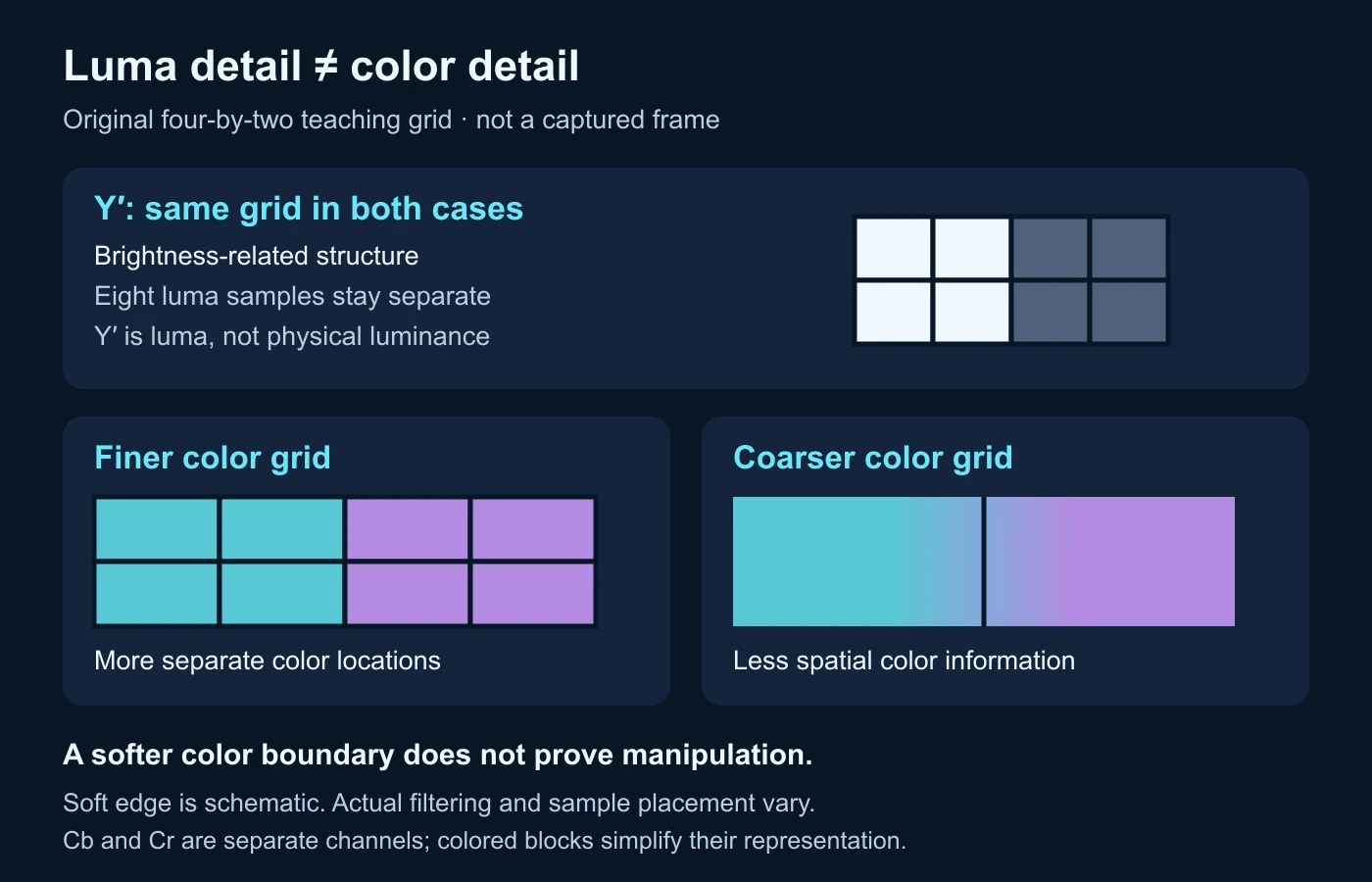
The finer color panel can represent the boundary with more separate sample locations. The coarser panel must represent neighboring areas with fewer locations. Its reconstruction has less spatial color information available. A soft or mixed-looking boundary is therefore plausible without changing the luma grid or inventing an object in the scene.
Do not assume a universal averaging recipe. A demonstration may average neighboring values to make its arithmetic easy, but actual sampling and reconstruction filters vary. Chroma siting also matters: the sample’s position relative to the luma grid is part of interpreting an edge. A different alignment can change the appearance without changing the ratio label.
Keep magnification honest. Enlarging a low-resolution crop can make individual samples visible while exaggerating how intrusive the issue is at normal viewing size. Record the zoom and show an ordinary-size view alongside the crop when you prepare a report. A dramatic enlarged edge is not automatically a noticeable defect for the intended viewer.
Finally, a reconstructed RGB display is not the original channel storage. The familiar colored picture is the viewing result. Reading its pixels alone does not reveal all the intermediate sampling, range or conversion decisions. An illustration can teach that relationship, but it cannot establish the exact history of an unknown clip.
Which details deserve a closer look?
Small colored text and graphics
Thin colored lettering is a useful inspection target because adjacent strokes and background areas can occupy very little space. Ask whether readability changes specifically at colored edges or whether the whole letter is soft. A screenshot of a video player adds another conversion and scaling step, so prefer the source frame or the closest available original rather than diagnosing from a social screenshot alone.
For an editor, the practical question is whether a label remains readable at its final displayed size. Enlarging the design, simplifying its color contrast or choosing a more suitable export may be better than judging a tiny label only at extreme zoom. Do not advertise that a sampling ratio alone guarantees perfect subtitle or interface rendering.
Keys, edges and fine patterns
A colored boundary used for compositing may expose differences between luma and chroma detail. Inspect the actual edge and the processing chain instead of assuming every fringe is a sampling problem. Capture focus, lighting, keying settings and subsequent resizing can also matter. Treat the sampling pattern as one documented condition in the review, not as a replacement for examining the material.
Fine colored patterns can also change when represented on a coarser grid. In a controlled comparison, keep framing and scale constant so you are not comparing different pattern sizes. If one export changes both resolution and sampling, the result does not isolate sampling. Write that limitation beside the comparison before choosing an explanation.
Ordinary camera footage
A natural scene does not supply perfectly separate test channels. Textures, movement, exposure and compression interact. Rather than declaring a face or fabric suspicious because its colors look soft, ask where similar behavior appears elsewhere in the frame. A recurring boundary effect across unrelated scene elements can help direct the next check, but it is still not proof of one cause.
Use neutral observation language: “color detail looks softer than neighboring brightness edges at this zoom.” That sentence preserves what you saw without claiming an encoder setting you have not recovered. If the format record later confirms a subsampled representation, you can connect the observation to that context while retaining the distinction between compatibility and certainty.
Separate sampling, storage and conversion history
A format name can describe more than sampling. The Chromium libyuv format documentation distinguishes planar and biplanar arrangements, channel resolution, color-space conventions and higher-bit-depth variants. Those are different attributes: a packing change is not automatically a change in spatial color detail.
For your own review, use three separate lines. The first records the channel sampling if known. The second records storage and bit depth if available. The third records the conversions you actually know occurred. This prevents a short format label from being stretched into a complete account of the clip’s appearance.
For example, your notes might say that an export has a documented 4:2:0 pixel format, that it was resized from an earlier project, and that the camera original is unavailable. Only the first statement addresses sampling directly. The resize is another relevant condition, and the unavailable original is a limitation, not an invitation to invent its format.
Moving to a representation with more sample locations does not magically recover the missing original color values. It creates a denser representation of what is currently available. A new export may be appropriate for further editing, but calling it restored source detail would overstate the evidence unless an actual original or a justified restoration process supports that claim.
Likewise, a final 4:4:4 record does not prove that every earlier step retained full chroma resolution. A chain can contain previous subsampling, resizing or rendering. Inspect the documented path rather than assigning all observed quality to the last file label. The video metadata guide helps distinguish readable file properties from a complete history.
Keep the source file unchanged while creating comparison exports. Use descriptive derivative names and retain the settings actually used. If the export software does not expose sampling, record that uncertainty. A repeatable note with a missing field is more useful than a confident format claim based on a screenshot of an unrelated preset.
Build a controlled review without pretending it is a laboratory result
The following worksheet is an original proposal for an editor’s comparison, not a test performed for this article. Its purpose is to make different explanations separable. You do not need a large benchmark suite to improve your notes; you do need to avoid changing several conditions and then attributing the whole outcome to one.
Define one visible question
Choose a concrete target, such as a short colored label crossing a dark background. Write the intended viewing size and what failure means for the project: illegible wording, visible fringing, or simply a difference in an enlarged crop. These are different outcomes. Defining the question first prevents the most dramatic crop from becoming the only basis for an export decision.
Keep an untouched reference and mark the frame or short interval. Do not compare different moments if movement changes the edge. If your reference itself is already compressed, call it the reference available to you rather than the unprocessed original. A careful label protects the comparison from making claims beyond its starting material.
Change one condition where your tools permit
When possible, hold frame dimensions, frame selection and display scaling constant while comparing available sampling options. Do not presume every application exposes every option. Record the actual pixel format reported for each result rather than a plan to use one. If an export also changes another setting, note it and treat the comparison as combined rather than isolated.
Inspect both color-sensitive and mostly luma-sensitive edges. A single colored label tells you about that label; a nearby brightness boundary provides a useful contrast. Avoid a single combined quality score. Record what happened at each target and whether the difference matters in the intended display context.
Write a decision that another editor can understand
- Identify the available reference and the exact target frame or interval.
- Record dimensions, known sampling, bit depth and changes you actually made.
- Keep the player zoom and viewing size consistent.
- Separate color-edge observations from general blur or blocking.
- State which export preserves the necessary readability for this use.
- List the missing original or settings that limit your conclusion.
A useful conclusion is specific: “This derivative keeps the label legible at the delivery size; the smaller color representation shows a visible mixed edge in the comparison crop.” It does not announce a universal superiority, measured percentage improvement or reconstruction of unavailable source pixels. The decision serves a task and remains open to better evidence.
Turn the comparison into a useful delivery notebook
Consider an entirely fictional editing job with a colored route label over a recorded street scene. The label is legible in the project preview but looks different in a delivery copy. Before blaming the camera, split the review into the recorded background and the added graphic. They may have entered the pipeline at different stages, so the label’s appearance cannot by itself establish a defect in the camera original.
Your first notebook entry identifies what actually changed: the same label wording and nominal layout appear in a different file. Your second entry lists the available evidence: project preview, delivery copy, known export settings and any source recording. Your third states what is unavailable, such as the platform’s intermediate conversion. This small inventory prevents an export comparison from becoming an invented account of a service’s private processing.
Now compare two possible decisions. If the delivery problem only affects a very small label, enlarging that graphic may solve the reader’s actual difficulty without changing the entire recording pipeline. If the project requires delicate color edges for later compositing, preserving an appropriate high-detail intermediate may matter for a different reason. The decisions are task-specific; neither proves that one sampling option should always be used for every delivery.
Keep a separate entry for the viewing path. The delivery copy may be scaled by a player or viewed through another screen recording. Inspect the file directly where practical, and compare the ordinary viewing size with the enlarged crop. If the change disappears when the viewing path is held constant, your earlier observation may have described display scaling rather than an isolated export property.
When colleagues review the notebook, give them the same reference and target frame instead of a selected dramatic screenshot. Ask whether the label meets the stated readability requirement, then ask whether the difference is restricted to color edges. Those questions produce a practical decision and a narrower technical observation. They do not ask reviewers to infer unseen formats from the appearance alone.
Finish with an action that preserves options: keep the source and project, retain the documented delivery copy, and change only the element or export condition justified by the review. Do not overwrite the original to make the explanation look cleaner. If the next version changes several conditions together, record that honestly and avoid calling it a controlled demonstration of sampling alone.
Color-edge artifacts do not establish manipulation
Sampling is relevant to video interpretation because ordinary processing can change fine edges. That is a reason to consider benign explanations, not a reason to excuse every anomaly. Compare the observed effect with the actual file information and other evidence. If several causes remain plausible, say so rather than selecting the most dramatic one.
An unknown clip may have crossed a camera, editor, export, messaging app and screen-recording step. The current file cannot be assumed to preserve each intermediate format. A subsampling-compatible edge neither identifies the exact pipeline nor proves the scene is authentic. Equally, an unusual edge cannot by itself identify an AI generator or a person who edited the video.
For an evidential review, distinguish observations, compatible explanations and established facts. “The red lettering is soft” is an observation. “Reduced chroma detail could contribute” is a compatible explanation. “The current file reports this pixel format” is a fact about the available file. Keeping those lines separate makes your reasoning easier to challenge and improve.
Use the broader video forensics guide when the task requires provenance, preservation and multiple evidence types. A technical video analysis can contribute another signal, but it does not replace the source context or establish claim truth. Chroma subsampling is one part of explaining a picture, not a verdict on the event it depicts.
The practical lesson is to protect the distinction between image appearance and production history. Learn the sample grid, document the formats you can actually inspect, and evaluate the details relevant to your delivery or verification task. That approach is more useful than treating every soft colored edge as either harmless by definition or automatically synthetic.
Color edges can change during compression.
Check the source clip and interpret artifacts with the encoding context.
Questions about chroma subsampling
Does 4:2:0 mean a video has no color?
No. It describes a coarser chroma grid, not absent color. The display reconstructs color information across the image.
Is chroma subsampling the same as lowering video resolution?
No. Sampling can reduce color-channel resolution while retaining the luma grid. A resize changes the image dimensions; an export may do both, so record them separately.
Will exporting a 4:2:0 file as 4:4:4 restore its original color detail?
Not automatically. More sample locations do not recreate unavailable original values. Preserve the real source when it exists and describe any restoration separately.
Can colored text look strange in a genuine recording?
Yes. Fine color edges can be affected by sampling and other processing. Inspect the source, format and viewing scale before assigning a cause.
Can the sampling ratio prove that a video is AI-generated?
No. It describes a representation property. Synthetic and ordinary recorded material can pass through similar exports; generation and authenticity need other evidence.
References and scope
- Microsoft: Recommended 8-Bit YUV Formats for Video Rendering — original sampling explanation; historical Windows-rendering context, not current camera recommendations.
- FFmpeg: pixel-format header — original format definitions used for the eight-bit planar sample-count exercise; no FFmpeg conversion was executed for this article.
- Chromium libyuv: formats documentation — original channel-resolution and storage distinctions; no device behavior inferred from a library format name.
Sources read on 14 October 2026. Grids, examples and the proposed review worksheet are original educational material. No actual clip, codec benchmark, detector score or measured quality improvement is represented.