
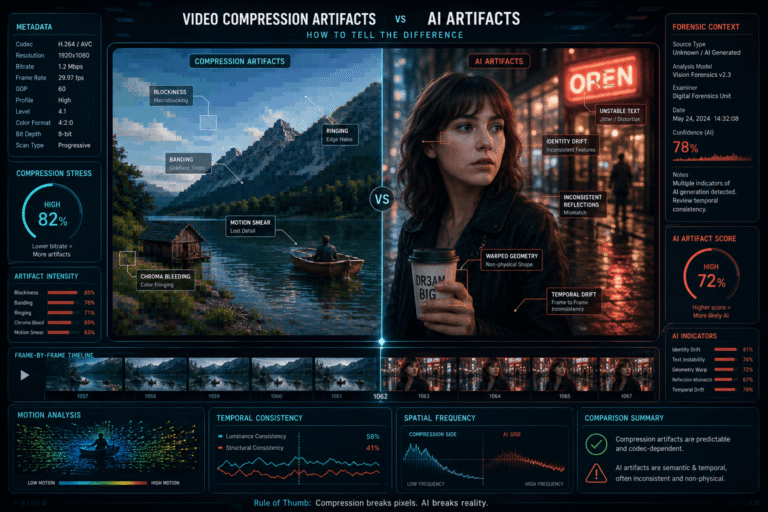
Video compression artifacts are visual or temporal distortions created when a codec removes, approximates, or reorganizes information to reduce file size or bitrate. AI artifacts come from a different process: a generative or AI-based system creates or modifies visual content and fails to preserve some aspect of identity, geometry, motion, physics, texture, or temporal continuity.
The two can look surprisingly similar. A heavily compressed face can have unstable edges. Fast motion can create block breakup around hands. Low bitrate can smear hair, teeth, text, or jewelry. Those defects may look like deepfake clues even when the video is completely camera-captured.
What Are Video Compression Artifacts?
Video compression artifacts are unwanted distortions introduced or amplified by the process of encoding video with limited data.
Modern video codecs reduce file size by exploiting two broad forms of redundancy:
- spatial redundancy, where nearby pixels within a frame can be represented efficiently
- temporal redundancy, where later frames can be predicted partly from earlier or nearby frames
When bitrate, resolution, codec settings, motion complexity, noise, or repeated re-encoding push the compression system too hard, information is discarded. The visible consequences are compression artifacts.
These artifacts do not imply that someone deceptively edited the content. They can appear in ordinary phone video, livestreams, surveillance footage, messaging-app downloads, screen recordings, and social-media reposts.
What Are AI Artifacts?
AI artifacts are anomalies associated with generated or AI-modified content rather than ordinary codec loss.
Depending on the model and manipulation type, these may involve:
- identity drift across frames
- object shape changing during motion
- incorrect occlusion relationships
- unstable text or symbols
- geometry that changes without a physical cause
- inconsistent reflections or shadows
- face-to-head alignment failures
- temporal changes in details that should remain persistent
These are not universal AI fingerprints. Generative systems improve, and authentic video can contain similar-looking defects because of compression, motion blur, image processing, or camera behavior.
NIST’s synthetic-content guidance emphasizes that synthetic-video detectors use spatial, temporal, spatio-temporal, frequency, and other learned cues, while performance can degrade substantially after compression, resizing, noise, and other post-processing. See NIST AI 100-4 on synthetic content detection.
The Core Difference: Encoding Error vs Content Generation Error
That distinction changes how you investigate the defect.
If the problem comes from encoding, you expect it to correlate with bitrate, block structure, motion, texture complexity, re-encoding, or chroma representation.
If the problem comes from AI generation, you look for a failure tied to the meaning or structure of the synthesized content: the same person’s face, the same hand, the same object, the same text, or the same physical relationship across time.
The Six-Axis Test for Artifact Origin
Instead of asking “Does this look AI?”, inspect the anomaly along six axes.
Common Compression Artifact: Blocking and Macroblocking
Blocking appears as visible rectangular boundaries or patches. It is especially noticeable in low-bitrate video, dark scenes, gradients, smoke, fast motion, and complex textures.
The exact block structure depends on the codec and encoding mode, so not every block artifact is an 8×8 square. Modern codecs use more flexible coding-unit structures than older MPEG systems.
What matters for diagnosis is the pattern:
- the defect often has grid-like or patch-like geometry
- it can affect background and foreground at the same time
- it tends to become worse when the encoder is under greater bitrate pressure
- it often changes as the codec reallocates bits between frames
FFmpeg includes a blockdetect filter specifically designed to estimate blockiness without altering the input frames. The official documentation describes it as a no-reference blocking-artifact measure. See the FFmpeg blockdetect documentation.
Ringing and Mosquito Noise Around Edges
Strong edges can develop faint ripples, halos, or noisy movement after lossy compression. Fine text, wires, hair, high-contrast facial features, and logos are common places to notice this.
The important diagnostic clue is that the distortion follows high-contrast edges, not necessarily the semantic importance of the object.
A halo around a jawline can look like face blending. But if similar ringing appears around lamp posts, subtitles, window frames, and clothing edges, compression becomes a stronger explanation.
Banding in Skies, Walls and Shadows
Banding appears when what should be a smooth tonal gradient turns into visible steps or bands.
It is common in:
- blue skies
- dark walls
- fog
- studio backdrops
- night scenes
- soft skin or shadow gradients
Compression can intensify banding, especially when combined with limited bit depth, aggressive quantization, denoising, or repeated encoding.
Banding is weak evidence for AI because ordinary video pipelines produce it easily.
Smearing and Loss of Detail During Motion
Inter-frame compression predicts motion rather than storing every frame independently. When prediction becomes difficult or bitrate is insufficient, moving regions may lose texture, smear, break into patches, or temporarily become less detailed.
This is why:
- hair can become mushy during a head turn
- hands can lose finger detail during fast movement
- crowds can dissolve into unstable texture
- grass, rain, confetti, smoke, and water can look chaotic
These are exactly the kinds of regions people sometimes mistake for generative-AI failures.
Color Bleeding and Chroma Artifacts
Many video pipelines store color information at lower spatial resolution than brightness information. Common chroma subsampling formats such as 4:2:0 are efficient and widely used.
After resizing, compression, sharpening, or repeated encoding, colored edges can appear softer or misaligned. Red text, neon lights, skin against a saturated background, and fine colored graphics can show this clearly.
A soft colored boundary around a face does not automatically indicate a face-swap mask. Check whether the same color behavior appears elsewhere in the frame.
Blur Can Be Compression, Camera Motion or Processing
Blur is another weak standalone AI clue.
Possible causes include:
- motion blur from the camera or subject
- focus error
- noise reduction
- resizing
- low bitrate
- platform transcoding
- intentional depth-of-field effects
FFmpeg also provides a blurdetect filter for estimating frame blurriness. Like block detection, it measures a visual property. It does not determine why the blur exists or whether AI generated the content.
What AI Artifacts Look Like When Compression Is Not the Main Cause
AI-related anomalies are more informative when they affect the continuity of meaning rather than merely image quality.
Identity drift
A person’s facial proportions, moles, facial hair, eye shape, teeth, or other identity-specific features change across frames without a plausible physical reason.
Object persistence failure
An object disappears, merges, changes shape, or reappears differently after a hand, camera movement, or occlusion.
Geometry instability
Hands, glasses, jewelry, facial boundaries, architecture, or object relationships change topology rather than simply becoming blurry.
Text instability
Visible text changes letters, spacing, or meaning across frames even though the sign or object itself should be stable.
Physical inconsistency
Reflections, shadows, collisions, or object interactions fail to remain compatible with the scene.
These are stronger AI hypotheses when the same generated region fails repeatedly while nearby unrelated content remains comparatively stable.
Compression Usually Follows Difficulty, AI Artifacts Often Follow Semantics
| Observation | More consistent with compression | More consistent with AI generation or manipulation |
|---|---|---|
| Artifacts increase during fast motion everywhere | Yes | Possible, but less specific |
| Rectangular breakup appears in dark or complex regions | Strongly plausible | Not a specific AI sign |
| Fine detail disappears from hair, foliage and hands together | Strongly plausible | Could coexist with AI, but compression is a direct explanation |
| A face changes identity while the background remains stable | Weak explanation | Potentially significant |
| A sign changes its letters across adjacent frames | Compression can blur letters, but should not systematically rewrite them | Potentially significant |
| An object disappears after occlusion and returns with different geometry | Compression may obscure detail but does not normally create a new object structure | Potentially significant |
The Grid Test: Does the Artifact Follow Codec Structure?
When you see blockiness, inspect whether similar boundaries recur at regular spatial intervals or across unrelated parts of the image.
Compression becomes more plausible when:
- the artifact forms rectangular or coding-block-like regions
- multiple unrelated objects show similar degradation
- the pattern gets worse in high-motion or high-detail frames
- quality improves when the scene becomes static
Do not expect a perfect visible grid. Modern codecs use variable block structures, filtering, prediction, and transforms that can make boundaries irregular.
The Semantic Test: Does the Error Understand the Object Too Much?
A useful counter-test is to ask whether the anomaly seems tied to what the object is.
Examples:
- only one person’s face changes shape
- a hand develops an impossible finger relationship while nearby texture remains clean
- the same logo changes design as the object rotates
- letters on a sign mutate while the sign’s edges remain stable
Those patterns are harder to explain as simple bitrate starvation because the failure follows semantic structure rather than general coding difficulty.
The Temporal Test: Watch the Artifact Across Several Seconds
A still frame often creates false confidence.
Scrub before and after the suspicious moment. Ask:
- Does the problem appear only on one highly compressed frame?
- Does it recur whenever motion becomes complex?
- Does the same identity feature drift gradually across time?
- Does an object reconstruct differently after each occlusion?
- Does the anomaly stay attached to one semantic region?
Temporal behavior is one reason the video forensics guide treats video as a time-based evidence source rather than a collection of isolated screenshots.
Recompression Can Hide AI Artifacts
This is one of the most important forensic complications.
A synthetic or manipulated video is often uploaded to a platform, downloaded, reposted, resized, screen-recorded, or sent through a messaging service. Each step can add ordinary compression artifacts on top of the original AI-generated traces.
NIST reports that synthetic-video detector performance is not robust to post-processing such as compression, noise, and resizing, and that systems trained on particular data and compression levels can generalize poorly to unseen conditions.
So a low-quality repost can create two simultaneous problems:
- compression adds defects that resemble fake-media artifacts
- compression destroys or weakens the subtle signals a detector might otherwise use
This is why “I cannot see AI artifacts anymore” is not the same as “the video is authentic.”
Compression Can Also Create False Deepfake Clues
Consider a face in a low-bitrate video call.
You may see:
- unstable jaw edges
- block breakup around the mouth
- smoothed skin
- missing eyelash detail
- soft teeth
- color bleeding around glasses
All of those can occur without face swapping.
If the same clip also shows block breakup around clothing, furniture, text, and the background during motion, the face defects have a strong ordinary compression explanation.
If the issue is specifically identity replacement, use the face swap video guide to test identity continuity rather than relying on soft edges.
Why Old “Weird Hands Means AI” Rules Are Unreliable
Hands are visually difficult for both generative models and ordinary video encoding.
Fast hand motion combines:
- thin structures
- self-occlusion
- motion blur
- rapid geometry change
- skin texture
- high-frequency edges
A compressed hand can look malformed in one frame because detail is lost. The better AI question is whether the hand’s underlying topology changes across time in a way that cannot be explained by blur, perspective, or occlusion.
AI Detection and Compression Are Technically Entangled
Deepfake detectors do not operate in a vacuum. They analyze decoded media after it has passed through some capture and encoding pipeline.
NIST’s OpenMFC treats general manipulation detection and deepfake detection as distinct forensic tasks. That distinction is useful here because a detector should ideally identify AI manipulation rather than simply respond to generic compression damage. See the NIST OpenMFC framework.
A robust workflow therefore asks two separate questions:
How degraded is this video?
and:
After accounting for that degradation, is there evidence specific to generation or manipulation?
Inspect the Encoding Context Before Judging the Pixels
Before interpreting visual artifacts, inspect the current file.
Useful properties include:
- codec
- resolution
- bitrate
- frame rate
- pixel format
- encoder
- container
- number of re-encoding or repost stages you can establish
If a 4K source has become a 360p, low-bitrate social-media copy, visible defects deserve a very different interpretation from the same artifacts in a high-quality camera original.
The video metadata guide explains how to read these technical fields without confusing encoding history with authenticity.
Use FFmpeg to Measure Blockiness, Not to Declare AI
FFmpeg includes useful diagnostic filters.
For example, blockiness can be measured with:
ffmpeg -i input.mp4 -vf blockdetect -f null -Blurriness can be measured with:
ffmpeg -i input.mp4 -vf blurdetect -f null -These measurements can support a statement such as “the clip has substantial blockiness” or “this frame range is unusually blurred.”
They cannot support a statement such as “the video is AI-generated.” Artifact measurement and artifact attribution are different tasks.
SWGDE’s forensic FFmpeg guidance also stresses that tool versions, decoding behavior, settings, and transcoding choices matter in forensic examinations. See the SWGDE Technical Notes on FFmpeg.
The Reference-Copy Test
If you can find an earlier or higher-quality version, compare it before drawing conclusions from the compressed copy.
This can answer:
- Was the suspicious edge already present before the repost?
- Did a face inconsistency appear only after low-bitrate transcoding?
- Does the high-quality version preserve object geometry?
- Did subtitles, cropping, or resizing create the apparent anomaly?
A reference copy is often more informative than increasingly complex artifact analysis.
The Quality Ladder: Analyze the Best Version First
If only a degraded copy is available, the conclusion should reflect that limitation.
Three Practical Cases
Case 1: Blocky face during a livestream
A speaker’s jaw, teeth, and glasses become unstable whenever they turn quickly. The background, clothing, and hands also break into rectangular patches at the same moments. During static sections, the image becomes much cleaner.
Most plausible first explanation: bitrate and motion-related compression stress.
This does not rule out AI manipulation, but the visible artifact pattern is not specific enough to support that conclusion.
Case 2: Stable background, changing identity
A high-quality clip has little global blockiness. During head rotation, one person’s facial proportions and identity-specific features change while clothing, background, and other people remain stable.
Forensic implication: a localized identity-manipulation hypothesis deserves investigation. Ordinary compression is a weaker explanation because the failure remains tied to the same semantic region.
Case 3: AI-generated video after several reposts
An original synthetic clip is compressed by a platform, downloaded, cropped, and re-uploaded. The final copy shows macroblocking, smoothing, and lost detail. Some original AI inconsistencies are harder to see.
Forensic implication: both artifact families may be present. Compression explains some visible degradation while also reducing the reliability of human inspection and automated detection.
An Artifact Triage Matrix
| Artifact | Compression explanation | AI-specific concern |
|---|---|---|
| Blocky squares | Very plausible under low bitrate or complex motion | Weak by itself |
| Soft face edges | Common after compression, scaling, denoising, or chroma loss | More relevant if identity geometry also changes across time |
| Unstable text | Compression can blur or break letters | Letters repeatedly changing identity or content is more concerning |
| Malformed hand | Motion blur and bitrate loss can destroy finger detail | Persistent topology changes across clear frames are more concerning |
| Halo around object | Ringing, sharpening, scaling, or chroma artifacts | More relevant if the halo follows only a manipulated region and changes semantically |
| Object disappears | Heavy corruption can obscure detail temporarily | Object persistence failure in otherwise clean video can be significant |
| Skin smoothing | Denoising, beauty filters, low bitrate, or resizing | Weak alone; stronger with identity or temporal inconsistencies |
Do Not “Enhance Away” the Evidence
Sharpening, denoising, deblocking, frame interpolation, super-resolution, and AI upscaling can make a clip easier to view while also changing the visual evidence.
Forensic practice should preserve the original and treat enhanced versions as derivative working copies.
If an AI upscaler reconstructs teeth, hair, or text, those generated details should never be analyzed as if they were present in the original frame.
Compression Artifacts Are Not Proof of Editing
Compression proves only that some encoding or transmission process affected the current media.
Even camera-original files are compressed in many normal workflows. H.264, H.265/HEVC, AV1, VP9, and other codecs are designed to compress video at capture, export, streaming, or distribution stages.
The presence of compression is therefore normal. What matters is whether the compression history is consistent with the asserted source and whether additional evidence supports a material edit.
AI Artifacts Are Not Proof of Deception
A synthetic or AI-modified video may be clearly disclosed, artistic, educational, accessible, or otherwise legitimate.
Detection and intent are separate questions.
The synthetic media guide explains why production method should not be confused with truthfulness or malicious intent.
When to Use a Deepfake Detector
A deepfake detector becomes useful after you have considered basic quality and encoding conditions.
Good questions to ask before trusting the score:
- Is the video heavily compressed?
- Is it resized or screen-recorded?
- Is the suspicious region visible across enough frames?
- Could the anomaly be explained by ordinary encoding?
- Does the detector’s signal align with source, temporal, and provenance evidence?
If the central question is deepfake-specific, use the deepfake detection guide for a broader discussion of detector evidence and limitations.
A Better Workflow for Compression vs AI Analysis
- Preserve the best available copy. Do not begin with an enhanced or re-exported version if a better source exists.
- Inspect encoding context. Record codec, resolution, bitrate, frame rate, software, and known repost history.
- Watch the entire clip. Identify whether degradation follows motion, darkness, texture, or scene complexity.
- Compare unrelated regions. If the same artifact appears everywhere, compression becomes more plausible.
- Track suspicious semantic regions across time. Look for identity, geometry, object, text, or physical continuity failures.
- Measure visible degradation where useful. Blockiness and blur metrics can document quality without assigning cause.
- Find a higher-quality or earlier version. Compare the suspicious region before and after re-encoding.
- Add AI detection when the hypothesis remains plausible. Treat the result as one evidence layer.
- Report the narrowest defensible conclusion. Separate “heavily compressed” from “AI-manipulated.”
Where DetectVideo AI Fits
DetectVideo AI can contribute technical evidence when a supported video needs analysis for possible AI generation, manipulation, temporal anomalies, or other forensic signals.
Compression quality should remain part of that interpretation. A degraded repost may contain ordinary artifacts, may conceal manipulation evidence, or may reduce detector reliability.
The correct workflow is not “artifact equals AI.” It is to combine content analysis, temporal evidence, file properties, source history, and the limitations introduced by compression.
How to Write the Verdict Precisely
| Verdict | Meaning |
|---|---|
| Compression artifacts dominate | The visible anomalies are well explained by encoding, bitrate, scaling, or re-encoding conditions |
| Compression limits analysis | Image degradation is too severe to make a strong content-level determination |
| Localized manipulation remains plausible | A specific region shows anomalies not adequately explained by general compression |
| AI-related evidence supported | Multiple independent signals support synthetic or AI-manipulated content |
| Mixed artifact sources | Compression degradation and manipulation evidence coexist |
| Insufficient evidence | The available quality or evidence does not support attribution of the artifact source |
Key Takeaway
The difference between video compression artifacts and AI artifacts is not how strange a single frame looks. It is what process best explains the pattern across space, time, and context.
Compression tends to follow bitrate pressure, block structure, motion complexity, texture, scaling, and re-encoding. AI-related failures are more informative when they follow identity, object persistence, geometry, text, or physical relationships across multiple frames.
The two can coexist, and compression can both create false clues and erase real synthetic-media signals. Start with the best source, inspect the encoding history, compare several seconds of motion, and use AI detection only as part of a broader forensic analysis.
FAQ About Video Compression Artifacts
What are video compression artifacts?
Video compression artifacts are visible or temporal distortions introduced when an encoder reduces data. Common examples include blocking, ringing, smearing, banding, loss of fine detail, and color degradation.
Can compression artifacts look like deepfake artifacts?
Yes. Compression can create unstable face edges, soft teeth, blurred hands, texture loss, block breakup, and color bleeding that resemble weak deepfake clues.
How can I tell compression artifacts from AI artifacts?
Check whether the defect follows bitrate stress, block structure, motion, and unrelated regions across the frame. AI-related concerns become stronger when semantic structures such as identity, object geometry, text, or physical relationships change persistently across time.
Does macroblocking mean a video was manipulated?
No. Macroblocking or blockiness is a normal compression artifact in low-bitrate or difficult-to-encode video. It does not establish deceptive editing or AI generation.
Can compression hide deepfake evidence?
Yes. Compression, resizing, noise, and other post-processing can weaken subtle synthetic-media signals and reduce the performance of some deepfake detectors.
Why do hands look strange in compressed video?
Fast hand motion combines blur, thin structures, self-occlusion, and high-frequency detail. Aggressive compression can remove finger detail or create temporary block breakup without any AI generation.
Can FFmpeg detect compression artifacts?
FFmpeg includes filters such as blockdetect and blurdetect that can measure blockiness and blurriness. These tools quantify image properties but do not determine whether AI generated or manipulated the content.
Should I upscale a compressed video before checking for AI?
Preserve and analyze the original first. AI upscaling and enhancement can generate new visual detail, which can interfere with forensic interpretation. Enhanced copies should be treated as derivatives.
Does a clean high-quality video prove it is not AI-generated?
No. Modern synthetic video can be visually clean, and the absence of obvious artifacts is not proof of camera origin. Source, provenance, temporal analysis, and technical detection may still be needed.