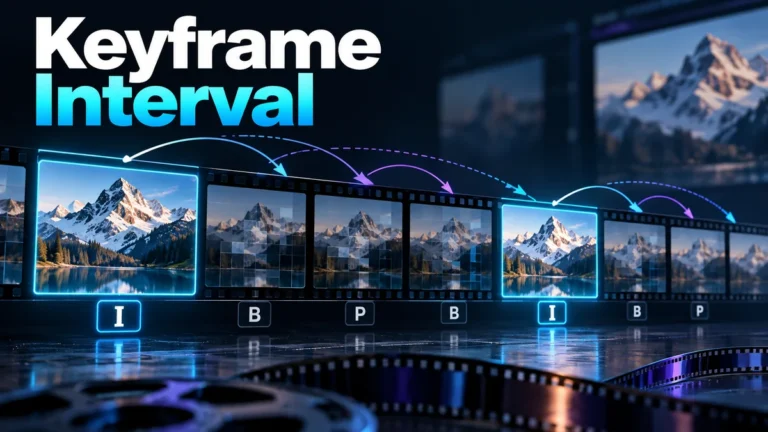
Keyframe interval describes the spacing between codec keyframes, often through a frame-count or duration setting. It matters for where a decoder can start and how a player reaches a requested moment. It does not tell you which picture best explains an event. For verification, distinguish technical access points from the frames you deliberately select to inspect a claim.
This guide owns access cadence and review selection, not a complete codec tutorial. Its timeline is an original arithmetic model with stated assumptions, not an encoded file or seek-speed benchmark. No FFmpeg, FFprobe, player, or encoder test was performed. Actual files need their own timestamps, access information, and playback checks.
Three meanings of keyframe should stay separate
In compressed video, keyframe commonly refers to a picture serving a particular decoding or synchronization role. In animation, a keyframe can instead be a deliberately set property value on a timeline. In editorial analysis, people sometimes call a representative screenshot a keyframe. Those meanings are related to different jobs, not interchangeable labels.
A useful screenshot might show a sign, a changed object, or an important gesture. It need not occupy a codec access point. Conversely, an access picture may be convenient for starting playback yet show an unhelpful blur or the wrong part of an action. Select review evidence by the question, not merely by a technical flag.
The published video frame extractor guide owns the practical extraction workflow. Here, the first task is to clarify what the word means in a setting or report. Ask whether the record describes decoding structure, animation controls, or a human selection. That clarification prevents two reviewers from discussing different pictures under one label.
Also separate an intra-coded picture from a complete access guarantee. A codec and its surrounding dependency structure determine the actual restart relationship. FFmpeg’s libx264 documentation distinguishes forced intra pictures from the option that forces IDR pictures. Do not assume every displayed I label describes the same reset behavior.
A setting can describe a maximum rather than a fixed rhythm
Read the actual setting’s units and contract. A maximum interval can permit earlier keyframes; it need not promise perfectly repeated spacing. Apple’s VideoToolbox maximum-keyframe-interval discussion describes that distinction and allows the encoder to place keyframes more often. This is one documented API, not a universal preset for all applications.
FFmpeg’s libx264 option reference likewise identifies its corresponding GOP-size option as a maximum. That word matters. If an inspected file has additional access pictures around changes, it can still be consistent with a maximum-distance request. The actual resulting cadence must be inspected rather than inferred from a single export-dialog number.
A zero, automatic, or default value also needs product-specific interpretation. Do not translate it into “no keyframes” or copy another application’s meaning. Preserve the documented setting name, units, encoder and relevant version when you run a real job. An unfamiliar value is a reason to read its own reference, not guess from the label.
The same restraint applies to scene changes. Some documented encoding controls concern scene-change detection, but you should not promise that every cut receives a particular picture type. A requested policy and the actual output are separate records. If a cut is important to your use, inspect its neighborhood rather than relying on a general explanation of automatic encoding.
Access cadence does not replace timestamps
A group of pictures, or GOP, describes a coding grouping. Keyframe spacing is a useful part of understanding it, but a frame count does not independently describe elapsed time. That requires the actual presentation timing. A stable constant-rate arithmetic example can divide a count by its stated rate; an unknown or variable-timed source needs more information.
Nor does a familiar file extension reveal the complete structure. The container, codec, access indexing and player work together. Treat a whole-file seek problem as a question about that actual combination, not proof that one frame-rate number or codec name caused it. Keep known properties distinct from convenient assumptions.
The video metadata guide explains the wider limits of reported fields. A duration, rate or software tag may be useful, but does not establish every picture’s role or source history. Record which representation you inspected and which fields were actually available before turning them into a timeline claim.
An original timeline separates access from requested output
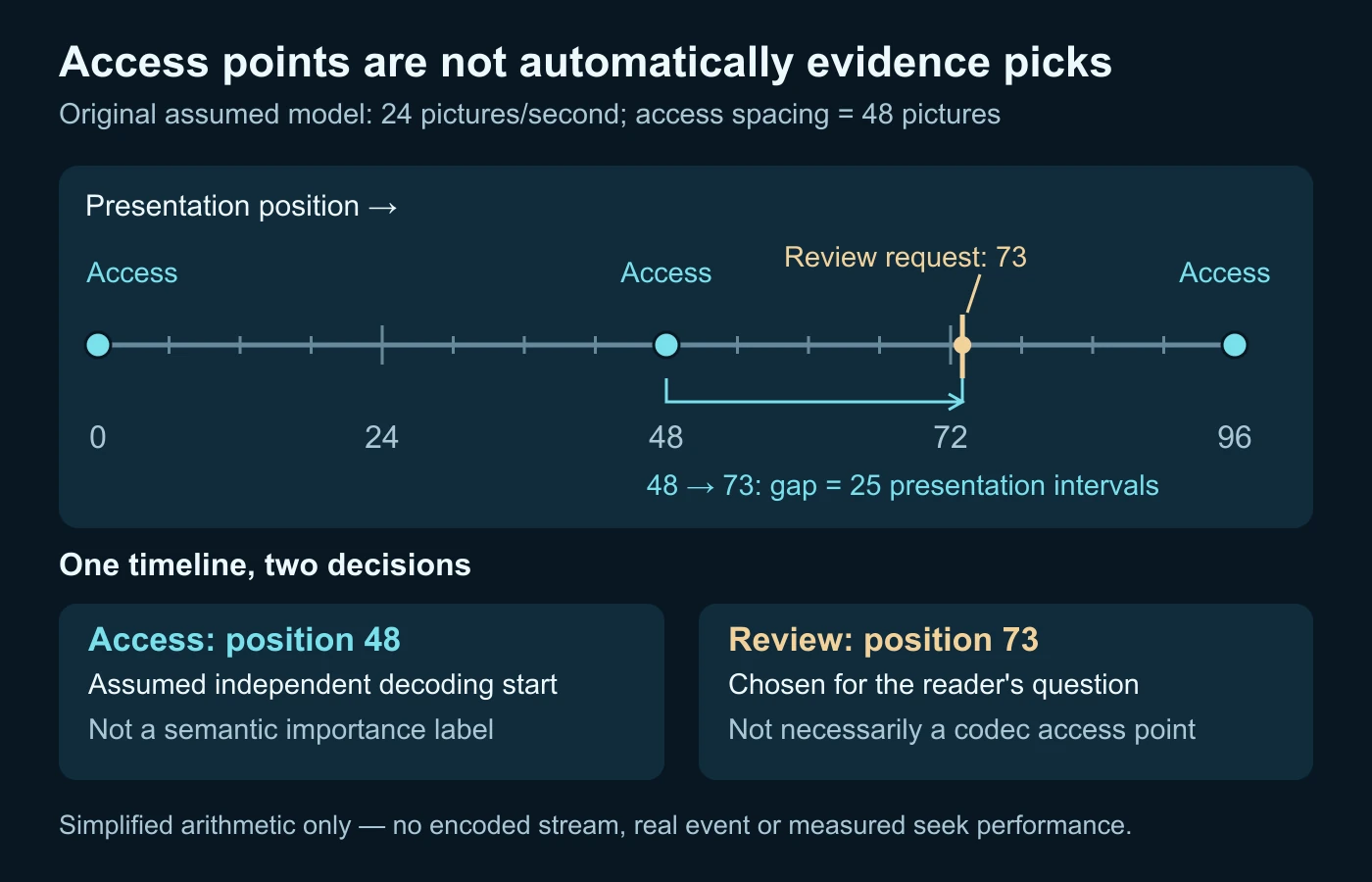
Construct a teaching sequence with pictures numbered from zero and an assumed constant rate of twenty-four pictures per second. For one version, designate independent access points at positions zero, forty-eight and ninety-six. Assume the chosen presentation positions after an access point require a decode-forward path from it. This is a simplified model, not an actual codec dependency graph.
Now request picture seventy-three. The preceding designated access point is forty-eight. Their difference is twenty-five presentation intervals. Counting both endpoints gives twenty-six listed positions, but the diagram reports the gap, not a measured count of CPU operations. Real decoders can have additional work, indexing, buffering and reference requirements that the model omits.
Under the stated constant-rate assumption, the access point at forty-eight corresponds to two seconds. The request at seventy-three corresponds to seventy-three divided by twenty-four seconds, approximately three point zero four two seconds. That calculation explains the timeline labels. It does not certify an event time, capture clock, or accurate seek result in an unknown file.
| Chosen spacing | Preceding designated access position | Presentation-position gap | Assumed spacing duration |
|---|---|---|---|
| 24 pictures | 72 | 1 | 1 second at the chosen rate. |
| 48 pictures | 48 | 25 | 2 seconds at the chosen rate. |
| 96 pictures | 0 | 73 | 4 seconds at the chosen rate. |
The table is arithmetic, not a performance ranking. A shorter modeled gap suggests fewer presentation positions between access and the target under these assumptions. It does not establish how many milliseconds any player needs, whether the file is indexed correctly, or which actual codec pictures can safely begin a decode.
Finally mark picture seventy-three as a human review choice because, in the hypothetical task, it shows a relevant detail. That reason is independent of the access schedule. The access point helps reach the picture; it does not decide whether the picture answers the question. Keeping those roles separate is the exercise’s main contribution.
Seeking depends on more than the distance between pictures
A player may begin from an available access location and work toward the requested moment. The file needs to make suitable data discoverable, and the playback workflow must interpret it correctly. A nearby access point is therefore only part of the access story, not a guarantee that every seek control lands on the exact requested picture.
The WebM container guidelines provide a concrete format-specific example: they discuss keyframe cue data and keyframes at cluster beginnings to support seeking. That guidance concerns the described WebM workflow. It should not be copied into a universal claim about every container, modern player, or codec.
A technical reader can distinguish a coarse seek from decode-forward selection. A coarse navigation may land at a convenient access location; a more precise workflow can then seek the requested presentation moment through decoding. The controls available depend on the actual tool. Do not call a nearby thumbnail the exact intended picture without checking what the tool returned.
If navigation behaves oddly, retain the file and record the request, returned view and tool context. Compare another permitted inspection path if suitable. A seek discrepancy can arise from access/indexing or interpretation issues without proving the media was manipulated. Locate the mismatch before repeatedly re-encoding the only available source.
Compression, access and quality are separate acceptance questions
A codec can exploit relationships between pictures instead of representing every picture independently. Refresh placement changes that coding opportunity, but the practical result depends on the encoder, content and other settings. Avoid a promise that halving an interval improves quality, doubles file size, or produces a particular speed increase.
If you actually compare two allowed exports, keep the relevant source and destination requirements constant where possible. Record which cadence-related setting changed and what else the exporter changed. Compare useful decoded appearance, file size and access behavior separately. One result should not quietly stand in for the others.
For a delivery job, the receiving workflow may have specific access or segment requirements. Read that destination’s current reference before selecting a setting. This article supplies no universal live-stream interval and does not instruct you to replace a platform’s documented policy with our teaching timeline.
For preservation, do not assume that an all-intra derivative becomes more original merely because every picture is coded independently. A re-encode remains another representation. It may improve a working workflow while changing coding structure or other properties. Keep the received source separate and record the purpose of the derivative.
A fictional review job reveals the semantic trap
Imagine a reviewer checking a permitted clip of a small sign being uncovered. The claim concerns the sign’s wording immediately after a hand moves away. This scenario is invented; no sign was recorded and no extraction test was run. The question is how to choose a useful reference without mistaking coding convenience for evidence relevance.
A quick access-only selection returns a picture while the hand still covers part of the wording. It is technically convenient but inadequate for that claim. The reviewer identifies the unobstructed interval and asks the inspection workflow for appropriate pictures there, rather than treating the first easily reached picture as representative.
The reviewer keeps surrounding moments as context. A single clean view might omit movement or a transition that changes the interpretation. Conversely, a blurred transitional picture might be unsuitable for reading text but useful for describing the sequence. Frame usefulness depends on the specific question, not a blanket sharp-versus-blurred score.
Suppose a second tool shows a nearby moment for the same entered time. The reviewer checks the file, timing conventions and returned output rather than assuming the tools extracted identical pictures. If exact correspondence cannot be established, the record states that limit. A confident filename cannot supply missing temporal precision.
Now suppose an editing derivative has a different keyframe schedule. The reviewer should not infer that the sign’s position changed just because its access flags differ. Compare the relevant decoded sequence and known operation record. Coding structure and the pictured action can change independently, so each deserves its own finding.
The final handoff identifies the inspected copy, relevant interval and selected reference roles. It might include an unobstructed wording frame plus earlier context, if genuinely available. It does not say that the codec chose the most important moment, or that an access flag proves an image camera-original.
Build an access-and-review worksheet
Use this original worksheet for one source and one practical question. It is a planning record, not a forensic standard or automatic keyframe detector. Keep unavailable facts explicit and separate technical access observations from conclusions about the scene.
| Item | Record | Keep separate |
|---|---|---|
| Copy | Actual file and known derivative relationship. | Received copy versus camera original. |
| Cadence | Documented setting, units and inspected output. | Maximum request versus actual spacing. |
| Access | Available flags, index information and tool behavior. | Convenient starting point versus exact output. |
| Timing | Relevant presentation positions and timestamps. | Frame index versus recording date. |
| Review | Claim, selected moments and surrounding context. | Coding importance versus semantic usefulness. |
When a colleague asks for keyframes, clarify the intended output before running a selection. Do they need technical access pictures, scene representatives, an exact interval, or a readable view of a detail? Providing the wrong kind can create a polished folder that still fails the actual task.
Use descriptive roles in filenames and notes. A reference selected for an object view should be labelled as such, with its source relationship and location in the inspected sequence. Do not call it an original merely because an inspection tool marked it with a keyframe flag.
Choose a review question before choosing a cadence
Two reviewers can legitimately need different moments from the same clip. One needs a stable view of a background sign; another asks whether a brief hand movement obscures it. A regularly spaced technical set may happen to include the first useful view and miss the second interval. The interval setting cannot decide which observation the reader’s question requires.
Write an acceptance condition for the reference set. For the wording question, retain a readable view tied to the inspected sequence. For the movement question, retain the relevant temporal neighborhood rather than replace it with a single still. This is a distinction between review purposes, not a universal instruction to export every frame.
If only a sampled collection is available, record that the collection is a selection. An absent action in those screenshots is not necessarily absent from the complete video. Request the appropriate source interval when that absence matters. Conversely, adding many near-identical screenshots does not compensate for missing source context or establish that the sample schedule covered every consequential moment.
Compare the right output after an access-related change
Suppose an allowed working export is created because a recipient has trouble navigating. Separate the requested target from the playback result: state the intended moment, the actual output shown and the view’s relationship to the source. A quicker thumbnail response can be useful while still returning an unsuitable reference for reading the sign.
Keep appearance and access checks attached to the accepted file rather than to its preset. An earlier export with similar settings may behave differently, and a later revision needs its own limited review. If the change improves the working copy, say which task improved. Do not call it preservation of every source property unless those properties were actually checked.
Read actual reports without inventing a tool test
The FFprobe main-options reference distinguishes frame reports from stream and packet reports. It also warns that seeking for a requested read interval may start at a different point. That is useful inspection context, not an executed command or a claim that this article measured your file.
If using that tool yourself, consult the installed version’s documentation and record the exact method. Choose the relevant video stream and inspect the fields it actually supplies. A missing or differently represented field should remain a reporting limit rather than be filled with values copied from somebody else’s example.
Keep private paths and other sensitive report data out of a public handoff. A concise summary of the relevant access/timing findings can be sufficient for discussion, while the detailed record remains appropriately controlled. The useful part is the relationship between file, method and finding, not the size of the dump.
No probe output is fabricated here. The diagram’s positions were chosen for arithmetic clarity. A real report could have irregular intervals, different timestamps and codec-specific access semantics. Use it to replace the teaching assumptions only after inspecting the actual permitted input.
Encoding clues do not establish a video’s origin
A keyframe pattern can support a description of the inspected encoding. It does not independently prove that the depicted event was captured, generated or deceptive. Ordinary recordings, edits and synthetic footage can all be encoded through similar delivery workflows.
The compression-artifact guide covers visual delivery effects separately. A coding pattern and a visible anomaly should be compared with source and processing context, not combined into an unsupported authenticity label. Seek structure can explain how you reached a picture without deciding what that picture proves.
Keep the conclusion narrow: inspected access spacing, suitable navigation, unresolved timing correspondence, or selected references supporting a stated review question. The video verification guide owns the broader source-and-claim process. Cadence is one technical property within that process, not a replacement for it.
The main lesson is practical: access points help a decoder start; review frames help a person examine a question. Preserve the source, verify the actual timing and choose the latter deliberately. A convenient keyframe can be useful without being the most informative moment in the video.
Questions about access cadence
Is the interval always expressed in seconds?
No. A setting may use frame counts or duration. Read the actual product’s units and whether it specifies a maximum or fixed spacing.
Does a maximum guarantee identical spacing?
No. Earlier keyframes can be permitted by the documented encoder contract. Inspect the resulting file rather than infer a perfect rhythm.
Is every I picture the same kind of reset?
Do not assume so. Codec-specific access and dependency semantics matter; an intra label alone is not a universal access guarantee.
Is the nearest keyframe the best evidence picture?
Not necessarily. Choose review moments for the claim and retain surrounding context, independently of technical access convenience.
Can shorter spacing guarantee faster seeks?
No. Access indexing, codec structure, data availability and player behavior also matter. The arithmetic example is not a speed test.
Can keyframe flags prove a video camera-original?
No. They concern the inspected representation, not the complete capture and editing history.
Primary references and model limits
- Apple VideoToolbox: Maximum keyframe interval — API-specific maximum and earlier-placement contract.
- FFmpeg codecs manual: libx264 — maximum GOP and intra/IDR distinction.
- WebM container guidelines — format-specific cues and cluster-placement discussion.
- FFprobe main options — frame reports and seeking limitations.
Sources checked on 14 October 2026. The constant-rate timeline, access schedule, sign scenario and worksheet are original illustrations. No encoder, decoder, seek-speed measurement or command-line tool was run.
Choose evidence frames with care.
Analyze the video alongside its timing and encoding information.