
Video deinterlacing turns an interlaced picture sequence into progressive images for viewing or further processing. The central problem is that alternating scan lines can represent different moments. Combining them without accounting for movement can produce comb-like edges. A useful conversion must be reviewed for both detail and motion, while the untouched source remains available.
This guide explains the field relationship through an original moving-edge exercise and a practical review worksheet. It is not a claim that an old clip was processed, that a particular filter was tested, or that clean edges establish authenticity. The aim is to recognize what reconstruction changes and avoid reading a processed line as an untouched observation.
Frames and fields are different units
For the simplified interlaced example used here, one field holds one alternating set of image lines and the next holds the complementary set. A progressive image presents a complete line grid. The important distinction is not just how the lines are arranged, but when the observations represented by those lines belong in the sequence.
The GStreamer interlaced-video design documentation distinguishes progressive, interleaved, mixed and alternate-field representations. In its alternate mode, each buffer carries one field; timestamps and buffer order establish temporal order. In its plain interleaved mode, a field-order flag identifies which field is presented first. These are documented representation conventions, not a promise that every file exposes equally useful information.
Imagine drawing a fence using alternating horizontal rows from two sketches. If the fence is stationary in both sketches, the rows can align. If it moves between sketches, each set of rows may show a different horizontal position. The resulting edge can alternate left and right. The analogy illustrates our stated timing assumption; it does not simulate a camera, tape transfer or codec.
Separate three questions in your notes: what the available file reports, what the player displays, and what was originally captured. You might establish the first two without recovering the third. A progressive delivery file may already contain an earlier conversion. Its current label cannot, by itself, establish whether the original recording used fields or which method reconstructed them.
Do not decide from an extension such as MP4 or MOV. Those labels identify packaging families rather than one universal scan arrangement. Instead, ask for the actual source description and inspect the relevant reported properties where your tools allow. Keep unknown information marked unknown, rather than completing the story from a familiar filename.
Why moving edges can look combed
Return to the fence analogy. Let the first line set place its vertical edge on the left and the complementary line set place it slightly farther right. A simple weave keeps both positions on alternating rows. At a magnified boundary, the alternating extensions resemble teeth. In this chosen example the effect follows directly from combining two different positions, not from an AI system changing the fence.
A stationary portion of the same illustration can still align. That contrast is useful: inspect the moving boundary and an unmoving reference separately rather than judging the entire picture from the worst edge. For a real clip, this comparison can guide further review, but it does not establish the exact capture mode. Several earlier processing steps may have changed what you received.
Distinguish the appearance from its cause. Write “alternating horizontal edge offsets in this interval” before writing “interlacing.” A repeated row pattern may be compatible with field handling, while a general soft outline may answer a different question. Keep your hypothesis provisional until the file information, processing record and surrounding sequence support it.
A screenshot supplies a limited view. Its display scaling and the selected pause moment may affect the pattern you see. When permitted, inspect the source clip directly and retain nearby movement, not just a dramatic enlarged still. Document the viewing scale so another person can distinguish a defect visible at delivery size from one visible only in a crop.
The existing video compression artifacts guide owns the broader comparison of encoding damage and possible AI clues. This article stays with the narrower field question. Do not use comb-like lines to dismiss every concern, and do not use them as an automatic deepfake label. A plausible ordinary explanation is one part of the evidence, not the final verdict.
Weave, bob and adaptive reconstruction
These names describe approaches, not interchangeable quality guarantees. Weave combines complementary line sets. In our moving-edge example, that preserves both sets but also their differing positions. Bob treats a field as the basis for a complete output image, filling its missing rows. Adaptive approaches can vary the use of spatial and temporal information rather than applying one choice everywhere.
Microsoft’s original VMR deinterlacing taxonomy describes line replication, vertical interpolation and field- or pixel-adaptive choices between spatial and temporal interpolation. It is legacy DirectShow documentation, used here to explain the vocabulary, not to recommend an obsolete API. Its line-replication description also cautions about jagged artifacts.
| Approach | Question about the reconstruction | Review concern |
|---|---|---|
| Weave | Can the two line sets be combined for this content? | Look for alternating displaced edges where their moments differ. |
| Bob-style reconstruction | How are a field’s missing rows filled? | Inspect fine lines, edge shape and movement, not only comb removal. |
| Adaptive method | Where does the method change its reconstruction choice? | Review boundaries between still and moving regions and scene transitions. |
The GStreamer deinterlace element reference exposes separate algorithm, field-selection and application-mode controls. Its descriptions caution against simple weave and temporal blending for general deinterlacing use. This is a concrete implementation’s documented behavior, not a universal recommendation that every similarly named application behaves identically.
For a review job, keep the method name and its settings together. “Adaptive” alone is not enough for another editor to reproduce the operation. Record the actual application and version, selected mode and field interpretation. If a tool offers only an automatic preset, record that limitation instead of inventing details it did not show.
Do not ask only which result looks sharpest when paused. A candidate can look pleasant in a still yet be unsuitable for the motion or detail you need to preserve. Conversely, a delivery copy can be adequate for ordinary viewing without being appropriate for examining a small disputed feature. Define the purpose before declaring a winner.
Field order and output timing need their own checks
Top and bottom name line-set parity, not the upper and lower halves of the scene. The temporal question is which set belongs first. Keep spatial labels and chronological order separate in your worksheet. Otherwise “top first” can be misunderstood as a cropping instruction or a description of where the camera pointed.
The FFmpeg yadif manual documents both one-output-per-frame and one-output-per-field modes, plus explicit top-first, bottom-first and automatic parity choices. Its automatic setting can assume top-first when the required decoder information is unavailable. The same manual’s bwdif section documents these mode and parity distinctions for that filter too. An automatic label is therefore not sufficient evidence that the source order was established.
No FFmpeg command or installed version was tested for this article. The useful lesson is to record the selected output unit, not copy a command blindly. One result per stored frame and one per field answer different timing choices. Review the actual output sequence and intended delivery requirement; do not equate a larger frame count with invented action or a smaller count with proof of deleted events.
For an unknown source, distinguish the file’s stated order from an order you infer during review. If an export is visibly irregular under one interpretation, that warrants investigation. It does not authorize a confident claim about the original camera mode. Request the transfer record or a better source when the unresolved timing matters.
Telecine and mixed material introduce another boundary. GStreamer’s design document distinguishes those states from plain interleaving, including repeated-field relationships. Do not treat every line-based issue as a job for the same deinterlacing preset. A film-transfer cadence question needs a suitable separate workflow; this guide does not provide an inverse-telecine recipe.
Compare playback timing with sound when sound matters to the task. A corrected picture boundary is not acceptance of the whole delivery. Check the beginning, the chosen movement interval and the end, keeping the same reference moments. Record an unresolved alignment issue separately rather than hiding it inside a general “deinterlaced successfully” note.
Work through a conceptual moving-edge sample
This is an original reasoning exercise, not a controlled encoder experiment. We assign a flat background and a bright vertical edge. In the first field the edge occupies an earlier horizontal position; in the second it occupies a later position. A stationary small mark remains in the same place. There is no real footage, measured motion speed or asserted camera format behind the illustration.
State the chosen observations
Write two lines: the first field contains alternate rows at the earlier edge position; the complementary field contains the other rows at the later position. Neither field provides a complete full-height observation of its moment. That missing-row fact is important. Filling the rows creates a representation for viewing; it should not be relabeled as a complete original observation.
Now keep the stationary mark as a comparison target. Both chosen moments place it consistently, while the moving edge changes. This gives the exercise two questions: how the method represents known stationary structure and how it handles structure that moved between fields. A single overall word such as “clear” would conceal that difference.
Inspect a simple weave
Alternate the two sets without changing their positions. The moving boundary becomes a left-right pattern across neighboring rows. The stationary mark aligns. This result follows from our invented row positions. It shows why selecting a full grid does not automatically select one single moment, and why a local moving edge can reveal a mismatch that a still background does not.
Do not infer that weaving always creates visible teeth in every source. Our construction deliberately chose movement between complementary fields. A different relationship can produce a different outcome. Stating the assumptions makes the drawing useful without turning it into a universal prediction of a real application’s output.
Inspect a bob-style interpretation
Take only the first field as the basis for one complete image and mark the rows that require filling. Repeat the thought exercise for the second field. Each output is now organized around one selected field rather than directly weaving two edge positions. The representation still contains reconstructed rows; removing the teeth does not mean every row became independently observed.
Ask about the edge’s shape, the fine stationary mark and the sequence’s apparent movement. Do not assign an improvement percentage from this schematic. Actual filling methods, input characteristics and delivery choices are outside the drawing. The example teaches where information comes from, not which product wins a benchmark.
Inspect the adaptive idea without inventing an algorithm
An adaptive concept treats the moving boundary and stable area as different reconstruction questions. The illustration labels that choice without pretending to implement a detector of movement or a full interpolation kernel. Its dashed rows mean “reconstructed here,” not “perfectly recovered source values.” Read the caption before comparing it with a real processed clip.
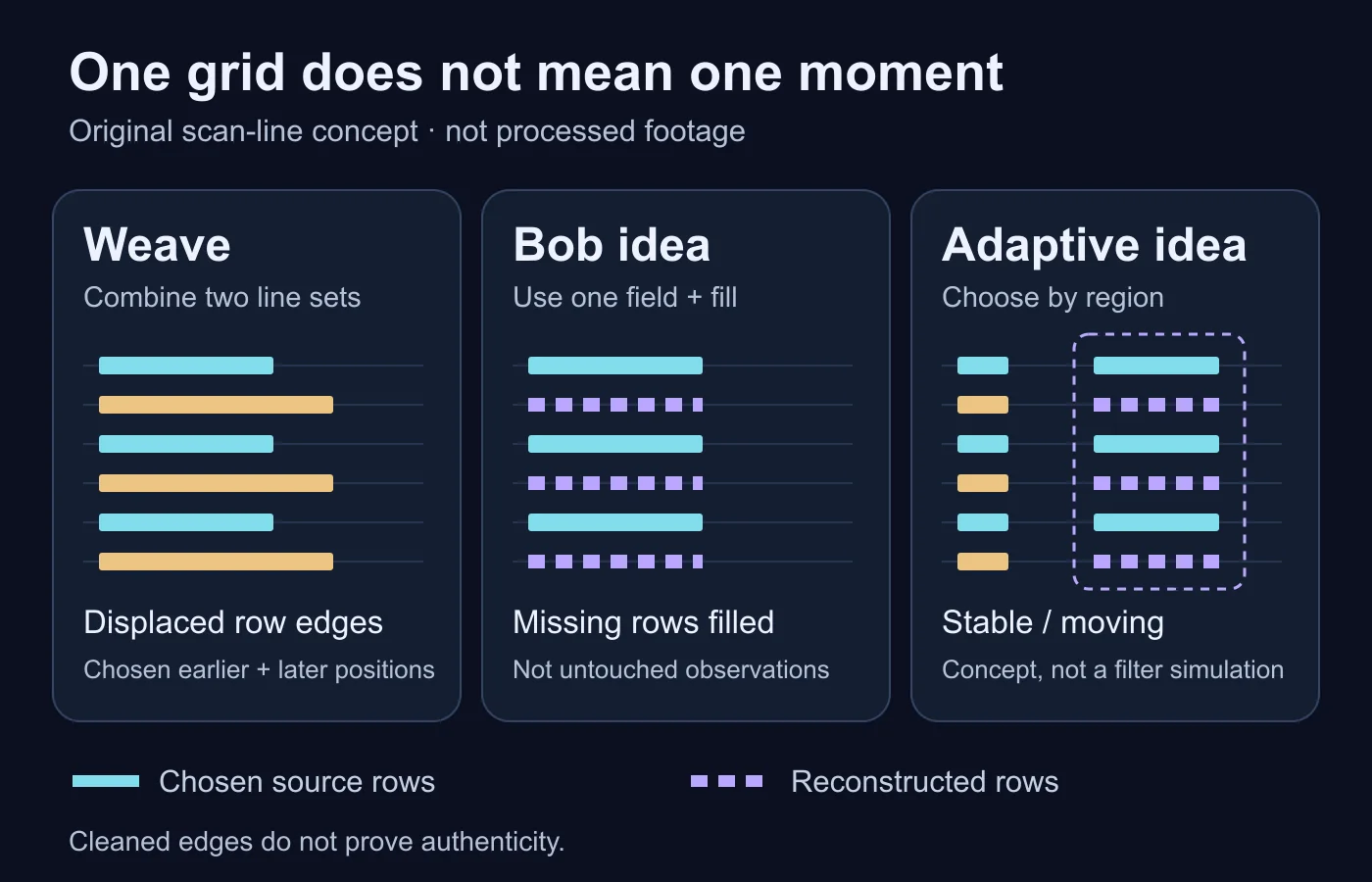
A sensible conclusion from this exercise is limited: line selection and reconstruction affect what a progressive output represents. It cannot establish an object’s true boundary in unavailable rows, a recording’s authenticity or a best setting for unknown footage. Those questions require the source and an actual, documented review.
Preserve the source and a useful processing record
Start a real job by retaining the supplied file unchanged and naming a working copy. If the supplied file is already a platform download or transfer, describe it that way. Do not promote it to a camera original merely because it is the earliest version you possess. That distinction remains useful when comparing a later deinterlaced derivative.
The video authentication guide owns the wider integrity, custody and evidentiary workflow. Here the processing record is narrower: identify the available source, explain why a progressive derivative is needed, and retain the chosen operation beside the output. For consequential evidence, use an appropriately qualified examination rather than treating this educational worksheet as a forensic standard.
| Record | Write down | Leave unresolved when |
|---|---|---|
| Available source | File identity and known transfer or publication path | The earlier capture or transfer copy is unavailable. |
| Scan interpretation | Reported mode and field-order basis | You only have an unlabeled screenshot or automatic preset. |
| Operation | Tool, version, method, output mode and known settings | The service does not expose its processing choices. |
| Review interval | Moving edge, stable detail and surrounding movement | Only a single selected pause frame is available. |
| Accepted derivative | Purpose, actual checks and remaining limits | Playback or relevant detail has not been examined. |
Choose names that connect the derivative to the source and operation, not names that imply the result is certified authentic. Keep unsuccessful candidates separate from accepted outputs. If the accepted file changes later, its earlier review no longer automatically covers the new bytes or settings. Recheck the conditions relevant to the recipient’s task.
Record only the information needed for a useful handoff. Private paths, delivery tokens or unrelated personal details do not belong in a public explanation. A colleague can receive the source identifier, selected method and interval without receiving every incidental field from your workstation. Keep sensitive material in an appropriate private record.
If the processing path is unknown, say so explicitly. A clean progressive copy may be helpful for viewing but weak for reconstructing the earlier field handling. Ask for the original transfer settings or another version rather than trying successive filters until one looks convincing. An attractive result is not evidence of the history you guessed.
Check the export without overstating what it proves
Begin at ordinary viewing size. Confirm that the delivery is usable for its stated purpose, then inspect the specific movement and detail targets. Keep the source and output aligned to corresponding content, not merely to matching row numbers in different technical reports. If the workflow changes output timing, record that before comparing still positions.
Review movement as movement
Watch the selected edge through the interval instead of choosing only the most flattering pause. Ask whether its direction is coherent, whether the surrounding movement remains suitable, and whether the chosen order interpretation has been documented. If a preview looks irregular, compare the actual file and viewing setup before attributing the problem to one field setting.
Check a scene transition as a separate target when one exists. The review should not be limited to the quiet portion that made the candidate look best. Record where the output has been inspected and where it has not. A successful short preview is not a statement about every moment in a long recording.
Review detail separately from edge cleanup
Inspect fine horizontal marks, small lettering and the important feature for your task. Has it remained readable at the intended scale? Is the apparent extra smoothness useful, or does it make a disputed feature harder to compare? State that task-specific observation instead of calling every smoother boundary better.
Keep other changes visible. If the export also resizes, denoises or re-encodes aggressively, its differences cannot be assigned solely to deinterlacing. A combined viewing derivative can be legitimate; it simply supports a more limited comparison. Do not report an isolated deinterlacing finding from a job that changed several properties together.
Write a bounded conclusion
A useful note might say that a named derivative reduces the visible alternating edge pattern in the inspected interval while retaining suitable playback for review. That sentence should be used only after those checks actually occur. It should also identify the preserved source, reconstructed nature of the output and any missing field-order evidence.
Use the broader video forensics guide if the question concerns manipulation, source attribution or a disputed event. Deinterlacing can change the representation you inspect, but it does not independently decide those questions. Ordinary processing and deceptive editing are different hypotheses, even when both affect the same clip.
- Preserve the source before creating a progressive viewing copy.
- Separate reported scan mode from an inferred production history.
- Document the field-order basis and selected output unit.
- Compare a moving edge, stable detail and surrounding playback.
- Keep reconstructed rows distinct from untouched source observations.
- Record combined processing and unresolved information honestly.
- Accept a derivative for its stated purpose, not as proof of authenticity.
Old video needs careful interpretation.
Keep the original and review processing artifacts before judging authenticity.
Questions about video deinterlacing
Does combing mean a video was generated by AI?
No. Alternating line offsets can be compatible with field handling. Inspect the source and processing path rather than assigning generation from one edge pattern.
Does bob restore every missing original scan line?
No such claim follows from the method name. It constructs a full output from a field, so missing rows require reconstruction rather than becoming untouched observations.
Is automatic field order always correct?
Do not assume so. A tool’s automatic behavior can depend on available metadata or fallbacks. Record the actual basis and review the output sequence.
Is one output per field the same as inventing new action?
No automatic equivalence is justified. Output mode concerns how the available fields are represented on a progressive timeline; inspect the input, method and actual result.
Should I overwrite the interlaced source with a cleaner copy?
No. Retain the source and label the viewing derivative. Cleanup can change detail and timing, so the original remains important for subsequent review.
Primary references and scope
- GStreamer: Interlaced Video — actual field-buffer, temporal-order and mixed-state conventions; not a universal claim about every container.
- Microsoft: VMRDeinterlaceTech — historical original terminology for spatial, temporal and adaptive reconstruction; no obsolete API implementation advised.
- GStreamer: deinterlace — actual implementation’s field, mode and algorithm controls; no pipeline executed.
- FFmpeg: yadif and bwdif — exact mode and parity descriptions; no local FFmpeg version, command or quality result tested.
Sources read on 14 October 2026. The moving-edge sample, tables and review worksheet are original educational material. No actual recording, encoder experiment, detector verdict or measured quality gain is represented.