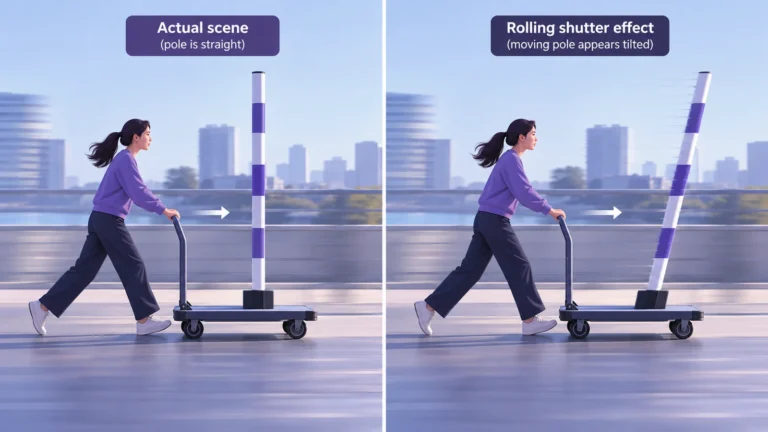
The rolling shutter effect is a timing artifact: different parts of a frame are recorded at slightly different moments. When a subject or camera moves during that process, a straight pole can look slanted, a building can wobble, or a rotating object can acquire an unfamiliar shape. These appearances can occur in genuine recordings. They are not, by themselves, evidence that a video was generated by AI.
The useful question is not simply whether a frame looks strange. Ask what moved, which parts changed together, and whether the source supplies enough context to explain the change. This guide provides a practical reading method for separating a plausible capture artifact from a claim that still needs verification. It does not certify a clip, identify a camera from one frame, or turn camera knowledge into a manipulation detector.
How a sensor is read
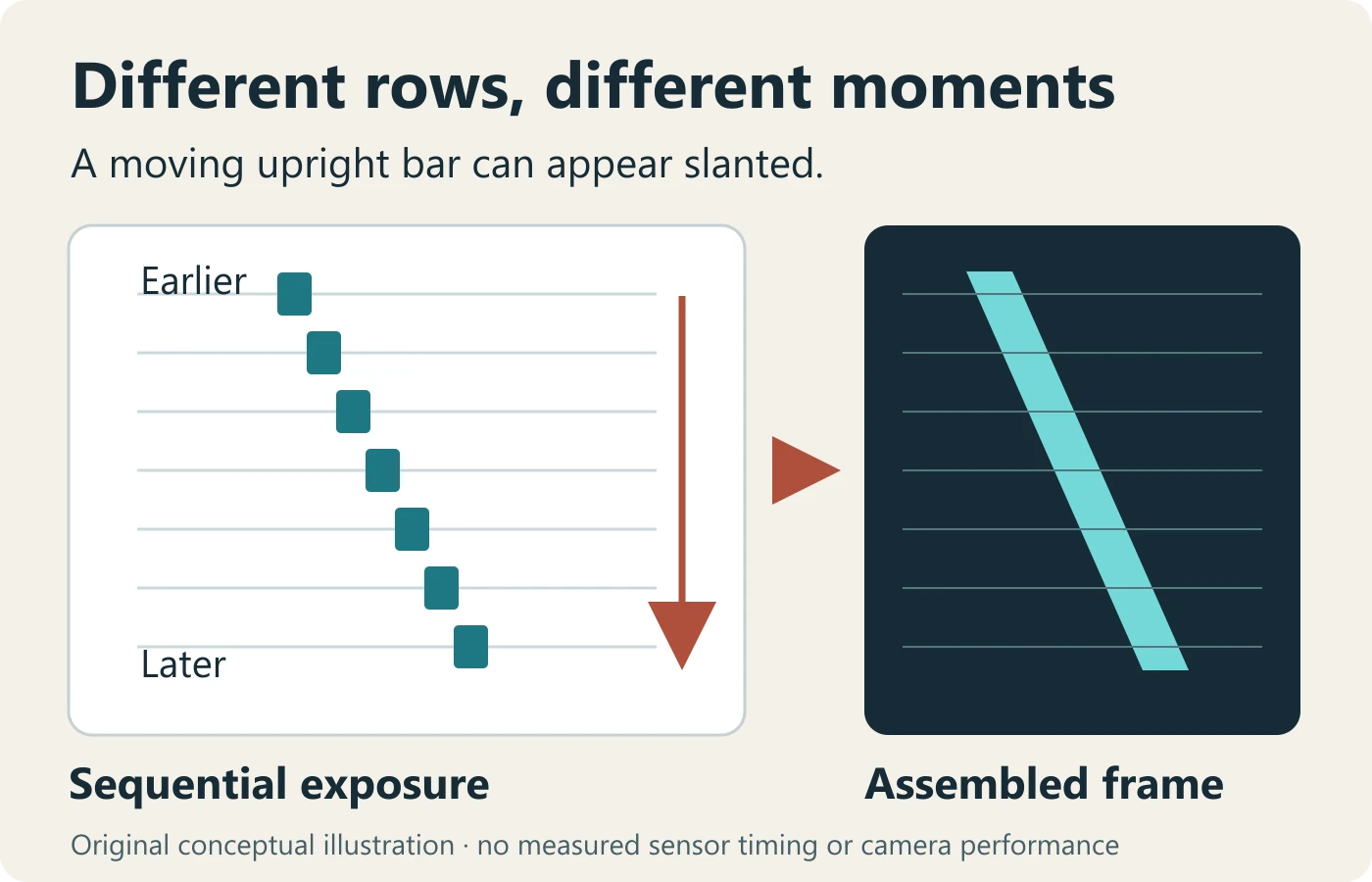
Think of a frame as a set of observations rather than a perfectly instantaneous photograph. In a rolling exposure, successive sensor rows start and finish their exposures at different times. A global exposure coordinates those moments across the sensor. Baumer’s technical explanation of the two shutter principles describes this line-by-line timing and the distortion that continued movement can introduce. The timing difference matters independently of how sharp each individual row appears.
Our diagram uses a moving upright bar as a simplified teaching object. Earlier rows see it in one position; later rows see it farther along. Assembling those observations can make the bar lean. The drawing intentionally contains no readout times, camera specifications, or measured displacement. It explains a possible mechanism, not the amount of distortion in your recording.
Start an inspection by noting whether the object is actually supposed to be straight. A flexible antenna, curtain, or plant is a poor reference. A pole may lean in the real scene. A building edge viewed at an angle can also lean normally. Choose several independent references and write down what makes each useful before assigning a cause to their appearance.
Keep three separate notes: what the frame shows, what the scene might explain, and what capture information is missing. For example, “three fixed edges lean during the pan” is an observation. “Sequential capture may contribute” is a hypothesis. “Original camera mode unknown” is a limitation. Keeping these statements separate prevents a plausible explanation from becoming an unsupported verdict.
Skew, wobble, and partial flashes
Skew is a useful description, not a diagnosis
Use “skew” for a directional lean or shear that appears in the image. Describe whether it affects the background, the moving object, or both. A screenshot with a leaning streetlight is weak evidence on its own. A longer sequence lets you inspect the moments when the camera starts, slows, changes direction, and settles. Those moments may provide a much more informative comparison than the single most dramatic frame.
Do not insist that every edge lean by exactly the same amount. Scene depth, object movement, stabilization, and the framing can complicate that expectation. Instead, look for a coherent relationship across several features. If the background changes together while a subject moves independently, record both patterns rather than forcing them into one category.
Wobble needs a time-based description
“Jello effect” is a common informal label for footage that seems to flex or ripple. A more useful note identifies the affected area and its relationship to camera movement. Does the whole scene oscillate after a bump? Does a small region change while its surroundings remain steady? Does the apparent bend continue after the camera stops? These questions guide review without requiring you to guess the sensor design.
Play the original sequence at normal speed before stepping through frames. Slow playback is useful for locating a change, but it can make an ordinary disturbance seem more alarming. Preserve the normal-speed view in your notes. Do not replace it with a loop of only the oddest frames; the selection itself changes the viewer’s understanding.
A bright band is not automatically an edit
A short lighting event can interact with the moment at which different rows are exposed. Sony’s electronic-shutter guidance for the ILCE-9 and ILCE-9M2 specifically warns about slight distortion or aliasing with very fast subjects, another photographer’s flash, and rapidly moving light sources. That is a model-specific statement, not a promise that every band in every video has the same cause.
When reviewing a bright horizontal region, check the surrounding event: a stage light, vehicle beacon, flash, display, or transition could be relevant. Also ask whether the band appears in earlier copies. If the original is unavailable, retain “lighting or capture interaction possible” as a possibility rather than calling the image either genuine or manipulated.
Which motion makes the effect worth investigating?
Prioritize moments where movement is clear enough to describe: a sideways pan across fixed structures, an object crossing the frame, a rotating part, or a camera vibration. Choose a short interval containing a quiet reference moment as well as the disturbance. The quiet moment is valuable because it helps distinguish a persistent scene feature from a change associated with motion.
Camera movement and object movement are different review tasks. In a pan, use several stationary background references. For a moving object, inspect its outline relative to a reasonably stable background. In a handheld recording with both kinds of movement, do not expect a simple demonstration. Write “mixed motion” and lower the confidence of any explanation that depends on treating the camera as stationary.
Record what you can actually see: “camera turns left,” “object crosses to the right,” or “view shakes vertically.” Do not estimate physical speed from a short cropped clip unless you have a defensible scale and timing method. A large movement on screen does not tell you the object’s real-world speed. Nor does an unfamiliar shape prove an impossible physical motion.
The reason to make these observations is to test a hypothesis, not collect suspicious-looking details. If the scene returns to a familiar shape when motion settles, that is worth noting. If one object appears to change structure independently, that deserves a separate question. Neither observation completes an authenticity investigation without the source and broader recording history.
Rolling shutter versus global shutter: what the comparison can establish
The central distinction is when image regions receive their exposures, not whether a camera is good or bad. Baumer also notes that faster sensor readout can reduce rolling-shutter effects. A global shutter does not make every recording sharp, well lit, or trustworthy. Conversely, rolling capture does not make a recording fake. Avoid converting a capture specification into a credibility score.
Separate exposure duration from the interval across the frame. A shorter exposure can reduce movement blur within an observation without necessarily making all rows observe the scene at the same moment. A crisp slanted edge is therefore not an automatic contradiction of a timing explanation. Check the actual recording mode before suggesting that one shutter-speed adjustment will solve everything.
For source review, ask for the camera model and recording mode only when they materially help. The answer “recorded on a phone” is usually insufficient to establish the relevant timing. Different modes, resolutions, and processing paths can behave differently. If the uploader cannot supply that information, do not invent it from a brand logo or a metadata field in a repost.
A useful comparison file keeps the scene and motion purpose consistent. A random global-shutter sample from a different scene does not establish what happened in the disputed clip. If you have no controlled comparison, use the two shutter concepts to frame possible explanations rather than pretending to have excluded all alternatives.
Capture and correction options
Improve capture without promising a universal setting
If you control a new recording, first clarify its purpose. For a static demonstration, a stable camera position and deliberate movement may matter more than a menu of corrections. For documentary evidence, preserving the scene and capture record takes priority over making it look polished. Do not introduce a cosmetic transform into the only retained copy.
Try a smoother camera movement, a steadier support, or a different available recording mode when practical. Keep a note of what changed. Change one factor at a time if you want the comparison to teach you anything. A new clip made with different motion, light, resolution, and framing cannot isolate which change helped. This is a proposed comparison procedure, not a claim that we tested your camera.
Check correction advice against the actual software version
Some editing tools offer geometric repair or stabilization, but availability changes. Adobe’s Premiere 26.0 effects-change documentation lists Rolling Shutter Repair as obsolete: hidden from the Effects panel and unavailable for new projects, while existing projects can still render it. Older instructions telling every current user to add that effect are therefore incomplete.
Before choosing a workflow, verify that your installed application actually supports the needed correction. Test a duplicate, retain its settings, and compare it with the untouched source at normal speed. Judge both the improvement and any newly introduced crop, edge movement, or unnatural geometry. A cleaner-looking export does not prove that the correction reconstructed the original scene accurately.
If the only available file is already stabilized, avoid layering another aggressive transform merely to make a review easier. Ask for the earlier file instead. Where that is impossible, describe the delivered copy as your evidence limit. A missing original is not proof of deception, but it narrows what a technical inspection can responsibly conclude.
Tradeoffs in corrected copies
Keep an original-to-derivative ledger. It can be simple: source filename, source supplier, correction software and version, settings changed, export filename, and the question the derivative is meant to illustrate. Avoid collecting unnecessary personal information. The goal is a reproducible account of your own processing, not a dossier about the uploader.
Use a corrected copy to explain a comparison, not to overwrite the observation. If a transform straightens an edge but alters a person’s outline, document both. Do not conceal the change behind a “before and after” thumbnail that uses different crops. Keep the same interval and enough surrounding scene for a reader to understand what has been moved.
Compression can make the assessment harder by changing detail around edges. The published guide to video compression artifacts covers that separate delivery problem. Keep geometric questions and blocky or smeared detail in different notes. A repost can contain both a capture artifact and a compression artifact; choosing one does not rule out the other.
Do not use AI enhancement as a neutral restoration step in an evidence comparison. If an enhancement generates plausible detail, that detail belongs to the processed output, not automatically to the scene. Label any illustrative derivative clearly. For a consequential claim, a qualified reviewer may need the untouched file and a documented processing history rather than a visually convincing repair.
A worked reading exercise: the leaning streetlight
The following is a fictional review exercise, not a camera experiment or an analyzed public clip. Imagine a short handheld recording of a street. During a quick sideways turn, a lamp post appears to lean. In a later still moment, it looks upright. The caption says, “AI cannot keep poles straight.” Your task is to decide what to check before repeating that claim.
First, separate the caption from the pixels. The pixels show a changing appearance during movement. The caption asserts a generation method. Those are not equivalent. Write the claim in one sentence and the observation in another. This step protects you from selecting every later detail to fit an accusation that the caption introduced.
Second, locate independent references. Inspect a second post and a building edge if they remain visible. If all appear to change during the same camera movement, a scene-wide capture or processing explanation becomes worth investigating. If only the lamp changes, broaden the questions to include object motion, occlusion, local processing, and the possibility that the reference itself is not rigid.
Third, request the longer recording or earliest available upload. An isolated extract might omit a quiet interval that explains the shape, or a transition that changes how it should be read. The existing reverse video search workflow can help locate earlier public versions. It does not recover a private original or guarantee that the earliest search result is the first recording.
Fourth, check whether the explanation remains limited to geometry. Even if sequential capture plausibly explains the post, it says nothing about whether the caption has the right location, date, or event. A real camera artifact can occur in a miscaptioned or selectively edited recording. Keep the event claim open until independent context supports it.
Finally, choose a proportionate conclusion. “The leaning post alone does not establish AI generation” is defensible from this exercise. “The video is authentic because it has rolling shutter” is not. Your conclusion should identify the unresolved question and the next useful source, rather than replace one unjustified certainty with another.
A compact observation table
| Observation | Useful next comparison | What it cannot prove |
|---|---|---|
| Several fixed edges change during a pan | A quieter interval in the same source | That the event caption is correct |
| A rotating part has an unfamiliar outline | Consecutive frames and capture context | A specific generator or camera model |
| A bright band crosses part of the image | Lighting activity and earlier copies | That someone inserted or removed content |
| A corrected copy looks steadier | Untouched source with the same framing | That every transformed detail is original |
The table is a note-taking aid, not a scoring system. Do not add points and manufacture a likelihood of manipulation. Its value is that each row asks for a different comparison and keeps an explicit limit beside the observation. If you cannot perform the comparison, mark it unavailable rather than assuming it would confirm your favored explanation.
Turn the notes into a useful handoff
If another reviewer needs to continue, give them a specific interval and a specific question. “Check this weird clip” is difficult to act on. “Compare the three fixed edges during the turn with their appearance after the camera settles” is a usable request. Include the source link or approved file location without including private access tokens in a public note.
Keep alternative explanations in separate rows. You might have a capture-timing question, a stabilization question, and a caption-context question. Specify what evidence would help each one. A camera-mode record addresses the first; an earlier unprocessed copy may help the second; an independent event source helps the third. None substitutes for all the others.
Decide what action the evidence justifies now. For an ordinary social post, withholding a confident accusation may be enough. For journalism, insurance, or a legal matter, preserve the material and seek the relevant qualified review. The artifact explanation should reduce overconfidence, not encourage someone to ignore a consequential unresolved claim.
When new evidence arrives, update the note rather than silently replacing it. Record which uncertainty it resolves and which remains. A confirmed camera mode can improve the technical context while leaving the date or location unverified. This small revision history makes your reasoning traceable without pretending that every investigation reaches a binary answer.
Distinguishing an artifact from evidence of tampering
A capture explanation and an authenticity assessment have different scopes. The first asks whether a pattern could arise during recording. The second examines what happened to a particular file and whether its associated claims are supported. Read the broader video forensics guide when you need to connect source history, continuity, audio, and file evidence without relying on one visual clue.
Use a short final-review checklist: retain the best source; inspect normal-speed context; describe the motion; compare independent references; distinguish capture from later processing; and state what remains unknown. A failure to obtain one item is not an automatic failure of the recording. It is a limitation on the strength of your conclusion.
For public sharing, avoid a dramatic freeze-frame as your entire explanation. Include the relevant movement and explain why the isolated shape is insufficient. Link to the source when safe and lawful, and avoid exposing private media or personal details. An educational correction can reduce confusion without making an accusation about a person or claiming technical certainty you do not possess.
When the issue is whether a clip is edited, staged, miscaptioned, or generated, the existing fake-video triage guide separates those possibilities. Rolling shutter belongs within that review as a potential ordinary explanation, not as a final label. The practical outcome is a better question: what additional evidence would distinguish the remaining possibilities?
Rolling shutter questions
Does rolling shutter mean a video is real?
No. An ordinary capture artifact does not establish the full history of a clip. Captured footage can still be edited, miscaptioned, or combined with generated content.
Can a fast shutter speed remove it?
Exposure duration and across-frame timing are separate. Check the camera and mode rather than assuming one exposure setting removes every distortion.
Is every wobbling video a rolling-shutter example?
No. Camera shake, stabilization, scene motion, and other processing can complicate the appearance. Review the sequence and source context.
Should I repair the file before analyzing it?
Retain the untouched source. A separately labeled derivative can help a comparison, but it should not replace the evidence.
Sources and scope
- Baumer: rolling and global shutter exposure principles.
- Sony: electronic-shutter guidance for ILCE-9 / ILCE-9M2.
- Adobe: effects changes in Premiere 26.0.
Reviewed 13 October 2026. Camera behavior is mode-specific; software availability can change. The worked exercise and diagrams are original teaching examples, not laboratory results.
Bent lines can come from real cameras.
Add a video check to your review instead of treating one artifact as proof.