

How to send videos without losing quality: share the actual source file through a file-transfer route, have the recipient download it rather than save a streaming preview, and compare the received copy with the source. Dimensions and file size are useful first checks. A matching SHA-256 checksum provides much stronger practical evidence that the bytes stayed unchanged. No sharing label guarantees preservation across every app, device, or setting.
First decide whether the recipient needs a viewing copy or the source. A convenient playable preview can be useful without being the original file. For editing, archiving, or examining a questionable video, you may need the original and its relevant context. This guide focuses on that sender-to-recipient handoff, not a list of supposedly perfect services or a full forensic authentication procedure.
Start with the right file, not the clearest-looking preview
Locate the best source you actually possess. That might be a camera recording, an original export you created, or an earlier file supplied by its creator. Record which it is. A finished editing export is not automatically the camera original; a file downloaded from a social post is not necessarily the uploader’s source. Preserving a copy exactly does not improve the history it already has.
Keep that source separate from versions prepared for sharing. Do not overwrite it to trim a clip, change orientation, reduce size, remove audio, or make it compatible with another player. If a smaller viewing copy is needed, create and label a derivative. Then the recipient can distinguish an exact transfer from a useful but changed version instead of discovering the difference after starting work.
Check the filename, duration, dimensions, size in bytes, and relevant streams where you can inspect them. Give the source a clear identifier in your notes without exposing private names or locations in a public link. “Source export, no transfer conversion requested” communicates more than “best quality.” If you do not know whether the file was processed before you received it, retain that uncertainty.
If the original is missing, do not promise to restore it by downloading a larger-looking repost or upscaling the current copy. Ask the creator or authorized source for the earliest suitable file. The reverse video search guide can help locate public earlier versions, but an earlier upload is still not automatically a camera original. Describe the version you can obtain truthfully.
Separate copying a file from creating a new video
A transfer route can move the existing file’s bytes, while a media-sharing route may produce a version designed for viewing. Those are different operations. A stream that looks acceptable on a phone may be a poor substitute for the source needed by an editor or reviewer. The question is not whether the thumbnail looks sharp; it is which file the recipient can actually obtain.
Look for an option that sends a file or permits downloading the uploaded original. Do not infer its behavior from a word such as “HD,” “document,” or “original” alone. Check the current product documentation and make a non-sensitive test through the actual route. A client update, format conversion, or download choice may affect the handoff. No named messaging app is claimed here to preserve every video and metadata field.
Some routes offer both a preview and a download. Tell the recipient to use the intended file-download control, not record the screen, save a thumbnail, or export from the preview player. If the route cannot provide the source, choose another authorized method. A high-resolution screen recording remains a new recording of playback, not an exact copy of the underlying asset.
If someone asks you to compress the file first, clarify the goal. Reducing transfer size and preserving identical bytes are not the same requirement. You can supply a smaller review version alongside the source if permissions and storage allow it. Keep their labels distinct. The compression-artifact guide explains why delivery quality deserves separate interpretation rather than a simplistic “small file equals fake” conclusion.
Choose the route and verify its settings
Use a file attachment deliberately
A file attachment can be appropriate when the source fits the allowed size and the service documents its behavior. Confirm the recipient can save the actual attachment. Do not move between a media-picker option and a file-picker option without noting the change. They may represent different workflows, so test the one you intend to use. Do not send private footage to multiple services merely to compare them.
Begin with a harmless file you control. Record its baseline, send it through the chosen route, download it at the recipient end, and compare it. If the path changes its bytes, find out whether conversion was requested, unavoidable, or associated with downloading a viewing copy. Do not repeatedly resend the important source while guessing. Solve the route with the test before handling sensitive material.
Use a download link with an explicit handoff
A link can avoid an attachment-size problem, but it introduces permissions and recipient workflow questions. Upload the intended source, confirm upload completion, and check what the recipient is authorized to download. A link that opens only a preview has not established source access. Do not advertise “anyone with the link” access as necessary for preserving quality; privacy and preservation are separate choices.
Use the narrowest access that suits the handoff. If you can name recipients or require authenticated access, consider that option. Confirm the recipient can open and download the file before an important deadline. Include a brief message stating which item is the source, whether a preview is derivative, and which comparison values the recipient should check. The link should not carry the only explanation of the file’s purpose.
Understand a documented device-sharing option
Apple’s current iPhone sharing guide distinguishes format choices: “Current” avoids a file-format conversion, and its “All Photos Data” option sends the original with edit history and metadata through AirDrop only. These are specific documented controls, not a claim that every Photos destination, Messages attachment, or shared album preserves the same data. Check your device’s current options.
Make privacy part of that choice. A source may contain location or other metadata you do not intend to disclose. If you need to remove information, preserve the private original and create a clearly labeled sanitized copy. Tell the recipient that it is a derivative and verify that derivative separately. Do not call a privacy-edited version byte-identical to the untouched source.
Check what the recipient actually received
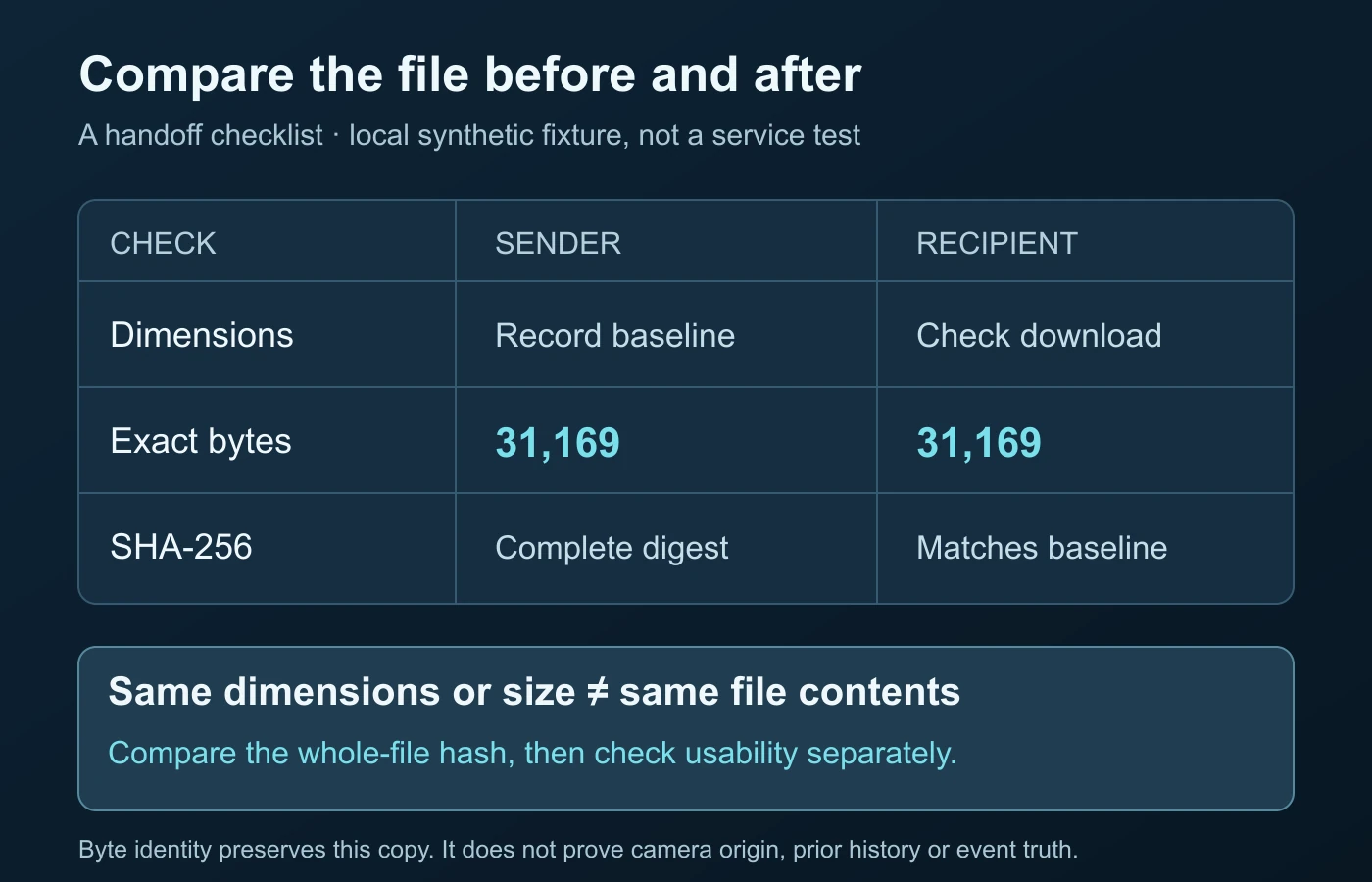
Have the recipient download into a location they can identify, then compare that file rather than the browser player. Check the exact byte count, not a rounded “MB” label from two different interfaces. Confirm the expected duration and video dimensions when inspection tools support the format. These values can catch an obvious wrong download or reduced copy, but agreement is not sufficient to establish byte identity.
For a technical overview, the official ffprobe manual documents -show_format, -show_streams, and JSON output. If you already have ffprobe and understand its use, a command such as ffprobe -v error -of json -show_format -show_streams received.webm can describe the container and streams. This guide did not run that command on a named sharing service or use it to declare an unknown clip authentic.
Use comparable inspection methods at both ends. If one interface reports display dimensions while another exposes stored dimensions and rotation, resolve that distinction before alleging a changed file. A different player appearance can reflect how software interprets the same asset. The video metadata guide covers field context and tool differences; this handoff guide does not need to repeat that full inspection tutorial.
| Check | Useful result | Limit |
|---|---|---|
| Expected filename and purpose | The recipient selected the intended item. | Names can change or be reused. |
| Dimensions and duration | No obvious wrong-size or wrong-length copy was selected. | Different files can share those values. |
| Exact byte count | A quick comparison of file length. | Equal length does not mean equal contents. |
| SHA-256 checksum | Practical integrity evidence for the two compared byte states. | Does not establish the scene’s truth or prior history. |
| Playback and required streams | The recipient can use the delivered file for the task. | A player problem can occur even when the bytes match. |
Do not skip audio if it matters. Confirm the recipient selected the file containing the required tracks and can use it in the intended workflow. If compatibility is the problem, agree on a separate viewing or editing derivative rather than silently replacing the source. The original can remain preserved while the recipient uses a format their software understands.
Use a checksum when preservation matters
A checksum compares content rather than a filename or appearance. Microsoft’s Get-FileHash documentation explains this integrity use and its SHA-256 option. Both parties must calculate the same algorithm over the complete intended files. A value computed before editing is not a baseline for a different version sent later.
On Windows PowerShell, Get-FileHash -LiteralPath 'source.webm' -Algorithm SHA256 obtains one baseline; substitute the actual authorized file path. The recipient can repeat the command for the downloaded copy and compare the entire returned hash. Do not compare only its first few characters, and do not confuse a packet or media-stream hash with the checksum of the whole file.
Record the baseline after choosing the final source for the transfer. Send its identifier, exact size, and full SHA-256 to the recipient through the agreed communication route. For higher-stakes handoffs, consider how that record is authenticated and retained; an attacker-controlled file and attacker-controlled checksum are not independent verification. This article does not provide a legal chain-of-custody service.
If the hashes differ, stop calling the handoff exact. Recheck which files were selected and whether a conversion, metadata operation, or download choice changed the bytes. A mismatch establishes a difference, not its cause or intent. The video authentication guide explains the broader evidence boundary. You can resolve ordinary delivery problems without accusing the sender of manipulating the scene.
Matching hashes provide strong practical integrity evidence for those two copies. They do not prove that the starting video was camera-original, that no earlier edit happened, or that the caption is true. Keep the statement narrow: “The recipient’s file matches the sender’s chosen baseline.” That is an excellent transfer result without pretending to answer a different verification question.
An actual controlled transfer check, with clear limits
For this guide, we used an original, non-sensitive synthetic WebM fixture created locally. Its purpose was to check the handoff-verification procedure, not camera quality or a cloud platform. The file contained 31,169 bytes. A temporary server bound to the local loopback interface returned those file bytes directly; the receiving process downloaded them with an HTTP GET. No public upload, messaging app, or production scanner was involved.
The received byte count was also 31,169. The two buffers compared exactly, and both whole-file SHA-256 values were 2acbd95658bad7349a8e4664d99d4b7c20db10b870d5145e83fb224c0891c926. As a negative control, we changed one byte in a separate in-memory copy. Its checksum no longer matched. The preserved fixture was not overwritten. These are actual local integrity results, not invented test figures.
What did that test establish? A direct byte-serving route and a complete-download comparison preserved the chosen fixture in this specific harness. It did not test AirDrop, email providers, file-hosting permissions, mobile messaging, recipient decoding, or detector performance. The lesson is the verification procedure: establish the baseline, download the intended item, compare exact contents, and state the scope. Run an appropriate harmless test through your own real handoff.
Repeat the procedure after a meaningful change to the route, settings, or source selection. Do not reuse a successful checksum from last week’s different export. If the recipient needs another version, make its own baseline and label it separately. A transfer log that identifies the file and the result is more useful than a broad claim that a service is “lossless.”
Keep access, privacy, and preservation aligned
Ask whether the recipient is authorized to receive the original. A full source can reveal more than a viewing copy: context outside a crop, audio, location, or embedded information. Byte preservation is not a reason to distribute sensitive footage indiscriminately. If authorization is unclear, resolve it before uploading. Use only a route appropriate for the people, content, and purpose involved.
Check recipient access using a permitted account or agreed test, not by making the link public to avoid a login problem. Explain expiry or download restrictions when the service provides them. If a link expires, the recipient should know how to request a new authorized handoff. Keep the original under your control until receipt and the relevant comparison are confirmed.
Do not store a secret access link in a public spreadsheet or article. A review note can record the file identifier and access arrangement without exposing credentials or private media URLs. When you no longer need temporary sharing access, use the service’s normal controls according to your agreement. Do not delete the only preserved original simply because a link was sent successfully.
Privacy changes need transparent labels. For example, a version with removed location metadata can still preserve the intended visual content for a particular task while differing from the private source. Hash and check that authorized derivative, and state what was deliberately changed. “Same visual purpose, sanitized copy” is different from “untouched original.” Both can be valid deliveries when the recipient understands which they received.
Resolve a failed handoff without reprocessing blindly
If the recipient obtains a much smaller video, first check whether they saved a preview or a viewing export. If the source upload is incomplete, complete it before sending another link. If access is denied, fix the intended permissions rather than converting the file. These are transfer and selection problems, not reasons to add another encoding stage to the original.
If the bytes match but playback fails, keep that successful integrity result. Check the recipient’s format support and task requirements through the appropriate software documentation. A second compatible derivative can be useful, but it should not replace the source without agreement. A playback failure alone does not mean quality was lost in transit.
If the hashes differ while dimensions and byte count look similar, report that difference accurately and investigate the route. Do not conclude that only metadata changed unless you have evidence for it. Keep both copies and their baselines so the comparison is reproducible. If the important source cannot be recovered, describe the received copy and its limitations instead of calling it original.
For video analysis, provide the best authorized file and the question it needs to answer. Identify whether it is a camera source, editing export, or platform copy, and mention known processing. Do not upload confidential material to a service without checking permission and handling terms. DetectVideo AI analyzes supported video; preserving a better starting file does not guarantee a detector verdict or establish the truth of the event.
Ask for a receipt that answers the right questions
A useful recipient confirmation can be short: identify the downloaded item, say whether the complete checksum matched, and note whether the file opens in the intended workflow. Those are three separate outcomes. “I watched it” confirms less than “I downloaded the agreed source and its checksum matches.” Neither statement needs to expose the private sharing link or the footage to unrelated people.
For a team handoff, agree who retains the source and which derivative is approved for routine review. If someone later sends a new export under the same familiar filename, establish a new baseline rather than assuming the old receipt covers it. Keep the original receipt attached to its specific version. This is a practical collaboration record, not a substitute for a formal evidentiary process.
If a deadline passes before comparison, record that receipt is unverified rather than deleting the source to reclaim space. The next step may be as simple as asking the recipient to finish downloading. A clear unresolved status is preferable to treating a sent notification as completed delivery.
The successful outcome is a clear handoff: the recipient knows what the file is, can access the intended version, understands any deliberate changes, and has comparison evidence when exact preservation matters. That workflow prevents avoidable quality loss while keeping compatibility, privacy, and authenticity claims in their proper places.
Questions about preserving shared video files
Does sending a video as a document always preserve quality?
No universal claim applies across apps and settings. Verify current documentation and test the exact sending and downloading route with a harmless file.
Is an HD preview the original video?
Not necessarily. A preview can be a separate viewing version. Ask for and download the intended source file, then compare it.
Do matching dimensions and file size prove an exact transfer?
No. Different files can share those properties. Compare the complete files with the same suitable checksum algorithm when byte preservation matters.
Does a matching SHA-256 prove that the video is authentic?
It provides integrity evidence between the compared file states. It does not establish camera origin, prior edits, or whether the depicted event and caption are true.
Can I remove private metadata and still call the copy untouched?
No. Preserve the private original, label the sanitized derivative, and verify that derivative separately. Privacy edits and byte identity are different goals.
What if the recipient cannot play the matching file?
Keep the source and the integrity result. Resolve format support or provide a separate agreed compatible version; do not silently replace the original.
Sources and test scope
- Apple: Share photos and videos on iPhone — current format and AirDrop-only original-data controls, not a universal service guarantee.
- FFmpeg: ffprobe documentation — format/stream inspection and JSON output options.
- Microsoft: Get-FileHash — whole-file checksum comparison and SHA-256 behavior.
References checked on 14 October 2026. The local WebM transfer test checks exact bytes only; it does not benchmark a sharing platform or decoder. Device and service behavior should be rechecked before important transfers.
Give your check a better starting point.
Upload the original clip when available rather than a compressed repost.