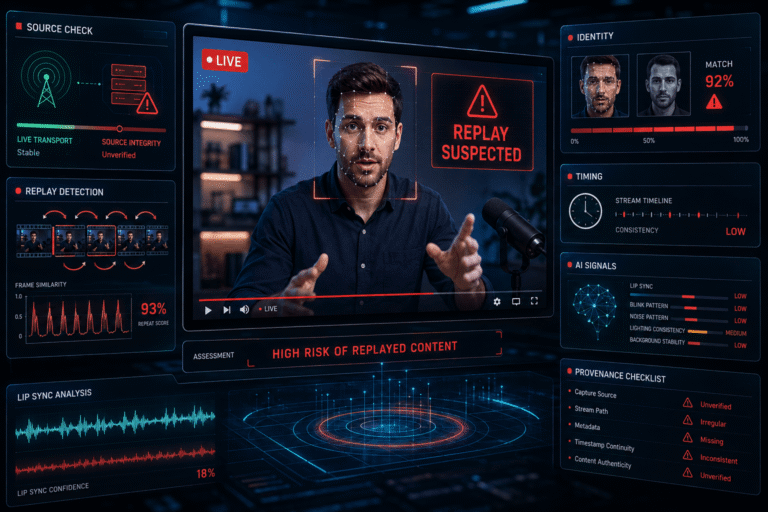
A fake livestream is content presented as live even though the visible scene, identity, timing, or source does not match what viewers are being led to believe. The stream may be a prerecorded video rebroadcast as current, a repeating loop, stolen footage from another channel, an AI-generated presenter, a deepfake identity, or a hybrid broadcast that mixes genuine live elements with synthetic or prerecorded media.
The most important distinction is simple: a platform showing a “Live” badge does not prove the camera image you see was captured at that moment. It proves that the platform is receiving and distributing a stream now. The stream can still contain old footage, replayed segments, generated video, prerecorded speech, or a false identity.
What Is a Fake Livestream?
A fake livestream is not one specific technical format. It is a mismatch between what the viewer believes is live and what is actually being delivered.
The mismatch can involve:
- time, where old footage is presented as happening now
- continuity, where a short clip is looped to look like an ongoing event
- identity, where a fake, stolen, or AI-generated person appears to be the broadcaster
- source, where an unofficial channel impersonates an official one
- content, where live transport carries prerecorded or synthetic media
- context, where genuine live footage is paired with a false event, location, or claim
A legitimate rebroadcast is not automatically fake. Television networks, sports channels, conferences, and creators routinely replay earlier material. The problem begins when the presentation causes viewers to reasonably believe the replay is a current live capture.
The Four Meanings of “Live” That Viewers Often Confuse
| Meaning | What it actually establishes |
|---|---|
| Live transport | The platform is receiving and distributing data in real time |
| Live capture | The camera or source is capturing the depicted scene close to the current time |
| Live identity | The visible or audible person is genuinely the claimed individual participating now |
| Live event claim | The scene really corresponds to the event, location, and time described by the broadcaster |
These properties can separate. A stream can be live at the transport layer while showing a three-year-old video. A person can be speaking in real time while an AI avatar replaces their face. A real camera can show a real place while the caption falsely claims a breaking emergency is happening there.
The Live Claim Stack
This model prevents a common mistake: proving one layer and assuming the rest are true.
Five Common Types of Fake Livestream
1. Prerecorded video presented as live
The stream itself is active, but the video being sent into it was recorded earlier. This can be as simple as playing a saved MP4 into streaming software.
The presentation may use words such as “LIVE NOW,” a countdown, a current date, or a breaking-news layout to create the impression that the underlying footage is happening now.
2. Looping livestream
A short segment repeats continuously or at scheduled intervals. Loops are common in legitimate ambient streams too, so repetition becomes deceptive only when the broadcaster represents the loop as a continuously unfolding live scene.
3. Stolen or rebroadcast live feed
A channel copies a genuine livestream from another source and republishes it under a different identity, location, event description, or commercial offer.
The pixels may be authentic and fresh while the source identity is false.
4. AI-generated or deepfake livestream
A real-time or near-real-time system generates a face, voice, avatar, background, or entire presenter. The synthetic element may be disclosed and legitimate, or it may be used to impersonate a public figure, executive, expert, or creator.
5. Hybrid livestream
A genuine live host can insert prerecorded footage, generated video, cloned speech, synthetic testimonials, fake charts, or AI-translated segments. “Partly live” does not tell you which element should be trusted.
The Best First Check Is the Source, Not the Face
If a major company, celebrity, government agency, conference, sports organization, or news outlet appears to be streaming, check whether the livestream exists on the entity’s established official channels.
Compare:
- exact channel handle
- verified website links
- channel age and publishing history
- normal branding and naming conventions
- scheduled event announcements
- other official social accounts
YouTube’s current impersonation policy explicitly prohibits unauthorized impersonation that can mislead viewers, including copying branding or using AI-generated likeness or voice to falsely imply authorization. Its examples even include using terms such as “Live” to pretend to be another creator’s backup or related channel. See the YouTube impersonation policy.
If identity misuse is the core issue, the AI impersonation guide covers that broader problem.
Check Whether the Event Was Actually Scheduled
For conferences, earnings calls, product launches, sports, public meetings, speeches, hearings, concerts, and planned announcements, an official schedule can establish whether a live event should exist at that time.
A stream claiming to show a company’s live product launch is immediately questionable if the company’s own site says the event ended hours earlier or is scheduled for another day.
Scheduled-event evidence does not prove that the media is authentic, but it is a fast way to test the timeline.
Real-Time Interaction Is Useful Evidence, but Not Proof
A genuine live presenter can react to new information as it appears. That creates a useful liveness signal.
Examples include:
- responding to a specific viewer question
- acknowledging a new participant or donation
- reacting to an unpredictable event occurring in the room
- referencing a changing game score, market event, or current announcement
- showing an object or scene element that was requested moments earlier
However, interaction is not absolute proof. Chat messages can be selected, delayed, scripted, or simulated. A real human operator can also drive an AI avatar in real time.
Use interaction to support freshness, not to prove identity or media authenticity by itself.
Latency Does Not Tell You Whether the Content Is Prerecorded
Livestreams normally have delay. Encoding, buffering, content delivery networks, moderation systems, player settings, and network conditions can all add latency.
A stream being 10, 30, or 60 seconds behind real time does not make it fake.
Likewise, low latency does not prove the visible scene is fresh. A prerecorded clip can be pushed through a low-latency live transport pipeline.
How to Detect a Replayed or Looping Livestream
Loops leave a different kind of evidence from ordinary AI artifacts.
Look for recurrence across time:
- the same person makes the same gesture again
- vehicles pass in exactly the same order
- an identical background sound repeats
- the same chat prompt or on-screen event returns at a fixed interval
- weather, shadows, clocks, or crowds reset instead of progressing
- a transition seam appears at regular intervals
The key is exact or near-exact recurrence. Similar behavior is not enough. People can naturally repeat gestures, and static scenes can remain unchanged for long periods.
Check Progression, Not Just Repetition
A real continuous scene usually accumulates change.
Depending on the subject, you may expect:
- shadows to move slowly
- crowds to evolve
- weather to change
- clocks to advance
- scoreboards or counters to progress
- traffic patterns not to reset
- objects moved by people to stay moved
When state repeatedly returns to an earlier configuration, a loop or replay becomes a stronger hypothesis.
Reverse Search a Livestream Frame
If you suspect a “live” scene is old, capture several distinctive frames and search them.
A matching image or video published before the current livestream can establish that the visual material existed earlier. This is particularly useful for fake breaking-news streams, old disaster footage, recycled public events, or prerecorded celebrity appearances.
The broader video verification workflow explains how source tracing, context, time, and media analysis should be combined.
Use precise language: finding the same frame in an older upload proves an earlier known occurrence of that visual, not necessarily the original recording date.
How AI Changes Fake Livestreams
Generative AI expands what can be changed during a live or near-live broadcast.
A broadcaster can potentially synthesize or modify:
- facial identity
- voice identity
- lip movement
- background
- translation or dubbing
- avatars and presenters
- inserted video clips
- visual demonstrations
This does not make synthetic livestreaming inherently deceptive. Virtual presenters, translation, accessibility tools, entertainment, and privacy-preserving avatars can all be legitimate.
The forensic question is whether the synthetic contribution is disclosed and whether the audience is being led to believe the depicted person or event is a direct live capture when it is not.
Do Not Use Old Deepfake Folklore as a Live Detector
Weak synthetic video can still produce warped hands, unstable glasses, odd mouth movement, or facial artifacts. But live video is also exposed to compression, packet loss, low light, autofocus, bandwidth adaptation, denoising, frame dropping, and motion blur.
Those ordinary streaming conditions can create the same visual symptoms.
Stronger questions include:
- Does identity remain stable during head turns?
- Do occlusions behave consistently when a hand or object crosses the face?
- Does lip movement remain aligned with speech across time?
- Do reflections and shadows respond naturally to movement?
- Does the same identity-specific detail persist through the stream?
Even then, visual inspection should be treated as supporting evidence rather than proof.
AI Disclosure Labels Help, but They Are Not a Complete Verification System
YouTube currently requires disclosure when photorealistic content is meaningfully generated or altered with AI, including cases where a real person appears to say or do something they did not, real-event footage is materially changed, or a realistic event is generated that did not occur.
YouTube can also apply AI-origin information when the creator discloses it, the content uses YouTube’s generative tools, the media contains compatible C2PA information, or platform systems identify applicable AI use. See YouTube’s AI disclosure guidance.
A disclosure supports the conclusion that AI was meaningfully involved. It does not automatically mean the livestream is fraudulent.
Likewise, no visible AI label does not prove that a stream is fully camera-captured or unaltered.
“How This Content Was Made” Is Provenance Context, Not a Truth Score
YouTube’s “How this content was made” section can display origin information such as “Made with AI” when the creator discloses AI use or compatible Content Credentials support the disclosure.
The platform states that Content Credentials can carry forward information from signing authorities in compatible workflows. See YouTube’s content-origin disclosure documentation.
This information is valuable because it concerns production history. It does not independently fact-check the words spoken during the stream, the offer being promoted, or the context of an inserted clip.
Live Provenance Is Becoming Technically Possible
C2PA 2.4 includes a dedicated Live Video specification for real-time streaming workflows and dynamically packaged content.
Instead of treating a long stream as one finished file, the specification supports validation at the segment level. It defines mechanisms for hashing live-video segments, carrying C2PA manifests or verifiable segment information, identifying stream and segment sequence, and maintaining cryptographic continuity between adjacent segments.
The current specification applies to ISO BMFF-based workflows and CMAF and does not support MPEG Transport Streams in this live-video mechanism. See the C2PA 2.4 Live Video specification.
This is important because a future verification experience does not need to wait until a livestream ends before provenance can be checked. But standards support and real-world deployment are different things. A livestream without C2PA live provenance is not automatically fake.
What Live Provenance Can and Cannot Establish
| Live provenance may support | Live provenance does not automatically prove |
|---|---|
| Integrity and continuity of signed stream segments | The speaker is telling the truth |
| Which compatible signer or system made provenance claims | The event is not staged |
| Recorded production or processing actions | The visible location or caption is factually correct |
| Whether protected segment data validates against its signed record | That unsigned livestreams are fake |
If signed media history is the primary question, the Content Credentials guide covers that evidence layer in more detail.
Fake Livestreams Used for Fraud Need a Different Final Check
A livestream can be technically real-time and still be part of a scam.
Common high-risk patterns include:
- a fake celebrity or executive promoting an investment
- a stolen public figure livestream paired with a cryptocurrency address
- a fake giveaway that requires an upfront payment
- a shopping stream directing viewers to a lookalike website
- a supposed authority figure sending viewers to a spoofed government or recovery service
- a QR code leading outside the verified organization’s domain
The FBI has documented criminals using AI-generated video to create believable public figures and authority figures, including real-time video chats and promotional material supporting fraud. Its current warning stresses independent verification of identity and destination rather than relying on the video itself. See the FBI IC3 warning on AI-assisted impersonation fraud.
If the stream is pushing money, credentials, a wallet, a login, or a private conversation, switch to the scam video verification workflow. Media authenticity and transaction legitimacy are separate questions.
The Destination Can Be Fake Even When the Livestream Is Real
A scammer does not need to generate a deepfake if they can steal a genuine livestream and attach a fraudulent link.
Before sending money or information:
- open the organization’s known official website independently
- confirm the promotion or event exists there
- compare the exact domain or wallet destination
- verify the channel relationship from the official site
- do not use urgency as a reason to skip verification
This is why a technically authentic video can still sit inside a fraudulent funnel.
Fake “Breaking News” Livestreams Require Timeline Verification
One common pattern is old footage presented as a current emergency, conflict, protest, disaster, election event, or public announcement.
Test the time claim by checking:
- earlier uploads of the same frames
- weather and daylight
- event schedules
- news coverage from independent sources
- visible signs, banners, buildings, and temporary details
- whether other reliable live sources show the same event progressing
The fact that a clip is being streamed now says nothing by itself about when the underlying footage was recorded.
Compare Parallel Live Sources
For a major public event, there may be several simultaneous views.
Compare independent sources for:
- the same weather
- crowd development
- lighting and time of day
- announced sequence of events
- visible speakers
- audio cues
- event milestones
A fake stream may use genuine footage but be delayed, looped, or attached to the wrong point in the event. Parallel coverage can reveal those mismatches quickly.
Do Not Overinterpret the Live Chat
Chat can provide context, but it is weak authenticity evidence.
Viewers may be bots, comments may be delayed, chat can be moderated, and scammers can seed messages that create fake social proof.
Claims such as “This is real, I am here now” should be treated like any other unsupported comment unless the person can be independently identified and their observation corroborated.
Viewer Count Is Not Proof of Legitimacy
A large audience can make a fake livestream feel authoritative.
Popularity does not verify:
- identity
- event freshness
- source authorization
- AI disclosure
- transaction safety
YouTube separately prohibits artificial engagement and deceptive practices. Even genuine audience numbers would still be social proof, not media authentication.
If You Can Save the Stream, Analyze the Sequence
An archived or captured segment allows deeper comparison than watching in real time.
Useful checks include:
- extracting frames at intervals
- looking for repeated frame sequences
- comparing recurring background motion
- checking whether audio patterns repeat
- reviewing face and identity continuity
- inspecting metadata from the captured copy while remembering it describes that copy
- searching distinctive frames for earlier appearances
A captured stream is a derived recording of what you received. Preserve the source URL, capture time, platform, and method alongside it so later analysis does not confuse the capture file with an original camera file.
A Fake Livestream Evidence Matrix
| Finding | What it supports | What it does not prove alone |
|---|---|---|
| The same sequence repeats exactly | Looped or replayed source becomes likely | Why it was looped or whether the presentation was deceptive |
| An older upload contains the same scene | The visual material existed earlier | The exact date of the original recording |
| Official source does not list the stream | The channel deserves identity verification | That the media itself is synthetic |
| AI disclosure is present | Meaningful AI generation or alteration was disclosed or signaled | That the stream is fraudulent |
| Face identity drifts across time | Possible synthetic identity or manipulation | The exact generation method without further analysis |
| Valid live provenance exists | Protected segment integrity and recorded provenance claims can be checked | Truth of external claims or offers |
A Practical Workflow to Verify a Livestream
- Define the live claim. Is the broadcaster claiming current capture, official identity, a specific event, or all three?
- Verify the source. Find the event or stream through an independently known official channel.
- Check the schedule. Confirm the event should be live at this time.
- Look for progression. Observe clocks, crowds, lighting, scores, state changes, and interactions over several minutes.
- Test for loops. Watch for exact recurrence of actions, audio, traffic, or scene state.
- Search frames. Check whether distinctive visuals existed before the claimed event.
- Compare parallel sources. Use independent live coverage where available.
- Inspect identity and synthetic-media evidence. Focus on temporal continuity rather than one visual glitch.
- Check labels and provenance. Use platform disclosure and Content Credentials when available.
- Verify the destination separately. If money, credentials, or downloads are involved, confirm the transaction path independently.
- State the narrowest defensible verdict.
Where DetectVideo AI Fits
DetectVideo AI can contribute technical analysis when a saved or supported video segment needs examination for AI generation, manipulation, temporal anomalies, compression, metadata, or related forensic signals.
It cannot prove that a public stream is currently live merely from the pixels, nor can it establish that an external payment destination is legitimate. Those questions require source, timing, platform, provenance, and fraud evidence.
The strongest workflow combines technical media analysis with source verification rather than treating either one as sufficient by itself.
Use Precise Livestream Verdicts
| Verdict | Meaning |
|---|---|
| Current live capture supported | Source, timing, progression, and corroborating evidence support that the scene is being captured now |
| Live transport, prerecorded content | The platform stream is active, but the visible material was recorded earlier |
| Looped or replayed livestream | Sequence evidence supports repeated or rebroadcast material |
| Source impersonation suspected | The channel or broadcaster identity does not align with the claimed official source |
| AI-altered and disclosed | Meaningful synthetic alteration is identified transparently |
| Synthetic identity suspected | Evidence supports further investigation of a generated or manipulated identity |
| Live status unverified | The available evidence cannot establish whether the underlying scene is being captured now |
Key Takeaway
“Live” is a delivery state, not an authenticity guarantee.
A stream can be technically live while carrying old footage, a loop, stolen video, a synthetic presenter, or a false identity. Verify the source first, then test whether the scene is fresh, whether the identity is genuine, whether the media has been altered or replayed, and whether the surrounding claim is supported.
For high-risk streams, especially those involving money or credentials, verify the destination independently. The most convincing video in the world cannot authenticate a wallet address, login page, or investment offer by itself.
FAQ About Fake Livestreams
What is a fake livestream?
A fake livestream is content presented in a way that misleads viewers about whether the scene is current, continuous, authentic, or coming from the claimed source. It can use prerecorded video, loops, stolen feeds, AI-generated presenters, or deepfake identities.
Can a livestream be prerecorded?
Yes. Streaming software can send a prerecorded video through a live broadcast pipeline. The platform may correctly show that a stream is active even though the visible content was recorded earlier.
How can I tell if a livestream is actually live?
Verify the official source and schedule, observe real-time progression, compare parallel coverage, look for current interactions or changing scene evidence, and search distinctive frames for older appearances. No single test is universal.
How do I detect a looping livestream?
Look for exact recurrence of actions, audio, vehicles, crowd movement, environmental state, or transition points. Repeated state resets are stronger evidence than ordinary similar behavior.
Can AI generate a livestream in real time?
AI systems can generate or modify faces, voices, avatars, backgrounds, speech, and other media in real time or near real time. Whether that is deceptive depends on how the synthetic media is represented and disclosed.
Does a YouTube AI label mean a livestream is fake?
No. It indicates meaningful AI generation or alteration under YouTube’s disclosure system. Synthetic content can be legitimate and transparent. The label does not establish fraud or false context.
Does no AI label mean the livestream is authentic?
No. Labels have coverage and workflow limits. A missing label is not proof that the stream is camera-captured, current, or unaltered.
Can Content Credentials work with live video?
Yes. C2PA 2.4 defines a live-video architecture that can validate compatible streaming segments and maintain continuity across them. Adoption is not universal, so the absence of live provenance does not indicate a fake stream.
Can a real livestream still be a scam?
Yes. A real host or genuine stolen stream can direct viewers to a fraudulent website, wallet, payment account, or private chat. Media authenticity and transaction legitimacy must be verified separately.
Can DetectVideo AI prove that a stream is live?
No. Technical video analysis can help examine saved or supported media for synthetic or manipulation signals, but proving current liveness requires external timing, source, interaction, platform, and corroboration evidence.