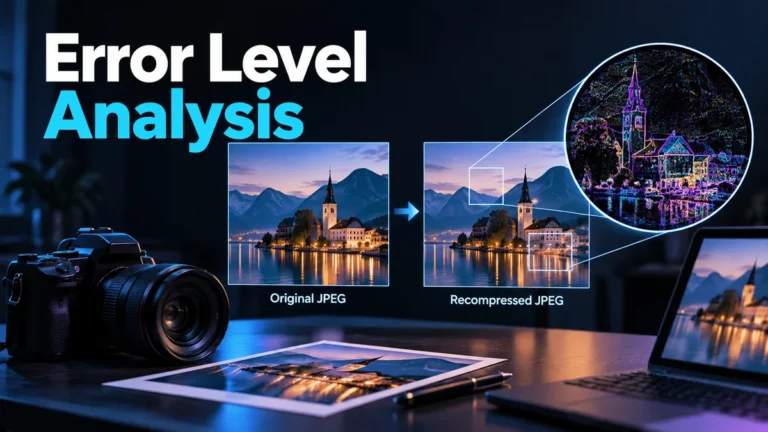
Error level analysis compares an image with a JPEG recompressed version and visualizes differences between the decoded pixels. A brighter area can identify a region worth inspecting, but it is not a forgery label. The result depends on the available copy, recompression settings, image content and display processing, so interpretation must remain conditional.
This guide explains that narrow residual view rather than providing a universal image-authentication test. The examples and arithmetic are original teaching material, not an examination of a real photograph or a measured detector result. For moving-image evidence, use the existing video forensics guide; a still-image map does not establish what happened throughout a clip.
What the comparison actually measures
Start with the decoded picture available to the method. Create a JPEG version under a chosen quality setting, decode that version, and compare the resulting pixel values. The difference is a response to this additional encoding step. It is not a direct measurement of the image’s truth, its creator’s intent or the date of an earlier edit.
The original Sherloq ELA implementation, together with its JPEG helper, provides one inspectable example: it encodes and decodes at a reference quality, then processes the difference for display. Its gain, contrast and display options show why the visible map is not an unmediated truth score.
That implementation is evidence of how one tool works, not validation of every ELA interpretation. Other tools can use different processing and display choices. Record the method and settings you actually used instead of assuming every map bearing the same name is numerically comparable. A screenshot without that information may be useful only as an illustration of a reported alert.
Distinguish the comparison from the history you want to investigate. A local difference might be compatible with an editing or publication step, but compatibility is not identification. To establish a particular insertion, you need evidence that addresses that insertion, not merely evidence that some pixels respond differently to a new JPEG save.
A dark region is similarly limited. It means a small displayed difference under that method and setting, not that the region has never changed. Material alteration can be followed by ordinary exporting, and the currently available copy may no longer retain a distinctive response. A clean-looking residual view is not an authenticity certificate.
Why JPEG and resaving context matter
JPEG is commonly used as a lossy image representation. Its processing can change detail rather than preserving every decoded value exactly. The original SWGDE compression guideline, version 3.0, describes quantization, JPEG block processing and artifacts, and advises preserving originals while processing working copies. Ordinary delivery history therefore belongs in the review.
For a reader, the important point is not to memorize every compression step. It is that your comparison operates on a particular representation after a particular history. A camera file, an editor export, a messaging thumbnail and a screenshot may all show a related picture while giving the method different starting values.
Keep the received file intact. Do not repeatedly save over it while changing analysis settings. A new export becomes another derivative with its own processing history. Label it accordingly so you do not later confuse a map of your own resave with a map of the originally acquired copy.
Opening and inspecting a file is different from re-encoding it. If your application silently exports a new version before the comparison, that is a relevant operation to record. If the workflow is unclear, preserve the uncertainty rather than pretending that the analysis began from an untouched camera original.
The file extension is not sufficient documentation. Confirm the actual format where possible and note the dimensions of the examined copy. A small JPEG thumbnail may have lost much of the information relevant to the disputed area. Enlarging it does not recreate the missing original detail; it only makes the available representation larger to view.
Residual values and visible brightness are different things
Here is a deliberately invented one-pixel exercise. Let a decoded RGB pixel be (100, 120, 140), and let a hypothetical recompressed version be (98, 123, 139). The absolute per-channel differences are (2, 3, 1). These values were hand-assigned to explain a comparison; no JPEG encoder produced them in a test for this article.
If a simple display multiplies those differences by ten, the displayed values become (20, 30, 10). Multiplying by forty instead gives (80, 120, 40). The underlying differences remain (2, 3, 1). A more visually prominent display has not supplied four times as much evidence of an edit.
| Item | RGB values | What it represents |
|---|---|---|
| Available pixel | (100, 120, 140) | Hand-assigned input for the example. |
| Recompressed counterpart | (98, 123, 139) | Hand-assigned second value. |
| Absolute difference | (2, 3, 1) | Arithmetic difference between the two. |
| Display gain ×10 | (20, 30, 10) | One visualization of that difference. |
| Display gain ×40 | (80, 120, 40) | A brighter visualization, not a new finding. |
Real display processing may also be nonlinear, desaturated, normalized or limited by the available output range. The example does not reproduce all those choices. Its purpose is to show why you should separate an underlying residual from the way a tool makes it visible.
Do not assign universal meaning to a color. A green or red patch can reflect channel differences or a chosen palette, not a standardized label for forgery. Read the actual legend and options. If no legend explains the output, report the visualization’s appearance without converting the color into a diagnostic category.
Keep scaling consistent when comparing views. If one crop is automatically brightened and another is not, visual prominence alone is not a fair comparison. Save the settings with each output and preserve a wider view. That makes the observation reviewable without implying that equal brightness is expected everywhere.
Keep encoding changes separate from display changes
A practical settings notebook can prevent two very different comparisons from becoming one dramatic story. In the first comparison, keep the JPEG reference setting fixed and change only the display gain. In the second, keep the display choices fixed and examine another documented reference setting. These are proposed review questions, not tests executed for this article.
The first comparison asks how presentation changes the visibility of the same underlying response. The second asks how an additional encoding choice changes the response itself. If both are changed together, you cannot attribute the new appearance to either one separately. Record the combination and avoid calling the result an isolated quality or gain effect.
For each view, keep a reference to the same received file, the encoding setting, the display setting and the region being discussed. An automatically stretched crop may need its own note even when its filename resembles the full image. The purpose is to let another reviewer locate the observation, not to produce a larger collection of apparently independent alerts.
Display limits deserve a note too. In the invented arithmetic above, multiplying the difference (2, 3, 1) by one hundred gives (200, 300, 100). If that hypothetical display clips channels to an eight-bit maximum of 255, it shows (200, 255, 100). Clipping has changed the visual relationship without revealing a new edit. Real tool processing must be read on its own terms.
When you prepare a report, include an ordinary-size image, a clearly located crop and enough settings to explain the residual view. Do not show only the most amplified patch. A reader needs to see whether the patch follows actual text, texture or an overlay and whether your comparison preserves those conditions.
If the method or automatic scaling cannot be documented, that is an explicit limit on reproducibility. It may still justify requesting a better source, but it should not be presented as a controlled measurement. Separate the modest next action from the stronger claim that the current materials cannot support.
Why genuine content can produce uneven differences
A smooth wall and a fine patterned fabric contain different detail. Sharp text, boundaries and texture may respond differently to recompression from low-detail areas. Comparing their residual brightness as though they should be uniform ignores the content being encoded. Unevenness is a question to investigate, not sufficient evidence of a pasted object.
Focus and local contrast also change what detail is available. A blurred background and a sharp nearby label are not equivalent reference regions. Choose comparisons that address your concern under reasonably similar conditions. If there is no appropriate comparison region, say that rather than selecting one only because it makes the disputed area look unusual.
A legitimate publication overlay can differ from the photograph behind it. A credit line, label or border may have been added for ordinary presentation. That is a real processing difference but not necessarily a false depiction of the scene. Your conclusion should distinguish an overlay from the specific material alteration being alleged.
Global operations can complicate a local-looking map too. Resizing, sharpening, changes in color processing and successive exports can affect the available pixels. Do not infer that a localized bright patch necessarily came from a localized edit. Describe the compatible alternatives and seek an earlier or higher-quality copy where available.
The review should be symmetrical. An ordinary explanation is not automatically the correct one, just as a suspicious explanation is not established by the map. Record what could distinguish them. A verified earlier version of the same exposure may be more informative than making the residual view brighter and staring at it longer.
Screenshots, PNG conversions and video frames need special caution
If the supplied file is a PNG and you create a JPEG for comparison, the method is now showing a response to your introduced JPEG encoding. It is not recovering a native JPEG history simply because the picture once appeared on a screen. Record the conversion instead of treating the resulting map as a direct account of how the PNG was created.
A screenshot can combine a photograph, interface text, buttons, borders and other content. Those components need not have one original encoding history. Before asking whether a region was inserted into the photograph, separate the photograph from the screenshot’s surrounding interface. The screenshot may be the only available evidence, but it should remain labeled as that.
A frame exported from video has another starting context. The clip may have been compressed through a video codec, and the exported still may then be JPEG-encoded. A difference map of that still is not a complete analysis of the original sequence or its compression history. Preserve the clip and frame selection separately.
If the frame raises a source question, use the video-frame reverse image search guide to seek relevant earlier uses. If ordinary video artifacts are the issue, the compression artifacts guide owns that broader interpretation. ELA should not absorb those different workflows into a single bright-region verdict.
Similarly, an image that originated in a generative process can be exported as an ordinary JPEG. A camera photograph can pass through several edits before reaching you. The current residual alone cannot reliably reconstruct every earlier production step or identify an AI provider. Format context and production method are related but different questions.
Use a controlled inspection worksheet before drawing a conclusion
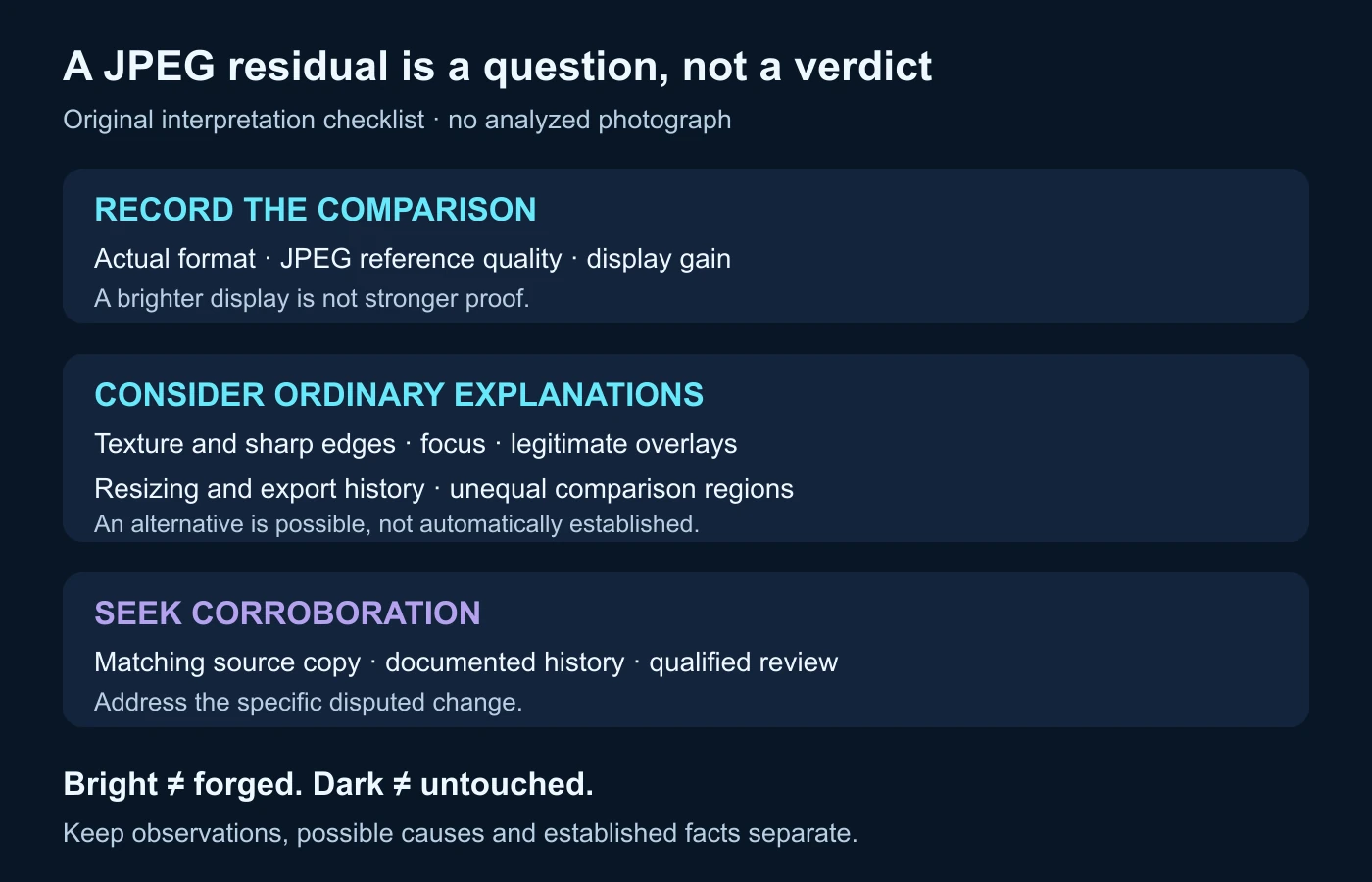
The following is an original proposed review, not an experiment performed on a real image. Its purpose is to organize a repeatable question about one available copy. If the case has legal, safety or reputational stakes, an appropriate trained examiner should decide which validated methods and reference material are suitable.
Identify the copy and the exact question
Name the received file, its actual format, dimensions and acquisition source. State whether it is a camera file, website delivery copy, screenshot or exported video frame, or mark that history unknown. Then describe the disputed feature in a way another reader can locate: a label’s border, a foreground object’s edge or a particular texture region.
Do not begin with a request to prove that the image is fake. Begin with the material difference that matters. A questioned credit line and an alleged inserted person are different propositions. That choice determines whether the highlighted area is relevant and what corroborating evidence could address it.
Preserve the method and its settings
Record the tool and available version, JPEG reference quality, scale or gain, contrast and color-display options. Keep the output with its settings rather than saving an isolated crop. If the system applies an automatic adjustment you cannot inspect, include that limitation in the note.
Quality numbers are settings within a particular implementation, not a universal comparable scale across all encoders. Do not assume one favored number is the definitive test. If you examine more than one reference setting, record each and explain why the comparison is useful; do not select only the most dramatic output.
Choose appropriate comparisons and alternatives
Inspect the disputed region alongside surrounding areas with similar detail where possible. Note focus, texture, contrast and legitimate overlays. If the region stays conspicuous under several settings, that is a documented observation, not independent proof multiplied by the number of maps. All views may still be responding to the same content or processing condition.
Seek an earlier matching source or an explanation of the export history. Check that the comparison actually shares the same base image rather than a neighboring exposure. A source record can clarify whether an overlay was added, while an earlier image can show an actual content difference. Keep that evidence separate from the residual itself.
A fictional record: a patterned scarf beside a smooth background
Imagine a constructed teaching photograph of a patterned scarf on a smooth backdrop. The only file available in the scenario is a small web JPEG, and a reader suspects that the scarf was pasted into it. No actual photograph or ELA computation is supplied here. The example asks what a residual observation could and could not resolve.
Suppose a reported map makes the scarf’s edges and pattern more prominent than the smooth backdrop. Record that appearance, then ask whether the comparison regions contain similar detail. They do not. The pattern and sharp boundaries provide an ordinary reason to expect a different response, so unevenness alone cannot distinguish insertion from a single photographed scene.
Now consider two possible next records. An earlier verified version of the same exposure could show the scarf in the same position, while an editor’s project record could explain an added border or caption. Those would address different questions. Neither should be invented merely because the residual makes one explanation feel convenient.
If no better copy or relevant history is available, the bounded conclusion is that this map does not resolve whether the scarf was inserted. That is not a declaration that insertion is impossible. It is a statement about what the current evidence can distinguish. A request for the source file or a trustworthy comparison is a useful next action.
If a later matching source establishes a material difference, update the finding on the basis of that comparison. Do not retroactively claim that the original heatmap proved the same conclusion. Keeping the evidential path clear allows another reviewer to understand what actually changed your assessment.
Corroborate the region and report an inconclusive result honestly
SWGDE image-authentication guidance, version 2.0, emphasizes content and structure, documented workflow, qualified conclusions and method limits. It is broader than ELA and does not validate every tool carrying that label. Use the map to locate a question inside an evidence-led review, not to replace that review.
Write observations separately from explanations. “The displayed residual is stronger around the scarf’s pattern under these settings” describes a view. “This could reflect the fine texture” offers an alternative. “A verified earlier matching exposure shows the same scarf” adds another evidence item. These statements should not be merged into a confident software-attribution claim.
A compact final record should identify the file, question, settings, relevant region, alternatives, corroboration and remaining uncertainty. Include whether an acquired original was unavailable. Avoid percentages of authenticity without a scientifically justified basis. The intensity of a displayed difference is not a calibrated probability that somebody edited the picture.
- Preserve the received file and label every derivative.
- Confirm format and distinguish the available copy from a camera original.
- Keep quality, gain and display choices with the map.
- Compare regions with appropriate detail and consider ordinary processing.
- Seek evidence that distinguishes the specific competing explanations.
- State what remains unresolved instead of issuing a binary AI or forgery verdict.
Stop when another visualization would only repeat the same uncertainty. A better source, documented comparison or appropriate expert review can add evidence; another unexplained heatmap may only add confidence. Error level analysis is most useful when its conditional question remains visible: how did this available image respond to this additional JPEG encoding and display process?
One test is not a verdict.
For suspicious footage, combine video analysis with source and context checks.
Questions about error level analysis
What does ELA measure in a JPEG?
It compares decoded values with those from a recompressed JPEG version and visualizes a difference under chosen settings. It does not directly measure authenticity or edit intent.
Does a bright region prove an insertion?
No. Detail, contrast, overlays and processing history can affect the response. The specific insertion question needs suitable corroboration.
Does a dark ELA map prove the image is untouched?
No. A small displayed residual under one method and setting does not establish that nothing changed before you received the file.
Can ELA reveal a PNG’s native JPEG history?
Not merely by converting it to JPEG. That conversion introduces your own encoding step; record it and do not treat the resulting map as a direct history of the PNG.
Can ELA identify an AI generator or authenticate a whole video?
No. A still-image recompression view does not establish a provider, generation method or the content and context of a complete sequence.
References and scope
- Sherloq: original ELA implementation and JPEG helper — an inspectable implementation example, not a validation study or a tool executed here.
- SWGDE: Digital Image Compression and File Format Guidelines, version 3.0 — JPEG/compression context and preservation guidance; no source figure copied.
- SWGDE: Best Practices for Image Authentication, version 2.0 — broader method, reporting and limitation context; not an ELA operating procedure.
Sources read on 14 October 2026. The pixel arithmetic, scarf scenario and checklist are original conceptual teaching material. No JPEG analysis, camera examination, forgery-detection rate or actual case result is represented.