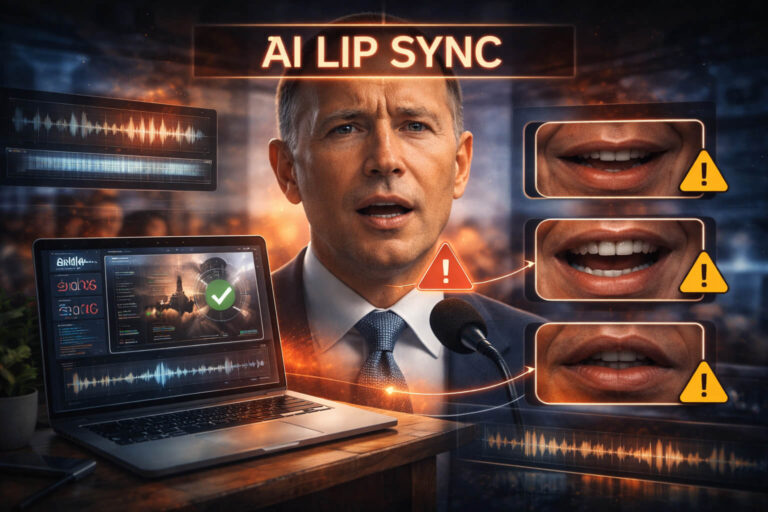
AI lip sync, also called AI lip synchronization or AI lipsync, uses artificial intelligence to make visible mouth movements match spoken audio. The technology can make dubbing, localization, avatars, and accessibility content feel more natural. It can also be used deceptively, for example to make a real person appear to say words they never said.
That second use is what makes modern lip-sync manipulation difficult to judge. A convincing AI lip sync video may leave most of the original face, lighting, background, and body untouched while changing only the mouth region. The result can look far more believable than an obvious face swap.
Quick answer: to spot a suspicious AI lip sync video, look for repeated audio-to-mouth timing errors, incorrect lip closure on sounds such as B, P, and M, unstable teeth or tongue detail, mouth motion that does not match the jaw and cheeks, and texture changes around the lips. Then check the original source and context. For higher-risk clips, use a multi-signal AI video detector as an additional layer of evidence rather than treating one visual clue as proof.
| Signal to check | What can look suspicious | What can cause a false alarm |
|---|---|---|
| Lip closure | The lips stay open or close too late during B, P, or M sounds | Low frame rate, motion blur, side angles |
| Audio-video timing | The voice repeatedly leads or trails the visible mouth movement | Dubbing, screen recording, editing or encoding delay |
| Mouth interior | Teeth, tongue, shadows, or the inner mouth change shape inconsistently | Compression, poor lighting, very small faces |
| Facial motion | The lips move strongly while the jaw, chin, or cheeks remain oddly quiet | Quiet speech, restrained expression, camera angle |
| Mouth-region texture | Blur, flicker, smoothing, or edge changes appear only around the lips | Beauty filters, bitrate changes, sharpening |
| Source and provenance | The clip has no traceable original, is heavily re-edited, or appears only in reposts | A legitimate video may still lose metadata or be reposted |
What Is AI Lip Sync?
AI lip sync is the automated alignment of visible speech movements with an audio track. In a typical workflow, a model analyzes speech sounds and generates or modifies mouth shapes so the person on screen appears to pronounce the new words at the correct time.
The underlying idea is easier to understand if you separate sound from appearance. A phoneme is a basic unit of speech sound. A viseme is the visible mouth shape associated with one or more speech sounds. AI lip synchronization tries to create a believable sequence of visemes that follows the timing and rhythm of the audio.
Real speech is more complex than matching one sound to one mouth shape. Mouth movement depends on the sounds before and after the current sound, a phenomenon known as coarticulation. The jaw, cheeks, chin, tongue, teeth, head pose, facial expression, and breathing pattern also contribute to how speech looks. This is one reason a video can be technically close to sync while still feeling subtly wrong.
AI lip sync, traditional lip syncing, and dubbing are not the same thing
| Technique | What happens | Is the mouth digitally changed? |
|---|---|---|
| Traditional lip syncing | A performer moves their mouth to prerecorded audio | No |
| Conventional dubbing | New audio is added to existing video, so mouth movement may not perfectly match | Usually no |
| AI lip sync | Software generates or edits mouth motion to match audio more closely | Usually yes |
| Deepfake lip sync | AI lip synchronization is used to change what a real person appears to say | Yes, often mainly around the mouth and lower face |
This distinction matters for verification. A lip-sync mismatch does not automatically mean a video is a deepfake. It may be a normal dub, a playback problem, a poorly encoded clip, or an intentionally stylized edit. The question is whether the visible speech, audio, source, and surrounding evidence are consistent with the claim being made.
How Does AI Lip Sync Work?
Different models use different architectures, but the high-level process is similar. The system receives audio, text converted to speech, or another speaking performance, then predicts how the target mouth should move across time. It must preserve the person’s identity while changing enough of the face to make the new speech look natural.
- Speech analysis: the model extracts timing and speech features from the audio.
- Mouth-motion prediction: it estimates the sequence of lip and lower-face movements needed for the speech.
- Visual generation or editing: the mouth region, and sometimes the jaw and nearby facial areas, are redrawn or transformed frame by frame.
- Temporal consistency: the system tries to keep identity, texture, lighting, and motion stable from one frame to the next.
- Blending: the generated region is integrated back into the original face or a fully generated video frame.
Modern systems can also be used for talking photos, avatar videos, translated speech, advertising localization, educational content, and post-production fixes. In those cases, AI lip sync is a production technique rather than evidence of deception. The risk begins when synthetic mouth movement is presented as an authentic recording of something a real person actually said.
Why Deepfake Lip Sync Can Be Hard to Detect
Lip-sync deepfakes are a particularly subtle form of manipulated video because the edited area can be small. Instead of replacing an entire face, the system may only need to synthesize the lips, mouth interior, and nearby facial motion. That preserves many authentic details that viewers normally use as trust signals.
Short-form social video makes the problem harder. Small screens, fast playback, captions, aggressive compression, filters, and repeated re-uploads can hide exactly the details you would want to inspect. A ten-second clip may also contain too few useful speech moments to make a confident visual judgment.
Research on lip-syncing deepfakes has therefore moved beyond static “weird face” artifacts. Work on mouth-region temporal inconsistencies examines how the mouth changes across adjacent frames and across a sequence, while other research studies audio-visual synchronization and lip movement as complementary detection signals.
The practical lesson is important: do not decide from one paused frame. A synthetic mouth can look plausible in a screenshot but behave inconsistently over time.
How to Spot an AI Lip Sync Video
1. Test B, P, and M sounds for full lip closure
B, P, and M are bilabial sounds, meaning both lips normally come together during articulation. This makes them useful checkpoints in lip sync detection. Find a clear word containing one of these sounds and watch whether the lips close at the expected moment.
- For B and P, look for a brief, clear closure followed by release.
- For M, the lips should normally meet while the sound continues through the nose.
- Check several examples, not just one frame or one word.
A single imperfect closure proves very little. Repeatedly missing the expected closure across clean, visible speech is much more meaningful.
2. Look for timing drift across words and syllables
AI lip sync can fail even when individual mouth shapes look realistic. The failure may be temporal: the mouth begins a sound slightly too early, reacts too late, or gradually drifts away from the audio before snapping back into alignment.
Watch for repeated patterns such as:
- the audio starting before the mouth begins to form the word
- the mouth finishing a phrase while the voice continues
- long vowels with mouth movement that is too short or too static
- fast phrases where the lips seem to skip intermediate shapes
- a delay that changes from one sentence to the next
Consistent offset across the entire video can also come from editing or playback problems. Variable drift localized to the face or certain speech segments deserves closer attention.
3. Check whether visible speech sounds make anatomical sense
Do not focus only on B, P, and M. Other sounds create useful visual expectations. F and V often bring the lower lip toward the upper teeth. Some TH sounds may briefly reveal the tongue near or between the teeth. Open vowels usually require a wider jaw opening than closed vowels.
You do not need to become a phonetics expert. The useful question is simply: does the mouth repeatedly form shapes that make sense for the sound you hear?
4. Watch the teeth, tongue, and inner mouth over time
The mouth interior is difficult to synthesize consistently because it changes rapidly, contains fine geometry, and is frequently occluded. In suspicious AI lip sync video, you may notice:
- teeth that change size, spacing, or brightness between nearby frames
- front teeth that look unusually flat or fused together
- a tongue that appears briefly and then disappears unnaturally
- dark areas inside the mouth that flicker or change shape without a physical reason
- shadows that do not match the visible direction of the light
Again, compression can create similar artifacts. The strongest clue is not “bad teeth” by itself, but repeated instability that follows the generated mouth region while the rest of the image remains more stable.
5. Compare the lips with the jaw, chin, and cheeks
Real speech is a coordinated facial action. Strong pronunciation, shouting, laughter, tension, and emphasis affect more than the lips. The jaw opens, the chin changes shape, cheeks move, facial muscles tighten, and the head may respond to the rhythm of the sentence.
A manipulated clip may show a mouth that moves energetically while the surrounding face appears unusually passive. Pay particular attention when the audio contains emotional or forceful speech. If the voice sounds intense but the lower face barely participates, the audio and facial performance may not belong together.
6. Inspect the boundary and texture around the mouth
Some lip sync systems edit a localized facial region. When the generated area does not blend perfectly, subtle boundary artifacts can appear:
- skin texture becomes smoother only around the lips
- beard or mustache hairs fade, bend, or reappear
- lipstick edges lose sharpness during speech
- the corners of the mouth shimmer during fast movement
- noise or film grain changes inside a small patch of the lower face
These clues are most useful when they appear and disappear with speech. A permanently soft image is more likely to be ordinary video quality than localized AI editing.
7. Stress-test head turns, smiles, and occlusion
Frontal, well-lit talking-head footage is usually easier to synchronize than difficult motion. Inspect moments where the speaker turns sideways, smiles widely, touches their face, speaks behind a microphone, or partially covers the mouth.
During these transitions, look for mouth shape instability, temporary identity changes around the lower face, stretched lips, broken facial hair, or a mouth that appears to slide relative to the head.
8. Listen for audio that does not belong to the scene
Some deceptive lip-sync videos also use synthetic or replaced audio. The video may therefore fail an audio reality check even if the mouth looks strong.
- Does the voice contain the room echo you would expect?
- Does background noise react naturally when the speaker pauses?
- Does the volume change when the person turns away from the camera?
- Are breaths, hesitations, mouth clicks, and other small speech imperfections present?
- Does the emotion in the voice match the expression on the face?
If the voice itself seems suspicious, use the dedicated guide to voice deepfake detection and treat the clip as a possible combination of audio and visual manipulation.
A Practical AI Lip Sync Detection Workflow
The most reliable way to evaluate suspected lip synchronization is to move from cheap checks to stronger evidence. Do not begin by zooming into random pixels. Start with source quality and repeatable observations.
- Get the best available version. Prefer the original file or earliest accessible upload. Reposts and screen recordings can add artifacts that were not present in the source.
- Watch once at normal speed. Note where speech feels unnatural without trying to prove anything yet.
- Replay the suspicious segment slowly. If the player allows it, use 0.5x speed and examine several speech events rather than one frame.
- Check bilabial sounds. Test B, P, and M for expected lip closure.
- Check temporal alignment. Compare the beginning and end of words, long vowels, pauses, and rapid phrases.
- Check the whole lower face. Compare the lips with teeth, tongue, jaw, chin, cheeks, facial hair, and expression.
- Listen without watching. Ask whether the voice, room tone, breath, and emotional delivery fit the scene.
- Verify the source and claim. Find the original uploader, full-length version, date, context, and independent confirmation where appropriate.
- Add technical analysis. When the stakes justify it, analyze the strongest available source with Detect Video AI and interpret the result together with your manual observations.
- Keep uncertainty explicit. “Suspicious” and “confirmed fake” are not the same conclusion.
For broader source checking, use the full video verification workflow. If the clip involves a face swap or broader identity manipulation, continue with the deepfake detection guide.
What Detect Video AI Adds to a Lip Sync Check
Manual review is useful because humans are sensitive to speech timing and facial performance, but visual inspection alone can be unreliable. Detect Video AI adds a technical layer by reviewing available visual, temporal, audio-video, compression, metadata, manipulation, and source signals through multiple detection engines.
That multi-signal approach matters for AI lip sync because a mouth anomaly becomes more meaningful when it agrees with other evidence. For example, temporal irregularity around the face may be more concerning when the audio-video relationship, compression pattern, source history, or other manipulation signals also look unusual.
The result should still be interpreted as evidence, not as an automatic verdict. The best available file matters, and not every signal is available in every clip. You can see the current analysis process in how Detect Video AI works.
AI Lip Sync Detection Checklist
| Check | Question to ask | If it fails |
|---|---|---|
| Source | Can I find the original or earliest credible upload? | Increase caution before analyzing tiny visual details |
| B/P/M closure | Do both lips meet at the expected moments? | Repeat the test on several words |
| Word timing | Do mouth onset and release track the audio consistently? | Check whether the offset is constant or changes over time |
| Mouth interior | Are teeth, tongue, darkness, and shadows stable across frames? | Compare with nearby frames and image quality elsewhere |
| Lower-face motion | Do jaw, chin, and cheeks match speech effort and emotion? | Look for a localized “moving mouth on a quiet face” effect |
| Texture | Does blur, grain, beard detail, or skin texture change only near the lips? | Check whether the effect follows speech or exists everywhere |
| Audio realism | Does the voice fit the room, distance, movement, and expression? | Investigate possible replaced or synthetic audio |
| Context | Do the date, caption, source, and independent evidence support the claim? | Do not treat visual realism as proof of authenticity |
| Technical analysis | Do multiple technical signals agree with the manual review? | Keep the result uncertain if evidence is mixed or weak |
AI Lip Sync vs Voice Deepfake vs Face Swap
These techniques often appear together, but they change different parts of a video.
| Manipulation | Main target | Typical verification focus |
|---|---|---|
| AI lip sync | Mouth movement and lower-face speech motion | Speech timing, visemes, mouth consistency, jaw and cheek motion |
| Voice deepfake | Voice identity or spoken words | Rhythm, breath, prosody, room acoustics, speaker identity |
| Face swap | Facial identity | Face boundaries, identity consistency, lighting, expression, occlusion |
| Fully AI-generated video | Most or all visual content | Scene consistency, motion, anatomy, physics, audio, source evidence |
If the entire clip may be synthetic rather than only the mouth region, see how to identify an AI-generated video. If the manipulation is designed to imitate a recognizable person, the AI impersonation guide covers the broader identity and scam pattern.
Common False Alarms: When Bad Lip Sync Is Not AI
A good verification process must be able to avoid false accusations as well as catch manipulation. Several ordinary production problems can resemble AI lip sync.
Conventional dubbing and translated video
Traditional dubbing replaces the audio without changing the original mouth movement. A mismatch is expected, especially when the translated sentence has a different rhythm or length. Some modern localization workflows also use legitimate AI lip synchronization to make the translated version look more natural. That makes disclosure and source context more important than the mere presence of synthetic mouth movement.
Screen recordings and capture delay
A screen recording can introduce a small audio offset. If the same delay is present from beginning to end and the clip shows clear signs of screen capture, test the original upload before drawing conclusions.
Low frame rate and dropped frames
When frames are missing, fast mouth closures may never appear on screen even though they happened in the original recording. This is especially important for B and P sounds, where the closure can be brief.
Heavy compression
Social platforms often reduce detail around fast-moving edges. Teeth, lips, beard hairs, and tongue detail can become blocky or unstable. Compare the mouth with other detailed moving regions. If the entire video breaks down similarly, compression is a stronger explanation than localized AI editing.
Beauty filters and facial retouching
Filters can smooth skin, reshape lips, alter teeth, or reduce texture around the mouth. That may create a synthetic appearance without changing what the person said.
Ordinary editing mistakes
A manually edited audio track can be slightly out of sync. A real video can also be cut, sped up, slowed down, or recaptioned in a misleading way without any AI generation. This is why authentic pixels do not guarantee authentic context.
Where Manipulated Lip Sync Is Commonly Used
Fake endorsements and scam ads
A scammer can reuse real footage of a public figure, replace the message, and synchronize the mouth to a new sales pitch. Because the face, clothes, and setting may all be real, viewers can mistake the clip for a genuine endorsement. If money, crypto, giveaways, account credentials, or urgency are involved, review the broader warning signs in the guide to scam videos.
Celebrity and public-figure impersonation
Lip sync is useful for impersonation because it can preserve a recognizable face while changing the statement. The altered message may be promotional, defamatory, emotional, or politically charged. Source verification is especially important when the clip contains a surprising claim that appears nowhere else.
Fake interviews, apologies, and confessions
A real interview can be repurposed by replacing a few sentences rather than generating an entire video. Selective manipulation can be harder to notice because most of the clip remains authentic. Compare suspicious segments with the full recording whenever possible.
Misinformation built from real footage
Sometimes the video itself is mostly genuine, but new audio, altered lips, captions, and a false context are combined to create a new story. For newsworthy claims, a structured news verification process is more reliable than judging facial appearance alone.
Can an Online AI Lip Sync Detector Prove a Video Is Fake?
No single online detector should be treated as absolute proof. Detection systems operate on the evidence available in a particular file or source. Their performance can be affected by compression, resolution, clip length, model family, post-processing, editing, and whether the manipulation is localized or combined with other techniques.
A better question is: does the detector add independent evidence that agrees with what I can verify manually and contextually?
For a strong assessment, combine:
- visual speech checks
- temporal consistency
- audio-video alignment
- source quality and provenance
- context and corroboration
- technical detection signals
This layered approach also reduces the risk of calling legitimate dubbing, compression, or editing a deepfake.
Check Provenance, Not Just Pixels
Visual detection is only one part of media authentication. Provenance asks where a file came from, how it has changed, and whether trustworthy information about its history is available.
The Coalition for Content Provenance and Authenticity (C2PA) develops the Content Credentials standard for recording and verifying information about the origin and edits of digital media. When valid credentials are present, they can provide useful information about a file’s history. When they are absent, that absence alone does not prove a video is fake.
NIST guidance on synthetic content transparency likewise treats detection, provenance, labeling, and related technical approaches as complementary tools rather than one universal solution.
For everyday verification, this means you should preserve the best available original, record where you found it, and separate two questions: Was this media technically manipulated? and Is the claim attached to it true? A clip can pass one question and fail the other.
What to Do When You Are Still Unsure
- Do not repost the clip as confirmed fact.
- Save the original URL and the best available copy.
- Write down the exact timestamps where the mismatch appears.
- Search for the full-length source instead of relying on a cropped excerpt.
- Check official channels and credible independent coverage for the underlying claim.
- Run technical analysis on the strongest available source if the stakes are high.
- Describe uncertainty accurately. “I cannot verify this” is more responsible than forcing a yes-or-no conclusion.
Key Takeaway
AI lip sync is no longer just a rough mouth overlay. Modern systems can create realistic lip synchronization for useful tasks such as dubbing and localization, while the same capability can be used to fabricate statements and deepfake videos.
The most reliable detection habit is to look for repeated inconsistencies across time, especially speech timing, bilabial lip closure, mouth interior stability, lower-face motion, and audio realism. Then verify the source and context. When necessary, add Detect Video AI as a technical evidence layer and interpret the result alongside the rest of the verification trail.
FAQ About AI Lip Sync
What is AI lip sync?
AI lip sync is the use of artificial intelligence to generate or modify mouth movements so they align with spoken audio. It is also called AI lip synchronization or AI lipsync. The technology can be used for legitimate dubbing and localization or for deceptive deepfake manipulation.
How does AI lip sync work?
AI lip sync analyzes speech timing and predicts the mouth and lower-face movements needed to match the audio. The system then generates or edits those visual regions across successive video frames while trying to preserve identity, lighting, texture, pose, and temporal consistency.
Is AI lip sync the same as a deepfake?
Not always. AI lip sync is a technique. It becomes a deepfake or deceptive manipulation when it is used to make a real person appear to say something they did not say or when the synthetic nature of the clip is intentionally misrepresented. Legitimate localization and avatar production can also use AI lip synchronization.
What are the easiest signs of fake AI lip sync?
Useful signs include incorrect lip closure on B, P, and M sounds, audio that repeatedly leads or trails the mouth, unstable teeth or tongue detail, a moving mouth with unusually still cheeks or jaw, and texture or edge changes localized around the lips. None of these signs should be used alone.
Why are B, P, and M useful for lip sync detection?
B, P, and M are bilabial sounds, so the upper and lower lips normally meet during articulation. When clean video repeatedly shows these sounds without the expected closure, the audio and visible speech may be inconsistent.
Can I check deepfake lip sync online?
Yes. Start with the best available file or original public source, perform manual audio-visual checks, verify the uploader and context, and then use an online AI video analysis tool for additional technical evidence. An online result should support a verification workflow, not replace it.
Can AI lip sync look completely realistic?
Some modern clips can look highly convincing, especially when the face is frontal, the lighting is stable, the speech is short, and the video is compressed for social media. That is why source verification and temporal analysis are more dependable than searching for one permanent visual artifact.
Does mismatched lip sync always mean a video is AI-generated?
No. Conventional dubbing, screen recording, low frame rate, dropped frames, editing delay, filters, and compression can all create apparent lip-sync problems. Check whether the mismatch is consistent with these benign explanations before labeling a clip as manipulated.
Can someone lip-sync without knowing the words or language?
Yes. A human performer can imitate the timing and mouth movement of prerecorded audio without fully understanding the language, and an AI system can generate synchronization directly from audio features. Visually accurate lip sync therefore does not prove that a person genuinely spoke or understood the words.
Can Detect Video AI detect lip-sync manipulation?
Detect Video AI can contribute to the assessment of a suspicious clip by analyzing available visual, temporal, audio-video, manipulation, compression, metadata, and source signals. Lip-sync cases should be interpreted through the combined evidence rather than a single detector score or one mouth artifact.
Research and Further Reading
- Exposing Lip-syncing Deepfakes from Mouth Inconsistencies, research on temporal inconsistencies in the mouth region.
- Audio-Visual Synchronization and Lip Movement Analysis for Real-Time Deepfake Detection, research on combining lip movement and audio-visual synchronization signals.
- NIST: Reducing Risks Posed by Synthetic Content, an overview of detection, provenance, watermarking, and transparency approaches.
- C2PA Content Credentials, an open standard for digital content provenance and authenticity information.