
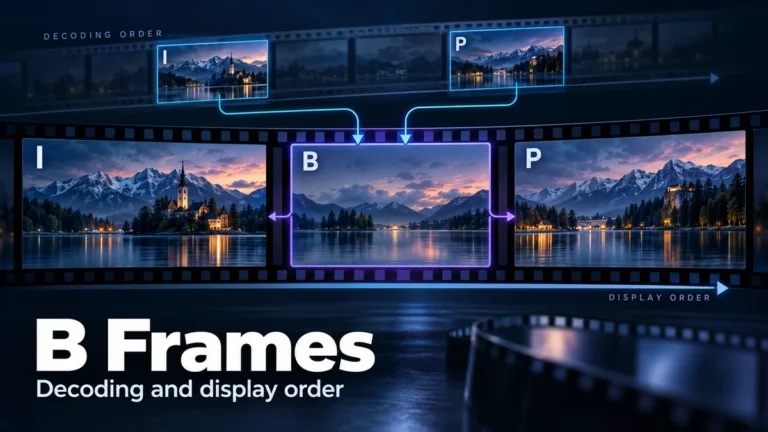
B frames are a compressed-video picture type associated with prediction from reference pictures. In a conventional reordered sequence, a picture that appears later during playback can be decoded first so that another picture can use it as a reference. The viewer still sees the intended timeline. This is an encoding relationship, not evidence that a camera observed the future or that AI invented the event.
The useful question is not whether a file “contains B frames” in isolation. It is which pictures depend on which references, what order makes those references available, and how the decoded pictures are scheduled for display. This guide explains those distinctions through an original, explicitly assumed four-picture example. It also provides a small review record you can use without turning ordinary compression into an authenticity verdict.
What I, P and B labels describe
These letters describe coding categories, not three different kinds of real-world event. FFmpeg’s picture-type documentation identifies I as intra, P as predicted and B as bidirectionally predicted. The category is information about a picture’s encoded representation. It does not identify the person recording it, its publication date or whether its caption is accurate.
An intra-coded picture does not require another picture as its temporal prediction reference. A predicted picture can use available reference information rather than describing every part independently. For a B-picture explanation, the important additional idea is that a reference may be later in the presentation sequence. That relationship can require reordering before the picture is displayed.
Do not interpret “predicted” as “a new fictional moment.” A video encoder is representing input pictures for later reconstruction. A generative editor or a motion-interpolation system may estimate additional content or additional playback moments for a different purpose. Similar everyday words such as prediction do not make those operations equivalent.
Likewise, the letter does not describe a complete image-quality grade. Two B pictures can have different content, dependencies and preserved detail. An I label is not a guarantee that a picture is visually pristine or free of earlier editing. It describes a coding category within the representation you are inspecting.
Keep codec and implementation context with the label. A short diagram can explain a conventional arrangement without describing every permissible prediction mode or every format. If an important conclusion depends on the exact bitstream structure, a general I/P/B glossary is not a substitute for the relevant codec specification and a qualified examination.
References must be available before dependent pictures
A reference picture is information the decoder can use while reconstructing another picture. The important dependency is availability: if picture B needs information from picture P, the decoder must have the required reference information before completing B. “Earlier” in this dependency process does not necessarily mean earlier in the visible story.
Think of two separate arrangements on your desk. One arrangement is the sequence a viewer should see. The other is the order in which you prepare the ingredients needed to produce that sequence. Preparing an ingredient early does not change where the completed item belongs. This analogy explains ordering only; it is not an implementation of a video decoder.
For a conventional demonstration, a B picture may use an earlier and a later picture in display order. The later reference can be decoded ahead of the B picture. Avoid changing that demonstration into a universal rule that every B picture must use the immediately preceding and immediately following pictures, or that all its image regions use an identical pair.
Dependencies can also extend beyond the small span you opened in a player. A selected section may omit reference material that the encoded stream expects. If an extraction or decoding problem occurs, first determine what the tool was given and whether the required context was available. An incomplete input is different from proof that the scene contains an impossible transition.
Do not rely on a screenshot of a letter beside a frame to establish a dependency graph. Record the codec, the inspected version and what the tool actually reports. A displayed picture type and a complete reference map are different amounts of information. When the reference relationship is unavailable, leave it unknown rather than inventing arrows.
Decoding order and display order answer different questions
Display order, also called presentation order, is the order in which the pictures belong on the playback timeline. Decoding order is the order in which the encoded samples are processed to reconstruct the pictures. The orders can differ while the finished playback remains correct.
Apple’s VideoToolbox frame-reordering documentation explains this distinction for B-frame encoding: emitted and stored decode order can differ from the order in which pictures were presented to the encoder. Its setting controls reordering in that API. It is not a universal diagnostic for every video product.
A decoder may therefore prepare a later display picture while retaining it for its intended presentation point. Seeing that preparation order in technical output does not mean the viewer saw events out of sequence. Before alleging that a clip was reordered, identify whether the observation concerns encoded storage, decoding, presentation or an actual editorial rearrangement.
FFmpeg’s AVCodecContext documentation describes a frame-reordering buffer and a maximum-B-frame encoding setting. These are technical fields with defined meanings, not authenticity measurements. In particular, a field called has_b_frames should be interpreted through its documented reordering-buffer meaning, not casually treated as a literal count of all B pictures in a movie.
Keep playback order as the reference when describing what a viewer observes. Keep decoding order when explaining the processing dependency. Changing the name of the order midway through a comparison can create an apparent contradiction that disappears once the two lists are correctly labeled.
A four-picture example with stated assumptions
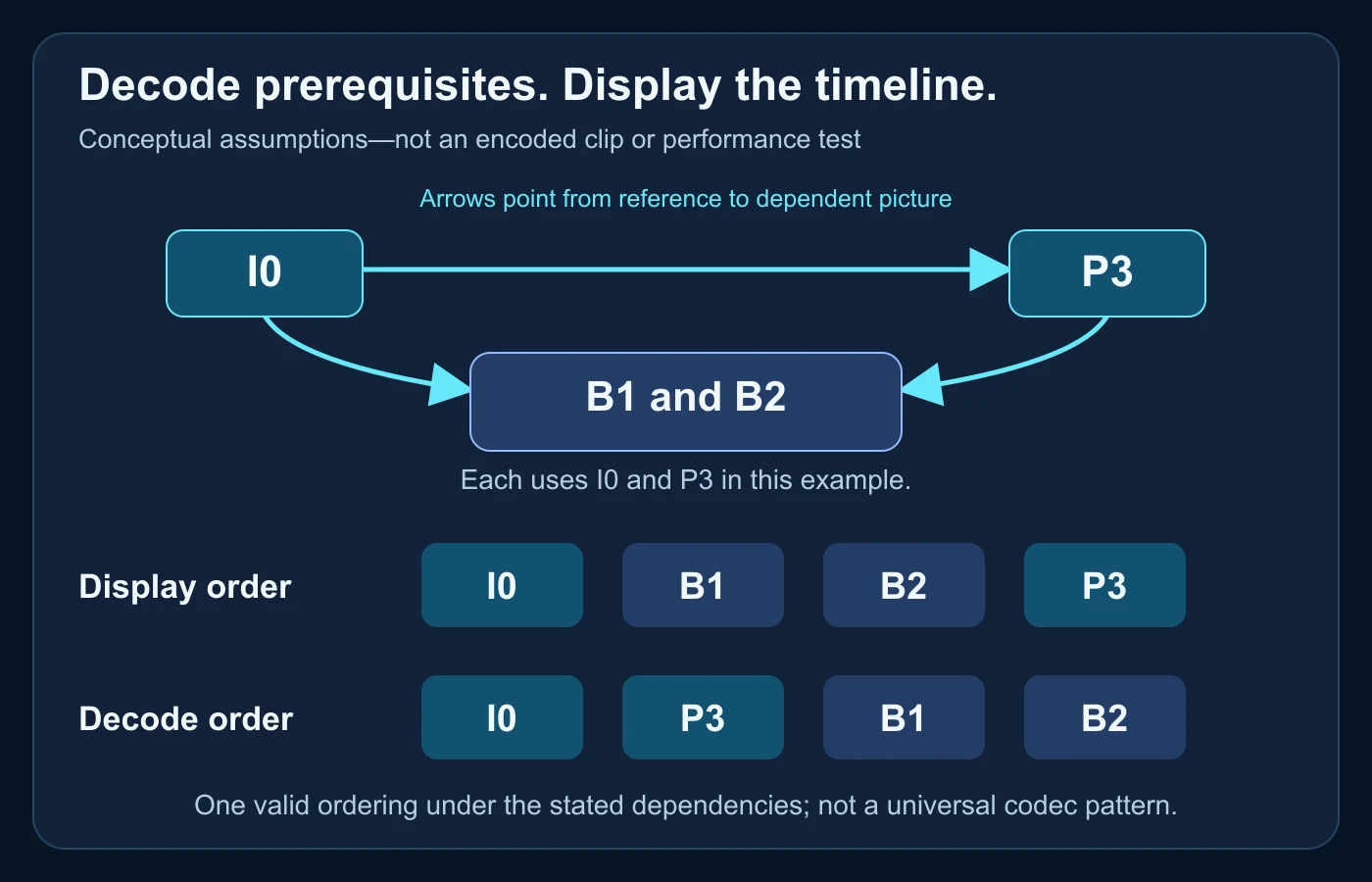
The following example is conceptual. We assigned four picture labels and their dependencies ourselves; we did not encode a clip, inspect a real bitstream or measure encoder performance. The numbers identify display positions, not timestamps, frame rates or camera serial numbers.
Assume that display order is I0, B1, B2, P3. Assume I0 can be decoded without a prior temporal reference, P3 uses I0, and both B1 and B2 use I0 and P3. For this demonstration, B1 and B2 do not act as references for another picture. Those assumptions make a small dependency problem we can solve directly.
| Picture label | Display position | Assumed references | Earliest useful decoding step in this example |
|---|---|---|---|
| I0 | First | No prior temporal picture | 1 |
| B1 | Second | I0 and P3 | After P3 is available |
| B2 | Third | I0 and P3 | After P3 is available |
| P3 | Fourth | I0 | 2 |
Work through availability, not the visible story
Start with I0 because our assumed dependency graph gives it no earlier temporal prerequisite. Now P3 can be reconstructed using I0. At that point both references for B1 and B2 are available. One dependency-safe decoding order is therefore I0, P3, B1, B2.
Our assumptions would also permit B2 before B1 once both references exist. The demonstration does not claim that a real encoder may rearrange its stored bitstream arbitrarily, or that every dependency-safe order is valid for every codec. It shows why the visible sequence alone is not the same list as the prerequisites.
Display the reconstructed pictures as I0, B1, B2, P3. P3 was prepared early but shown last. Nothing in that ordering exercise establishes what the pictures depict, whether they came from a camera or whether the creator later edited them. The exercise proves a limited logical point about the chosen references.
What changes if a reference is missing?
Under our assumptions, removing P3 leaves B1 and B2 without a required reference. That is a dependency problem, not automatically a claim that their underlying recorded moments never existed. A real decoder’s response to missing data depends on its format, implementation and available recovery information; the illustration does not predict that response.
If you received only the middle section of a file, write that down. Ask whether the section was exported as a separately decodable derivative or simply cut from encoded data. Do not compare a damaged or incomplete decoding view with normal playback and conclude that their difference identifies deceptive scene editing.
Changing the assumed references would change the graph. For example, an arrangement in which another B picture is a reference needs an additional dependency check. Do not add that arrow to this illustration while leaving its decoding explanation unchanged. A useful diagram states its assumptions instead of pretending one arrangement describes all compressed video.
Presentation timestamps are not recording dates
Technical timing can help schedule pictures, but it needs labels and units. A presentation timestamp concerns when a sample belongs on a media timeline. A decoding timestamp concerns its decoding schedule. Neither should be promoted into a verified calendar date without separate evidence about the recording and the field’s meaning.
Apple’s QuickTime composition-offset documentation describes a mapping between decode and presentation time for out-of-order video samples. The documented offset connects those schedules. Its explanation does not make every file use the same container structure, nor does it identify the event’s real-world date.
Before comparing two readouts, identify whether each row represents a packet, an encoded sample, a decoded picture or an editor’s display position. Then identify the stream and time base. Two columns with different purposes can disagree numerically without disagreeing about what the viewer should see.
For example, a reviewer might copy the second row of a packet view and the second still in a presentation sequence. The row numbers match, but the pictured moments need not. An apparent object jump in that comparison could be a mismatched selection. Match the intended displayed picture before making a continuity claim.
The existing video metadata guide covers file fields, date interpretation and source-history limits in detail. Use it for those wider tasks. Here the essential discipline is narrower: a decode/display mapping is not a camera clock and must not become a date claim by implication.
Some B pictures can be references too
The simple example deliberately treats B1 and B2 as non-reference pictures. That is an explanatory choice, not a universal property of the letter B. Some supported encoding structures use B pictures as references for other pictures, creating a more involved dependency graph.
The NVIDIA NVENC programming guide documents B-frame reference modes and requires checking feature availability. That is enough to reject a blanket “B frames are never references” rule. Its product-specific configuration and quality claims should not be transferred to every encoder or source file.
When inspecting such material, work from documented relationships rather than a memorized IBBP pattern. Establish which referenced pictures must already be available and which picture the output describes. If a tool exposes only picture letters, you may not have enough information to reconstruct the full relationship yourself.
Keep recommendations out of the evidence record unless they answer the actual task. This guide does not prescribe an ideal number of B frames, a best GOP length or a guaranteed bitrate saving. Delivery requirements, codec capabilities and latency constraints belong to the specific encoding workflow, not an authenticity shortcut.
What B frames cannot tell you about AI or editing
A camera recording, an ordinary edited export and a synthetic clip can all be distributed through compressed-video workflows. Identifying a B-picture structure tells you about that representation, not which production history occurred before it. It cannot independently prove or exclude AI generation.
Likewise, converting a file into a representation with different picture categories does not create evidence that its scene changed. A differently encoded copy may show the same content, while an edited clip can retain an ordinary coding structure. Compare the media and its source history rather than assigning intent to one codec label.
The compression-artifacts guide explains visual damage and its possible confusion with AI clues. Do not repeat its grid, blur and texture tests as a B-frame score. Dependency structure and visible artifact attribution are different questions, even when they appear in the same investigation.
Finally, a correctly decoded sequence does not validate its caption. A real event can be misdated or misidentified; context can be omitted through editing without an impossible B-frame dependency. Keep any factual claim attached to the clip separate from the coding relationships used to play it.
A practical dependency-review worksheet
Use this original worksheet when somebody presents encoded-picture behavior as evidence. It is not a codec conformance test or a professional forensic standard. Its purpose is to expose which observations are available, which assumptions were made and what additional material would make the comparison meaningful.
| Record | Question to answer | If unavailable |
|---|---|---|
| Source version | Which exact file or derivative was inspected? | Do not call it the camera original. |
| Coding context | Which codec, tool and version produced the view? | Do not infer a format from picture letters alone. |
| Order | Decode, storage or presentation sequence? | Do not compare unlabeled row positions. |
| References | Which pictures are required and present? | Keep the dependency graph unresolved. |
| Timing | Which stream, units and timeline? | Do not convert a value into a date. |
| Claim | What does the observation actually support? | Separate the technical finding from the allegation. |
Preserve the version you actually inspected
Keep the supplied file unchanged and identify any working copy. If you export a new copy to make playback easier, retain it as a derivative with its processing description. A later export can have a different coded-picture arrangement; silently substituting it makes an earlier dependency observation harder to reproduce.
Record an attributable source location and the relevant claim without collecting unnecessary private data. A temporary access token is not a useful public citation. Keep sensitive media and private delivery details out of a public article, even when you need a controlled evidence record for the review.
Compare equivalent observations
When comparing versions, align a recognizable displayed moment and retain the surrounding sequence. If a copy includes a trim, reordered editorial segments or a different playback speed, record that before matching technical row numbers. Equivalent labels on two tool windows do not guarantee equivalent content.
Describe a missing reference, a reported type or an unresolved timing field as exactly that. Do not turn an inspection limitation into a property of the original event. Ask for the complete input, a better source or a documented tool view that answers the specific dependency question.
Write a bounded handoff
A useful handoff might say: “This view reports reordered coded pictures; we have not established editorial reordering of the displayed scene.” Add the file version, tool view and relevant interval so another reviewer can inspect the same question. If the scene claim remains important, identify the separate source or content evidence still needed.
The existing video forensics guide provides the broader preservation and interpretation framework. A dependency worksheet should support that work, not replace it. For consequential allegations, seek appropriate expertise rather than treating an educational graph as a validated examination.
A common mistake: calling normal reordering a scene edit
Consider a hypothetical reviewer who receives a technical list and a player’s still-image sequence. The technical list places a later display picture before a B picture. The reviewer calls that evidence that somebody rearranged the action. No actual file was tested for this example; it illustrates a reasoning mistake.
First, ask what order the list represents. If it is decode order, the later display reference may have been prepared early for an ordinary dependency. Next, compare the player’s sequence against the intended presentation timeline. A difference between those two kinds of lists is not itself a difference in the story the player showed.
If a real editorial discontinuity is observed, investigate it separately. Locate the displayed transition, seek a longer or earlier source and document what changed. Do not discard that evidence merely because B frames exist, and do not claim B frames caused every visible glitch. The coding explanation narrows one mistaken inference; it does not settle every possible edit.
A proportionate conclusion can preserve both findings: the technical view includes normal reordering, while the claimed continuity of the scene remains unverified. That is more useful than forcing the entire clip into “authentic” or “AI” because one set of frame letters looked unfamiliar.
Before relying on an I/P/B observation
- Identify the exact source copy and preserve it unchanged.
- State whether the view describes decoding or presentation order.
- Distinguish reported picture types from a complete reference map.
- Keep the example’s assumed dependencies separate from measured file evidence.
- Do not assume every B picture is non-reference or uses adjacent pictures.
- Retain timing labels, stream identity and units.
- Separate compression reconstruction from generated new playback moments.
- Report what the finding supports without assigning source, truth or intent to a codec letter.
B frames become easier to interpret when dependencies and timeline positions are kept separate. References explain how a picture can be prepared; presentation order explains when it belongs in playback. Neither alone explains how the scene was created or whether the surrounding claim is true.
Compression structure is only one part of the evidence.
Check a questionable video with the available technical signals and preserve its original source before interpreting encoded-frame behavior.
B-frame questions
Does a B frame mean AI generated the picture?
No. It is a coding category. Establishing production history requires source and content evidence, not a single compressed-picture label.
Why might a later picture be decoded first?
It can provide reference information needed by a picture displayed earlier. The presentation schedule still places the pictures at their intended playback positions.
Are B pictures always non-reference?
No. Supported codec and encoder structures can use B pictures as references. The non-reference assumption in this guide’s small example is explicitly limited to that demonstration.
Is decoding order the same as recording order?
No automatic equivalence is justified. Decode order concerns coded-picture processing; recording history and real-world timing require separate evidence.
Should I disable B frames to verify a clip?
Do not re-encode the original merely to remove a category. Preserve the source; a separately documented derivative can help a workflow but cannot replace its original evidence.
Primary technical sources
- Apple VideoToolbox: AllowFrameReordering — frame dependency and order.
- Apple QuickTime: Composition offset atom — decode/presentation timing mapping.
- FFmpeg: Picture types — I/P/B terminology.
- FFmpeg: AVCodecContext — documented reordering-buffer and B-frame fields.
- NVIDIA NVENC programming guide 13.0 — supported B-frame reference behavior.