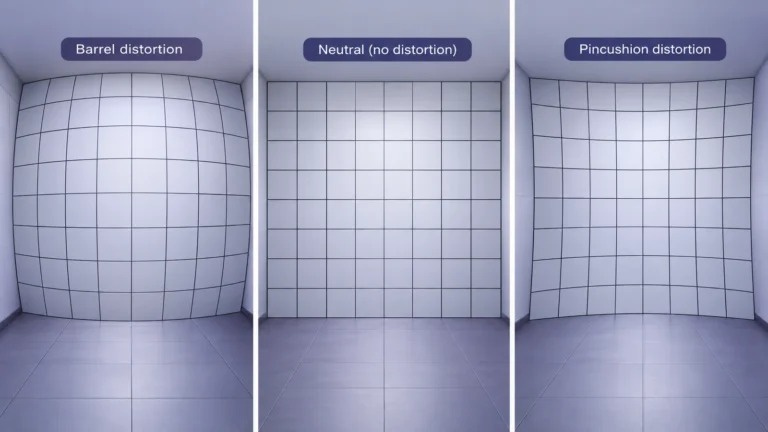
Lens distortion changes how a camera maps a scene into an image, sometimes curving straight lines or altering proportions near the frame edge. Perspective is a different issue: camera position changes the relative appearance of objects at different distances. A close selfie, a wide group photograph, and a corrected architectural image can look unfamiliar for ordinary photographic reasons. Unusual proportions are not, by themselves, proof of editing or AI generation.
This guide helps you ask the right geometric question before judging an image. It separates curved-line mapping from viewpoint, explains why comparisons need matching context, and supplies a practical review worksheet. It does not identify a person from facial proportions, diagnose appearance, or promise that a software correction reveals the true original scene.
Barrel, pincushion, and complex distortion
The names describe familiar mapping patterns. In barrel distortion, straight lines bow outward; in pincushion distortion, they bend inward. Adobe’s Camera Raw lens-correction documentation distinguishes these effects from chromatic aberration, which involves color focusing rather than the same geometric task. Real lens behavior need not fit a perfectly simple pattern, and an illustration of barrel distortion is not a specification for every wide lens.
Before calling a line curved, decide whether it is straight in the scene. A building can have bowed cladding, an old doorway can be uneven, and a hanging cable is not a calibration reference. Look for multiple features with a plausible common geometry. If you cannot establish that the reference is straight, record “shape uncertain” rather than using it as evidence for a lens or an editor.
Also note where the feature appears. Near the center, near an edge, and near a corner are different inspection locations. The OpenCV camera-calibration tutorial describes radial distortion and distinguishes it from tangential distortion. It also explains why known calibration patterns are useful. A social-media screenshot is not automatically equivalent to such a pattern.
“Complex distortion” is a useful warning against forcing a scene into one label. You may observe curves with different behavior across the image, but without suitable references and capture information you cannot responsibly recover a lens model. Use plain descriptions first: “outer vertical lines curve,” “center line appears straight,” or “the image has already been cropped.” Those notes are more reproducible than an unsupported technical name.
Perspective is not the same effect
For the review task, separate two questions: where was the camera, and how did the lens map the view? Moving the camera changes the viewpoint. A geometric lens correction changes image mapping. They can both affect appearance, but solving one does not automatically solve the other. A straightened wall can still show the perspective of a camera placed close to its near end.
An original mathematical study by Ward and colleagues, Nasal Distortion in Short-Distance Photographs, modeled how short camera distances affect the relative projected sizes of facial features. It supports caution about comparing close portraits with distant ones. Its model is not an identity test or a universal percentage for every face, angle, lens, and viewing condition.
Use a non-personal thought exercise. Imagine two equal-size markers, one closer to the camera than the other. In a close view, their distances differ more relative to the camera position. Move the camera back and the relationship changes. This is a conceptual explanation, not a test we conducted. It keeps the subject neutral while showing why a changed viewpoint deserves its own note.
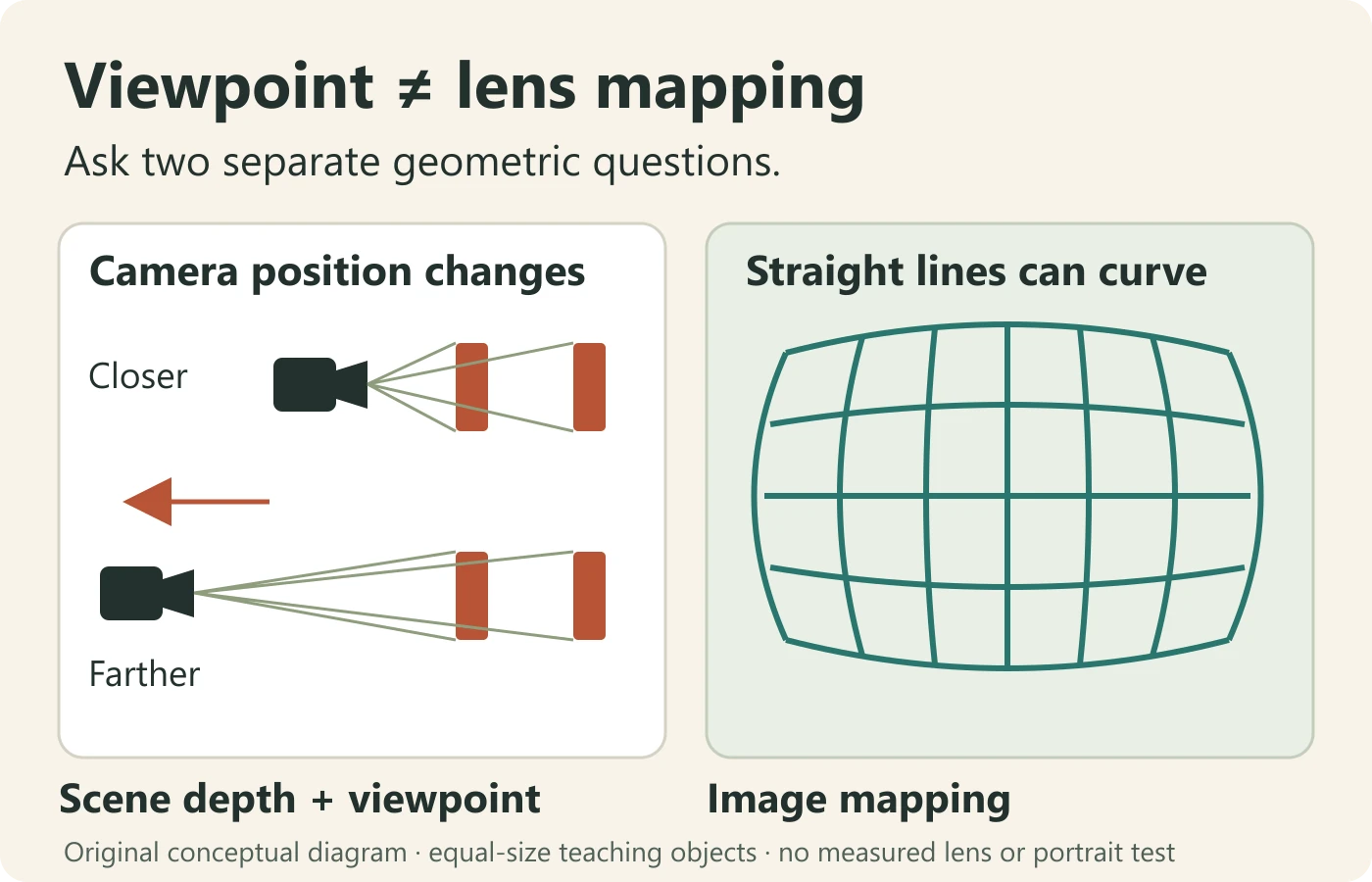
Avoid saying “wide angle always distorts faces” as if that identified one cause. A wider view may encourage close framing, include subjects far from the center, or use a different projection. Your review should identify which conditions are actually known. The label on a camera setting is not a substitute for observing position, placement, and processing.
Keep the distinction visible in your conclusion. “The two photographs use different viewpoints” is not the same as “the lens is defective.” “Curved background lines suggest a mapping question” is not the same as “someone changed the person’s face.” Those carefully scoped statements give the next reviewer something to investigate rather than a claim to repeat.
Faces and objects near the edge
When something looks stretched near a border, inspect the entire frame before zooming into it. A close crop can hide where the subject originally sat. Ask for the uncropped image when available, and retain the crop as a separate copy. Do not assume that the visible border of a repost is the original camera border.
Use the background as context, not as a guaranteed answer. Several objects changing shape in a similar region may help you frame a mapping hypothesis. One person’s expression, head angle, or motion can add a separate explanation. If the camera image includes several people, avoid treating the central person as a perfect reference for everyone standing elsewhere.
Compare positions rather than ranking appearances. Useful notes include “subject is near the left edge,” “head turned relative to camera,” and “only a screenshot is available.” Unhelpful notes include “face looks wrong” or “this proportion proves a fake.” The first set can be checked against a source. The second replaces observation with a conclusion and may encourage harmful identity speculation.
For a video, inspect whether the same subject moves between edge and center while the camera remains reasonably steady. That can provide additional context, but it is not a controlled experiment: movement, expression, distance, and stabilization may change too. Describe the comparison’s limitations rather than presenting it as a reliable face-normalization procedure.
If the real task is locating earlier public appearances of an image, use a source-discovery workflow instead of measuring features. The existing reverse face search guide explains why candidate matches require context and do not prove identity. Do not use a lens-distortion explanation to turn a visually similar result into a confirmed person.
Camera distance and framing
Focal length affects the field of view. Canon’s focal-length and field-of-view explanation describes shorter focal lengths as providing wider views and longer ones as narrower. For fair comparisons, write down whether the camera position also changed. Matching subject size in two finished images does not tell you that they were captured from the same place.
Separate three operations in your notes: moving the camera, changing the lens or zoom setting, and cropping the finished image. They can produce similar-looking framing while leaving different evidence about the scene. A crop does not move the camera back. A tighter view from a fixed position does not establish the same conditions as stepping away and reframing.
For a comparison you control, choose a harmless object with visible depth rather than photographing a person to prove an appearance claim. Make a record of position and framing, keep the originals, and avoid changing several factors at once. The purpose is to learn how your setup behaves. It is not a basis for asserting what happened to a stranger’s photo.
For an existing public image, request practical context: the earlier uncropped file, the capture position if known, and whether a lens profile or perspective correction was applied. Do not demand unnecessary location or personal data. If the answer is unavailable, mark it unknown. An unknown camera distance cannot responsibly become an exact correction setting.
Finally, consider the comparison medium. A phone screenshot, a stretched presentation slide, and an exported image may not preserve identical framing or proportions. Review both files at a sensible scale and avoid resizing width and height independently. Document what you did to display them so an apparent change introduced by your own comparison is not blamed on the source.
Lens profiles and correction limits
A lens profile can supply a supported correction when the relevant camera and lens information is available. Adobe describes automatic profile selection using identifying metadata, manual selection when needed, and differences in profile availability for raw and non-raw files. That is not a guarantee that any downloaded image has the required information or that one correction works for every processed derivative.
A responsible review keeps the unmodified file separate and labels the corrected copy. Record the application, version, selected profile, and any manual adjustment. If you only want to demonstrate that a curved-line appearance is compatible with a mapping effect, say that explicitly. Do not call the result a recovered original or quietly substitute it for the evidence.
Calibration is a different level of work from moving a slider until a wall looks attractive. OpenCV’s tutorial estimates camera parameters from known pattern observations and shows undistortion and cropping choices. A suitable model and appropriate inputs matter. A stranger’s single cropped portrait rarely supplies that kind of calibration record.
After any illustrative correction, check the whole frame. What happened at the border? Did a feature leave the crop? Did the transform make one reference look straighter while making another less plausible? Preserve the result and settings even if you decide not to use it. The rejected attempt can explain why you stopped short of making a strong claim.
Correction should answer a limited question. It cannot reveal hidden objects, establish who held the camera, or authenticate a caption. If a tool generates missing detail or applies an appearance filter, treat that operation separately from a geometric remapping. A cleaner-looking picture can still contain uncertainty that no cosmetic adjustment resolves.
A worked comparison: the cropped group photograph
This fictional exercise is designed for readers, not presented as an actual analyzed photograph. Imagine a group picture taken in a small room. A person near the left side appears broader than in a close-up posted elsewhere. A comment claims the difference proves that the group picture was edited. You have two exported files but neither original.
Begin by writing the claim precisely: “the person’s proportions were changed by editing.” Then list what the comparison actually supplies: two appearances, different framing, unknown camera distance, unknown processing, and a possibly cropped group frame. The claim requires a cause that the supplied material does not yet establish. That gap is the reason to ask for context.
Inspect the room before inspecting the person. Are known straight edges visible, and do they appear curved? Is the person at the original frame edge or only the edge of the shared crop? Does the close-up use a different viewpoint? These questions separate scene geometry from assumptions about a face. Do not invent an answer when the relevant area was cropped away.
Next, prepare a fair display comparison. Preserve aspect ratio, label each file, and show enough surrounding context to explain placement. Do not rotate, warp, or selectively enlarge one image to make the two faces align. Such a transform could create the result you are supposedly investigating. If you show a transformed illustration, place it beside the untouched source and label it clearly.
Then identify the most useful request. An uncropped group original would help establish frame placement. The earlier close-up would help establish whether it was filtered or resized. A capture note could help with viewpoint. None is guaranteed to exist. Ask respectfully, and avoid requesting private images merely to satisfy curiosity about someone’s appearance.
The responsible conclusion is limited: the two exported images are not a matched comparison, and ordinary capture or processing differences remain plausible. That does not prove the editing claim false; it explains why the current evidence is insufficient. For a broader manipulation question, the published video forensics guide describes a multi-evidence review rather than a judgment based only on proportions.
A comparison worksheet
| Question | Record | Do not infer |
|---|---|---|
| Where is the subject in the original frame? | Center, edge, corner, or unknown after cropping | Original placement from a repost border |
| Is the viewpoint comparable? | Distance and angle if genuinely known | Matching distance from matching head size |
| Do straight references curve? | Several references and their locations | A lens model from one uncertain edge |
| What processing is documented? | Profile, transform, crop, or unknown | That a polished copy is untouched |
| What source could resolve the question? | Earlier file or capture context | Identity or deception from appearance alone |
Use the worksheet as a sequence, not a numeric score. Fill the unknown cells honestly. A table with several unknowns is still useful because it shows exactly why the comparison cannot support a confident allegation. Do not convert the number of unknowns into an authenticity percentage or a supposed probability that someone altered the image.
Comparing sources fairly
Start with the earliest or highest-quality version you can legitimately obtain, then document how each later copy differs. An image inside a messaging screenshot may include rescaling, cropping, or surrounding interface content. A comparison should make those differences visible instead of treating both files as equally close to the capture source.
Keep geometric appearance and delivery detail separate. Smearing, block boundaries, or loss of edge detail may be a compression question rather than a lens question. The existing compression-artifact guide covers that distinction for video. If your still is a frame extracted from a repost, preserve its connection to the original sequence and note the extraction method.
Review a sequence when it exists. A single frame can omit a change in pose or camera position that makes the comparison understandable. However, a sequence is not automatically trustworthy either. Retain the question you began with, inspect the neighboring frames, and avoid inventing motion that the supplied material never shows.
Choose a final comparison that another reader could follow. State which files you used, what you changed for display, what you did not change, and which information remained unavailable. When sharing examples, use permission or appropriate public material and minimize personal details. Technical curiosity does not justify circulating private portraits or making claims about an individual’s identity.
A second exercise: the apparently bowed doorway
Imagine a listing photograph in which a doorway appears curved. Your practical question is whether the photograph is a reliable reference for the room, not whether the camera can be identified from one edge. Start by checking whether the door frame is actually straight, whether other vertical references share the curve, and whether the picture has been corrected or cropped.
If you can request another view, ask for a wider unaltered image with several useful references rather than a tightly cropped close-up of the suspect edge. A crop can remove the very context needed to understand the mapping. A second viewpoint may help explain the room, but it should not be presented as a matched calibration image unless the relevant conditions were controlled.
If you demonstrate a correction, show it as an illustration alongside the delivered file. Do not claim an exact room dimension from a transform chosen by eye. Mark any lost border area and explain the question the illustration addresses. A visually straighter doorway does not establish the room’s size, the capture history, or the seller’s intent.
The exercise ends with a concrete next step: seek an appropriate original or inspect the room through another reliable source before relying on measurements. This keeps camera geometry connected to the reader’s actual decision while avoiding an unsupported accusation or a cosmetic fix masquerading as evidence.
Why distortion is not proof of editing
A distorted appearance and a manipulated file are not interchangeable categories. Ordinary capture can produce unfamiliar geometry, and ordinary editing can correct it without changing the event’s meaning. Conversely, a plausible lens pattern does not rule out manipulation elsewhere. A review should ask what the particular observation supports, rather than let one explanation settle the entire image.
If the surrounding claim concerns a video’s authenticity, check source context, continuity, and independent evidence. The fake-video guide distinguishes edited, staged, miscaptioned, and generated footage. Keeping those tasks separate protects this lens discussion from becoming a universal detector or a substitute for verification.
A concise final note can contain three sentences: describe the observed geometry; name the ordinary explanations that remain plausible; specify the missing evidence. For example, “The outer lines curve in this cropped copy. Lens mapping and later correction remain relevant possibilities. An uncropped earlier file would be needed to assess the comparison fairly.” This is stronger than a dramatic but unsupported label.
The goal is not to make every image look normal. It is to make your reasoning explicit enough that another person can inspect it. Preserve originals, match comparisons where possible, and accept that some source questions remain unresolved. Camera geometry supplies context; it does not authorize certainty about editing, identity, or AI generation from appearance alone.
Lens distortion questions
Is perspective distortion the same as barrel distortion?
No. Viewpoint changes the projection of scene depth; barrel distortion describes a curved-line mapping pattern. Both can affect the same image.
Does a stretched face prove manipulation?
No. Position, distance, pose, projection, cropping, and processing all need context. Facial proportions alone do not establish identity or editing.
Can a lens profile recover the original appearance?
A supported profile can correct a documented lens effect, but a corrected derivative is not proof of the original scene or file history.
Should I judge a video from one extracted frame?
Prefer the sequence and its source context. The selected frame may omit camera or subject movement that matters to the comparison.
Sources and scope
- Adobe: lens correction in Camera Raw.
- OpenCV: camera calibration and undistortion.
- Canon: focal length and field of view.
- Ward et al.: short-distance photograph projection model.
Reviewed 13 October 2026. The original diagrams and group-photo exercise are conceptual teaching materials. They are not measured lens tests or identity evidence.
Odd proportions need context.
Review the original video together with the camera and source clues.
For a related video, add analysis to your source review; this CTA is not a still-image lens-correction service.