
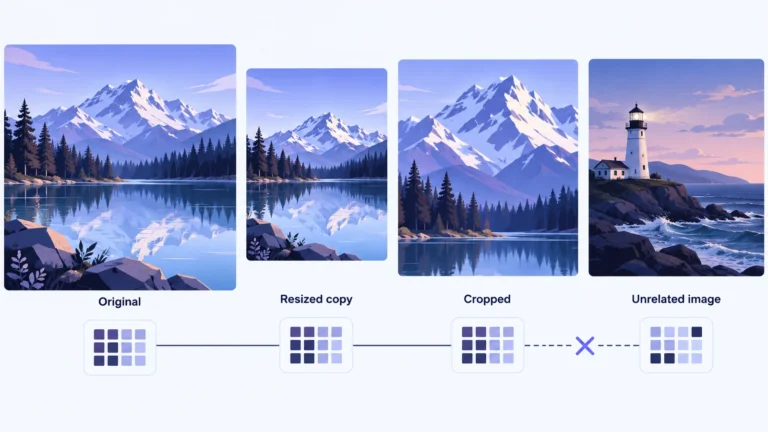
Perceptual hashing turns an image’s visual content into a compact fingerprint for approximate comparison. It can help retrieve near-duplicate copies even when their files differ, but a close match does not prove who made an image, what happened in the scene or whether it is authentic. Use the match to select evidence for review, not to finish the investigation.
This guide explains the difference between image similarity and file integrity, then works through an explicitly invented set of short fingerprints. You will learn how a distance is counted, why neighboring matches do not necessarily form one reliable group, and how to record a candidate without exaggerating what it establishes.
Two hashes can answer two different questions
A file hash and a perceptual hash both condense information, but the information and comparison goals differ. Calling either result simply “the hash” can conceal the distinction. Before interpreting a tool’s output, establish what was hashed and which relationship the tool is trying to identify.
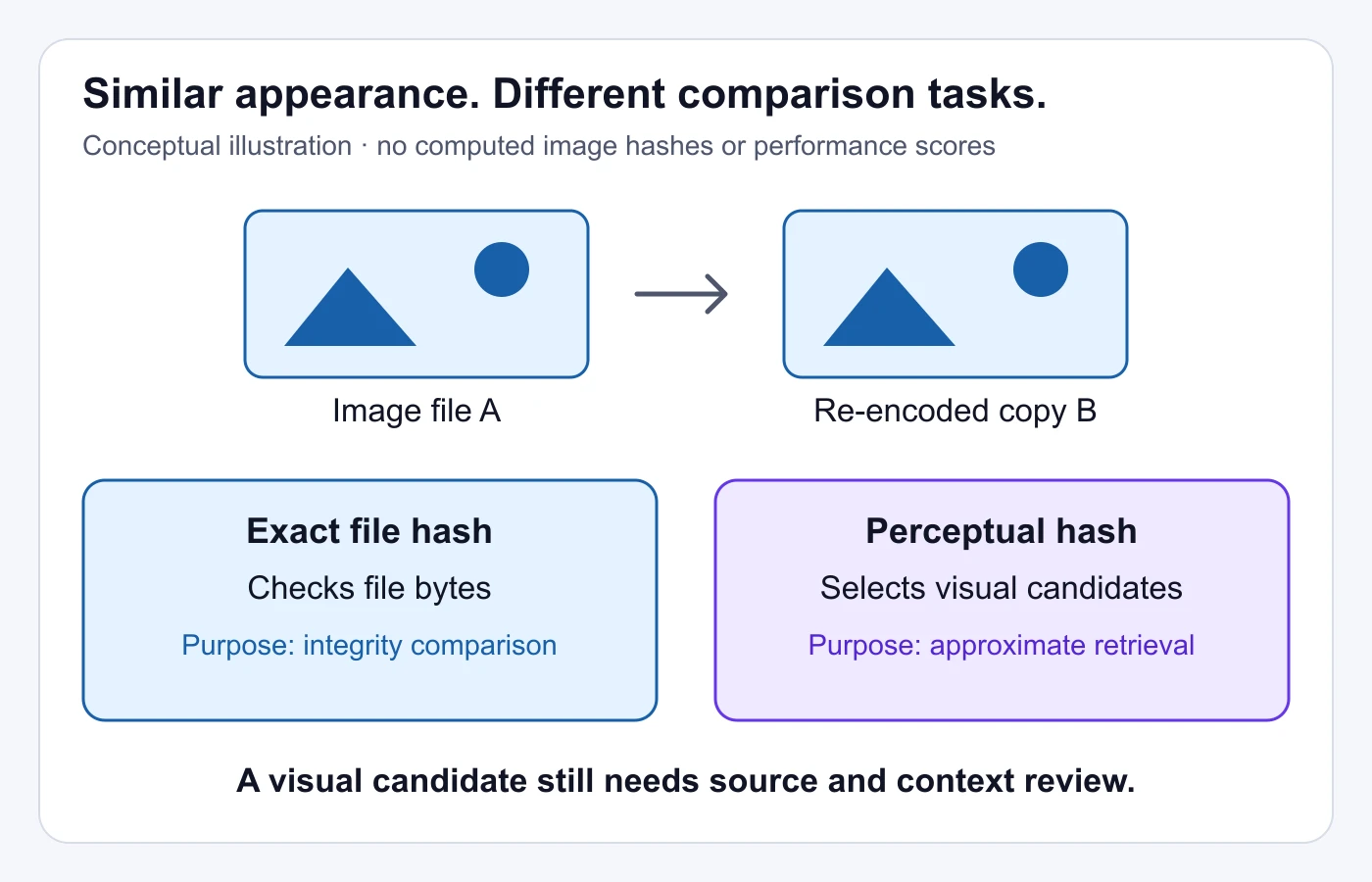
NIST’s Secure Hash Standard describes cryptographic message digests used to check integrity. With a suitable algorithm such as SHA-256, a changed input is very likely to produce a different digest. The digest concerns the input data, not a judgment that two pictures look alike.
That makes a cryptographic digest useful when preserving a specific file. You can record the digest at receipt and compare it with the digest of the copy you later examine. This does not establish that the scene was truthful when the file arrived. It answers a narrower question about whether the data under comparison changed.
The pHash development guide describes a different objective: compare fingerprints of perceptual content across some modifications. A re-encoded picture may remain visually recognizable even though its stored bytes differ. Perceptual hashing aims to help with that relationship rather than requiring byte-for-byte identity.
| Your task | Useful comparison | What still needs review |
|---|---|---|
| Preserve an exact received file | Cryptographic digest of that file | The source and external claim |
| Retrieve possible edited copies | Compatible perceptual fingerprints and distance | The images and their actual relationship |
| Establish who first published it | Attributable source and publication evidence | Whether earlier unseen copies exist |
| Evaluate the scene’s truth | Relevant contextual and independent evidence | Unresolved facts and production history |
For example, exporting an image into a different format changes the file you are preserving. That is not, by itself, evidence of deception. Equally, finding a similar fingerprint is not evidence that no meaningful alteration occurred. Keep the result attached to the task it can support.
How visual fingerprints are formed and compared
There is no single universal perceptual-hashing procedure. An implementation selects visual information, condenses it and defines a comparison method. The result may be a binary string or another representation. You need the method’s identity and compatible settings to interpret its distance.
The pHash project’s design documentation describes a DCT image hash based on frequency information and other methods using different features. DCT means discrete cosine transform: a way to express image information through patterns at different spatial frequencies. The project distinguishes approximate matching from recognizing an image’s semantic meaning.
A semantic relationship is a relationship in meaning. Two separately photographed red bicycles can be related in subject without being copies of the same image. Conversely, a cropped and compressed copy can come from one source even if it looks different at first glance. Do not assume that every “similar image” system is using a perceptual hash, or that every hash implements broad object recognition.
For binary fingerprints of equal length, Hamming distance counts the positions where the bits differ. A bit is a zero or a one. Small distance means the strings are close under that comparison; whether the underlying images should be treated as related depends on the algorithm, the input and the decision rule.
The pHash documentation provides examples and thresholds from its own evaluation. Those values are not universal settings for every image collection or hashing method. If you are choosing a threshold for your system, use evidence from the task and implementation you actually operate rather than copying a number without its conditions.
Algorithm compatibility matters before any threshold discussion. A distance between fingerprints produced by different preprocessing, versions or methods may not have the meaning you intend. Record that information with a result so a later reviewer can reproduce the same comparison instead of guessing from two unexplained strings.
A worked eight-bit example, not an image experiment
The strings below were assigned manually to explain comparison. They were not calculated from the illustrations, a pHash library or real photographs. Eight bits make the arithmetic readable; this is not a recommendation for a deployed hash length or a real similarity threshold.
| Illustrative label | Assigned string | Different positions from A |
|---|---|---|
| A: reference | 10010010 |
0 |
| B: candidate | 10010011 |
1 |
| C: distant candidate | 11101100 |
6 |
| D: another candidate | 11010011 |
2 |
Compare A and B from left to right. Their first seven positions agree; the final position differs. Their Hamming distance is therefore one. That is a complete statement about these assigned strings. It says nothing about the accuracy of a real matcher or the likelihood that two photographs share an origin.
A and C differ in six positions. In this demonstration, a rule that selects candidates no more than one position away from A would include B and exclude C and D. The rule is invented for the exercise. Real decisions require evidence about the image collection and the method, not the apparent clarity of this small table.
Why a chain of close results can mislead
Now compare B and D. They differ only in the second position, so their distance is also one. A is close to B, and B is close to D, but A and D differ in two positions. Under the demonstration’s one-position rule, A and D do not pass the same pairwise test.
This is a useful caution when organizing results. If a system groups everything connected by any nearby neighbor, a group can contain members that are not close to the original reference. A connection through another candidate is different from a direct comparison. Decide which relationship your grouping is meant to represent.
A review record might therefore say “B passed the direct candidate rule against A; D was connected through B but failed the direct rule against A.” That preserves the evidence. Writing “A, B and D are the same image” would erase the distinction and turn a grouping choice into a stronger factual claim.
The original diagram below summarizes another boundary: checking file bytes and retrieving visual candidates are separate comparisons. It is a conceptual illustration, not a screenshot of a matching service or proof of actual performance.
Why edits can affect a match
A matcher sees the material supplied to its input process. If you change that material, you may change the information its fingerprint captures. The effect depends on the algorithm and transformation; “robust” does not mean unaffected by every edit.
Resize and re-encoding
A resized or re-encoded image can still depict the same composition, which makes near-duplicate retrieval a useful goal. However, do not assume that every size, quality level or repeated export produces the same distance. Keep the source and a description of the transformation so you can interpret a returned candidate.
If you use a screenshot instead of an image file, you have also introduced a viewing context. Player borders, overlays and the displayed size may be part of what you submitted. Treat that as a different input, not as an exact copy of the media it shows.
Crops, borders and overlays
A crop removes information; a border adds information; an overlay obscures information. Each may change the composition presented to the matcher. A crop containing only a small generic part of a scene also gives a reviewer less distinctive evidence, regardless of the score the tool returns.
Save both the untouched input and any search variation you create. Write “cropped around the storefront” rather than allowing the crop to become your only record of the scene. A useful candidate should be reviewed against the broader source whenever that source is available.
Separate similarity from semantic identity
The same person, landmark or object can appear in many unrelated images. A broad resemblance may be worth exploring without establishing a common file origin. Ask whether you are investigating copies of one image, images of one subject or the meaning of a scene. Those are different retrieval tasks.
For the practical process of choosing and searching video frames, use the existing reverse image search guide. This article explains the comparison mechanism rather than repeating the search-engine tutorial.
Thresholds balance different kinds of mistakes
A threshold turns a distance into a decision, such as “include this candidate for review.” It should specify the action it controls. A rule for organizing a private image library need not be suitable for making an allegation about somebody’s media.
A false match selects an image that does not have the intended relationship to the reference. A missed match fails to select an image that does. Raising or lowering a distance cutoff can change which candidates are returned, but no universal cutoff settles every collection, edit and purpose.
Original CertPHash research studies perceptual-hash robustness and distinguishes matching functionality from collision and evasion concerns under stated assumptions. Its formal problem and evaluations do not make every existing matcher secure or guarantee a result for arbitrary images. This guide does not reproduce attack instructions or benchmark rates.
For your own review process, begin with a small, permissioned collection of relevant examples. Include known related copies and known unrelated images, then inspect the candidates your intended configuration selects. Describe that as an evaluation of that collection and configuration. Do not promote it into a general accuracy number.
Choose examples that resemble your actual task. If you expect captions and crops, evaluate those conditions. If your work concerns scans or diagrams, a collection of unrelated scenic photographs may not resolve the important questions. A clean demonstration can be useful while still failing to represent the difficult cases you will encounter.
Record the consequences of an error. A false candidate in a research folder may cost review time. A false public accusation can cause more substantial harm. Keep the automated selection step separate from any consequential conclusion, and make it possible to inspect the original evidence.
Also decide what to do with uncertain results. An intermediate distance can lead to additional comparison rather than forced acceptance or rejection. A good record can preserve “candidate retained; relationship unresolved” without pretending the system supplied a binary truth verdict.
A candidate-review worksheet you can reuse
This worksheet is an original organizational aid, not a standard required by a particular tool. Complete it for a candidate you intend to rely on. It makes the relationship between input, configuration and conclusion visible to another reviewer.
- Define the relationship sought. State whether you want exact file identity, an edited copy of one image or another kind of resemblance. A result cannot be assessed sensibly if the target relationship changes after you see the score.
- Identify the actual inputs. Record which files, frames or screenshots were compared. Preserve the originals and note crops, overlays, resizing or other changes you made for the comparison. Do not record a search variation as untouched evidence.
- Describe the comparison configuration. Save the method, relevant settings, distance measure and cutoff if available. If a service hides these details, record that limitation. An unexplained score should not become a reproducible technical finding.
- Inspect the candidate itself. Compare distinctive objects and their arrangement, then look for differences that matter to your question. A score can help select a file; it cannot perform every contextual judgment you need.
- Establish source context separately. Record the candidate’s attributable location, date and surrounding claim. A matching image on a page may be a repost or derivative. Do not let the retrieval order determine authorship.
- Write a bounded conclusion. Say what the comparison supports and what remains unknown. Preserve contrary observations and identify what additional source or version would help. Make the next action specific enough for another reviewer to follow.
You can use the worksheet without maintaining a giant database. One clear candidate record may be more useful than a folder full of unexplained screenshots. The important feature is that somebody can follow the comparison and distinguish its technical result from the conclusion you chose to draw.
Example of a bounded candidate record
Imagine that your reference shows a shop window and a candidate shows the same apparent arrangement with a caption added. This is a hypothetical review scenario, not a tested result. Your record could identify the untouched reference, the downloaded candidate and the matcher configuration, then note that the candidate passed the configured selection rule. During visual review, you recognize the arrangement but cannot read a sign hidden by the caption.
The next action is to seek the candidate without that overlay and inspect its publication context. Do not substitute “same source confirmed” for the missing observation. If an uncovered version later reveals a different sign, retain that difference rather than explaining it away because the distance was small. If no uncovered copy can be found, the record can remain open: visually related candidate, important area obscured, source relationship unresolved. This conclusion is useful precisely because it tells the next reviewer which evidence is missing.
A match does not establish authenticity or authorship
Suppose a candidate appears to be a modified copy of the image you received. That can support a version-comparison investigation. It does not establish which version came first, which account created it or whether either attached caption describes a real event.
Compare those questions explicitly. A date on a page is evidence to inspect, not a property encoded in the perceptual fingerprint. An image may be reused with a different location claim while remaining a strong visual match. A close copy can therefore help reveal misleading context instead of validating that context.
The video provenance guide covers how to trace media and claim history. If your candidate is a frame from a clip, the reverse video search guide explains the broader source-finding process. Neither task is completed by one short image fingerprint.
Keep sequence questions separate as well. One matched frame cannot establish that two complete videos have the same soundtrack, ordering or uninterrupted content. Use the actual clips and their source history for those comparisons. A still-image mechanism should not silently inherit a whole-video conclusion.
Finally, a visual match is not an AI-generation verdict. A generated image can be copied and distributed; a camera image can be copied and misleadingly captioned. Retrieving a related file and assessing the media’s production method are different operations.
Handle fingerprints and private media thoughtfully
A compact representation is not automatically an anonymous record. If a system can match a fingerprint back to a known image collection, that relationship may reveal information about the media you supplied. Consider who can query the collection and what they can associate with the result.
Before using an external service, review what you are sending and whether you are permitted to share it. Avoid uploading private identity documents, confidential footage or another person’s sensitive images merely to experiment with matching. A local workflow and a public search service can have different data-handling consequences.
Keep your own records proportionate to the task. Store the evidence necessary to reproduce a conclusion, with appropriate access controls, rather than collecting unrelated personal information. If the review can be documented without public copies of sensitive assets, do not turn the evidence folder into a public gallery.
Be careful with labels that can outlive the investigation. “Possible near-duplicate candidate” preserves uncertainty. “Proven stolen image” asserts ownership and misuse that the hash did not establish. Technical terminology should make a conclusion more precise, not make an unsupported claim sound authoritative.
Before you rely on a matching result
- The intended relationship is clearly stated.
- The compared inputs and any search edits are identified.
- The fingerprints use a compatible method and representation.
- The distance rule controls a stated action, not a universal truth label.
- Direct matches are distinguished from neighbor-chain groupings.
- The actual candidate images have been inspected.
- Source, authorship, context and production questions remain separate.
- Uncertainty and possible errors are preserved in the final record.
Perceptual hashing is most useful when it narrows the material you need to inspect. Preserve that role: a fingerprint can lead you to a candidate, while the file, source and context determine what you can responsibly conclude.
A visual match is only a starting point.
For video copies, check source context and the clip itself.
Questions about perceptual hashing
Is a perceptual hash the same as a file checksum?
No. A cryptographic file digest supports a byte-integrity comparison. A perceptual fingerprint supports approximate content comparison under its method. Identify which type a tool produced before interpreting a result.
Does a distance of zero prove the images are identical?
It means the compared representations agree under that method. It does not establish that the original files are byte-for-byte identical or that the surrounding source claims are true.
Can perceptual hashing recognize everyone in a photo?
Do not treat an image-copy fingerprint as an identity-recognition system. Finding related visual content and identifying a real person are different tasks with different evidence requirements.
What threshold should I use?
There is no universal threshold for every implementation and collection. Define the action it controls, inspect relevant examples and record the method’s limits. Do not transfer an old demonstration’s setting without its context.
What does a failed match establish?
It establishes that the attempted comparison did not return the relationship under those conditions. It does not prove that no related copy exists, that the media is authentic or that the source history is complete.
Sources and technical references
- pHash Development Guide — original project documentation.
- pHash Design and Validation — original project algorithm documentation.
- FIPS 180-4: Secure Hash Standard — NIST, integrity definitions and algorithm specification.
- CertPHash: Towards Certified Perceptual Hashing via Robust Training — Yang and colleagues, USENIX Security 2025.