
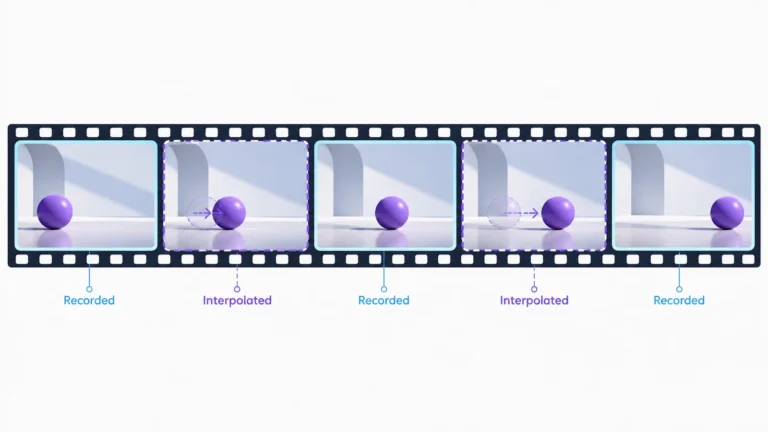
Motion interpolation creates additional images between the frames already present in a video sequence. Those inserted frames can make playback look smoother or support a slowed-down edit, but they are estimates, not new camera observations. If you are inspecting unusual motion, the important distinction is whether you are seeing recorded material, an exported processed version, or extra processing applied only by the display.
This guide explains the mechanism and gives you a practical original-versus-processed comparison. It does not promise to identify every inserted frame by sight. A video may be conventionally captured and later interpolated, generated and then interpolated, or untouched while a television changes its presentation. Smoothness alone cannot settle its origin or the truth of its caption.
Recorded versus inserted frames
Imagine two supplied frames of a ball: one shows it on the left and the other on the right. An interpolation system can create an image for an intermediate moment. That image has to estimate what was between the observations. The endpoints do not directly reveal every position, shape, lighting change, or obstruction that occurred during the gap.
Our teaching example uses a straight path because it is easy to draw, not because the missing real-world motion must be straight. A ball might accelerate, change direction, or pass behind something. A convincing intermediate image is therefore not evidence that a camera actually observed that particular moment. Keep the word “estimated” attached to it when explaining the sequence.
In editing, distinguish new image synthesis from repetition or removal. Adobe’s current Premiere time-interpolation documentation separates frame sampling, frame blending, and optical flow: sampling repeats or removes existing frames, blending combines neighboring images, and optical flow estimates motion to generate intermediate images. These are different operations even when they all appear inside a speed-adjustment workflow.
A file’s reported frame rate is not enough to tell which operation occurred. A higher-rate export might contain repeated frames, newly generated ones, or a mixture. A lower-rate file might also have a complex prior history. Ask for the export method or a less processed source instead of treating one metadata number as a recording certificate.
Simple blends and estimated motion
Blending combines appearances
A simple blend can place contributions from neighboring images into one result. In our conceptual ball example, that could leave two faint ball positions rather than a clean middle position. The exact appearance depends on the method and inputs. A double edge is an observation to investigate, not a unique signature that tells you which application was used.
Look at the entire moving boundary, not only the subject’s most alarming detail. If nearby objects show related double edges, record that relationship. If only a small region changes, keep that as a separate question. Different scene elements can behave differently under one process, so neither pattern independently proves a local manipulation.
Motion estimation proposes correspondence
Motion-based interpolation tries to use relationships between the input images to place content in an estimated intermediate state. That can produce a cleaner-looking result than a simple blend in a suitable case. It still has to handle uncertainty about what moved, what became hidden, and which details correspond. A plausible output is not the same as direct evidence of the missing moment.
FFmpeg’s documented minterpolate filter offers duplication, blending, and motion-compensated interpolation modes. The separate fps filter changes constant frame rate by duplicating or dropping frames. This difference is why “converted to a higher frame rate” does not necessarily mean “new motion was estimated.” No command or performance result is being claimed here.
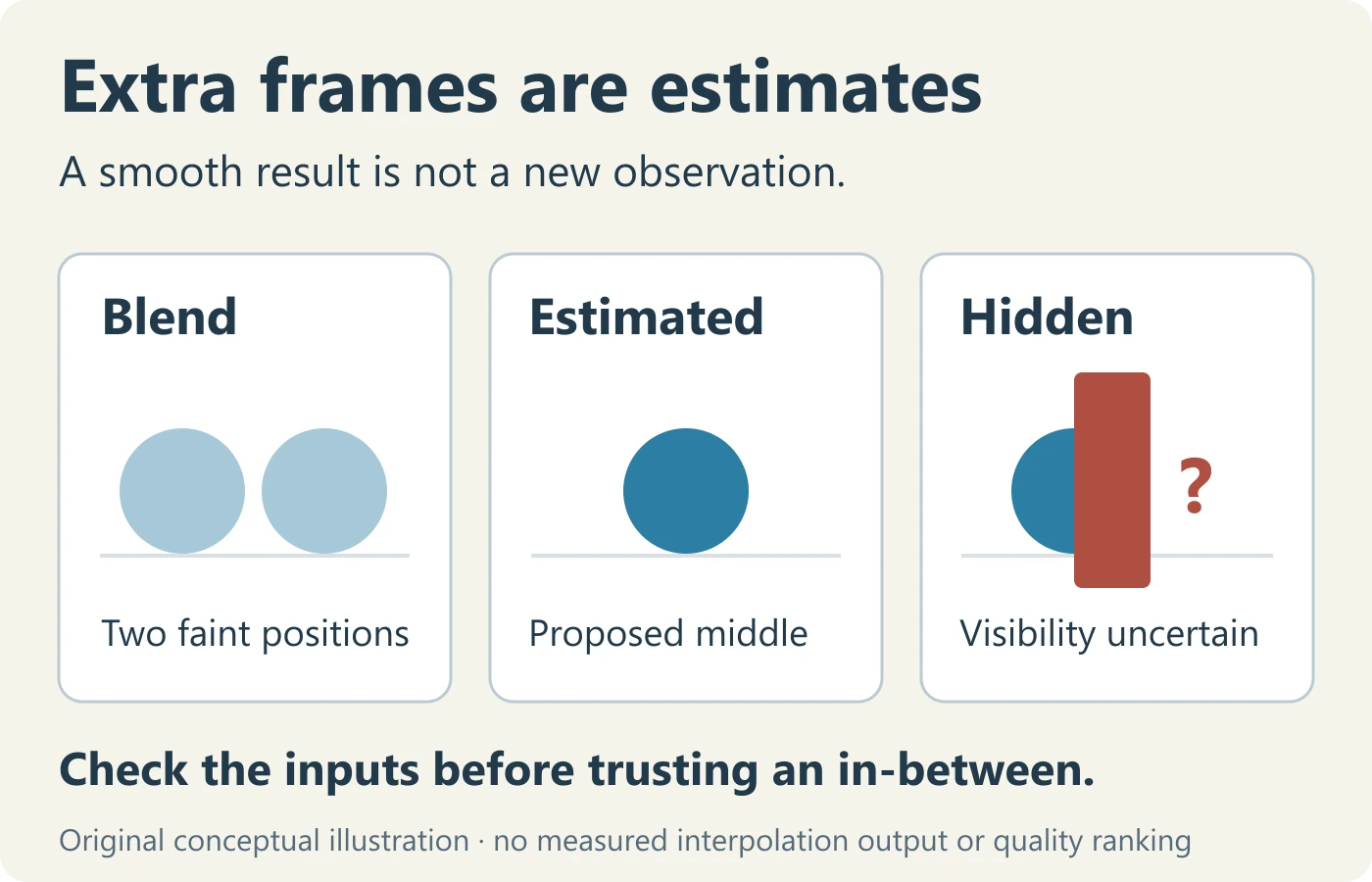
Do not rank methods by how reassuring the final picture looks. A softly blended frame may make its uncertainty visible, while a sharp estimated frame can conceal it. For evidence review, the relevant question is what the processing changed and whether the untouched sequence remains available, not which output looks most polished.
Smooth motion and the soap-opera effect
People often use “soap-opera effect” to describe motion that feels unexpectedly smooth compared with the presentation they expected. Treat that as a viewing impression rather than a technical verdict. Ask where the change occurs: inside the file, in the player, or in the screen’s processing. These locations require different checks.
Display settings can affect what you see without changing the supplied video file. Sony’s Motionflow guide for its named projector models describes smoothing settings, an off option, and a True Cinema setting intended to reproduce the original frame rate. That is an example of model-specific presentation control, not a universal menu instruction for all televisions or projectors.
For a fair display comparison, keep the same file and viewing interval. Note the device and setting you changed, then restore it after the comparison if appropriate. Do not compare a streaming app on one display with a downloaded export on another and attribute every difference to interpolation. Delivery, scaling, timing, and display behavior may all differ.
If the odd appearance occurs only on one screen, document that before investigating the file. If it appears in decoded frames from the file itself, the question moves toward file processing. A screen recording adds another capture layer and is not a clean way to establish what the original sequence contained.
Also separate aesthetic preference from verification. A viewer may like smoother motion, dislike it, or notice no difference. None of those reactions establishes an event’s date, a speaker’s words, or the absence of editing. A useful review describes the processing question without treating taste as technical evidence.
Occlusion, revealed areas, and texture errors
Occlusion means that something becomes hidden behind another surface. A newly revealed area presents the opposite problem: it becomes visible without having been visible in the earlier image. These are useful places to inspect an interpolated derivative because the relationship between the input images may not supply an obvious answer for every intermediate pixel.
Use a simple imaginary scene: a ball passes behind a narrow post. The first supplied frame shows it on one side and the second shows it on the other. A middle frame may need to decide how much of the ball the post hides. Do not treat a guessed outline at that moment as an observed trajectory, especially if the edit is being used to explain a collision or contact.
Repeated patterns raise a different question. If several similar tiles or stripes are visible, a proposed correspondence may connect the wrong look-alike feature. Inspect whether the uncertainty is attached to a repeated pattern, a crossing boundary, or an abrupt transition. That gives you a more useful description than “the software melted the background.”
Keep blur and compression in the account. They can limit what the input images contain, making fine comparisons harder. The existing compression-artifact guide covers delivery changes separately. A processed frame can combine several ordinary effects; assigning one cause should not erase the others from the review.
At a cut, there may be no continuous scene motion to estimate. Do not explain a transition artifact as if the same objects necessarily moved from the first shot into the second. Mark the boundary, compare the actual source shots, and check whether the interpolation method was applied across a transition. The source timeline matters more than a visually impressive middle frame.
Reading the original and processed clips
Prepare a version ledger
Give the source and derivative distinct names. Record where each came from, whether the file is a camera original or only an earlier known copy, and what processing is documented. “Original” should not silently mean “the least altered file I happened to find.” If provenance is incomplete, use that more limited description.
For a derivative you create, record application and version, source sequence, speed change, interpolation choice, and export settings relevant to timing. You do not need to publish a machine’s private filesystem details. Keep a reproducible description of the operation and retain the untouched input so another reviewer can inspect it.
Align an event, not just a timestamp
A slowed version and its source may show the same event at different playback times. Align a recognizable event boundary rather than assuming the same displayed timestamp means the same captured moment. If an edit includes trims or repeated segments, map those changes explicitly. A side-by-side comparison is misleading when the two windows show different parts of the action.
Watch both versions at their intended playback speed first. Then inspect a short interval containing the change and some surrounding context. Keep the normal-speed observation in your notes. Repeatedly looping the oddest derivative frame can exaggerate its significance and hide a source sequence that already explains the event.
Extract without pretending to recover camera frames
When you extract a still from an interpolated file, you are extracting a frame of that delivered file. It may be an inserted image. It does not become camera-observed merely because the extraction tool saved it losslessly. The frame-extraction guide explains how to preserve useful references without confusing a selected still with full sequence evidence.
Label comparison stills by file, position, and purpose. Avoid names such as “real frame” and “fake frame” unless an established source supports those labels. “Source-copy frame” and “processed-output frame” tell the reader what you actually know. If input-to-output correspondence is uncertain, say so rather than guessing which images were inserted.
A worked review: the slowed sports clip
This is a fictional reading exercise, not a measured sports analysis. Imagine a slowed repost of a ball game. Around a crossing player’s arm, the ball’s edge appears stretched for a moment. The accompanying caption says the artifact proves that the entire match footage was generated. You also find an earlier, normally paced public copy.
Start by separating the two claims. One concerns a strange edge in a derivative. The other concerns the origin of the whole scene. The first observation cannot establish the second without additional evidence. Write “edge changes during crossing” as the observation and “generation of the scene” as the claim to be tested.
Locate the corresponding action in the earlier copy. Do not assume the repost’s displayed time identifies it. Compare the player’s crossing, the ball position, and the surrounding movement. If the earlier copy does not contain the same visible distortion, that makes later processing a relevant question. It does not automatically establish which processing operation caused it.
Check the supplied account of the edit. Was it slowed? Was interpolation selected? Was a display recording used? If the uploader provides the workflow, retain it as reported information rather than silently treating it as independently verified. If no account exists, keep the processing method unknown and describe the observable difference between the copies.
Now test whether the artifact affects the claim. For a general highlight, the difference may be mostly presentational. For a disputed contact or timing decision, an estimated in-between image is not an appropriate substitute for a camera observation. Request the source and relevant qualified review instead of using the visually smooth derivative to make an exact event judgment.
A proportionate conclusion might say, “The distortion appears in the slowed copy and warrants a processing check; it does not by itself establish that the scene was generated.” That sentence keeps the source comparison, the uncertainty, and the claim’s scope together. It avoids both dismissing the artifact and exaggerating what it proves.
A source-and-output comparison table
| Review item | Record | Do not assume |
|---|---|---|
| Version | Source supplier and documented processing | An earlier repost is a camera original |
| Timing | Corresponding event and speed changes | Matching timestamps mean matching moments |
| Boundary | Crossing objects, reveal, or cut | A generated middle shape was observed |
| Playback | Player and display settings | Smoothness must be encoded in the file |
| Decision | Claim affected and missing evidence | A visual artifact settles the whole story |
The table is not an authenticity score. Use it to identify missing information and an actionable next request. If several entries remain unknown, the right response is a limited conclusion, not an invented probability of interpolation. If the source and derivative are both available, retain enough context that another reader can repeat the comparison.
A second exercise: one file, two viewing experiences
Imagine that the same saved clip looks ordinary on a laptop but unusually smooth on a living-room display. Do not immediately label the television view an altered source. First confirm that both devices actually use the same file rather than different streaming versions. Keep the same event interval and note the applications used to play it.
Next, consult the display’s own instructions for its motion settings. If a supported comparison is available, change only that setting and replay the interval. Retain a note of the original value so the device can be restored. Do not enter service menus, reset the television, or change unrelated picture controls for a simple source-review question.
Suppose the appearance changes with a documented smoothing setting. Your conclusion concerns presentation on that device. It does not establish that the file was never processed earlier, and it does not establish a recording frame rate. Conversely, if the appearance remains, do not conclude that interpolation is absent everywhere. The file and player may still need separate inspection.
For a useful handoff, describe the comparison as “same supplied file, different display setting” and specify what you observed. Avoid a phone recording of the screen as your only evidence: that introduces a new camera, display interaction, and export history. If you include such a recording illustratively, label the capture layer and retain the actual file separately.
This exercise shows why a viewing complaint and a file-integrity claim should not be merged. Start at the layer you can actually inspect, state the limited result, and move to a different layer only when the remaining question requires it. That approach can resolve an ordinary presentation issue without turning it into a false allegation about the creator.
When interpolation helps, and when it changes the question
For creative work, an interpolated slow-motion sequence may serve a deliberate presentation goal. Judge it at the intended playback rate, inspect awkward boundaries, and decide whether the result communicates the action without distracting errors. The editor’s standard is not identical to the standard for using a frame as evidence of what happened.
For instruction, animation, or illustration, label the transformation when it matters. A smooth visual explanation can be useful without pretending to supply extra measurements. If a training video shows a process more slowly, make clear whether the intervening images were captured or synthesized. This helps readers understand what detail the material genuinely supports.
For verification, keep the source primary. A derivative may make an interval easier to discuss, but it should not replace the file used to inspect temporal evidence. The existing AI video detection methods guide explains why several evidence families matter; an interpolation observation should be one contextual detail, not a standalone detector.
Before sharing a comparison, ask whether your labels could mislead. Does “enhanced” conceal synthesis? Does “restored” suggest lost moments were recovered? Does “original” refer only to a download? Prefer language describing the actual operation and evidence status. Clear provenance is more useful than a persuasive name for a processed export.
Why artificial smoothness does not prove a deepfake
Processing and scene origin are different properties. Interpolation can add estimated images to captured footage without inventing the depicted event. It can also be applied to synthetic footage. Conversely, generated or deceptive material need not look unusually smooth. There is no reliable shortcut from a viewing impression to a comprehensive origin verdict.
If a clip’s origin remains uncertain, inspect the best supported version and combine the available source, sequence, audio, and technical evidence. The broader AI video analysis guide distinguishes ordinary edits from changes that alter meaning. This article’s contribution is narrower: understanding what extra frames can and cannot add to that review.
Finish with a small handoff note: the exact observed interval, the versions compared, the known processing, the unresolved uncertainty, and the next evidence that would help. Do not include private media tokens or unnecessary personal details. A useful note lets someone continue the investigation without repeating a dramatic but unsupported accusation.
The central takeaway is straightforward: added frames are added estimates. They may improve presentation, expose a processing error, or complicate an evidence comparison. Preserve the source and keep the distinction visible. A smooth-looking sequence can be enjoyable or useful while still being unsuitable for claims that require directly recorded intermediate moments.
Motion interpolation questions
Are interpolated frames recorded by the camera?
No. Newly synthesized intermediate frames are estimates based on available inputs. Repeated frames are also not new observations.
Does a higher frame rate prove interpolation?
No. Recording, repetition, conversion, and synthesis can produce different histories. Check the source and processing record.
Can a television change motion without changing the file?
Yes, presentation processing is separate from the stored file. Check the model’s supported settings before attributing the appearance to an edit.
Does interpolation mean the entire video is a deepfake?
No. Ordinary captured footage can be processed. Origin and later transformations need separate evidence.
Sources and scope
- Adobe: Premiere time-interpolation methods.
- FFmpeg: minterpolate filter and fps filter.
- Sony: Motionflow settings for named projector models.
Reviewed 13 October 2026. The sports example and diagrams are original conceptual exercises, not measured algorithm results. No FFmpeg commands are represented as tested.
Unusual motion needs more than a guess.
Check the original video and compare it with processed versions.