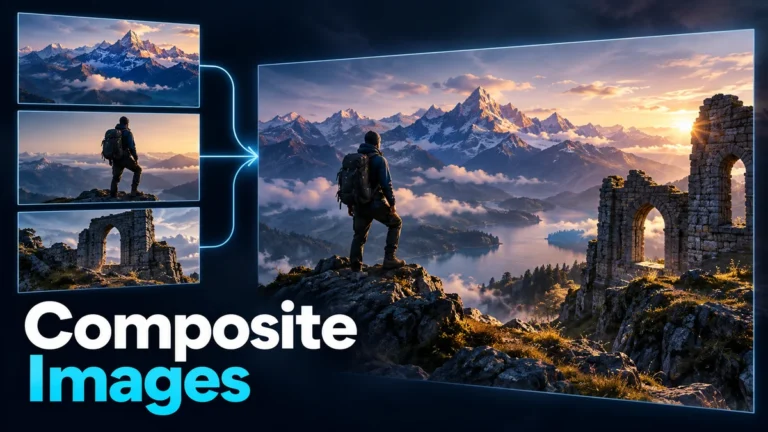
What is a composite image? It is a picture assembled from multiple visual contributions into one result. Those contributions can be photographs, drawings, text, rendered elements or generated material. A seamless scene need not have existed as one camera exposure. To understand it, identify the components, their arrangement and what the final caption asks you to believe.
This guide explains layer anatomy and meaning through an original fictional illustration. It is not a generic photo-authenticity test, a Photoshop product guide or evidence that a real image was manipulated. No camera, editing application or forensic detector was tested. The diagram’s scene components are separately authored shapes, not recovered photographs of a place.
A finished picture can contain several source relationships
Imagine a background from one source, a foreground object from another and a title added by the designer. The final image presents them together, but the production record can still distinguish their origins. One flattened export does not mean one exposure, one place, one date or one creator.
Adobe’s current combine-images documentation describes assembling photo elements with layers, selection and masks. That is a concrete editing workflow, not a rule that every composite must use that application. The important conceptual relationship is which contributions were brought together and how.
A composite can be visibly assembled, like an explanatory graphic, or designed to feel like one coherent scene. Visible seams do not determine the category. An obviously separated set of photographs and a carefully integrated poster can both contain multiple contributions, although their visual purpose and terminology may differ.
Keep the question narrow when receiving a file. Ask whether it is a final illustration, a working layered document or a purported single-capture photograph. A layered document may explain an assembly, but the audience may receive only its flattened export. The production relationship should remain understandable even when editing controls are unavailable.
Compositing is older than generative AI
The National Portrait Gallery’s photomontage glossary describes combining photographs through cutting and joining, with comparable digital approaches. That history prevents a common mistake: an assembled image is not automatically an AI-generated one. Multiple-source construction existed before contemporary generation tools.
Conventional captured components can form a composite. Generated components can also be included, and one project can mix methods. Identify the actual contribution when the record permits it. Do not replace “combined from several photographs” with “made by AI” simply because the result looks unusually polished.
The published synthetic media guide owns the wider production-category map. This article stays with assembly: which pieces entered the final picture and what their combination communicates. A method label alone does not answer whether the final scene’s implied event occurred.
The same caution applies in the opposite direction. If all ingredients were camera-captured, the final arrangement can still be newly constructed. Genuine photographs of separate objects are not automatically proof that the objects were together. Component authenticity and final-scene co-presence are different questions.
Layers separate contributions before the final export
A layer provides a way to keep a contribution separately arranged or treated in a working composition. Order can determine which visible material appears in front. Position and scale can change how sources relate. The final image may combine them into one view without retaining an editable explanation of that ordering.
A mask controls visibility rather than supplying a new source by itself. Adobe’s layer-mask tutorial describes revealing, hiding and partially hiding material. Keep that visibility role separate from the provenance of the underlying element. A mask can decide which part is shown without proving where that part came from.
Opacity and blending affect how contributions interact. A partially visible object may be a creative overlap rather than something transparent in the recorded world. Record the intended relationship instead of describing every visible effect as a physical property of the pictured subject.
Adjustment contributions deserve a separate note as well. A creator can modify color or brightness to unify a design without adding a new depicted object. That is different from importing a person or place. The useful production description distinguishes visible-content additions from treatments that alter how existing material is presented.
Flattening can make a delivery simpler, but it is not a history certificate. If the task requires an assembly account, preserve a suitable working record alongside the exported picture. Do not infer that an export with no visible layer controls came from a single capture.
An original three-contribution scene makes the anatomy visible
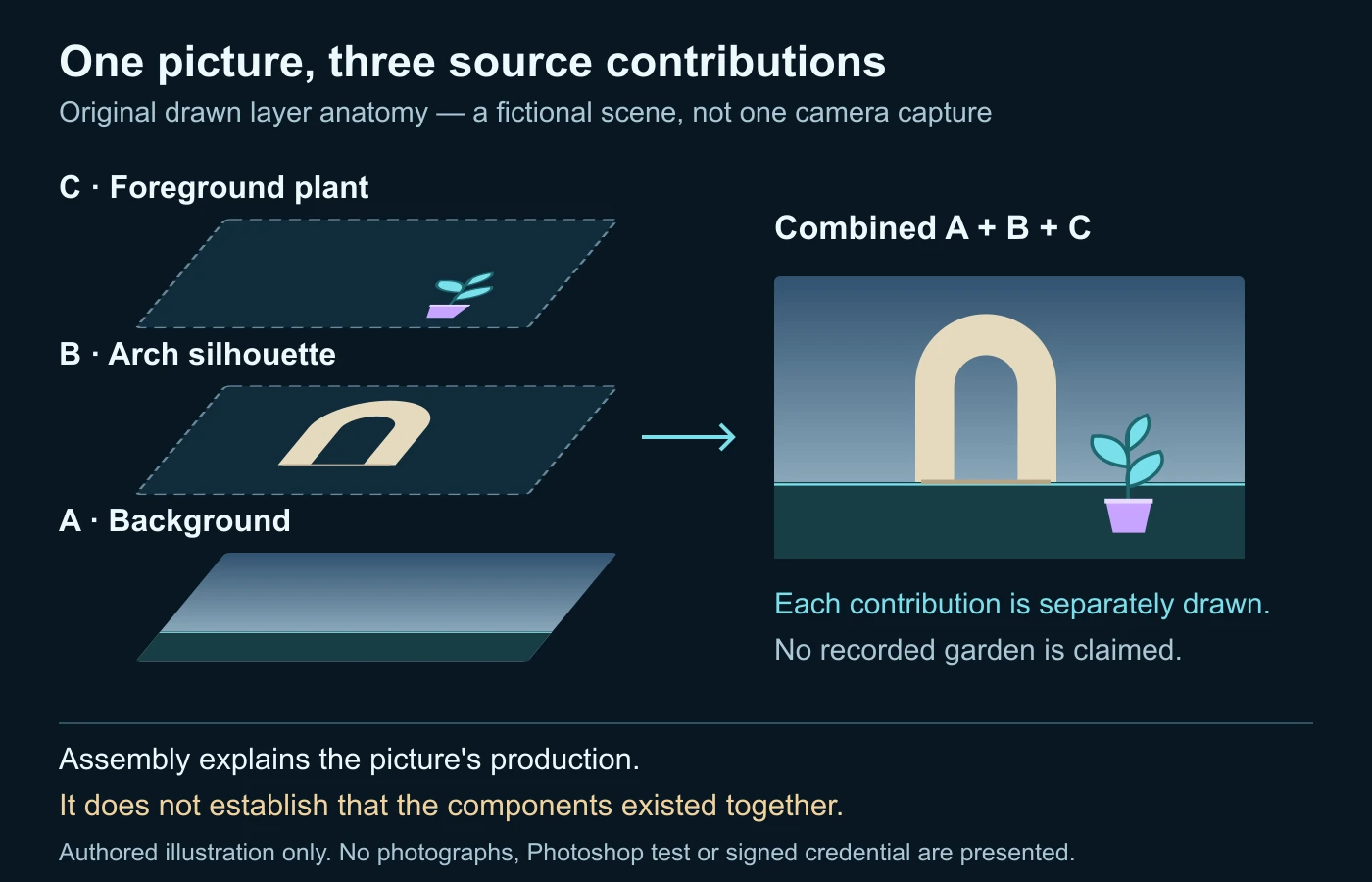
Our explanatory diagram constructs a fictional garden-like scene from three separately drawn groups. Group A is a sky-and-ground background. Group B is a simple arch silhouette placed over it. Group C is a small foreground plant shape. These are original illustrative shapes, not photographs from different real places or a tested editing application’s output.
The drawing separates each group before showing the combined arrangement. The background supplies the setting. The arch supplies a focal object. The plant adds a foreground cue. Their visual alignment creates a readable scene, but no camera observed that garden. The disclosure follows the assembled result, not merely a hidden production file.
Consider what happens if group B moves behind group C. The plant can obscure part of the arch and suggest depth. That ordering is a design decision, not an independent distance measurement. The reader should not infer physical geometry from the illustration’s arrangement.
| Contribution | Role | Origin stated here | What it does not establish |
|---|---|---|---|
| A: sky and ground | Background setting. | Separately authored illustrative shapes. | A recorded place, weather or time. |
| B: arch | Focal object. | Original geometric silhouette. | A real structure standing in that setting. |
| C: plant | Foreground contribution. | Original drawn shape group. | A captured object or measured distance. |
| Combined result | Educational scene. | Deliberate arrangement of A, B and C. | That the elements were together in reality. |
The register is deliberately specific. “Edited image” is not wrong, but it tells a downstream editor less than “three original drawn contributions combined into a fictional scene.” A short account of meaningful components can remain useful even when the final picture is visually simple.
No numerical realism score is attached to the example. Its purpose is to make an assembly relationship legible. The actual SVG groups and rendered image are an authored educational artifact, not a controlled test of software quality or a reconstruction of a photographed garden.
Visual coherence and factual coherence are different
A creator can align edges, light and perspective so the picture feels cohesive. That coherence can be a successful artistic choice without establishing a factual event. A convincing shadow or shared color treatment does not prove the imported object was present in the background’s recorded scene.
For a permitted creative job, review the actual delivery at both useful close view and intended viewing size. Look for unwanted boundaries, scale conflicts and confusing depth order. These are quality questions. Avoid treating a successful quality review as independent verification of the components’ historical relationship.
For a factual review, begin with the specific claim. Is the picture being used to show an object at a location, a person’s attendance, or a condition at a particular time? A source component supporting one of those details may not support the whole combination. Match each important relationship to appropriate evidence.
Visual discrepancies can motivate a question but are not dependable universal signatures. Ordinary camera conditions and subsequent processing can create uneven edges or appearance. A coherent composite may leave no obvious seam. Do not identify a particular application or accuse a creator from a single mismatch.
A fictional poster changes meaning when its caption changes
Imagine a designer making a harmless exhibition poster. It combines a permitted photograph of a courtyard, a separately photographed sculpture and drawn decorative shapes. This is a fictional planning scenario, not an actual production project. The image is intended to suggest the exhibition’s themes rather than document where the sculpture stood.
The production note identifies the courtyard and sculpture as separate contributions. The design caption describes an illustrative composite. A viewer can appreciate the scene without assuming the sculpture was photographed in that courtyard. The note is more useful than a vague declaration that the poster is “enhanced.”
Now imagine the same exported picture is reused beside a statement that the sculpture was installed in the courtyard on a particular day. Nothing in the pixels has changed, but the claim has. The assembly record does not establish that installation. A relevant original photograph or other appropriate independent source would be needed.
The editor should therefore review purpose at reuse, not just repeat the earlier artistic approval. A picture accepted for a concept poster may be unsuitable as a facilities record or event proof. That is a meaning mismatch, not necessarily a defect in the designer’s original creative task.
Suppose an actual installation photograph later becomes available. Compare the important arrangement and date context rather than announcing that the illustrative image has been retroactively verified in every detail. The new source may support a specific fact while the earlier poster remains assembled.
A good final description retains both relationships: the poster combined separately sourced elements; the installation claim is supported, contradicted or unresolved by its own evidence. You do not need one overloaded real-or-fake label to explain the situation clearly.
Track the changes that alter a claim
Extend the scenario with a crop for social sharing. The new crop removes the poster title and the visible illustration label. Its remaining scene may now look like a documentary photograph. Before approving that version, ask whether its surrounding caption supplies the context the original design contained.
Also consider a background substitution. Replacing one courtyard with another can change an implied location even when the sculpture contribution is untouched. Record that meaningful intervention. A source register should describe the accepted version, not silently carry over a location account belonging to an earlier design.
A recipient needs to know which export is approved for which use. Keep the original artwork version, revised crop and accompanying description connected. A well-organized layer folder is valuable, but it does not prevent a downstream meaning error unless the relevant context follows the delivered image.
Build a component-to-claim worksheet
This original worksheet makes the assembly review concrete. It is not a forensic certification, copyright clearance tool or automatic detector. Use it for one delivered version and one important audience claim. Record unknowns rather than invent a source history to make every row complete.
| Review item | Question | Useful record |
|---|---|---|
| Components | Which meaningful objects or regions came from separate contributions? | Source identity and role for each known component. |
| Assembly | What was positioned, masked, scaled or replaced? | Actual operation account, with unknowns retained. |
| Claim | What does the audience understand about presence, place or time? | The particular fact needing support. |
| Disclosure | Does the delivered version explain the meaningful assembly? | Caption or production note appropriate to that use. |
| Next evidence | What independent source supports the claimed relationship? | Relevant original, attributable record or unresolved limit. |
Do not require unnecessary private information in the register. A public illustration note usually does not need private filenames, personal identities or source-access tokens. Preserve appropriate detailed records separately and share only the information needed to understand the contribution and its limits.
The review can end with a bounded acceptance decision: suitable as a disclosed concept illustration, unsuitable for the claimed documentary use, or assembly history unknown. Those outcomes are more informative than an unsupported probability score about whether a picture looks edited.
Trace available components without assuming search finds everything
A source comparison can reveal that part of a scene appeared earlier in another image. Preserve the larger context and inspect the matching source before drawing a relationship. A visually similar building or object is not automatically the actual component used in the received composite.
The reverse image search guide provides the published workflow for video frames and screenshots. Use matches as source leads and read the pages around them. This article does not promise a search engine can identify every layer or reconstruct a private editing project.
If a relevant match is found, compare what changed: crop, scale, background, neighboring objects and caption. Distinguish a component match from a match to the entire final scene. A courtyard source can help explain the background without independently locating an imported sculpture there.
If no match is found, keep the limit. The source may be private, unindexed, altered, newly created or unavailable. Search absence is not proof that the whole image was AI-generated. Continue with any appropriate production account or independent evidence for the important claim.
If a consequential edit allegation remains, the video forensics guide provides the broader evidence framework for related footage. The layer anatomy here is not that investigative workflow or a substitute for qualified examination. It helps define the assembly question before another method is asked to answer it.
Recorded provenance can describe assembly, not guarantee its story
The current C2PA 2.4 ingredient specification includes a relationship for a component contributing to an asset. This can express a documented assembly relationship when a compatible workflow records it. It is not a promise that every composite contains a complete, publicly readable layer list.
C2PA’s scope separates cryptographically checkable provenance from judgments about the surrounding story. A recorded component relationship can help explain production without establishing that two objects were physically together. Read what the credential actually covers instead of promoting its presence into a universal truth certificate.
The Content Credentials guide owns the detailed inspection workflow and limitations. Here, preserve the narrow question: does the available record support the stated source contribution and version relationship? Missing provenance remains an absence of usable evidence through that path, not automatic proof of deception.
No credential is fabricated for our drawing. Its source groups and caption are an ordinary authored record, not a signed manifest or verified camera history. That distinction keeps an educational diagram from appearing to demonstrate a provenance system it did not implement.
Disclosure should explain the meaningful assembly
A clear description names the important operation. For a concept scene, explain that separate background and object sources were combined. For an instructional graphic, identify which elements are drawings or illustrative overlays. The goal is understandable context, not a technical inventory so long that the meaningful change disappears inside it.
Do not imply that one word solves every disclosure or permission requirement. The intended use, relevant rules and underlying sources can matter. This guide offers technical and editorial understanding, not individual legal advice or a guarantee that any particular use is cleared.
Preserve the components you are entitled to keep and record their actual provenance without inventing a license or creator identity. If necessary rights or consent are unclear, resolve them through the appropriate source before publication. A realistic composite is not evidence that the maker had permission to assemble every ingredient.
Review the received export as well as the working document. A thumbnail, crop or stripped repost may obscure the original context. Avoid silently treating one file as if it retained all of the explanatory information available to the creator.
Keep still-image assembly separate from video analysis
A composite still can appear in a video as a title card, insert or claimed frame. That creates a related sequence question, but does not make every source component a video observation. Locate the still’s role and seek the strongest available original sequence before making a broader claim.
DetectVideo AI’s video analysis is not described here as an image-layer extraction or composite-photo service. If there is a related supported clip, technical analysis can complement source and editing context. It cannot supply a missing production file or independently prove a still’s location claim.
Finish with the useful distinction: a composite describes assembly, not intent or truth. Identify the meaningful contributions, preserve their relationships and evaluate the actual claim separately. That lets creative images communicate honestly without forcing every assembled scene into a simplistic authentic-or-fake category.
Questions about assembled pictures
Must a composite be made with AI?
No. Conventional photographs, drawings and other sources can be assembled without generative AI.
Does a flattened file mean one camera exposure?
No. It is a delivered representation that may combine contributions formerly kept separate.
Does a seamless edge prove a single captured scene?
No. Visual coherence and the source relationship are different questions.
Can genuine component photos prove the combined scene occurred?
Not by themselves. Their co-presence, date and location require appropriate independent support.
Can a credential supply every layer?
Do not assume so. Read the available provenance and what its compatible workflow actually recorded.
Is a composite necessarily deceptive?
No. Purpose, description and the surrounding claim determine how the assembly should be understood.
Primary references and illustration scope
- Adobe: Combine images in Photoshop — source elements, layers and assembly.
- Adobe: Build a composite with layer masks — visibility control rather than source verification.
- National Portrait Gallery: Photomontage — conventional assembly and digital relationship.
- C2PA 2.4 technical specification — composed assets, ingredients and provenance scope.
Sources checked on 14 October 2026. The drawing, component register, worksheet and poster scenario are original educational examples. No real location, camera source, Photoshop experiment, forensic test or signed provenance claim is presented.
A convincing scene can combine different sources.
Trace its components and review any related video evidence.