
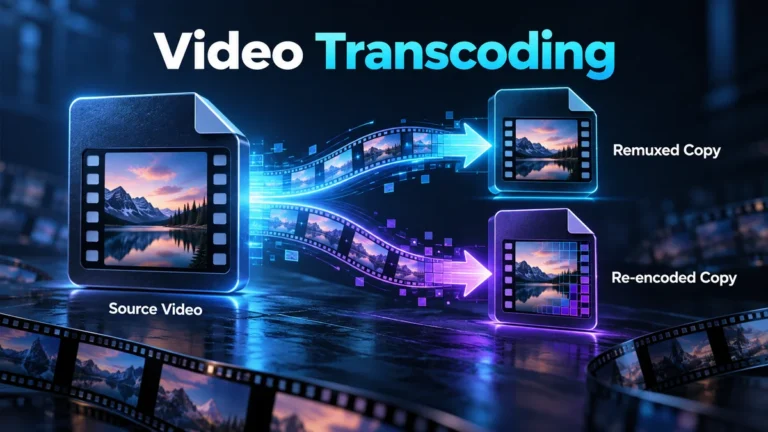
Video transcoding decodes an existing media stream and encodes it again, usually to meet a different playback, editing or delivery requirement. It differs from remuxing, which repackages compatible encoded streams without the same decode-and-encode step. Both can produce a different file, so preserve the source and inspect the actual output instead of judging conversion by its extension.
This guide helps you decide which transformation is needed and record what changed afterward. Its practical contribution is a conversion decision worksheet and a fictional two-output review. It is not an MP4-versus-MOV comparison, a promise of universal player compatibility or a claimed local encoder benchmark. The source’s relationship to each derivative remains part of the result.
Separate the container from the streams it carries
A container organizes encoded media and associated information. A stream is a particular video, audio or other media sequence within it. A codec describes how the media is represented for encoding and decoding. These are related layers, but one familiar extension does not fully describe the codecs, tracks or playback requirements inside the file.
The WebM Project’s container guidelines provide a concrete example by distinguishing the container, codec identifiers, tracks and timing elements. They illustrate why packaging and the encoded media have separate roles. Do not turn one container’s rules into universal instructions for every format, or assume that renaming a file makes its streams compatible with a different container. WebM Container Guidelines
Write the actual requirement before choosing a conversion preset. “The recipient needs a playable review copy” is different from “the editor needs a particular codec” or “the archive needs the source unchanged.” A format that solves one task can remove a track or change a property needed for another. Choose and inspect the relevant output rather than making one general “optimized” file serve every purpose.
Remuxing changes packaging; transcoding changes encoding
FFmpeg’s official documentation defines streamcopy as copying encoded packets without decoding, filtering or encoding them. Its streamcopy examples show changing containers or selected stream arrangements, subject to target-format constraints. The transcoding section defines decoding and then encoding again. This is a technical distinction, not a guarantee that a particular remux command preserves every piece of source metadata. FFmpeg: Streamcopy and Transcoding
A compatible stream can sometimes be repackaged when the container is the obstacle. If the receiving software cannot decode the codec, packaging alone may not solve the problem. Changes such as resizing or applying a picture filter involve decoded media and therefore a different processing path. Identify which requirement is driving the operation rather than converting because a filename looks unfamiliar.
A mixed operation is also possible: one stream can be copied while another is encoded. Do not describe the whole file as untouched because its video stream was copied if its audio was changed or a relevant track was removed. A useful record lists the treatment of each required stream. This keeps the conversion’s scope visible even when the final file opens normally.
Lossy, lossless and unchanged are different promises
Lossy encoding trades information for an output suited to its constraints. Repeated lossy exports can therefore modify decoded detail even when the scene remains recognizable. The degree of change depends on the source and operation; there is no universal rule that every conversion loses the same amount. Compare the relevant media rather than translating file size into a quality verdict.
A lossless encoding stage is not equivalent to restoring information already absent from the input. If the source is a compressed repost, preserving its decoded frames exactly does not recreate the camera source. It also does not necessarily preserve the original container, metadata or all tracks. State which representation is preserved, not simply that the file is “perfect.”
Whole-file identity is a separate requirement. A remuxed output normally has new packaging, so it should not be expected to have the same whole-file checksum as its source. That difference alone does not prove picture degradation. Conversely, matching dimensions, a similar size or a familiar filename cannot prove that two files contain identical bytes. Use the appropriate comparison for the actual preservation question.
Inspect what the conversion is allowed to change
Before running a job, identify the required streams and properties. Include the relevant audio tracks, subtitles and orientation behavior rather than checking only the main picture. A recipient may need dialogue in a particular language or captions available as a selectable track. Those requirements can be lost even when a converter produces an attractive thumbnail.
Separate display orientation from stored dimensions. A file may carry an orientation instruction that the player interprets during viewing. If an export renders that orientation into the pixels, the stored properties may change while the viewer sees a similarly upright image. Do not diagnose the operation from one dimensions field alone; compare the information and visible behavior together.
Decide whether duration, frame timing or color handling must remain suitable for the task. A conversion preset can request changes beyond the codec. Review its documented settings and the actual output rather than assuming that a label such as “high quality” protects every property. Keep deliberate changes distinct from unexpected differences that require investigation.
Use a conversion decision worksheet
The following original worksheet turns a vague request into a limited job. It does not select a universal encoder setting or certify forensic preservation. Work through it for one source and one destination. An unresolved compatibility requirement should be answered through the receiving workflow’s documentation or an authorized harmless test, not by repeatedly converting the only important copy.
| Requirement | Possible path to assess | Check before acceptance |
|---|---|---|
| Exact file retention | Keep and copy the source, without conversion | Chosen baseline and complete-copy integrity |
| Packaging compatibility | Assess a compatible stream-copy/remux route | Target container support and required tracks |
| Codec compatibility | Assess re-encoding of the affected stream | Documented target support and useful decoded output |
| Picture transformation | Decode, apply the intended operation and encode | Dimensions, timing, color and relevant detail |
| Smaller review copy | Prepare a labeled derivative | Task suitability without replacing the source |
The answer can be more than one file. A preserved source and a compatible viewing derivative solve different needs. Label them accordingly and tell the recipient which should be used for which task. This is usually clearer than expecting a small delivery copy to retain every source characteristic needed by an editor or technical reviewer.
A fictional two-output job explains what to compare
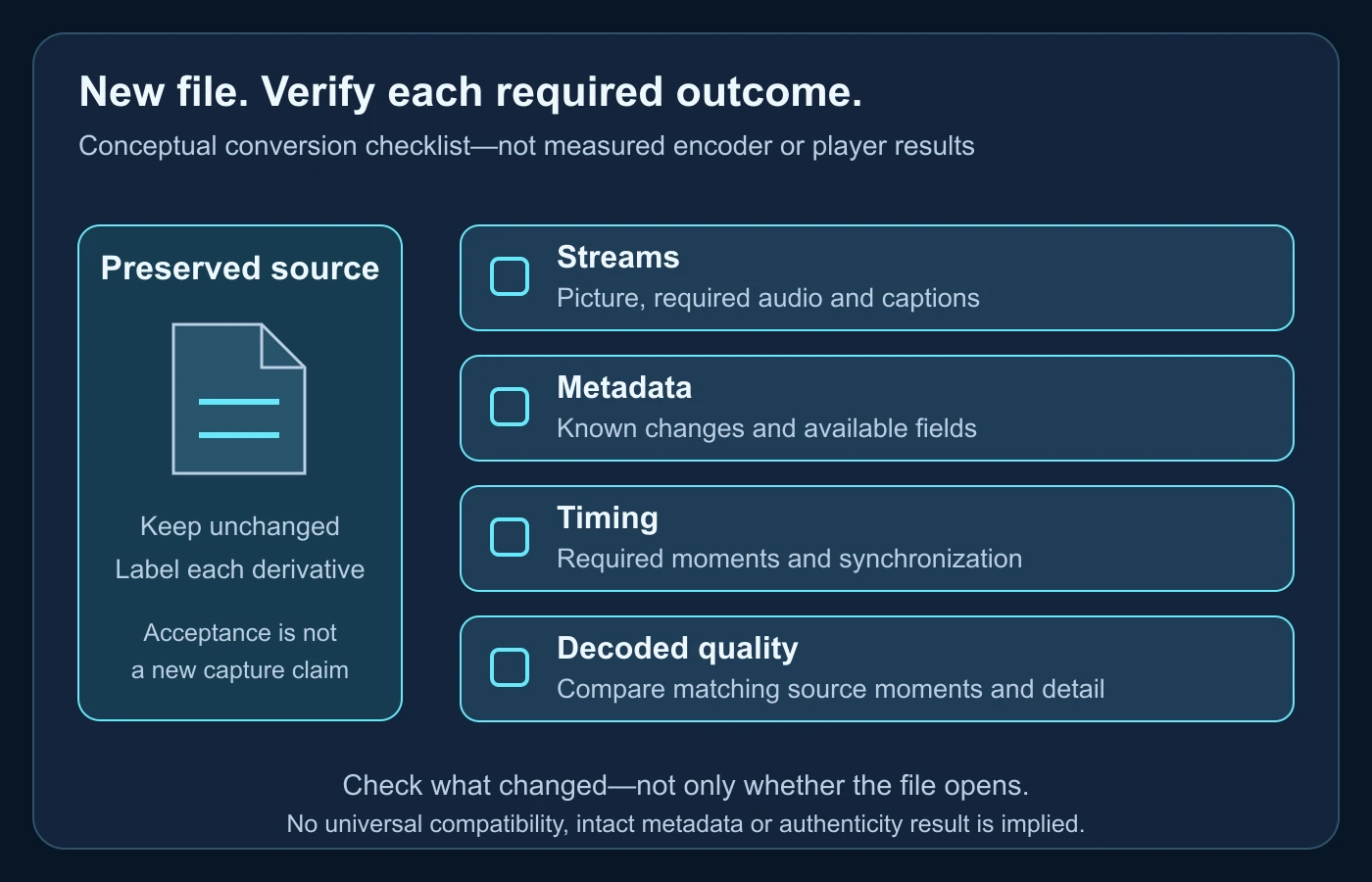
Imagine a team receives a permitted video source for internal review. One colleague wants a different container; another needs a codec their editing workflow can decode. The team keeps the original and plans two derivatives. This is a fictional job, not a performed conversion or a measured quality comparison. Its purpose is to show how the acceptance record differs between operations.
Assess a packaging-only derivative
The team first checks whether the source’s required streams are supported by the requested container. If a stream-copy route is suitable, it records that intended path and the selected tracks. After creation, the reviewer would confirm that the output opens, the required tracks are present and the relevant timing is usable. Successful picture playback alone would not verify every metadata field.
If the target cannot represent a required item, the team should not silently drop it to make the job succeed. It can choose another delivery arrangement or prepare a clearly documented derivative with agreed limitations. The source stays preserved. A container error is a reason to revisit the requirement, not proof that the scene is corrupt or the sender is deceptive.
Assess a re-encoded editing derivative
The second job requires changing the video codec. The team records that the picture will be decoded and encoded again, together with the relevant output choices. It identifies whether audio is copied, encoded or intentionally omitted. The derivative may be useful for editing even though its stream structure and byte-level identity differ from the input.
The reviewer selects a few source moments representing movement, a detailed surface and a transition, then compares corresponding output moments. These are review locations, not a fabricated quality score. If the task concerns a small visible feature, inspect that feature directly rather than accepting the output because its general composition looks similar.
Write a conclusion for each output
The packaging derivative’s record might state that intended streams were repackaged and required playback checks passed, if those checks actually occurred. The editing derivative’s record might state that re-encoding produced a usable working copy with specified changes. Neither record should call the derivative a camera original. In this article, no real job was run, so these are examples of appropriate reporting, not test results.
If an output is rejected, retain its relationship to the source without distributing it as approved. A replacement version requires its own acceptance check. Do not let an earlier successful review cover a later export under the same filename. The source identifier, operation and accepted file should remain connected in the handoff.
Review the full required stream set
Extend the fictional job with two audio tracks: the main recording and commentary. A reviewer who watches only the default playback may not notice that the delivered file lacks the required main track or selects commentary instead. The team therefore records the required track roles before conversion and compares the actual output list afterward. This is a proposed acceptance procedure, not a claim that an encoder was tested.
Captions deserve the same care. If the task requires selectable captions, a picture containing visibly burned-in text is not automatically an equivalent delivery. It changes how the recipient can use the words and may introduce another picture-processing operation. Ask what the destination actually needs rather than accepting any export in which some text appears.
A clear acceptance note can say that the required video and main audio are present, commentary is omitted by agreement and captions remain available in the intended form—but only after those checks occur. If a field or track cannot be inspected, keep that item unverified. Do not silently replace the required set with whichever streams happened to play during a quick preview.
Read container and stream information before guessing
FFprobe’s official manual documents separate format and stream reports, plus structured output. Those can describe an input without writing a converted video. A documented example is ffprobe -v error -of json -show_format -show_streams review-input.mp4, using the actual local permitted path. This article did not execute it or verify an installed version; check your tool’s help and record its version before relying on output. FFprobe: Main options
Inspect the input and derivative with a comparable method. Record relevant codec identifiers, stream count, stored dimensions, duration and available fields. An absent field is not necessarily evidence that the scene was changed; the format or inspection path may not expose it. Resolve important differences through the operation record and suitable source comparison rather than inventing a history from one value.
Keep reports private when they contain private filenames, locations or other sensitive information. A public article or recipient summary does not need the entire dump. Copy the necessary findings into a bounded review note and retain appropriate access to the detailed record. A technically detailed report can still be concise and privacy-conscious.
Metadata can change without the event changing
An export can create new file-level dates or software information. Metadata may also be omitted or intentionally changed during processing. The video-metadata guide explains how to interpret such fields with context. This conversion article does not turn a timestamp or encoder label into proof of capture time, deception or a particular edit.
Record known transformation details before they become uncertain. “Container repackaged for this workflow” communicates a different history from “camera file obtained directly.” If the source arrived as an unknown platform copy, keep that uncertainty through conversion. A fresh local export does not make its earlier origin known.
If the task requires provenance information, confirm what survived in the output and retain the source separately. Do not assume an ordinary successful transcode preserves all signed records or interpretation context. Conversely, a missing record may reflect an unsupported workflow rather than intentional concealment. Identify the actual copy you inspected before assigning meaning to absence.
Check timing and synchronization as their own outcomes
A picture can look right while timing differs. Compare the beginning, a representative middle interval and the end, especially when audio matters. Look for unintended omissions, duplication or loss of synchronization. A reported overall duration is a useful starting point but does not independently establish that every moment appears in the intended way.
Keep frame timing separate from the coding arrangement. A decoder’s order of work is not necessarily the order the audience sees, and conversion can change coding structure without changing the intended sequence. This guide does not recreate a B-frame or variable-frame-rate tutorial. It asks the reviewer to check that the required timing remains usable and to record changes rather than infer them from one frame-rate label.
If a player interprets the file differently, investigate the target and source with appropriate tools. Do not immediately re-encode repeatedly in response to one preview issue. A playback configuration, missing track or wrong output selection may be the actual problem. Preserve the unsuccessful version long enough to understand the difference, without confusing it with the accepted derivative.
Include important color requirements in the review
If the source and destination have different color-handling requirements, record the intended treatment rather than judging one brighter preview as better. A codec label or container extension does not by itself describe every color-related property. Inspect what the workflow documents and what the delivered version reports, then compare it in an appropriate viewing setup.
Bit depth concerns the precision used to represent sample values, not whether the event is genuine. A changed value can be a meaningful technical difference without proving deceptive editing. If a color transformation was requested, keep it in the operation record. If it was not requested, investigate the export path and the receiving viewer before assigning a cause. The goal is a suitable derivative with explained changes, not a claim that every field must remain identical after an intentionally different encoding.
Compare decoded appearance at a meaningful scale
Use the same scene moments and a stated viewing scale. A tiny output thumbnail can hide quality changes, while an extreme enlarged crop can make ordinary processing look dramatic. Compare the features that matter to the recipient’s purpose. Fast movement and detailed surfaces can expose different weaknesses from a stationary flat background, so avoid treating one pleasant frame as the whole test.
Distinguish deliberate processing from unintended loss. A resized viewing copy may be acceptable at its intended scale even when unsuitable for inspecting fine detail. A larger output cannot recover information already absent from the source merely by carrying more pixels. Document which task the derivative serves instead of calling every conversion an improvement or every difference a failure.
The compression-artifact guide provides the specific visual-degradation context. Do not attribute a new block, soft texture or ringing edge automatically to AI generation. Compare the source and output and consider ordinary encoding and processing. Conversion history can explain a difference without settling the authenticity of the depicted event.
Deliver the derivative without replacing the evidence
Send a short record with the purpose, source identifier, known operations, required checks and accepted output. Tell the recipient which file is preserved and which is for viewing or editing. If the derivative omits a track or changes an important property by agreement, make that limitation clear. A successful upload notification is not an acceptance check of the resulting media.
The video-authentication guide owns the fuller evidentiary preservation process. Here, the conversion decision should remain narrower: retain the source, explain the transformation and avoid using the derivative as if it were unprocessed evidence. Important investigative questions may require qualified examination rather than an ordinary export checklist.
- State why conversion is needed and what the recipient requires.
- Identify the container and required streams separately.
- Choose a packaging or encoding path supported by the actual workflow.
- Record known changes to picture, audio, timing and metadata.
- Inspect the corresponding source and output moments.
- Label the accepted derivative and retain the preserved source.
Finish with a limited claim about the output you checked. Compatibility, smaller delivery size and editing convenience can be legitimate reasons to create another version. They do not make it the original or establish the source’s truth. A documented transformation lets conversion solve its practical problem without obscuring where the video came from.
Conversion can remove useful clues.
Use the original video for analysis whenever it is available.
Questions about video conversion
Is changing an extension transcoding?
No. Renaming a file does not decode and encode its streams or establish compatibility with a different container.
Does a remux preserve identical file bytes?
Do not assume so. Packaging can change while selected encoded media is copied; whole-file identity is a separate comparison.
Can only the video be transcoded?
Yes, a workflow can treat streams differently. Record which audio, video and other required tracks were copied, changed or omitted.
Does lossless encoding restore a compressed original?
No. A lossless stage does not recreate information already absent from its input or guarantee every original container field survived.
Does an encoder tag prove deception?
No. It can reflect an ordinary processing path. Interpret it with the source, operation record and relevant media evidence.
Primary sources used
- FFmpeg: Streamcopy and Transcoding — packet copying versus decode/encode and per-stream treatment.
- FFprobe: Main options — format, stream and structured inspection output.
- WebM Project: Container Guidelines — concrete container, stream and timing separation, not a universal compatibility matrix.