
AI phishing uses AI-assisted content to support a deceptive request for access, information, money, or another sensitive action. A message may sound fluent, personalized, and familiar without being authorized. Do not try to prove who wrote it before choosing safely. Pause the requested action, reach the person or organization through an independently trusted route, and confirm the specific request—not just the name or logo.
This guide focuses on reviewing polished email, text, and related messages before responding. It does not provide attack prompts, phishing templates, or instructions to build a fraudulent page. Its worked examples are fictional defensive exercises, not messages we sent or attacks we measured. Platform-specific messaging scams, broader identity impersonation, and executive-payment procedures remain separate topics.
What AI can change, and what it cannot authorize
The FBI’s December 2024 generative-AI fraud advisory describes criminal use of generated text, translations, images, voices, and videos to make deception more believable. The warning supports taking polished communication seriously; it does not say that every well-written message is AI-generated or that every scam uses AI. Do not turn a general threat capability into an unsupported verdict about one sender.
A better-written message can remove some of the awkwardness people once used as a warning sign. But grammar was never authorization. A legitimate organization may make a typo, and an unauthorized sender may write perfectly. The safety question is whether the requested action belongs to a verified relationship and process. That question still works when the text’s authoring method is unknown.
Separate three layers in your notes: the presentation, the claimed authority, and the requested control. Presentation is the writing or media that makes a message feel credible. Authority is who supposedly permits the action. Control is what you surrender or change if you comply. A familiar signature can support recognition while leaving both authority and the requested control unverified.
AI also does not make ordinary synthetic content inherently malicious. Someone may legitimately use an assistant to draft a customer email or translate a notice. Judge the authorization and action rather than punishing a particular writing style. The goal is to avoid both false reassurance and false accusation, especially when you have no direct evidence of how the text was produced.
Replace the typo test with a sensitive-action test
Read the request in plain language. Does it want you to enter a password, supply a code, approve a login, disclose a document, install software, or change a payment arrangement? Write that action separately from the persuasive story. “Prevent account suspension” is a claim; “sign in through this supplied destination” is an action. Do not let the claim hide the control being requested.
The FTC’s phishing guidance describes messages that use familiar companies and account stories to obtain information or prompt unsafe interactions. Use that warning as context, not a rigid catalog of forbidden words. An invoice or account notice can be legitimate; the important step is confirming it through the established service rather than relying on the unexpected message alone.
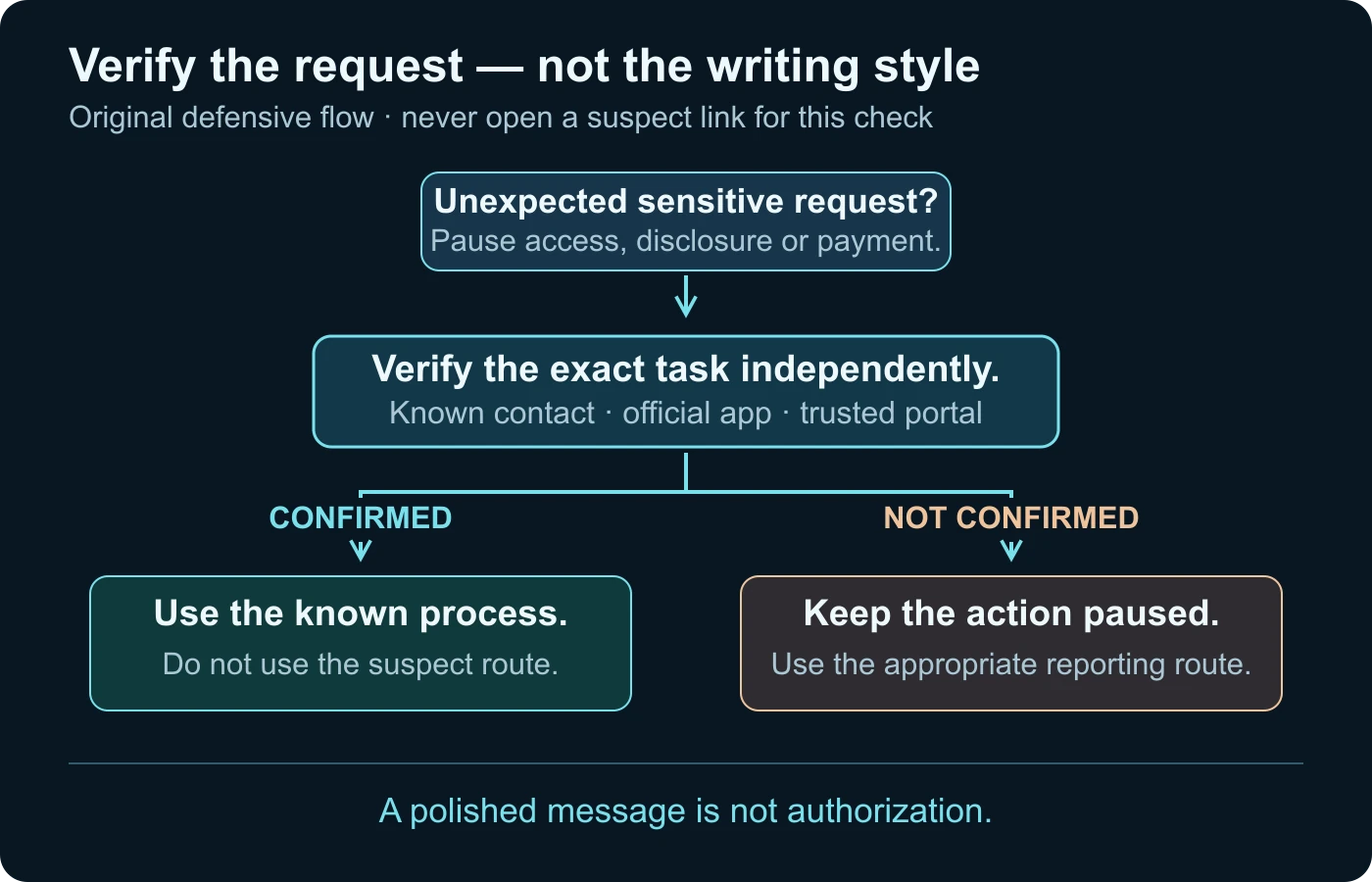
Urgency can make verification feel like a delay you cannot afford. Treat it as a reason to use the normal trusted process, not an excuse to skip it. If the account problem is genuine, opening the official app or contacting the provider through a known route can establish that. If you cannot confirm it in time, keeping the sensitive action paused is a reasonable decision.
Personal details do not solve this test. A message may mention your name, a public event, or a familiar role. That context can make it feel relevant without showing that the sender controls the legitimate organization or is authorized to handle credentials. Do not reveal additional private details to “test” the sender. Verify the request outside the conversation instead.
Check the sender without opening the supplied destination
Look at the sender information your email or messaging interface actually exposes. A display name and avatar are not the same as a verified account address or contact relationship. Compare what you see with the contact information you already had. Record unfamiliar or changed details without assuming that every change proves fraud; an organization can change channels legitimately, but the change needs confirmation.
If an email claims to come from a business, compare its visible address with that business’s established contact context. Do not rely on a logo, professional footer, or a link label as proof. Nor should an apparently correct address alone settle a high-risk request. The request may still need authorization checks, and a familiar account can be misused. You do not need to conduct a private investigation of the sender to pause it.
For links, the safest routine review is often not to use the supplied link at all. Open a known bookmark, the already installed legitimate app, or a contact route you established independently. Do not visit a questionable page with fake credentials “to see what happens,” download its attachment, or scan its QR code as part of an authenticity experiment. Those actions are unnecessary for a defensive decision.
Do not assume a destination is safe because a browser shows an encrypted connection or a familiar-looking page. Those observations are different from the relationship you are trying to confirm. You can verify an account notice from within the established service without accepting the message’s route. If you are unsure how to reach the service, seek help through a trusted source rather than following an unsolicited support offer.
Forwarding a live suspect link to a friend can expand the problem. If you need assistance, share the relevant visible details through an appropriate safe route and make clear that the message is unverified. Follow your organization’s reporting procedure for work material. Do not distribute credentials, private attachments, or a full customer conversation to unrelated people while asking whether it looks suspicious.
Verify the particular request through an independent channel
An independent channel is one whose origin does not depend on the suspect message. For a known person, that might be a number already in your contacts. For a service, it may be its legitimate app or an established account portal. A second address or phone number supplied by the same message is not independent merely because it uses a different medium.
Ask a specific question. “Do you have an account notice?” is weaker than “Did your service request this particular action for my account?” Confirm what is needed and how the verified organization expects you to do it. Do not read out a one-time code or password as part of asking that question. Use the genuine service’s own secure process rather than copying instructions from the unverified message.
The FTC recommends using a phone number or website you know is real when a message claims a problem. The FBI’s AI-fraud advisory similarly emphasizes recontacting a claimed organization directly. This does not guarantee every result, but it removes the sender’s control over the verification route. See the FTC’s suspect-message response guidance and the FBI advisory.
| Message claims | Sensitive action | Independent check |
|---|---|---|
| An account needs attention | Login or personal-information entry | Open the established app or account route separately. |
| A contact needs urgent help | Disclosure or payment | Recontact them through a previously trusted channel. |
| Support needs a security step | Code sharing, software installation, or approval | Use the provider’s independently accessed support process. |
| A familiar organization changed instructions | New destination or changed access | Confirm the exact change with the established contact. |
| A video proves authorization | Any consequential action | Confirm the request separately from media analysis. |
A confirmation can also be negative or incomplete. The organization might say it did not send the message, or you may be unable to reach it. Record which outcome you actually obtained. “Not confirmed” is not the same as “AI-generated,” but it is enough to keep an unexpected sensitive action paused. Your decision does not need a label for the author’s technology.
When a voice note, image, or clip supports the message
Media can make a message feel independently supported even when it comes from the same unverified source. A voice note, headshot, screenshot, or clip may simply repeat the claim. Ask what independent fact the media establishes. A face that looks familiar does not confirm who controls the account or whether a new login or payment instruction is authorized.
The FBI advisory explicitly discusses generated audio and video in fraud contexts. Keep its warning proportionate: no synthetic technique is required for a misleading request, and no appearance-only test can safely resolve every case. The AI impersonation guide owns the broader face, voice, and identity chain. This article focuses on the message’s requested action.
If a clip matters, preserve the source and check where it was published before treating it as a current personal instruction. A real earlier recording can be attached to a new false message. The reverse video search guide covers earlier-source discovery. Do not wait to finish that analysis before refusing an unverified request for access or credentials.
A technical video result also cannot certify a destination. A genuine speaker may appear above an unrelated link or within an unauthorized account. The scam video guide addresses the relationship between media, offers, and destinations. Use media analysis for the media question; keep request authorization as a separate decision.
A fictional membership notice: review without clicking
Imagine an email claiming that a fictional community membership will be suspended unless you complete a security update immediately. It is grammatically clean, mentions the group’s name, and includes a professional signature. We do not provide a full phishing template, actual sender address, or active link. This is an invented decision exercise, not a reported attack or an AI-detection test.
First summarize the claim and requested control. The claim is an urgent membership problem; the control is a new login or information submission through the message’s route. Notice that writing quality does not answer whether the membership service issued it. You can make a safe next choice without deciding whether a person or model drafted the email.
Next open the membership service using the route you already use, without following the email’s destination. Check whether that established account presents the relevant notice. If the request is not visible, contact the group through its known support process and ask about this specific change. Do not use a “verification” phone number printed only in the unexpected email.
Suppose the established contact says that no such update was requested. Record that finding and follow the appropriate reporting process. Do not continue questioning the sender in an attempt to expose how the text was generated. If the contact cannot confirm either way, keep the action paused and label the message unresolved. No response is needed simply because a polished message demands one.
Now imagine the organization confirms a legitimate account task but says it must be completed inside its ordinary portal. That confirmation does not require opening the original message’s link. Complete the task through the verified process, if appropriate, and retain the distinction. The useful outcome is not “the email looked genuine.” It is “the exact task and approved route were independently confirmed.”
This exercise makes the decision reproducible. A colleague can see the claim, the requested control, the route used for confirmation, and the result. It avoids speculative claims about AI authorship and does not train anyone to craft a better deceptive message. The same review structure can apply across channels while preserving the differences in their reporting and account controls.
Record a useful result without amplifying the message
Make the review note about the decision, not a dramatic description of the suspected attacker. For the fictional notice, a short record can identify the membership task, the independently opened portal, the established contact used, and what that contact confirmed. Record the time of your check when it matters to the task. Do not copy an active suspect destination into a broadly shared worksheet just to make the record look complete.
Keep observed facts separate from interpretation. “The known contact did not authorize this update” describes a result. “The sender used an AI model” requires different evidence that the review did not obtain. Likewise, the absence of a notice in one portal view may leave the matter unresolved rather than prove that no legitimate account issue exists. Preserve that uncertainty while keeping the unsafe route out of your next step.
If two apparently legitimate contacts give conflicting answers, clarify the precise task through the organization’s established process. A department may confirm a general announcement while another cannot verify the particular account request. Do not let the unverified sender resolve the conflict by supplying a new helper or demanding that you ignore the ordinary portal. Your goal is an approved action and route, not winning an argument about the email’s appearance.
Share only the detail the appropriate reviewer needs. A work security team may have a defined way to receive message evidence; a public discussion does not need private account identifiers or documents. This makes the exercise useful without turning a defensive worksheet into another distribution channel for the questionable message. The record should explain why an action was completed, declined, or left paused.
After an interaction, respond to what happened
If you already engaged, list the actions you actually took: replied, opened a page, entered a password, approved a prompt, sent documents, installed something, or paid. Do not describe all of them as merely “clicked.” That detail guides the relevant provider or security team. Stop providing new information while you seek help through an independently accessed route.
The FTC’s response guidance for people who were scammed distinguishes exposed account credentials, device access, personal information, and payments. It advises appropriate account protection and prompt contact with affected payment providers. This is not a guarantee of recovery or a legal deadline. Follow the legitimate provider’s or your organization’s instructions for your actual situation.
If you entered a password, use the genuine service to secure the affected account and consider other accounts that reused it. If an account is locked or you approved an unfamiliar access step, use its official recovery and support process. Do not send codes to an unsolicited helper who claims to reverse the incident. An account problem is not a reason to surrender control to another unverified person.
If this involves a work account or device, contact your established security or IT team promptly. Preserve the relevant message and describe any files or permissions involved without reopening questionable material. If money or financial details were involved, contact the institution through a trusted route rather than negotiating with the sender. If you are uncertain about device safety, seek appropriate qualified assistance.
Keep sensitive incident details private. A public warning can explain the pattern without publishing identity documents, passwords, private links, or another person’s conversation. Use the applicable platform, organizational, or official reporting route. This guide does not determine every jurisdiction’s reporting requirements; the aim is accurate containment information, not a public accusation about an unknown operator.
Build a small habit that survives better-generated text
Agree in advance how you will verify consequential requests from familiar people and services. That may be an established phone number, a known account portal, or an internal approval route. The habit matters because improvising under pressure lets the incoming message define the process. Do not treat every new communication as fraudulent; reserve the stronger check for the action and uncertainty involved.
Use account protections supported by the service and keep software current. The FTC’s phishing guidance recommends layers such as updates and multi-factor authentication. They complement request verification; they do not make an unexpected code-sharing or access-approval request safe. No layer should be described as a complete defense against every possible message or misuse.
For messaging-specific account controls, the WhatsApp scams guide provides that narrower context. Do not import its exact menu or device-linking steps into another service. This article’s portable skill is recognizing a sensitive request and leaving the sender-controlled verification path, not memorizing one app’s interface.
End each review with one narrow result: confirmed through a known route, not authorized by the claimed source, or unresolved and paused. If video itself remains a concern, describe that separately. You do not need to know whether AI drafted the message to protect a credential, preserve a source, or decline an unverified action. A good process remains useful when the presentation becomes more convincing.
Questions about polished suspicious messages
Can good grammar prove that a message is legitimate?
No. Writing quality does not establish sender authority or request safety. Confirm sensitive actions through an independently trusted route.
Can I tell that a phishing message used AI from its style?
This guide makes no such claim. Treat authoring method as unknown unless you have reliable evidence. A safe decision does not require proving AI use.
Should I open the link to check whether the page looks real?
No opening is needed for the review flow here. Reach the claimed service separately through a route you already trust and verify the specific task.
Does a familiar voice or video authorize a request?
No. Verify the person, request, and approved process independently. Media analysis answers a different question.
What if the organization cannot confirm the message?
Keep the sensitive action paused and record that the request remains unverified. Do not invent a definite scam or AI-authorship verdict.
What should I report if I already interacted?
Describe the precise action and exposure to the affected provider or established security team. Do not reopen questionable material or send more sensitive information to an unsolicited helper.
Sources and defensive scope
- FBI/IC3: Criminals Use Generative Artificial Intelligence to Facilitate Financial Fraud — generated content and independently recontacting claimed organizations.
- FTC: How To Recognize and Avoid Phishing Scams — sensitive-message recognition, trusted contact routes, and protective layers.
- FTC: What To Do if You Were Scammed — action-specific containment and legitimate provider contact.
Sources checked on 14 October 2026. The membership scenario and decision tree are original fictional educational material. No attack was conducted, no model detection accuracy is asserted, and no offensive construction instructions are provided.
Do not let a convincing clip rush you.
Check suspicious video and verify the request through a trusted channel.