

What is AI upscaling? It is the use of a trained model to estimate a higher-resolution version of an image or video from a lower-resolution input. The output contains more pixels, but those added values are not new camera observations. Upscaling can make media more suitable for a larger display or an editing task while still leaving fine text, facial details, or textures uncertain.
The key question is not simply whether the result looks sharper. Ask which details were supported by the source and which were supplied by the processing. This guide explains that distinction with a mathematical illustration and a comparison worksheet. It does not rank products, claim to recover a person’s identity, or present a generated license plate as reliable evidence.
More output pixels are not the same as more captured detail
Pixel dimensions describe the size of the image grid. Doubling its width and height creates four times as many pixel positions. That arithmetic does not establish what each new position should contain. If a small label was unreadable in the source, a larger grid can represent a more legible-looking shape without proving that the shape matches the original label.
Adobe’s Camera Raw enhancement documentation gives a concrete still-image example: its Super Resolution feature doubles width and height, producing four times the pixel count. That is a documented product behavior, not a claim that every upscaler uses the same scale or that Camera Raw is a video-analysis tool. Keep the product example separate from the general concept.
Consider an invented 320-by-180 image. It has 57,600 pixel positions. A 640-by-360 output has 230,400. The 172,800 additional positions are created during the enlargement. These are derived counts for a hypothetical grid, not a quality measurement. A larger file or a higher-resolution export label does not tell you how faithfully those positions represent a previously recorded scene.
The source may already be a crop, compressed export, or screenshot. Enlarging it does not undo that history. Before processing, identify the file you are using and preserve it. A camera original and a small repost deserve different descriptions even if the upscaler produces equally large outputs. Do not rename the enlarged copy “original” because it is easier to view.
How interpolation differs from a learned estimate
Ordinary resampling places existing information on a new grid. Depending on the method, it may repeat a value or combine neighboring values to estimate a new one. It can produce blocky or smoother appearances, but neither appearance is an independent observation of the scene. A smooth enlargement does not establish that the source contained a smooth surface.
AI upscaling adds a learned model to the estimation. NVIDIA’s mechanism explanation describes predicting a higher-resolution image from the low-resolution input. We use that narrow description, not the article’s marketing claims or historical device specifications. Learned patterns can influence what the output looks like; the model is not returning to the original location and photographing it again.
A learned prior is information acquired from training examples rather than a new measurement of this particular scene. It can help a model produce plausible edges or textures. But “this resembles the kind of texture the model learned” is different from “this exact texture was present on this object.” That distinction matters most when a small detail carries an identity, textual, or evidentiary claim.
Models also optimize different objectives. The original SRGAN research paper illustrates a super-resolution method designed around perceptual and adversarial objectives rather than pixel error alone. It is one research example, not a description of every current upscaler. The relevant lesson is that a visually convincing objective and exact agreement with an unavailable source are different requirements.
Do not assume all systems operate on one isolated still. Some workflows can use multiple observations or additional context. That may change the information available, but it does not justify claiming that any particular feature was recovered correctly without an appropriate comparison. Identify what the documented method actually uses and distinguish supplied observations from inferred output.
A small mathematical example shows the uncertainty
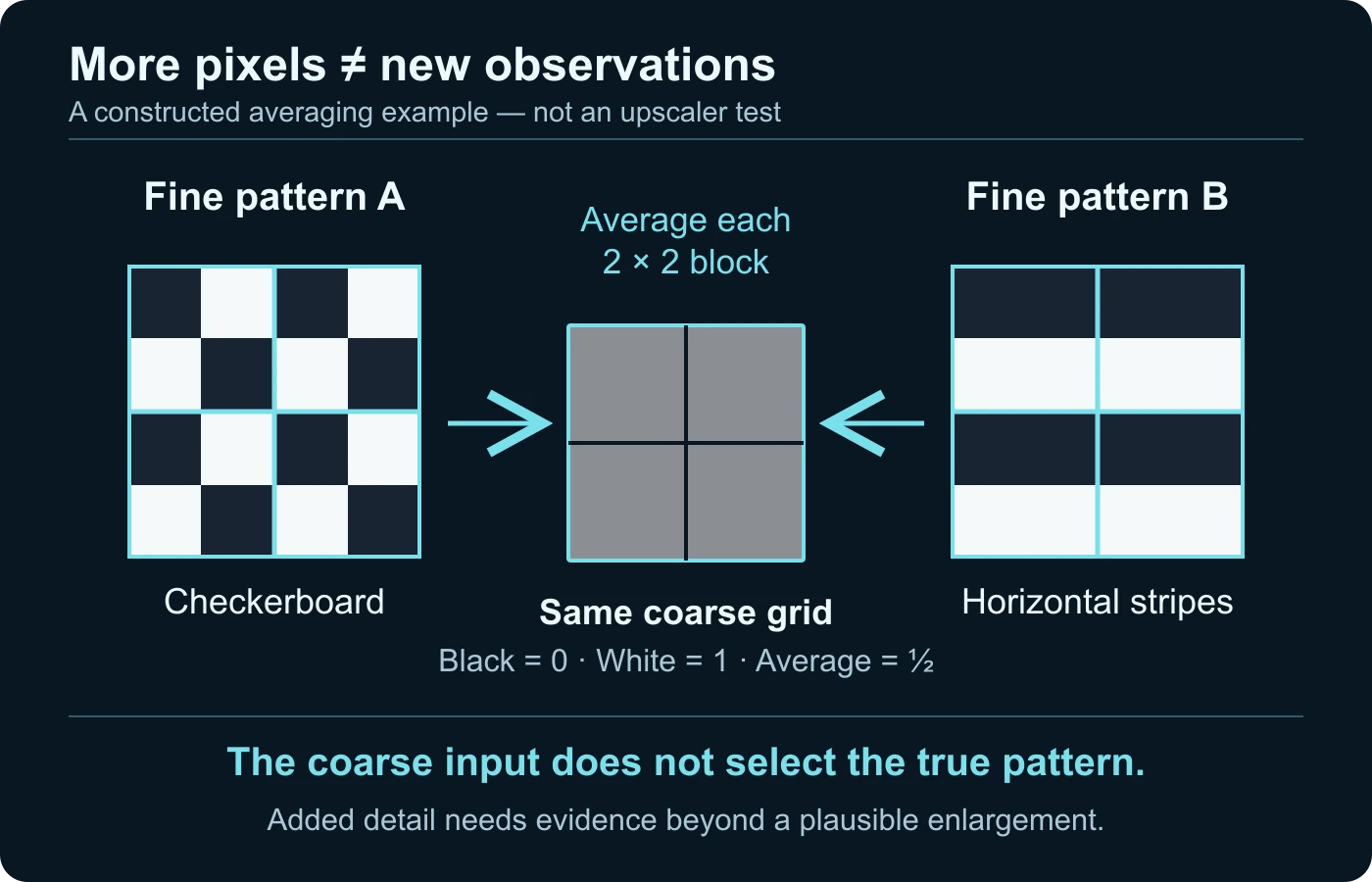
Imagine two different four-by-four patterns containing only black and white squares. In the first, black and white alternate in a checkerboard. In the second, the rows alternate between all black and all white. These are intentionally constructed patterns, not photographs. They are different fine-detail arrangements even though they contain the same overall proportion of black and white.
Now define a simple reduction rule: replace each non-overlapping two-by-two block with its average. In both patterns, every such block contains two black and two white squares. If black is zero and white is one, each average is one half. Both patterns therefore reduce to the same two-by-two gray grid under this particular rule.
Given only that gray grid, the reduction does not tell you whether the original was the checkerboard or the striped pattern. An enlargement can select or suggest one arrangement, but the supplied input has not uniquely established it. This is a mathematical illustration of ambiguity. It is not a claim that a commercial model actually generated either pattern in a test.
Translate the example carefully to a real review. A fine woven texture, tiny text stroke, or facial feature can also be underdetermined by a degraded input. The exact real-world uncertainty depends on how the source was captured and processed. Do not assign the toy model’s averaging rule to an unknown camera. Use it to understand why added detail needs corroboration, not to calculate an authenticity score.
If independent higher-quality material is available, compare the relevant feature with it. That new source may resolve a question the small input cannot. If no such source exists, retain “not established” as an outcome. Generating another sharp-looking candidate is not equivalent to obtaining an independent observation of the same detail.
Review texture, text, and faces differently
A decorative texture may be acceptable when the task is making a background pleasant on a larger screen. The same processing is not necessarily appropriate when a reviewer must establish what a small word or mark originally said. Decide which part of the image carries the claim before judging the result. An improvement in general appearance does not settle the important feature.
For text, compare the source and output side by side at a matched view of the region. Can the source support the letters you are now reading, or were the strokes previously ambiguous? Record any difference in the shape or spacing. Do not submit an upscaled word as a transcription merely because it resembles a familiar phrase. Seek the original sign, a higher-quality frame, or an independent source.
For a face, separate a smoother-looking appearance from an identity claim. Added skin texture, eyelashes, or facial edges should not become the basis for identifying a private person. A convincing likeness can still contain uncertain fine details. This article provides no face-recovery guarantee, similarity threshold, or investigative authority. Use proportionate, privacy-respecting independent verification where the identity matters.
For repeating textures, inspect continuity rather than admiring one close-up. Do seams, lines, and pattern boundaries remain compatible across the region? In video, watch whether the treatment stays coherent as the object moves or becomes partly obscured. A changing output can motivate a processing review, but it is not automatically evidence that the source scene was generated.
A model can also leave an output that is more modest than the source comparison you wanted. Do not pressure the software to invent certainty by increasing enhancement repeatedly. If a feature remains unresolved, the useful conclusion may be that the available source cannot support the requested reading. That limit protects both the review and people affected by an inaccurate claim.
Make before-and-after comparisons answer a real question
Choose a purpose before making derivatives. Are you preparing a presentation, improving viewing comfort, or trying to inspect a particular region? Write down the purpose and the feature you want to evaluate. “Make it better” gives you no stopping rule. A larger output can be a success for presentation while remaining unsuitable for a fine-detail conclusion.
Preserve the source and create a separate processed file. Record the tool or workflow, settings, source dimensions, output dimensions, and any additional operations you knowingly used. If the tool automatically combines enlargement with other adjustments, describe that combination rather than calling it pure scaling. You do not need to reverse-engineer a private model to keep an honest processing record.
View both the whole scene and the relevant region. A dramatic zoom can make every source look inadequate, while a tiny thumbnail can hide output problems. Keep the comparison scale and crop clear to anyone else reading your note. If the output is shown larger for a presentation example, say so; do not imply equal inspection conditions when they differ.
| Question | What to record | What not to infer |
|---|---|---|
| Did the grid get larger? | Source and output dimensions, scale factor | That new scene evidence was captured |
| Did a word become legible-looking? | Which strokes the source supports and which remain ambiguous | A reliable transcription without corroboration |
| Did texture change? | Location, continuity, and processing settings | That the added pattern belonged to the original object |
| Does video detail stay stable? | The relevant time range and behavior during movement | The identity of an unknown generator or editor |
| Is the copy easier to use? | The particular presentation or review task it serves | That every authenticity question is resolved |
Keep an unprocessed comparison available to the recipient. If the derivative is the only version shown, its appearance can quietly become the baseline for future claims. The video authentication guide covers preservation and integrity more fully. Here, the essential handoff is simpler: identify the derivative and retain its source relationship.
Make the comparison understandable to another reviewer
Before sending a before-and-after pair, check whether both views show the same region and moment. A crop from a different frame may contain a clearer observation that has nothing to do with enlargement. If you changed the frame selection as well as the processing, identify both changes. Otherwise the recipient may credit an upscaler for information that was already available elsewhere in the source.
Give each view a plain role label: source, resized reference, enhanced derivative, or independently obtained comparison. Do not use “before” and “after” as the only description when several operations sit between them. State what the reader should compare, such as an edge shape, a word, or texture continuity. One focused question is easier to evaluate than a dramatic general claim of improvement.
If you prepare multiple variants, retain the ones needed to understand the choice rather than displaying only the most persuasive result. Explain why the selected variant serves the stated task and which feature remains uncertain. A preference for its appearance is a valid presentation judgment, but label it as such. Do not present selection from several candidates as independent confirmation of a source detail.
Finally, let the receiving reviewer reach the unprocessed source through an authorized route. Their ability to compare it is part of the handoff. If privacy or access restrictions prevent sharing the source, describe that limitation instead of asking them to treat the derivative as self-verifying.
A fictional frame review: useful enlargement, unsupported reading
Consider a hypothetical video frame showing a small package label. The package shape is visible, but the printed word is indistinct. You make a larger working copy so a colleague can discuss where the label sits in the scene. No real image, upscaler, or identification task is tested in this example. Its purpose is to distinguish two possible uses of the same derivative.
For locating the label, the enlargement might make discussion more convenient. Mark the region in a separate annotated copy and keep the original frame. That practical use does not require claiming that the tool recovered the lettering. Tell your colleague exactly which copy is enlarged and why you prepared it. A clear source comparison prevents the annotation from being mistaken for capture detail.
For reading the word, apply a different standard. Inspect whether the source supports the letter shapes or whether several readings remain plausible. Do not pick the familiar word because it seems to fit the story. Ask whether another frame shows the label more clearly or whether an independent product record resolves it. The frame-selection guide owns the task of choosing useful original moments.
Suppose the derivative suggests a clear-looking word but the source remains ambiguous. Your note can say that the enhanced view suggests a candidate reading that is not independently established. Do not replace the source caption with that candidate. If the label affects an accusation or identification, the appropriate next step is better source evidence or qualified review, not progressively stronger enhancement.
Suppose an independent earlier recording shows the same label clearly. Compare the context and source relationship before accepting that evidence. The new recording, not the upscaler’s confidence, may resolve the reading. Keep those reasoning steps separate so someone else can understand which finding came from processing and which came from corroboration.
When AI upscaling is useful, and when to stop
Upscaling can serve a legitimate presentation goal: preparing an authorized image for a larger layout, making an old clip comfortable to view, or creating a working copy for discussion. The task should tolerate the kind of estimation involved. Specify what counts as useful and retain a route back to the source rather than presenting the enhancement as a new capture.
If the central need is exact source detail, be cautious about accepting appearance as success. A task involving a tiny symbol, identity, or consequential text reading needs support beyond a plausible pattern. No single slider setting makes an unknown result reliable evidence. Stop when the available source and corroboration cannot justify the intended claim.
Upscaling is also not a substitute for every restoration operation. Focus error, compression, noise, motion blur, cropping, and missing context are different problems. A workflow may combine several changes, but a larger grid does not explain which problem was solved. The compression-artifact guide provides the narrower degradation context when that is the real issue.
Do not use a model’s output to measure its own correctness. If a tool labels an estimate confident, you still need to understand what that confidence refers to and what evidence supports it. Another tool producing a similar texture may share assumptions rather than provide independent ground truth. State the limit when a reference is unavailable.
Keep video processing and authenticity conclusions separate
For video, preserve the time-based source rather than judging a single enhanced still. Note the processed interval and any known changes to resolution or timing. View the output at the intended speed and compare it with the relevant source moments. A nice-looking paused frame can conceal an inconsistent treatment across motion, while a transient problem in a derivative may not exist in the original.
Do not diagnose AI generation of the original solely from an enhanced output. The processing may add synthetic estimation to otherwise camera-captured material. Conversely, an unenhanced synthetic clip can look clean. Identify which file was analyzed and what happened to it before interpreting a result. The video forensics guide places processing, source, and content findings in a broader evidence framework.
A final note can distinguish three levels: the source observation, the derived representation, and the supported conclusion. For example, “the source word is unresolved,” “the enlargement suggests a candidate,” and “no independent reading is established.” That is more informative than declaring the image either useless or perfectly restored.
When sending an enhanced copy, include its purpose, source identifier, known settings, and the questions it cannot settle. Keep any private source material under appropriate access controls. Do not distribute facial or personal details merely because processing made them appear clearer. Better presentation should not expand the scope of an investigation without a legitimate reason.
The practical habit is simple: use more pixels when they help the task, but keep the evidence boundary visible. Enlargement can support viewing and discussion. Newly captured evidence, source corroboration, and exact historical detail remain different things. An honest comparison lets useful enhancement coexist with uncertainty instead of hiding it.
Questions about inferred detail
Does AI upscaling create new pixels?
Yes. A larger output grid needs additional pixel values. Those values are estimates from processing, not new camera observations of the scene.
Is every AI upscaler a generative adversarial network?
No. SRGAN is one research example. Methods and objectives vary; check the documented workflow rather than assuming one architecture describes every product.
Can an upscaled word or face be reliable evidence?
Not merely because it looks clear. Check what the source supports and obtain proportionate independent corroboration before making a consequential reading or identity claim.
Does doubling width and height double the pixel count?
No. It multiplies the pixel count by four. That arithmetic says nothing by itself about the accuracy of added detail.
Should I delete the smaller source after enlargement?
No. Preserve it and label the enlarged derivative. The source is necessary for reviewing the processing and its limits.
Can DetectVideo AI restore missing image detail?
This guide makes no such product claim. DetectVideo AI analyzes supported video for relevant signals; it is not presented here as an image-restoration or identity-recovery service.
Sources and illustration limits
- Adobe: Improve image quality using Camera Raw — specific still-image Super Resolution behavior.
- NVIDIA: What Is AI Upscaling? — trained prediction concept; historical product marketing is not independent accuracy evidence.
- Ledig and colleagues: Photo-Realistic Single Image Super-Resolution Using a Generative Adversarial Network — original research on perceptual objectives and estimated output.
Sources checked on 14 October 2026. The grids and label scenario are original constructed illustrations. No actual upscaler comparison, identity test, camera experiment, or quality benchmark is claimed.
More pixels do not automatically mean more truth.
Analyze the best available source clip and keep its enhancement history.