

To check potentially fake LinkedIn profiles, separate three questions: who the account claims to represent, whether its professional claims have independent support, and whether its current request is authorized. A polished headshot, detailed career history or familiar company name cannot answer all three. A sparse profile is not automatically fake either. Verify the particular relationship before sending money, documents or privileged information.
This guide focuses on the professional introduction: a recruiter contacts you, a potential collaborator presents a biography, or an account claims to speak for an employer. It provides an original claim-contact-request worksheet and a fictional walkthrough. It does not ask you to diagnose someone’s identity from their face, collect unnecessary personal records or treat normal privacy choices as misconduct.
Define which profile claim matters
A LinkedIn profile can contain a name, photograph, employment history, skills and contact details. These are separate claims. Even when a person exists and a photograph depicts them, a particular role, qualification or authority to act can remain unconfirmed.
Start with one sentence that explains why you need to trust the account. “This person is authorized to recruit for this vacancy” is more useful than “this profile looks genuine.” The first sentence points toward an employer and a specific hiring process. The second encourages an open-ended search for reassuring appearances.
LinkedIn’s Professional Community Policies prohibit fake profiles, misleading professional information and false associations with organizations. A policy defines expected conduct; it does not make every displayed claim independently verified. Use the platform’s protections alongside your own proportionate checks.
The relevant claim also determines how much evidence is reasonable. A public discussion about an industry event needs less verification than a request for identity documents or administrative access. Do not escalate a casual connection into a private-person investigation merely because the account has an unfamiliar name.
Keep uncertainty specific. You can know that an organization exists while not knowing whether the sender works for it. You can confirm someone’s role while still needing to verify a changed payment instruction. A narrow unresolved claim is easier to investigate than a sweeping accusation about the entire person.
Incomplete is different from inconsistent
LinkedIn’s fake-profile guidance explicitly warns that incomplete profiles may belong to new or private members. Missing information gives you less material to check; it does not by itself establish deception. Look for a relevant contradiction or suspicious request rather than using profile completeness as a verdict.
A person changing careers may have a short history. Someone doing confidential work may omit clients or project details. A member may choose not to post a photograph. None of those observations gives you permission to infer nationality, character or professional competence from appearance.
An inconsistency is more useful when it can be tested. For example, the account claims to recruit for a named role, but an independently reached company contact cannot identify that process. Record what was asked and what was confirmed. A general inability to find the person on the internet is weaker than a specific contradicted claim.
Dates can also need ordinary explanations. Freelance work may overlap with employment; an old company may have changed its name; a profile may be out of date. Ask a relevant, neutral question rather than assuming that every overlapping period is impossible. The response should be assessed alongside independent evidence, not rewarded merely for sounding confident.
Your decision can remain practical while the identity question stays open. You can decline an unverified request without publicly declaring the account fake. That protects your information and leaves room for a legitimate person to supply an appropriate verification route.
Check the employer outside the sender’s route
A profile’s employer link is a lead, not independent confirmation that the account holder works there. Likewise, a website supplied in a message can belong to a different organization, a copied page or an unrelated party. Begin from a company location you already trust or establish independently.
Find the company’s official contact or careers route yourself. If a recruiter claims to represent a vacancy, confirm whether the vacancy and the proposed process belong to that employer. Do not make the sender’s phone number, shortened link or attached contact sheet the only path through which you verify the sender.
Compare the exact organization, not just a familiar word in the name. Similar company names and brand variations can make a relationship look plausible. Record which organization you reached and how you established that route. A search-result snippet or copied logo alone is not a completed company check.
Email domains are useful context but not a whole identity test. A personal mailbox can be legitimate for some independent professionals, while a professional-looking domain can still be unrelated to the claimed employer. Ask whether the organization can confirm the particular contact and process rather than treating either mailbox style as decisive.
A short neutral question can be enough: “An account claiming to represent your organization invited me to discuss this role. Is this contact and application route authorized?” Share only the information needed to identify the request. Do not send a passport, salary history or confidential project file to prove that you are serious.
Review the profile image without making it an identity test
A profile picture can be copied, retouched, generated or simply taken in a studio. Visual polish is not a reliable way to distinguish those possibilities. Ask whether a source relationship can be supported, not whether the portrait looks too attractive, too professional or unfamiliar.
If you have a legitimate reason to examine image reuse, review the source pages behind any search result. A similar photograph may belong to the same person, a look-alike or a different context. A thumbnail is not enough to establish who controls the LinkedIn account using it.
The existing reverse face search guide explains candidate matches, source pages and privacy limits. Use it for that narrower discovery task rather than treating face search as a legal-identity check. Prefer the least invasive method that can answer the actual question.
No search result is also inconclusive. Public indexing is incomplete, and legitimate people may have little visible imagery. Do not use an absence of matches to declare that a face is generated. Equally, finding an older real photograph does not authenticate a newer account’s biography or message.
Keep image evidence attached to its scope. “A candidate page may contain the same photograph” is a lead to review. “This account belongs to that person” requires additional support. Avoid publishing private-person photographs or personal details merely to invite others to speculate about the account.
Read verification details, not just the badge
LinkedIn’s verification documentation distinguishes identity, workplace and educational-institution verification. It says members can inspect active verification details and that availability differs. Check the actual verified information relevant to the claim instead of treating every badge as one all-purpose endorsement.
For example, a verified association with an organization does not logically establish authority to change its bank details or make a confidential offer. Identity information does not independently validate every career statement. These are evidence boundaries, not claims that the verification feature is useless.
Missing verification is not an automatic fake-profile finding. LinkedIn describes verifications as optional and subject to eligibility. A member who has not completed an available process, or cannot use a particular process, should not be labeled fraudulent on that basis alone.
Use the current official help page when the interface matters. Badge placement and supported options can change. This guide does not claim to have tested your account’s menus or availability. A screenshot pasted into a message is also different from inspecting the relevant information on the actual platform.
Continue to verify the request independently. An apparently legitimate account can still send an unexpected instruction, and the instruction can need confirmation even when the person’s profile claims are supported. Trust should attach to the specific action you are considering, not permanently transfer from a symbol.
Check the capacity in which a person is contacting you
Consider a hypothetical consultant who genuinely works with an organization but contacts you about a separate project. The association can be real while the new project’s authority remains a different question. Ask whether the person is acting as an employee, an outside supplier or an independent collaborator, and which organization is responsible for the proposed agreement.
Your record should preserve that distinction. An organization confirming that it knows the consultant is not necessarily confirming that it issued the invitation or controls the destination for your documents. A familiar intermediary can introduce a legitimate opportunity, but you still need a clear route for verifying who requested the action and where it should go.
This check also avoids unfair conclusions. An external recruiter or freelancer may have an ordinary relationship that does not resemble a full-time staff profile. Confirm the relevant capacity instead of demanding that every legitimate professional fit one employment pattern. The goal is an attributable process, not a judgment about how somebody arranges their working life.
Separate professional contact from a sensitive request
The safest time to pause is before the conversation becomes costly or intrusive. Identify what the sender wants you to do now: discuss a role, send a document, install software, provide an access code or transfer money. An ordinary introduction and a sensitive action deserve different verification thresholds.
The FTC’s job-scam guidance warns against paying for a promised job and against depositing a supposed employer’s check and sending money onward. It also advises independent research and cautions that no complaints do not guarantee honesty. These are concrete request patterns, not a visual diagnosis of a LinkedIn portrait.
If a message shifts from a routine conversation to a demand for money or confidential information, recheck the process through the employer’s established route. Do not let earlier friendly exchanges remove that checkpoint. A new destination or changed instruction is a new claim to verify.
You do not need to prove fraud before withholding information. Say that you will continue through the organization’s confirmed procedure. Avoid sending authentication codes, account passwords or unrelated client information to a professional contact. A role description does not establish a need for those secrets.
Moving off-platform is context, not an automatic verdict. Professionals use email and calls legitimately. The more informative question is whether the new channel and request can be confirmed independently, especially when the sender discourages verification or insists on immediate secrecy.
An original claim-contact-request worksheet
This worksheet is an organizational aid, not a fraud score. It separates what the account says, where confirmation came from and what the contact is asking you to do. Fill only the relevant rows; you do not need to collect a complete personal biography.
| Layer | Specific question | Useful independent support | Limit to keep |
|---|---|---|---|
| Person | Who is this account claiming to represent? | Appropriate attributable public or organizational confirmation | A photograph alone does not prove account control. |
| Employer | Which organization and role? | An independently reached official contact | A named company is not a verified association. |
| Process | Which vacancy, project or appointment? | The organization’s confirmed process | A genuine organization can be impersonated. |
| Request | What action and destination? | Confirmation through an established route | Earlier trust does not validate a new instruction. |
| Decision | What can safely happen next? | A bounded record of confirmed and unresolved claims | Uncertainty is not proof of misconduct. |
Include when you reviewed the claim, because employment and contact details can change. Distinguish a source’s own statement from something copied elsewhere. Several websites repeating the same biography are not necessarily several independent confirmations.
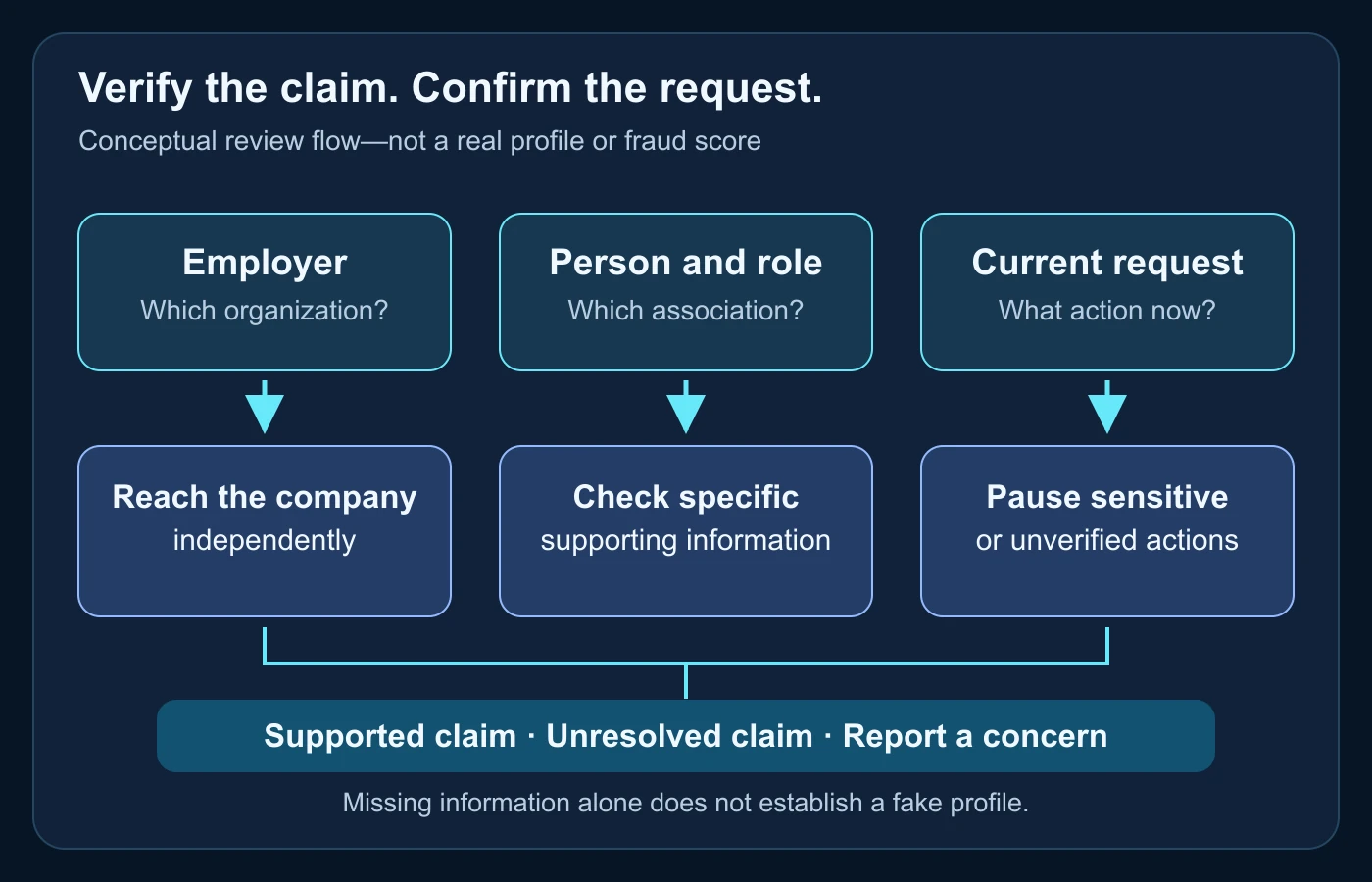
Write a short next action beside an unresolved row. “Confirm this recruiter through the published company contact” is useful. “Investigate everything about this person” is neither focused nor proportionate. The worksheet should reduce uncertainty without creating a private-data collection exercise.
A fictional profile-review walkthrough
Imagine a fictional account called Rowan that claims to recruit for Example Studio. Rowan sends a plausible role description and asks you to continue through a link in the message. The company, profile and request are invented for this walkthrough; no real account was investigated or tested.
First pass: do not overinterpret appearance
The account has a short work history and a polished portrait. Record those observations without deciding that either proves fraud. Your actual task is to confirm the recruiting relationship and the proposed application route, not to determine whether a stranger deserves a social-media account.
You independently locate Example Studio’s official contact route within the fictional scenario. You ask whether Rowan and the named vacancy belong to its process. Until that relationship is confirmed, you do not submit sensitive documents through the sender’s link. That is a risk decision, not a finding about the account holder’s identity.
Two possible responses lead to different conclusions
Suppose the organization confirms both the contact and the process through the independently established route. Your record can say that the particular recruiting relationship is supported. It should not say that every statement on Rowan’s profile is proven or that any future payment request will automatically be authorized.
Alternatively, suppose the organization cannot confirm the role or supplied destination. Record the precise response and keep the request paused. There may be an outdated listing, a mistaken company name or impersonation; more evidence may be needed to distinguish them. Avoid expanding the response into facts the organization did not supply.
If the conversation then asks for an upfront payment to secure the supposed job, treat that request as a separate concern and consult the official scam guidance. You can stop engagement and report the relevant behavior without claiming that you identified the real person behind the account.
Keep the record small enough to be useful
A concise handoff identifies the profile link, relevant claim, independent contact route, response and unresolved request. Redact unrelated private information. Someone reviewing your note should be able to follow what you checked without inheriting a folder full of personal speculation or undocumented screenshots.
Report a concrete concern without public accusation
LinkedIn currently documents reporting through the profile’s More control, then Report / Block, followed by the appropriate account-report reason. Use the official reporting instructions for the current interface. This article describes that documentation; it does not submit reports or guarantee a platform decision.
Choose a reason supported by the behavior you observed. Preserve the relevant account location and message context according to your needs, but do not publish unrelated personal data. A report should help the platform review a specific concern, not enlist strangers to harass a person whose identity remains unresolved.
If you already sent money in a suspected job scam, the FTC advises contacting the payment company promptly and reporting the fraud. Follow the appropriate official guidance for your circumstances and location. Do not pay another unverified professional contact who promises guaranteed recovery.
If your own identity or image is being used, document the impersonating account and follow the platform’s current process. Separately protect any affected accounts through their established security routes. Avoid sharing login details with an account claiming it can remove the profile for you.
Keep adjacent identity and video questions separate
The existing synthetic identity fraud guide covers broader fabricated identity records and organizational proofing. A LinkedIn introduction is a narrower surface. This article should not substitute a public-profile worksheet for an employer’s regulated onboarding or identity controls.
If the concern later involves a remote interview or a questionable recording, the deepfake interview guide explains that separate media-and-hiring problem. A video may deserve technical review without being able to verify an employment claim, a legal identity or authority to act.
Do not make a video call the sole answer to a professional-claim question. It can create contact with somebody, but the relevant organization and process still need independent support. Keep any media analysis attached to what it actually evaluates rather than using it as a universal person-verification stamp.
Before trusting a professional introduction
- Define the specific role, relationship or request you need to trust.
- Distinguish missing information from a testable contradiction.
- Reach the organization through an independently established route.
- Read verification details without treating a badge as unlimited authority.
- Keep photograph matches as source leads, not confirmed identity.
- Pause sensitive requests until the relevant process is confirmed.
- Document narrow findings and leave unresolved claims visible.
- Report concrete concerns responsibly without exposing private information.
A credible professional profile is not built from one reassuring feature. The useful result is a supported relationship and a safe next step. You can respect privacy, avoid false accusations and still refuse a request whose authority has not been confirmed.
Before trusting the introduction, check the evidence.
Review a related video and confirm the person’s claims independently.
Questions about suspicious LinkedIn profiles
Is a profile with no photograph fake?
No. Incomplete and private profiles can be legitimate. Check the particular claim or request instead of using completeness as a verdict.
Does a verification badge prove the recruiter is authorized?
Inspect which information was verified. A supported identity or association does not independently authorize every instruction or validate every profile statement.
Does a photo match prove who owns the account?
No. It can supply a source lead. Account control and professional authority need separate support.
Should I send ID to prove I am interested?
Do not send sensitive documents to an unconfirmed professional contact. Establish the organization’s legitimate process and appropriate destination first.
Can DetectVideo AI verify a LinkedIn biography?
No. Technical review of supported video is different from confirming employment history, account ownership or recruiting authority.
Official sources used
- LinkedIn: Report fake profiles — warning-sign limits and reporting route.
- LinkedIn Professional Community Policies — accurate identity and affiliations.
- LinkedIn: Verifications on your profile — types and availability of verified information.
- FTC: Job Scams — dangerous request patterns and official response guidance.