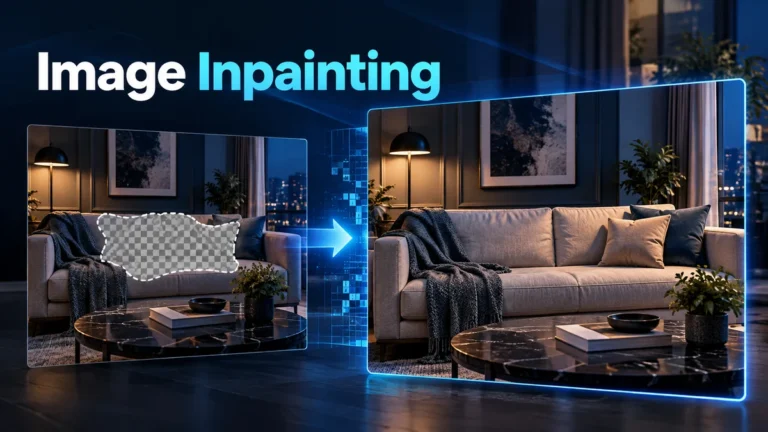
Image inpainting fills a selected missing or unwanted region inside a picture using surrounding information and, in some methods, learned image patterns. A plausible fill is newly reconstructed visual content, not proof of what originally occupied that space. Keep the source, selected mask and resulting version separate when an edit could affect how viewers interpret the scene.
This guide explains interior reconstruction through an original room-edit planning example and a review worksheet. It does not claim that an AI experiment was performed or that a particular tool restores lost truth. The reader’s task is to understand what was selected, how the fill relates to context and what the edited image can responsibly communicate.
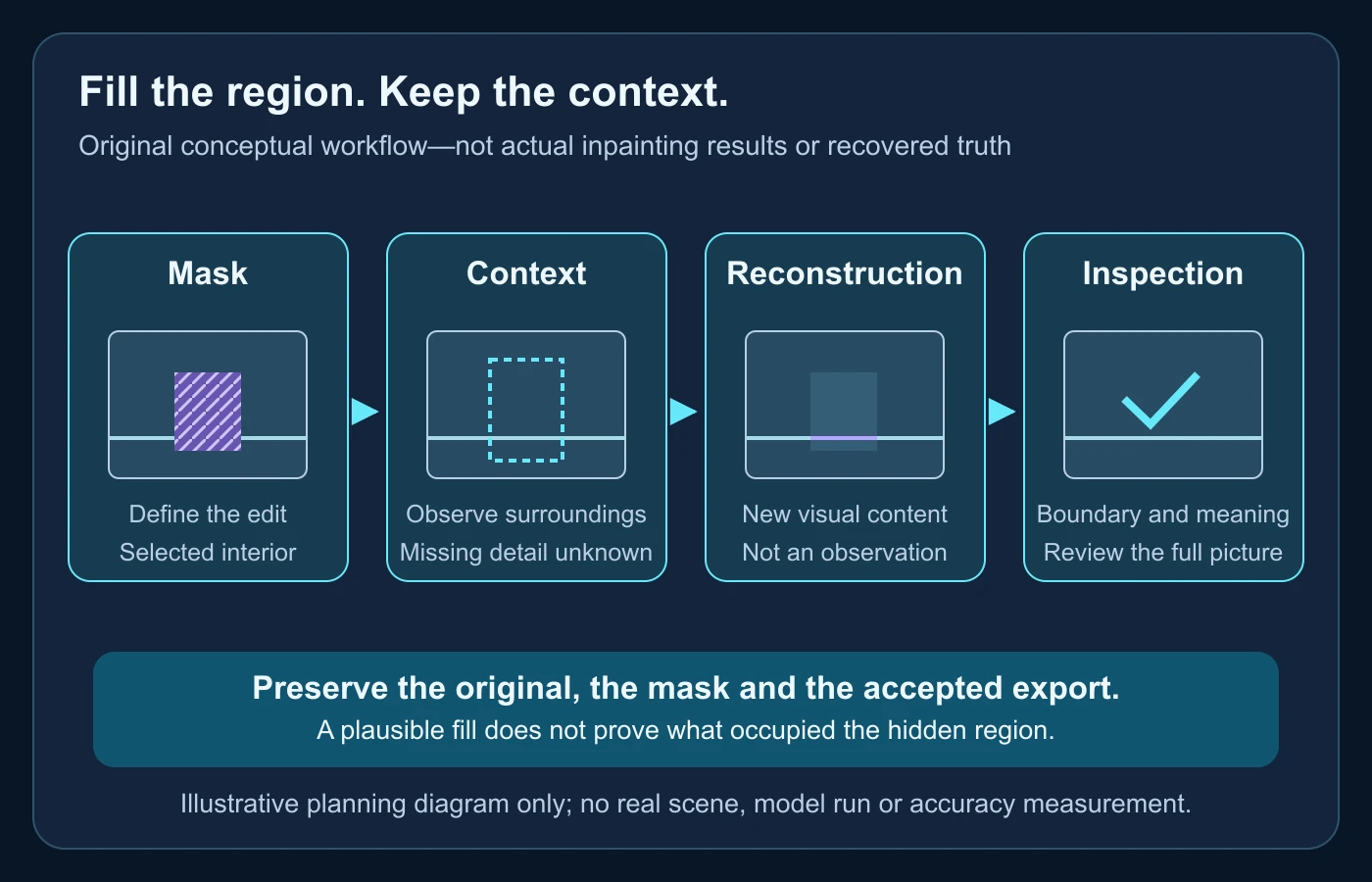
The mask defines the question being asked
A mask identifies a region for reconstruction. It is not the reconstructed result itself. One editor may select a small scratch; another may select an entire object and its shadow. Those choices ask very different questions even if the same filling method is used. Record the intended change before generating or accepting a version, because the selection expresses what the editor wants to replace.
OpenCV’s official tutorial demonstrates a same-sized mask whose nonzero pixels mark areas to fill. Its described classical methods use neighboring information, including continuation from a region’s boundary. That explains one concrete implementation, not a promise that every interface represents masks identically or restricts every output change to the selected pixels. OpenCV: Image Inpainting
Keep the distinction between an intended selection and the actual edit. A tool may alter a boundary, blend with nearby material or process a wider working area. Compare the exported output rather than assuming a mask is a guarantee of untouched surroundings. If a particular workflow requires all unselected pixels to remain unchanged, verify that requirement in that workflow instead of inferring it from the word inpainting.
Interior filling differs from extending the frame
Inpainting concerns a region within the image. Expanding beyond the original border is usually described as outpainting. Both can reconstruct material that a camera did not capture in the delivered picture, but their reference situations differ. Inside the frame, an editor may have visible context on several sides of a hole. Beyond the border, there is no original image content in the newly added area.
Adding an invented background can also be confused with compositing, where material from another source is placed into the image. Ask whether the replacement was generated, copied from a source, interpolated from nearby content or assembled by several techniques. The finished picture may not reveal that history. A clear production description should identify meaningful interventions without pretending that all filled regions were made by one algorithm.
This article stays with interior edits. It does not provide a general expansion tutorial, a list of object-removal services or instructions for falsifying evidence. A harmless design illustration and a documentary photograph require different acceptance standards. Establish the use before deciding whether a visually attractive result is suitable.
Classical filling and generative filling use different evidence
Classical approaches can extend nearby structure or use image information to fill a damaged area. OpenCV documents neighborhood-based methods for small marks and selected regions. Their strength is a defined computational relationship to nearby pixels, but that relationship does not reveal the true hidden scene. Continuing a wall’s texture is a reconstruction choice, not a recovered recording of the wall behind an object.
Generative methods can also draw on learned patterns of images. In the original RePaint research, a pretrained diffusion model proposes unknown content while known image information conditions the process. Diffusion here refers to a learned denoising-generation procedure, not physically uncovering pixels. The paper’s authors explicitly discuss realistic completions differing from the reference in extreme mask cases. Lugmayr and colleagues: RePaint
That difference matters for interpretation. A generator may produce a coherent cupboard where the original contained shelves, or an empty surface where a hidden object should have been. The fill can fit the visible context without matching the original arrangement. Do not use the model’s confidence of presentation as historical evidence. The appropriate statement is about how the image was edited, not a claim to know the obscured past.
A prompt supplies direction, not a source record
A text instruction can describe the desired fill, but its specificity does not make it a factual reference. “Continue the cream wall behind the chair” guides an edit; it does not document the wall’s actual condition. The source image, another camera view or an appropriate original record would be different evidence. Preserve those materials if they exist rather than treating generated detail as their replacement.
Adobe’s current Generative Fill documentation describes selecting an area, choosing the fill operation and entering a prompt or leaving it blank for a context-based fill. It also describes choosing a variation. This is vendor workflow documentation, not independent evidence of factual reconstruction. The relevant page was updated in September 2026; interface and model choices can change. Adobe: Edit images with Generative Fill
Write a review instruction alongside the prompt. For example, “Do not accept a version that changes the visible doorway or adds readable signs.” That does not force a model to comply, but it makes acceptance criteria explicit for the person inspecting the output. Keep rejected variations distinct from the accepted export so a later reviewer does not mistake an unused alternative for the published result.
Inspect the boundary before the overall effect
The boundary is where reconstructed material meets the retained picture. Inspect lines crossing it, textures approaching it and shadows affected by it. A seam may be visible as a sudden change in sharpness or grain, but a smooth seam alone does not establish a faithful result. Reconstruction can remove a seam while introducing an incorrect object or geometric relationship.
Use a task-specific order. If the selected region crosses a table edge, inspect that edge first. Does its direction remain plausible, and does it join the retained side? If the region contains patterned wallpaper, compare pattern scale and alignment. Then step back to review the full scene. A locally convincing patch can still be wrong in the wider composition.
Do not invent an artifact rule that all inpainting must violate. Compression, ordinary retouching and noise reduction can create similar discontinuities. Conversely, a sophisticated fill may have no obvious boundary. Visual inspection is a quality and investigation aid; it is not a reliable way to identify the exact model or prove an edit never happened.
Check geometry, light and repeated texture separately
Geometry concerns how shapes relate in space. A reconstructed floor line should be reviewed against the visible room rather than judged as an isolated attractive line. Look at intersections, contact points and depth ordering: which surface should be in front, what should meet and where a line should continue. These checks describe the output without claiming that a camera measurement has been recovered.
Light requires a separate pass. Removing an object may leave its shadow or require a replacement shadow consistent with the remaining scene. Review direction, contact and reflected color where they matter. A dark patch is not automatically an object-removal artifact, and no shadow is not automatically correct. The source and intended use determine which difference needs explanation.
Repeated texture deserves attention because local repetition can look plausible while becoming inconsistent across a larger area. Tiles may change size, a woven pattern may lose direction or a repeated motif may end abruptly. Examine enough context to understand the pattern before assessing the fill. A thumbnail can conceal these issues, so review the actual delivered resolution and a useful close view.
An original mask-context-fill review worksheet
Use the following worksheet for one accepted version, not for every result collected in a folder. It separates editorial intent, visual inspection and factual limitations. The entries are questions to answer; they are not scores or proof of authenticity. If the source needed to answer a question is missing, record that absence rather than substituting a generated detail.
| Stage | Record | Review question |
|---|---|---|
| Source | Original file and stated purpose | Is this illustration, restoration or evidence? |
| Mask | Selected region and intended removal or repair | What meaningful information is being replaced? |
| Context | Visible lines, textures, lighting and any genuine reference | Which details are supported, and which are unavailable? |
| Fill | Method, relevant instruction and accepted version | What new visual content appears? |
| Inspection | Boundary, scene and export checks | Does the result meet this use without misleading its audience? |
Do not collapse “looks coherent” into “is accurate.” A creative mock-up can be accepted as a mock-up after inspection. A photograph used to establish an object’s presence needs evidence about the object, not merely a pleasing fill. The worksheet should preserve this difference in the final description, especially if the same image later moves into a more consequential context.
A harmless room example makes the decision concrete
Imagine a fictional photograph of a reading room used to plan a poster. A cardboard box sits beside a table. The designer wants an illustrative version without the box so the composition leaves room for text. No actual filling software was run for this example. The purpose is to work through what should be recorded and inspected before using a result.
Define what the edit changes
The mask covers the box and the part of its shadow selected for reconstruction. The designer notes that the original wall and floor behind the box are not visible. Neighboring wall color and floor lines can guide a fill, but they cannot independently establish every hidden detail. The accepted picture will be described as an edited illustration, not as an unaltered room photograph.
A genuine second photograph from the same scene could supply additional information if it existed. In this scenario it does not. The designer should not imply that generated floor texture came from such a reference. Separating “context inferred from this picture” from “detail observed in another source” keeps the production record useful.
Inspect two hypothetical alternatives
Consider two possible fills. One continues the wall and floor but bends the table leg at the selection boundary. Another keeps the leg coherent but adds an imaginary wall socket. These are hypothetical alternatives, not measured model outputs. The first has a geometry problem; the second introduces a scene detail. Choosing between them depends on purpose, not on which variation looks more elaborate.
The designer rejects the bent leg and does not silently accept the invented socket. A simpler revision may be suitable if the poster remains clearly illustrative. If the image instead becomes a facilities record, the team must reconsider the edited version entirely. It cannot use a creative acceptance decision to prove the room’s actual electrical fittings.
Keep the source usable after publication
The production folder preserves the original, mask and accepted export with a short edit note. A downstream editor receives the description “box removed; hidden wall and floor reconstructed for poster composition.” That is more informative than “cleaned up.” The note tells another person which scene information no longer comes directly from the original photograph.
When the poster is cropped for another channel, review whether the edit explanation still accompanies it appropriately. A changed crop may hide the original context and make the picture look documentary. Do not assume every future audience knows the earlier purpose. The strongest record connects each delivered version to its meaning, not just to a file name.
Write observations that another editor can act on
In the fictional room review, divide the inspection note into wall, floor and table rather than writing “the patch is bad.” The wall note might say that a new socket appears without a reference. The floor note might say that a line no longer joins the retained section. The table note might say that the leg changes direction at the mask edge. These are localized observations, not a measured error rate or a diagnosis of the model’s internals.
Give each observation a practical disposition. An invented socket can be removed from an illustrative version; a documentary use can be refused until original support is available. A geometry mismatch can be returned for revision without asserting that a particular tool always fails. Record the accepted outcome after review rather than leaving a rejected variant in the handoff as if it were approved.
Use both a close view and the complete composition. The close view helps locate the boundary; the wider view reveals whether the edit changes the room’s meaning. For example, removing the box might make an obstructed route appear clear. Even a technically seamless fill could then communicate an incorrect facilities condition. The question is not simply whether the selected pixels look good. It is whether the audience will reasonably understand the edited picture’s purpose and whether the description supplies the context that purpose needs.
Restoration does not automatically recover lost truth
Repairing scratches can make an old photograph easier to read. It can also replace information that was unavailable in the damaged copy. Keep that distinction visible. A small fill on a plain border is different from reconstructing a face, inscription or identifying object. The more a region matters to the interpretation, the more important appropriate original evidence becomes.
If an archival image has a missing sign, a generated readable sign should not be presented as recovered wording. A credible reconstruction would require another source supporting that wording and a clear account of how it was used. Without that source, preserve the absence or explicitly identify the result as a conjectural illustration. Visual sharpness is not a substitute for historical support.
The same principle applies to a modern evidentiary photograph. Retain the original and avoid presenting reconstructed interiors as direct observations. If a question cannot be answered from available material, leave it unresolved. This is not a claim that all restoration is harmful; it is a way to keep a useful repair from acquiring a false evidentiary meaning.
Describe the edit and preserve provenance
A useful edit note names the meaningful intervention: a scratch repaired, an object removed or a missing region generated. Record the tool or method where known, relevant instruction and approved export. Do not manufacture a method label based on the result’s appearance. If you received only the edited image, describe the limits of your knowledge rather than inventing a complete production history.
The Content Credentials guide explains how recorded provenance can support an editing-history review and why it is not a truth score. If a credential or production record is available, inspect what it actually covers. Do not deliberately strip provenance as a default optimization or assume a missing record proves deceptive editing.
A source search can also help locate earlier versions. For a frame from a related clip, use the reverse-image-search workflow to develop source leads, then inspect the matching pages. A match is not automatically the original, and no match does not establish that an image was generated. Source comparison supports the investigation without replacing the edit record.
Inspect the delivery copy before drawing a conclusion
Exporting and distributing an image can change resolution, compression and metadata. Review the copy people will actually receive as well as the working file. If a seam disappears in a compressed thumbnail, that does not mean the original review concern was resolved. If compression creates new blocks, those should not be attributed automatically to the filling algorithm.
A single inpainted frame inside a video adds a temporal question: does the reconstructed region remain coherent through neighboring moments? This article does not teach a video-removal pipeline. It simply distinguishes a still-image edit from a claim about an entire recording. The AI-generated-video guide covers the broader relationship between generated material and video production.
- Preserve the original and the specific version being inspected.
- Define the intended interior change and the selected region.
- Identify which visible context supports the reconstruction.
- Check boundaries, geometry, light and texture separately.
- Compare meaningful new details with genuine references, if available.
- Record the edit and its limits before changing the image’s purpose.
Finish with a bounded statement. “An object was removed and the selected background was reconstructed” is useful when the record supports it. “The picture now proves what was behind the object” is not justified by a plausible fill. The purpose of review is to preserve the distinction between reconstructed appearance and observed evidence, not to attach a universal real-or-fake verdict to every edit.
Filled pixels can change the story.
For a related clip, check the original video and preserve editing context.
Questions about image filling
Does inpainting reveal the true hidden background?
No. It reconstructs content using available context and the method’s assumptions. A plausible result is not an observation of the hidden scene.
Is an inpainted area always made with generative AI?
No. Classical neighborhood and structural methods also perform filling. Identify the actual method when the record is available.
Does a mask guarantee nothing outside it changes?
Do not assume so across all tools and exports. Verify the requirement in the specific workflow and compare the delivered result.
How is outpainting different?
Outpainting expands beyond the original border. Inpainting reconstructs an interior region; both can introduce content that was not directly observed.
Can a smooth boundary prove the picture is unedited?
No. A coherent edit may leave no obvious seam, and ordinary processing can create similar artifacts. Use source and production evidence as well.
Primary sources used
- OpenCV: Image Inpainting — mask and classical neighborhood-based methods.
- Lugmayr and colleagues: RePaint — original conditioned diffusion method and limitations, not a benchmark of current services.
- Adobe: Edit images with Generative Fill — current vendor selection, prompt and variation workflow.