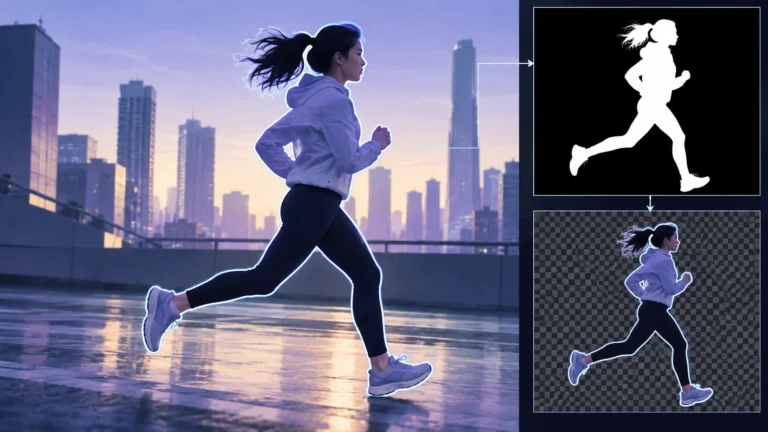
AI rotoscoping uses automated subject selection and tracking to help isolate a moving person or object from a video background. The output is a mask or matte used in compositing, not a newly verified recording. Automation can establish a useful first pass, but difficult boundaries and changes across frames still need review against the source footage.
This guide explains what that isolation means and gives you a practical way to inspect it. The goal is to tell whether a particular matte serves a particular shot, not to rank tools or promise that every edge can be recovered. You will work through an original, explicitly fictional scene and create a short correction log that another editor can understand.
What rotoscoping changes in a video workflow
A video frame normally contains both the subject and the scene around it. A compositor may want to treat them separately: adjust the subject’s color, place an effect behind it or move it over a different background. Rotoscoping supplies the selection needed for those operations. The selection itself does not invent the pixels behind the subject.
Keep three deliverables separate. The source footage contains the photographed or supplied image. The matte describes which parts you intend to keep and how their boundaries blend. The finished composite combines the selected material with other layers. You might approve the matte while rejecting the composite because the replacement background or lighting does not fit.
For a simple solid object, the selection can be relatively crisp. At a moving hand, a flyaway hair or a translucent edge, a hard cutout may discard meaningful boundary detail. Your intended use matters: a rough isolation for a temporary layout is a different task from an edge that will remain prominent in the final shot.
Adobe’s Roto Brush and Refine Matte documentation describes foreground/background selection, propagation and refinement. These are separate operations. Calling the workflow AI-assisted does not eliminate the need to inspect the resulting selection or explain what later compositing changed.
Know the difference between a mask and an alpha matte
A mask often answers a membership question: does this pixel belong to the selected region? An alpha matte also describes partial contribution near a boundary. In a typical visualization, white represents retained foreground, black excluded background and intermediate gray a partial contribution. The image of the matte is a working representation, not a photograph of a physical outline.
Imagine an edge pixel influenced by both a moving sleeve and the wall behind it. Treating it as completely foreground or completely background may create a visible hard boundary. A softer value can represent a mixture, although estimating the right value from the recorded image is a separate problem. Simply adding blur around every edge is not the same as solving it.
The original Robust High-Resolution Video Matting with Temporal Guidance paper describes matting in terms of foreground, background and an alpha coefficient. It also distinguishes segmentation from detailed matting. Use that distinction to ask what your tool actually provides rather than expecting a coarse subject mask to be a finished hair matte.
When reviewing an output, examine both its shape and its use in the composite. A neat black-and-white silhouette can still cut off a thin strap or preserve unwanted background between fingers. A gray boundary can still contain too much of the original background color. Neither representation should be approved solely because it looks tidy.
Manual control and automated selection solve different parts
Manual roto gives an artist direct control over a boundary through the shot. Assisted selection can reduce the repeated work of identifying the same subject in successive frames. The useful combination depends on the footage, the tool and the requested result. There is no universal rule that every automatic mask is usable or every handmade shape is better.
Ask first how the subject is specified. A click, box, painted region or other prompt may tell the system what to follow. Then ask how you can correct a mistake and how that correction affects neighboring frames. You need to know whether a change updates only one view or changes the selection over a larger span.
The original SAM 2 paper describes promptable segmentation in images and video, including interaction and temporal memory. That is evidence of a segmentation approach, not evidence that every application uses SAM 2 or that its output provides a final soft matte. Avoid identifying a hidden model from a product’s marketing word “AI.”
Before a demanding shot, determine what can be exported: a rendered matte, an editable mask, a project or a finished composite. Those outputs support different kinds of correction and review. Keep a reversible version of the work before applying a destructive change. The time saved in first-pass selection is less valuable if nobody can inspect or repair the final boundary.
Choose a useful starting frame and inspect transitions
Choose a frame where the intended subject is understandable and reasonably visible. A complicated overlap is a poor place to introduce an otherwise unfamiliar selection if a clearer nearby view exists. Record why you chose the starting view and what should be included: the person alone, the person and a carried object, or a particular part of the body.
Play through the shot before adjusting it. Identify changes that can challenge the selection: a turn, an arm crossing the torso, another object passing in front, an exit from frame or a return after occlusion. This is your review map. It is more useful than checking a few equally spaced thumbnails that happen to miss the hard moments.
A frame that looks excellent in isolation can be followed by a visible boundary jump. Review the transitions around a correction in both directions when the workflow permits. Do not assume that fixing the last frame leaves the earlier propagated result untouched. Save a version and compare the revised span with the earlier one.
Adobe documents base-frame strokes, propagation and a freeze step for its Roto Brush workflow. Exact controls vary with installed versions, so use the relevant official instructions. In your own correction log, record the affected span and boundary instead of writing only “fixed hair.” The log should identify what a later reviewer must check.
Hair requires retention, not just a smoother silhouette
Hair is useful for explaining why a mask and a matte differ. A group of flyaway strands may not have a single solid boundary. A selection can preserve the main head while removing those fine structures or bringing parts of the old background along with them. Both mistakes may become more visible when the subject is placed on a different background.
Compare the source and the isolated result at a meaningful viewing size. Ask which structures are actually recorded, which have been lost and which unwanted areas remain. Do not demand that an unclear source recover precise strands it never resolved. The job is to preserve justified detail, not draw imaginary detail and call it extraction.
Look through time. A strand that appears and disappears in the matte while the source changes smoothly may deserve correction. But the source itself may also contain changing visibility, focus or occlusion. Describe the particular difference between input and output. “The result loses this recorded strand during the turn” is more useful than “hair looks AI.”
Use background changes as a diagnostic aid, not as a fake demonstration of tool accuracy. A light test background can reveal one kind of leftover edge; a dark one can reveal another. The final check is the intended composite. Preserve a note of the testing view so nobody mistakes your diagnostic background for the actual scene.
Motion blur needs a boundary that agrees with the source
A rapidly moving sleeve or hand can occupy a soft region in the recorded frame. Cutting it into a sharp shape may change its apparent motion. Making the entire subject vaguely transparent can be equally wrong. Review the local source blur and ask whether the matte represents that boundary coherently through the surrounding frames.
Separate a selection mistake from a compositing mistake. If the matte clips the recorded blur, repair the matte where possible. If the isolation preserves a plausible edge but the new background makes it look wrong, inspect the foreground colors and the composite setup. Applying the same adjustment everywhere may solve neither problem.
Use a short review loop around the fastest motion. Play it at ordinary speed to notice temporal instability, then inspect individual frames to understand the cause. A slowed preview is an inspection view, not a guarantee that the final playback will look natural. Always return to the actual delivery speed.
The original video-matting research cited above uses temporal information to improve coherence rather than treating every frame as an unrelated image. The general lesson for an editor is to review sequences. It does not establish a performance number for your tool or justify promising artifact-free motion.
Occlusion is about which layer is in front
When a subject passes behind a railing, the railing should remain in front if you are preserving the original depth relationship. When a person carries a bag, you must decide whether the bag belongs in the selected foreground. Those are production decisions the selection must represent. The word “subject” alone does not settle them.
Watch the entry into the overlap, the interval of concealment and the reappearance. The mask should not jump to the foreground object or recover a different part when the intended subject returns. If the software cannot maintain the correct interpretation, split the work into manageable spans or use an appropriate manual correction available in your workflow.
Do not fill an unseen region and call it rotoscoping. Reconstructing background or generating hidden subject content is another operation. A cutout of the visible pixels does not reveal what was behind them. Keep the preservation of visible foreground separate from object removal, inpainting and scene generation.
Occlusion also matters in manipulated-video investigation, but that is a different reader task. The face swap guide discusses identity continuity during overlap. Here you are reviewing a selection for compositing. A poor matte is not, by itself, proof of a particular deepfake technique or deceptive intent.
An original three-event review exercise
The following scene is fictional and conceptual. No camera test, tool benchmark or client result is implied. Imagine a person with curly hair crossing a room, lifting a loose sleeve and walking behind a rail. You want to preserve the visible person while placing a graphic behind them, leaving the rail’s foreground relationship intact.
Divide the review into three events rather than three arbitrary frame numbers. In the first, the hair is clearly visible against a contrasting wall. In the second, the sleeve moves quickly. In the third, the rail crosses the person’s torso. The explanatory illustration accompanies these three boundary tasks; its simplified shapes are not masks returned by a real tool.
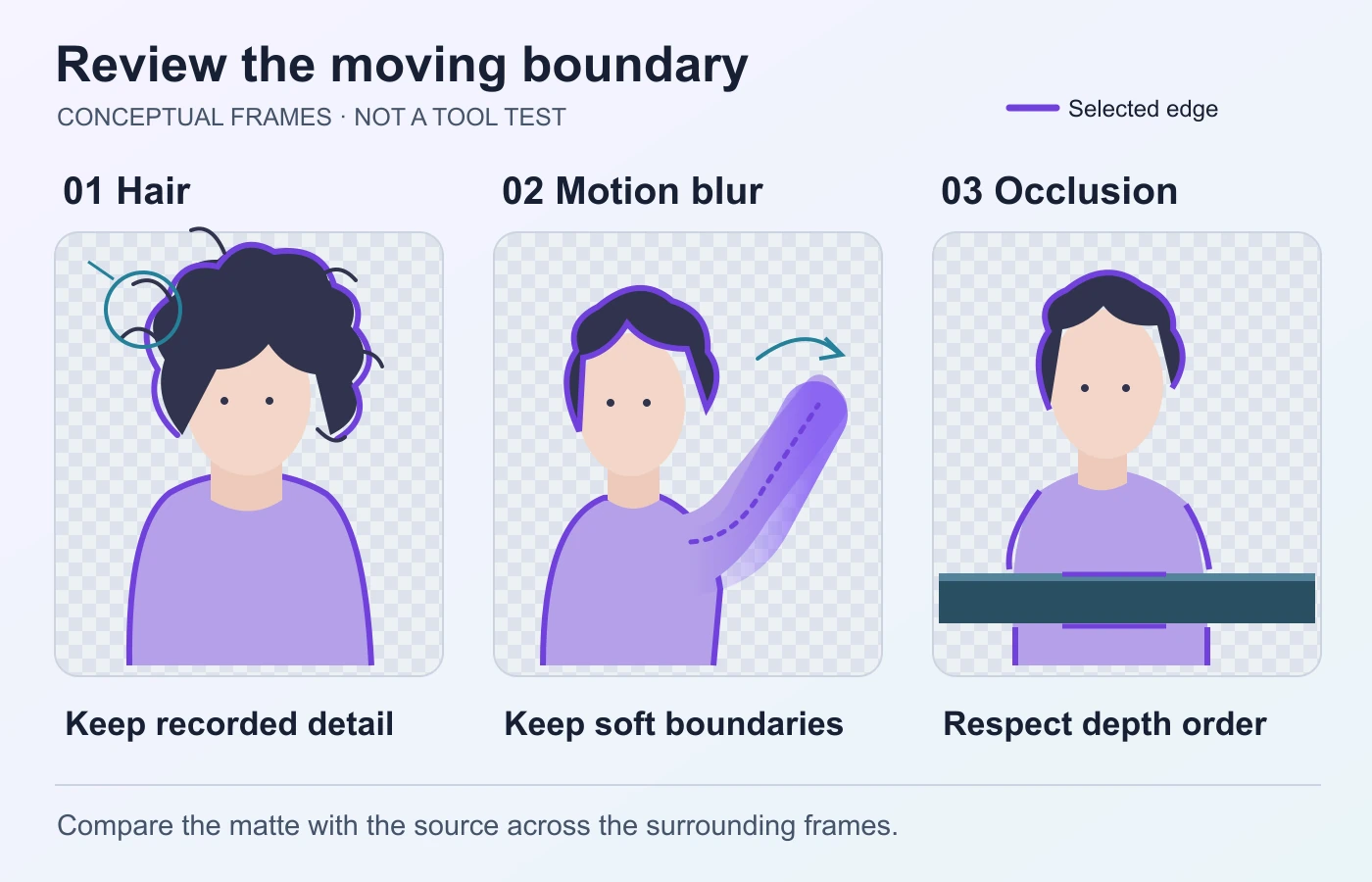
For hair, write down whether the recorded fine structures survive in the matte. For the sleeve, compare the blur boundary with the source and the intended composite. For the rail, specify which visible pixels should be excluded. If you cannot state the intended result, an attractive automatic preview is not enough to approve it.
Suppose your hypothetical first pass retains the main head but loses some visible hair, sharpens the sleeve’s soft motion boundary and briefly includes the rail. These are three different correction requests. A single blanket feather adjustment would not necessarily resolve them, because detail retention, partial boundary contribution and object membership are different problems.
Record each correction separately and recheck its transition. If improving the hair introduces a shimmering outline later in the shot, keep the new problem in the log. If excluding the rail cuts into the torso before the overlap begins, revisit the affected span. A complete exercise includes the consequences of a correction, not only a better-looking chosen frame.
You can use this exercise on your own authorized footage, but report its actual outcome only after performing it. Until then it is a planning worksheet. It provides a distinct way to review the shot without inventing a success rate or declaring one product the solution.
Use a correction table that describes the actual task
This original table organizes the exercise into inspectable requests. It is not a universal model error taxonomy or a tested ranking. Add your own source frame or time position to each row and specify the intended use of the isolated subject.
| Boundary task | Question for the reviewer | Correction to investigate |
|---|---|---|
| Fine hair | Which recorded strands disappear? | Local edge refinement without inventing missing detail. |
| Moving sleeve | Does the result preserve the source’s soft boundary? | Review partial contribution and local blur behavior. |
| Foreground rail | Is the rail excluded at the right moments? | Correct object membership and depth relationship. |
| Reappearance | Does the same subject return coherently? | Check the span around entry and exit from occlusion. |
| Final background | Does a leftover edge become visible? | Inspect matte and foreground colors separately. |
The best next step may be another selection prompt, an editable shape or a shorter work span. Choose it from the available evidence and controls. Do not assume that one method must handle an entire shot identically. An honest workflow can combine assistance and manual work while documenting the resulting composite.
Keep source, matte and final composite review separate
Once the matte is usable, inspect the composite as a whole. Does the subject belong at the intended position and scale? Do foreground objects still cover it correctly? Are the colors, apparent light and contact relationships appropriate for the intended creative scene? Those questions remain even when selection is technically sound.
Decide how the finished piece is presented. A clearly described creative composite makes a different claim from a clip offered as an untouched event recording. Preserve the original and a project record so collaborators understand what changed. Do not imply that clean edges make the composite authentic evidence.
Where supported, signed provenance may document compatible actions. The C2PA specification describes provenance assertions rather than an external truth judgment. The existing Content Credentials guide explains how to interpret those records without claiming that all workflows provide them.
If you are reviewing someone else’s clip, distinguish “an isolated subject was composited” from “this specific tool made the mask.” The existing AI video analysis guide covers manipulation questions in a broader evidence context. The matte’s visual defects alone generally do not disclose every step of the production history.
Preserve a useful handoff and finish with a scoped decision
Keep the source footage, the editable project if available, the matte output and the finished render as separate deliverables. Give them clear version names and identify their relationship. A reviewer should not have to guess whether a file is original footage, a diagnostic view or the final composite.
Record the tool version, relevant settings, source span and correction decisions when available. This is a production record, not a guarantee that every hidden implementation detail is known. The existing video authentication guide explains why preservation and traceable copies matter when material may later be examined as evidence.
Before handing the shot off, use a final practical checklist:
- The intended foreground and carried objects are specified.
- Fine edges are compared with recorded source detail.
- Fast motion is reviewed as a sequence at delivery speed.
- Occlusion entry, concealment and reappearance are checked.
- The matte and composite are reviewed separately.
- Diagnostic views are labeled and originals remain available.
Approve a bounded result: “This matte is suitable for this composite at the reviewed delivery size,” or “these boundary events still need correction.” That communicates a usable decision without promising universal quality. AI rotoscoping is most valuable when it saves repeated selection work while leaving the intended boundaries, corrections and final representation understandable.
Questions about AI rotoscoping
How does AI rotoscoping isolate a subject?
A supported workflow uses a selection or prompt to identify foreground and propagate that choice across frames. Some systems also refine partial edges. The exact controls and output depend on the tool.
Is a segmentation mask the same as a finished matte?
No. A coarse membership mask may locate the subject without representing fine or soft boundaries adequately for the intended composite. Inspect both the selection and its final use.
Which errors should I check first?
Review fine detail, fast-motion boundaries, overlap and reappearance. Choose moments relevant to your shot rather than assuming one frozen frame represents the whole sequence.
Does rotoscoping remove an object from the source video?
It supplies a selection for later operations. Reconstructing what an object concealed is a separate task, such as inpainting or background replacement. A matte does not recover unseen evidence.
Can a clean cutout prove a video is genuine?
No. Good compositing quality and factual authenticity are different questions. Preserve the source, production history and relevant context if the clip supports a real-world claim.