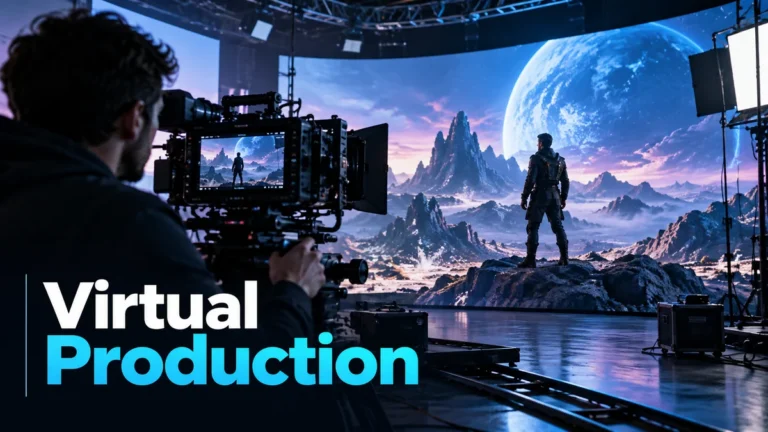
Virtual production combines digital scene-making with filmmaking workflows, often using real-time tools to plan, preview, or capture a shot. In an LED-volume shoot, a real camera records performers and physical objects in front of a displayed digital environment. The recording is physical, while the place represented behind the performer may be designed. “Virtual” therefore does not by itself mean AI-generated, deceptive, or entirely computer-rendered.
The useful question is what each part of the shot represents. This guide explains a physical camera, a virtual environment, and the resulting capture as separate layers. It is not an equipment buyer’s guide or instructions for installing a stage. Its fictional scene and original diagram are teaching examples, not a filmed experiment, an actual production, or a benchmark of visual quality.
Virtual production is wider than an LED wall
An LED volume is a prominent example, not the definition of the entire field. Epic’s virtual-production explainer includes visualization, virtual scouting, live compositing, and in-camera visual effects among its workflows. A project can use digital planning without making every final shot on a display stage. Keep the named technique separate from the broad umbrella.
Planning and final capture also have different roles. A virtual preview can help a team discuss where a camera should move or how a scene might look. That preview is not necessarily the final audience image. When a production shares process material, ask whether you are seeing a planning view, an on-set preview, a camera recording, or a finished composite.
Autodesk’s overview of virtual-production techniques likewise distinguishes visualization, performance capture, and live LED walls. We use that taxonomy, not its promises about cost or speed. An individual project’s schedule, budget, and result cannot be inferred simply from using a real-time tool.
This matters when explaining a clip to someone else. “It used virtual production” is a starting point for a workflow question, not a complete description of how a particular frame was made. Identify the technique and the meaningful element it contributed. You can then discuss what was physically recorded without suggesting that every visible object existed in the same physical place.
What the real camera records on an LED volume
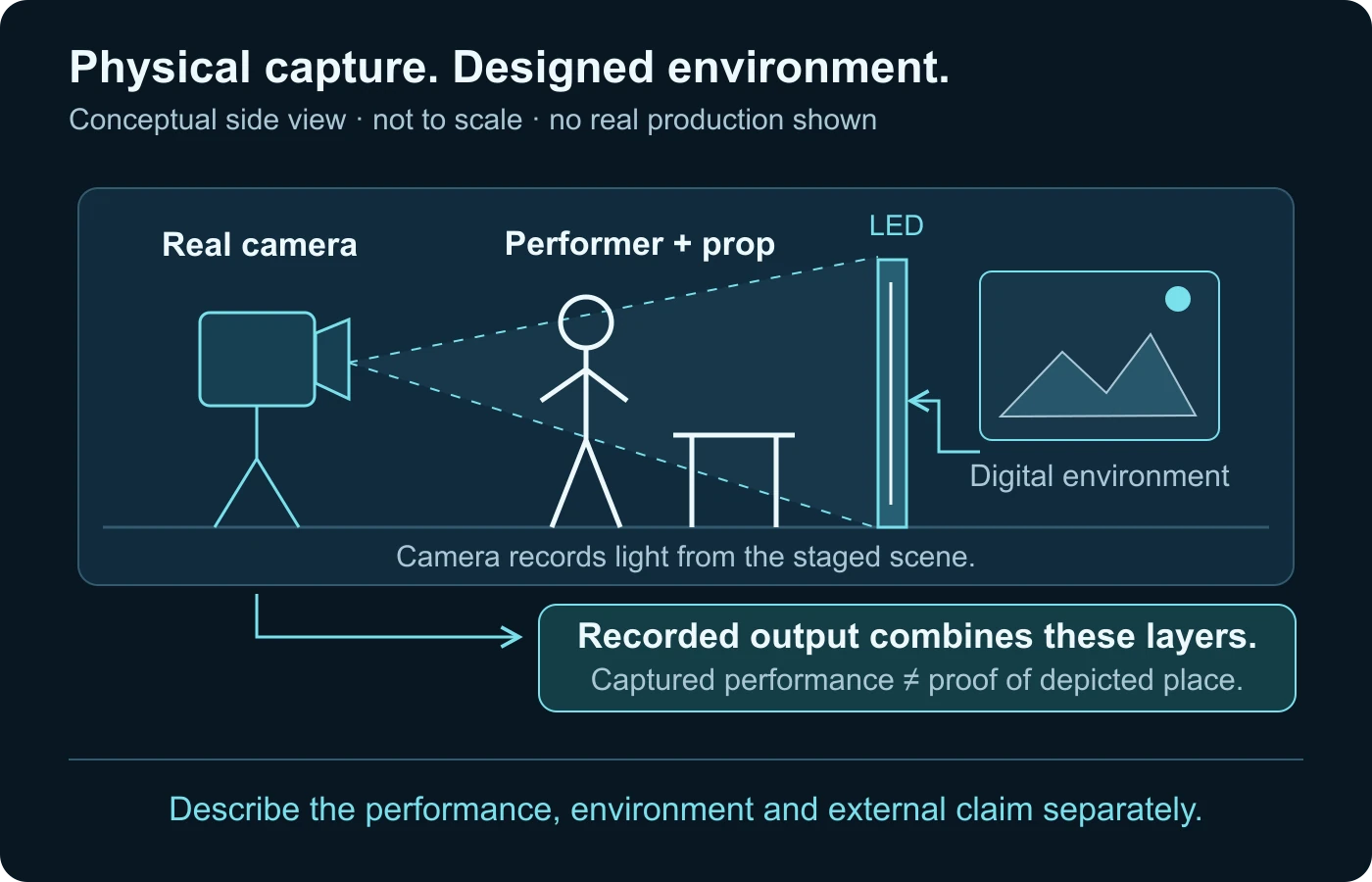
Consider a performer standing beside a physical table, with a landscape displayed behind them. The camera receives light from the performer, table, and display. It records the staged scene in front of its lens. The landscape can depict a location that is not physically behind that table, even though the camera genuinely observed light from the display.
In-camera visual effects aim to integrate the physical foreground with displayed imagery during capture. Epic’s in-camera VFX overview describes LED lighting, camera tracking, and real-time rendering in that workflow. Those are production components, not an automatic claim that the finished scene needs no later work.
Keep capture and representation separate. A camera file can record a staged performance honestly while the background represents a fictional place. This is not the same as a camera documenting that the performer visited the depicted location. The distinction is ordinary filmmaking context, but it becomes important if the clip is later recaptioned as evidence of a real event.
A physical prop can also be blended with a displayed continuation. For instance, a real section of a room may end where the environment continues digitally. Do not assume one production label describes every visible part. Ask which elements were on the stage and which were represented by the environment or added later.
Tracking makes the environment respond to a viewpoint
A still background shown on a screen and a tracked three-dimensional environment are different arrangements. In the tracked workflow described by Epic, the camera-facing image is rendered for the physical camera’s changing viewpoint. The point is to make the virtual environment’s perspective agree with the view being recorded, rather than merely display the same flat image while the camera moves.
A simple way to understand parallax is to imagine looking past a nearby object toward a distant one as you move sideways. Their apparent relationship changes with your viewpoint. A designed three-dimensional scene can render a corresponding relationship for its virtual camera. This explanation is conceptual geometry, not a claim that we measured a stage or that every virtual shot uses the same tracking method.
Epic calls the camera-facing part of the displayed view the inner frustum. Its overview distinguishes that view from surrounding displayed content that can provide light and reflections. These are workflow terms, not two different finished movies. Use them to ask what the camera needed to see and what the surrounding stage needed to contribute.
For an audience reviewer, good-looking perspective is not proof of a real outdoor location. It may be the intended result of a calibrated production workflow. Equally, a mismatch should not be treated as a universal AI tell. A stage, a composite, a lens issue, or an unrelated processing problem may produce an observation that needs context.
Lens matching and timing belong to the capture relationship
Knowing a camera’s position is not the whole relationship. Epic’s camera lens calibration documentation explains matching physical and virtual cameras, lens distortion, and relevant lens data. A renderer must represent the intended camera view; an unlabelled software preview is not enough to establish how the real lens saw the stage.
Think of this as matching two descriptions of one viewpoint. The physical lens produces its view of the staged scene. The virtual camera produces the environment view that needs to fit that capture. Different zoom or focus conditions can matter to the documented calibration. This article does not supply calibration settings, error tolerances, or compatibility assurances for an unknown camera.
Timing is another relationship rather than a magic number. Epic’s nDisplay synchronization documentation describes coordinating simulation and display presentation across devices. The narrow takeaway is that synchronized views require deliberate timing; this is not an instruction to change a graphics driver or install professional synchronization hardware.
If process footage shows a seam or a momentary mismatch, record where it appears and which view you are examining. A behind-the-scenes camera may be looking at the wall from a different perspective than the production camera. Its observation can explain the physical setup without showing exactly what the intended lens captured. Avoid declaring the final shot defective from an unrelated observer’s angle.
LED capture and green-screen compositing answer different workflow questions
With green-screen compositing, the foreground capture can be combined with a replacement environment later. With an LED arrangement, the displayed environment can contribute to the view recorded on set. Epic’s broader explainer presents in-camera finals as one possible outcome while also acknowledging subsequent work. Do not turn that possibility into a rule that every LED shot is finished when recording stops.
For a reviewer, the most useful difference is where the background entered the image. Was it displayed in front of the camera during the performance, added into the image afterward, or used only as a preview? That is more precise than asking whether the scene is simply “real.” Both workflows can contain a real performer and a designed environment.
A project can also mix approaches across shots. One view may use an LED wall, another a physical set, and another a later composite. An approved production explanation should say which shot or element it describes. Do not borrow the production method of one scene to authenticate every scene in a sequence.
There is no need to treat these choices as moral categories. They are ways of making a scene. The relevant trust issue is whether the scene’s representation matches how it is presented to the audience. A fictional film and a purported live-location report can use similar-looking imagery while making very different claims.
Digital sets do not automatically mean generative AI
The virtual-production workflows described in the references involve digital assets, rendering, camera relationships, and physical capture. The term alone does not identify how every asset was authored. Do not label a displayed environment AI-generated merely because it was digital, or declare that no AI was used because the final output came through a camera.
If AI involvement matters, ask a narrower production question: was it used to create an environment asset, modify a recorded element, synthesize a performance, or assist an unrelated task? An answer about a background does not answer the performer’s identity or the soundtrack’s origin. The existing AI-generated video guide covers generation categories rather than this LED-capture relationship.
Similarly, “synthetic” can describe an element without establishing deception. A clearly represented fictional environment can be part of legitimate production. The synthetic media guide owns that broader classification. Here the practical goal is to identify the physical and designed layers before assigning a label to the entire clip.
Do not let an appearance-only judgment fill a missing production record. Realism can be an artistic goal, and a deliberately stylized set can be an equally valid choice. If the exact authoring method is unknown, say so. That uncertainty is more informative than a confident AI label unsupported by the available evidence.
A fictional window scene: distinguish the three layers
Imagine a presenter beside a real desk and window frame on a stage. Behind the frame, an LED surface displays a designed nighttime city. The presenter speaks while a physical camera makes a short sideways move. This is an invented teaching setup, not a shoot we performed or a known production we investigated.
First identify the performance layer. The presenter, desk, and frame are physical elements in this hypothetical setup. Their presence on stage does not imply that the skyline is an actual view through a building window. Record the distinction before deciding what a camera-origin statement means.
Next identify the environment layer. The city is an image produced for the display. If the workflow tracks the camera, the rendered view should correspond to the changing intended viewpoint. That tells you how the production aims to make the scene coherent; it does not establish whether the modeled city is a real location or whether the skyline asset was made with AI.
Then identify the capture layer. The camera records light from the physical scene and display together. A source file from that camera can therefore be a real recording of a staged representation. It should not be described as direct evidence that the presenter stood inside the depicted city building.
Suppose the publisher labels the clip a fictional product presentation made on a virtual set. That context can make the production relationship clear. Suppose a repost instead claims that the presenter reported live from that city during a particular event. The new claim needs independent support. It is not established by the existence of the camera file.
Now suppose you have only a short social-media copy and no process explanation. You can ask for an attributable original, a longer source, and relevant production context. Do not invent the physical setup from a visible reflection or a guess about the background. The hypothetical scene helps you organize questions; it is not a detector that classifies unknown clips.
Finally, write a conclusion with separate subjects. The performance may be recorded, the environment may be designed, and the claim about a real-world location may remain unverified. Those findings can coexist. A useful review states which evidence supports each one instead of forcing the whole scene into a single “camera or AI” answer.
Use a shot-description worksheet, not an equipment list
For an authorized production handoff, record the meaningful elements and where they enter the image. The worksheet below is an original editorial aid. It is not a claim that every production stores these fields, nor a technical specification for operating an LED system. An unknown field should remain unknown rather than be inferred from cinematic appearance.
| Layer | Useful question | Limit to record |
|---|---|---|
| Physical performance | Which performer, prop, or set section was captured? | Capture does not prove a depicted external location. |
| Displayed environment | What did the wall show during this shot? | Digital does not identify an AI authoring method. |
| Camera relationship | Was the view tracked or a fixed displayed image? | An observer’s view may differ from the production lens. |
| Later changes | What meaningful additions or replacements followed capture? | A process preview may not be the final file. |
| Audience claim | Is it fiction, illustration, promotion, or an event record? | The claim needs evidence beyond visual coherence. |
A useful handoff connects the description to the actual shot or version. “Used a virtual set” attached to an entire project is too broad when only one sequence used it. If you have authorized access to production records, identify the relevant take or file in the organization’s normal system without publishing private crew, performer, or project information unnecessarily.
Record later edits separately. A shot can begin as an in-camera result and still receive meaningful compositing, replacement, or audio work. Ask the production owner to identify those changes rather than assuming that a behind-the-scenes image captures the entire history. The video provenance guide covers lineage and version tracing more fully.
Give the source capture and finished version different roles
If an authorized reviewer can access both, label the source capture and the finished delivery separately. A camera file supports questions about what was recorded on the stage. A final edited file supports questions about what the audience received. Neither should silently take the other’s role. The video authentication guide explains source preservation and integrity beyond this production example.
A useful review can compare one relevant moment rather than display a collection of unrelated process pictures. Identify the moment, the version, and the element under discussion. If a background changed after capture, describe that change. If a backstage picture cannot be connected to the final take, keep it as contextual material rather than evidence that settles the shot’s origin.
Do not demand private project files merely to satisfy curiosity. Production owners may have legitimate restrictions on sharing performers, unreleased assets, or technical records. Note the resulting limit and use an appropriately qualified description. “Recorded on a virtual set according to the attributable production account” and “independently established from the original capture” are different levels of support.
Inspect process evidence without overclaiming
An attributable process explanation can be stronger than a guess about pixels. But an unverified backstage photo is not self-authenticating, and a demonstration from one project does not establish the workflow of another. Connect the explanation to the relevant publisher, production, shot, and final version before relying on it.
Ask what the process material actually shows. A visible wall and camera may support an LED-stage setup. They do not necessarily show which digital assets were used, whether a particular take reached the final edit, or what happened afterward. Keep each claim within the evidence shown and seek clarification from an attributable source when necessary.
A display artifact can also be a production clue without being an AI verdict. Epic’s overview discusses moiré in LED capture; its presence or absence does not settle the origin of every element. Avoid a checklist that labels all unusual backgrounds generated or all convincing reflections authentic. Production constraints are not universal authenticity signatures.
When reviewing a clip for a consequential claim, do not attempt to reconstruct a private studio from tiny details or identify performers without a legitimate purpose. Stay with the public source, relevant production explanation, and claim at issue. Technical media analysis can contribute evidence, but it cannot certify that a location, event, or endorsement is genuine.
Describe what was recorded and what was represented
A precise description can be short: a physical performance captured against a displayed digital environment; a green-screen capture with a later background; or a workflow unresolved from the available source. Add AI authoring information only where evidence supports it. Do not replace a useful production description with an unsupported binary label.
If you publish a demonstration, make the fictional or designed setting clear where it matters to understanding. Keep source and final versions connected for authorized review. If you investigate a repost, verify the repost’s location or event claim independently rather than assuming that a real camera file settles it.
Virtual production makes the boundary between physical capture and designed representation more visible when it is explained honestly. A real camera can record a real performance within a represented place. Understanding those layers lets you appreciate the filmmaking while remaining careful about what the finished scene proves.
Questions about recorded virtual sets
Is virtual production the same as AI-generated video?
No. It names filmmaking workflows. Determine how a particular asset or performance was authored separately.
Does every virtual production use an LED wall?
No. The broader category includes planning, visualization, scouting, live compositing, and other techniques.
What does a camera record on an LED stage?
It records light from the staged scene, including physical elements and displayed imagery. That does not prove the represented background location existed behind the performer.
Does in-camera VFX eliminate all later work?
No. In-camera finals are possible in suitable cases; a project may still use later compositing and other changes.
Can a behind-the-scenes view look different from the final camera view?
Yes. It may observe the stage from another angle or show a preview rather than the relevant production capture.
Can a detector certify the depicted location?
No. Media analysis and source evidence can support review, but the external location or event claim needs independent verification.
Primary references and illustration limits
- Epic Games: What is virtual production? — umbrella workflows and possible in-camera finals.
- Autodesk: What Is Virtual Production — visualization, performance capture, and LED techniques.
- Epic Games: In-Camera VFX Overview — tracked camera view, LED environment and optical constraints.
- Epic Games: Camera Lens Calibration Overview — physical/virtual viewpoint and lens relationships.
- Epic Games: Synchronization in nDisplay — display and simulation timing.
Sources checked on 14 October 2026. Vendor workflow documentation supports narrow mechanism descriptions, not promised savings, equipment compatibility, or scene-authentication accuracy. The window scene and diagram are original conceptual examples; no stage experiment was performed.
Recorded footage can include a virtual set.
Use context and video analysis together when assessing what a scene represents.