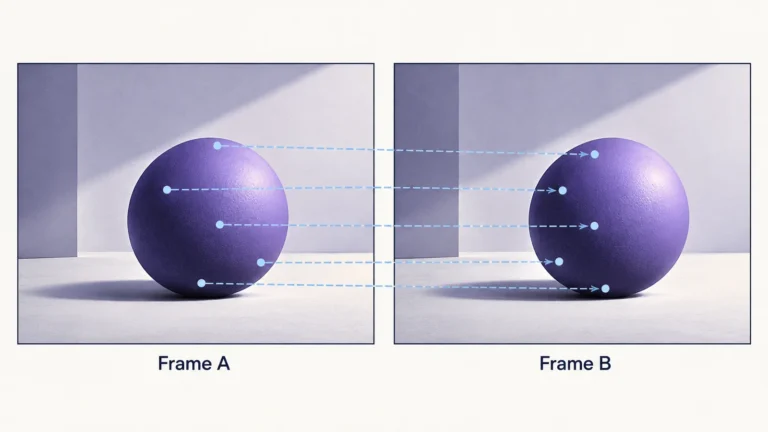
Optical flow estimates apparent movement between images, usually represented by arrows or a field of two-dimensional vectors. It asks where an image feature appears to have moved from one frame to another. That is not the same as directly measuring an object’s three-dimensional movement, identifying its cause, or deciding whether the video depicts a true event.
The distinction matters when reviewing stabilization, interpolation, tracking overlays, or suspicious-looking motion. A detailed flow visualization can appear authoritative even where the match is uncertain. This guide explains how to read that uncertainty, supplies a small drawn example, and provides a practical worksheet. It does not claim that DetectVideo exposes a particular optical-flow algorithm or that arrows alone provide a deepfake verdict.
Pixels and apparent motion
Imagine a visible corner in one frame and a similar corner in the next. A method proposes a correspondence between them. The associated arrow points from the first image location toward the proposed second location. It describes an image-plane relationship, not automatically the path of a physical object through space.
The OpenCV optical-flow tutorial defines flow as apparent motion caused by object or camera movement. Its examples use two-dimensional displacement vectors. For review, retain that word “apparent”: camera movement and scene movement can both change an image, and the arrow does not independently identify which occurred.
Start by asking what the visualization displays. Are arrows drawn from the earlier frame or the later one? Are they pixel displacements, scaled display marks, or another representation? Does the legend say how lengths and colors were chosen? Without that information, a large arrow is not a trustworthy speed measurement.
If there is no legend, write down what is missing before interpreting the pattern. Do not use a familiar color convention from a different tool to fill the gap. A visualization can normalize or sample its values for readability, so two screenshots with different-looking arrows may not be directly comparable even when the underlying motion is similar.
Sparse and dense flow
Sparse flow estimates movement for selected features; dense flow supplies estimates across the image. OpenCV illustrates these with a Lucas–Kanade feature-tracking example and a Farneback dense-flow example. More arrows mean broader coverage, not necessarily stronger evidence or fewer mistakes. A dense result can include estimates where the input offers little distinctive information.
When reading a sparse overlay, note how features were selected. Were they concentrated on one face, on a textured background, or on the clearest corners? The absence of arrows elsewhere might mean those places were not selected. It does not automatically mean the region did not move or that it is free from manipulation.
When reading a dense overlay, look for how uncertainty is represented. Does the tool show a confidence or validity indication? Are hidden regions marked, or does the display look equally decisive everywhere? A visually complete field should not tempt you to assume that every location has an equally defensible correspondence.
Choose the representation for the question. Selected feature tracks may help you inspect a few stable landmarks. A dense field may help describe broader motion patterns. Neither choice supplies event truth on its own. The useful output is a documented relationship between inputs, method, visualization, and a specific review question.
Assumptions behind matching
Some classical methods rely on approximately stable brightness and similar neighboring motion. These assumptions help make estimation possible, but real images need not satisfy them everywhere. The relevant question is whether the selected input region offers enough consistent information for the proposed match, not whether the software can draw an arrow there.
MIT’s Foundations of Computer Vision chapter on optical flow distinguishes apparent brightness movement from a physical motion field. It discusses cases where changing illumination, low texture, and occlusion complicate that relationship. Its brightness-constancy model is an approximation, not a guarantee that intensity remains fixed in an actual recording.
For a practical first pass, inspect the two inputs without the overlay. Note exposure changes, a lighting sweep, a cut, and any obvious processing difference. If the inputs look substantially different for reasons beyond movement, retain that in your notes. Do not let a polished visualization erase a limitation plainly visible in the underlying frames.
Next, identify which features are distinctive. A marked corner on a textured object is a different matching problem from an unmarked patch of wall. Describe why a feature seems suitable rather than assuming all pixels are interchangeable. If you cannot confidently identify the same feature yourself, be cautious about treating its automated correspondence as evidence.
Finally, ask what the method assumes about the interval. Two adjacent decoded frames, two widely separated screenshots, and two images across a cut are different inputs. Record their relationship and any skipped interval. A proposed correspondence across an unknown gap should not be presented as a continuous observed track.
Occlusions, blur, and repeated textures
Hidden content is a correspondence problem
When a feature disappears behind another object, the next image may contain no visible counterpart. MIT’s explanation notes that appearing or disappearing content breaks a simple one-to-one mapping. A returned arrow near that boundary therefore deserves scrutiny. It is not evidence that the hidden feature genuinely moved to whichever visible patch the estimate selected.
Separate “not visible” from “not present.” A feature behind an obstruction may still exist in the scene. The image cannot directly tell you its hidden path. If a tracking overlay continues through the obstruction, ask whether that part is prediction, interpolation, or a confirmed observation. Labels should make the distinction visible.
Look-alike patterns can create competing matches
Our explanatory diagram uses repeated marks beside a hiding object. The marks deliberately look alike so that several correspondences seem plausible. The question marks indicate uncertainty, not a measured failure rate. You should not interpret the drawing as an algorithm output or infer that every repeated texture will cause the same result.
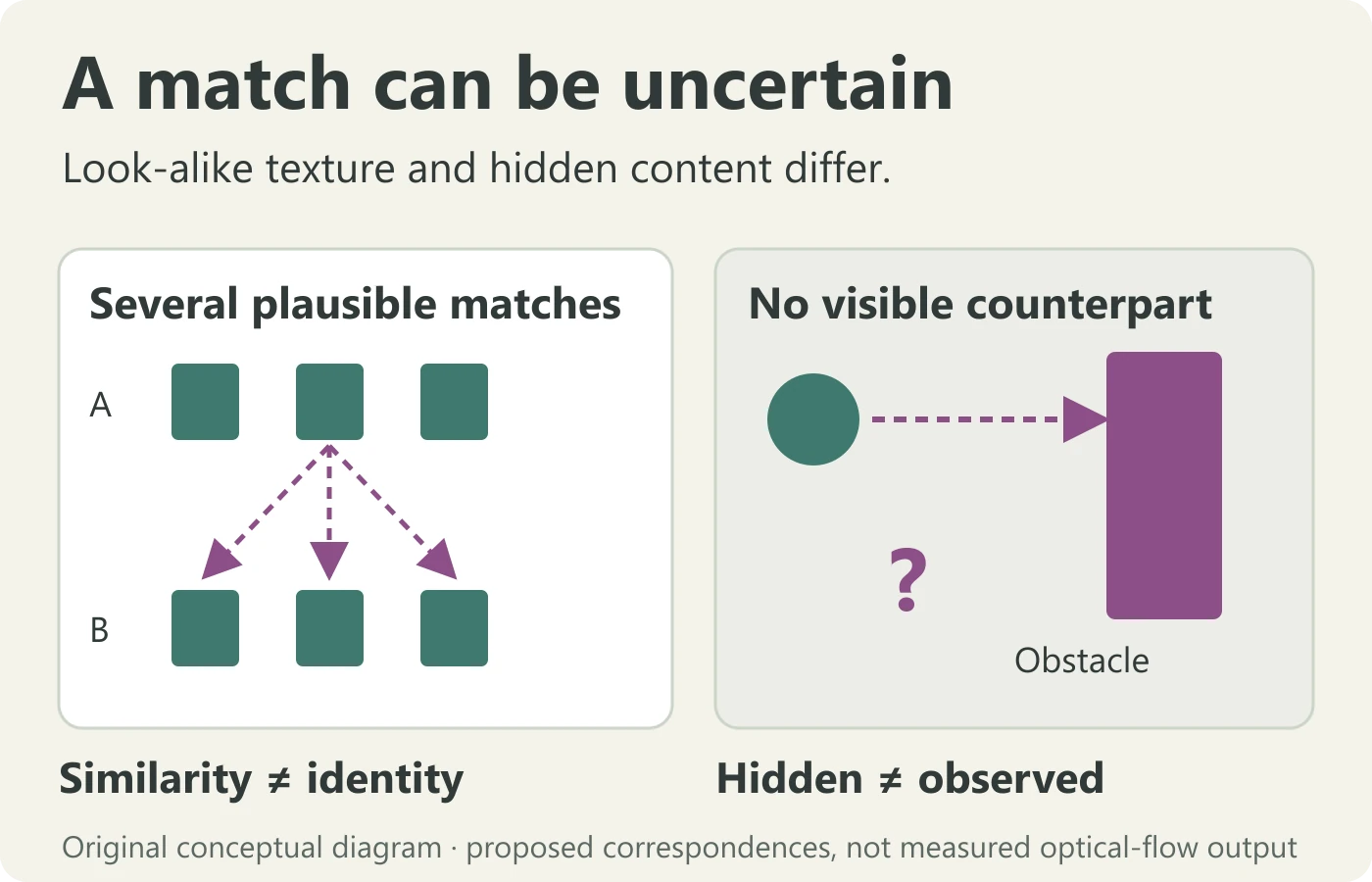
For a real input, look beyond the repeated feature to its surroundings. A nearby unique corner or label may help a reviewer distinguish one instance from another. If the context is absent, do not confidently assign an identity to each stripe or tile. The uncertainty belongs in the report, not just in your private hesitation.
Blur can remove the detail you hoped to track
Inspect whether the chosen feature is still distinguishable after movement. A blurred boundary may not offer the same visual information as a sharp one. Compression, resizing, and denoising can complicate that comparison too. The published compression-artifact guide covers the delivery layer; keep it separate from conclusions about the scene.
A weak match is not itself a manipulation finding. It may mean that the input is insufficient for the requested task. Before escalating a claim, seek a less processed source, a better interval, or a more suitable feature. Document when these alternatives are unavailable rather than forcing the existing overlay to answer more than it can.
How flow is used in editing
Optical flow can support tasks such as intermediate-frame synthesis. Adobe’s Premiere time-interpolation documentation describes its Optical Flow option as analyzing motion to generate new intermediate frames. That is a processing use, not a direct observation of a moment the camera missed.
If you are inspecting a slowed derivative, ask whether the frame of interest was estimated. An apparently smooth crossing can be useful for presentation while remaining inappropriate as an exact measurement of contact or position. Preserve the source sequence and label the derivative by its documented operation rather than calling it a recovered original.
Flow may also appear in tracking or stabilization workflows, but do not assume every product uses the same method. A menu label, a colorful field, or the phrase “AI analysis” does not specify an algorithm. Consult the actual tool’s documentation when the method matters and avoid attributing an implementation to a service without evidence.
For your own illustrative processing, retain the input files, application version, chosen operation, and output. State which part of the explanation the derivative supports. If you changed crop, timing, or scale, show that in the comparison record. A compelling overlay should not conceal a transform that materially changes how the motion is perceived.
A visual worked example with drawn coordinates
This example uses invented teaching coordinates on two drawings, not measurements from a camera. In drawing A, a marked corner is at column two, row three. In drawing B, the intended corresponding corner is at column five, row four. Under those explicit assumptions, the drawn displacement is three columns right and one row down.
The arithmetic is simply the later coordinate minus the earlier coordinate. It does not provide meters per second, object depth, or a trajectory between the drawings. The grid cells are diagram units. Without a supported spatial scale, elapsed-time account, and scene model, the displacement cannot be converted into a defensible real-world speed.
Now add an identical second corner in drawing B. The initial arithmetic still works for whichever match you choose, but the matching question is no longer trivial. You need context to justify why the first corner corresponds to one candidate rather than the other. A precise numerical vector can therefore be based on an uncertain association.
Next, place a foreground panel over the intended destination. The corner is hidden, so there is no directly visible counterpart at that location. Do not silently choose the other identical corner just to complete the track. Mark the point as unobserved in that drawing and state whether any displayed continuation would be a prediction.
Finally, remove the overlay and read the two drawings again. This is a useful discipline for real review: compare the output with the inputs it claims to explain. A plausible arrow should not become a substitute for the available evidence. If the output contradicts a plainly visible reference, investigate the match, the visualization, or the input preparation.
A method-reading worksheet
| Item | Question | Limit to retain |
|---|---|---|
| Inputs | Which two frames and what interval? | Unknown gaps are not continuous observations |
| Correspondence | Which visible feature is matched? | Similar appearance does not prove identity |
| Coverage | Selected points or a dense field? | More arrows do not establish more certainty |
| Visibility | Does the feature remain visible? | Hidden paths are not directly observed |
| Legend | What do length and color mean? | Display scaling is not physical speed |
| Use | Tracking, synthesis, or another task? | A processing estimate is not a truth verdict |
Complete the worksheet before assigning a cause to a strange vector. If a value is unavailable, use “unknown” rather than copying a default from another implementation. The completed table should make clear which statements concern observed inputs and which concern estimates or display choices.
Do not turn the table into a manipulation score. Its purpose is to expose assumptions and make the analysis repeatable. A report that identifies an unresolved correspondence can be more useful than one that presents a full, confident-looking field without explaining how it was produced.
Checking direction without inventing certainty
Return to the drawn coordinate example. If the intended feature moves from column two, row three to column five, row four, the conceptual reverse correspondence goes three columns left and one row up. This arithmetic helps explain why the direction of a visualization matters. It does not establish that a real method will recover both correspondences correctly.
OpenCV’s tutorial warns that a disappearing feature may be matched to a similar-looking point and describes a sample with a backward check. Such a check is useful context, not a universal accuracy guarantee. If a tool reports it, ask what was checked and which points were rejected. Do not assume every displayed arrow passed an equivalent validation procedure.
For manual review, you can apply a related question without pretending to run an algorithm: does the proposed later feature lead you back to the intended earlier feature, or to another look-alike? Keep the two frames visible and describe the ambiguity. If you cannot distinguish the candidates, retain uncertainty even when the arrow’s numerical displacement looks precise.
Then check units and preparation. A displacement expressed in resized-image pixels differs from one expressed in original-image pixels. A drawing scaled for display can make the arrow look longer without changing the underlying estimate. Record which representation you have before comparing numbers or screenshots from different sources.
Finally, decide whether a numerical statement is useful at all. If the input interval, display scaling, or correspondence is unknown, a qualitative note may be more honest: “movement estimate is uncertain near the boundary.” Precision should come from supported inputs and a defined method, not from the number of decimal places a tool displays.
This extra check is a reading aid rather than a forensic test. Its outcome can tell you that a comparison needs better documentation. It cannot independently establish the camera’s motion, reconstruct hidden content, or certify the event. Use it to improve the next question, not to make an unsupported verdict look mathematical.
A practical review: the hand crossing a patterned shirt
Consider a fictional clip in which a hand crosses a striped shirt. A displayed flow field shows arrows switching direction around the crossing. The caption calls this proof of an AI-generated person. Your review begins by locating the input frames and confirming that the overlay actually corresponds to them.
Inspect the hand boundary and the shirt pattern separately. The hand may obscure a feature in one frame, while repeated stripes offer several look-alike candidates. Write those observations without diagnosing the algorithm or the person. The question is whether the proposed matches are supported, not whether the arrows look unusual enough to justify the caption.
Check a nearby interval where the hand does not cover the pattern, if available. Compare it with the crossing interval under the same display legend. Do not invent a numerical improvement or treat the quiet interval as a controlled benchmark. It is another contextual observation that may help explain why matching is less clear at the boundary.
Seek the unaltered or earlier known file and document processing. If the clip was interpolated, stabilized, or screen-recorded, that history matters to the inputs. The frame-extraction guide helps retain appropriately labeled still references. Extraction prepares evidence; it does not prove that a selected frame was camera-observed.
A proportionate result might be: “The crossing and repeated pattern make the correspondence uncertain; the flow overlay alone does not establish scene generation.” If a broader authenticity claim remains important, continue with source, audio, sequence, and technical review rather than repeatedly inspecting the same uncertain arrows.
Preparing a reviewer handoff
Provide the exact input interval, a copy or safe source location, the displayed method if known, and the unresolved question. If the overlay comes from another person, distinguish their description from your independent observations. Do not include private access links or credentials in a public report.
Keep a small record of preparation: extraction, crop, resizing, and any timing changes. A feature moved by your own crop alignment should not be attributed to the original scene. If you cannot reconstruct how a visualization was prepared, explain that limit before relying on its arrows.
Ask the next reviewer for a specific task, such as checking correspondence at the crossing boundary, rather than asking them to “prove the video real.” Narrow tasks are easier to reproduce and harder to overinterpret. They also keep the optical-flow question distinct from independent questions about source, event, and meaning.
What flow cannot tell about real-world truth
An estimated vector is not an authenticity certificate. Ordinary video can contain difficult correspondences, and convincing synthetic video can produce orderly ones. A flow error describes a problem for a particular input and method; it does not identify the cause of the video or establish whether someone deliberately deceived viewers.
The AI video detection methods guide covers temporal analysis within a broader evidence stack. Do not reduce that task to a rule such as “chaotic arrows mean fake.” Inputs, processing, method limits, and independent source evidence all matter to the interpretation.
Similarly, a smooth field cannot validate the caption. A real recording can be presented with the wrong date or location. An ordinary edit can omit context without creating a distinctive flow anomaly. The broader AI video analysis workflow keeps those meaning and integrity questions separate.
The useful final conclusion states what the field supports and what it does not. It might describe coherent apparent motion in a visible region, uncertain matches near an occlusion, or insufficient input detail. Preserve those limited findings. Optical flow is valuable when it clarifies relationships between images, not when its visual complexity is mistaken for proof of reality.
Optical flow questions
Do the arrows show physical speed?
Not automatically. They represent image-plane estimates; units, timing, scale, camera movement, and scene geometry need separate support.
Is dense flow more accurate than sparse flow?
Coverage and accuracy are different. A dense field supplies broader estimates but may include uncertain regions.
What happens when an object is hidden?
A visible correspondence may be unavailable. A continued track can be a prediction or an incorrect match, so check the method and labels.
Can optical flow alone detect a deepfake?
No standalone verdict is justified from one flow pattern. Combine appropriate technical signals with source and context review.
Sources and scope
- OpenCV: optical-flow tutorial.
- MIT Foundations of Computer Vision: optical-flow estimation.
- Adobe: optical flow in time interpolation.
Source review began 13 October 2026. The coordinates, patterned-shirt exercise, and diagrams are original teaching examples, not measured flow results or product implementation claims.
Motion clues work best in context.
Review a video with multiple signals rather than relying on one motion pattern.