
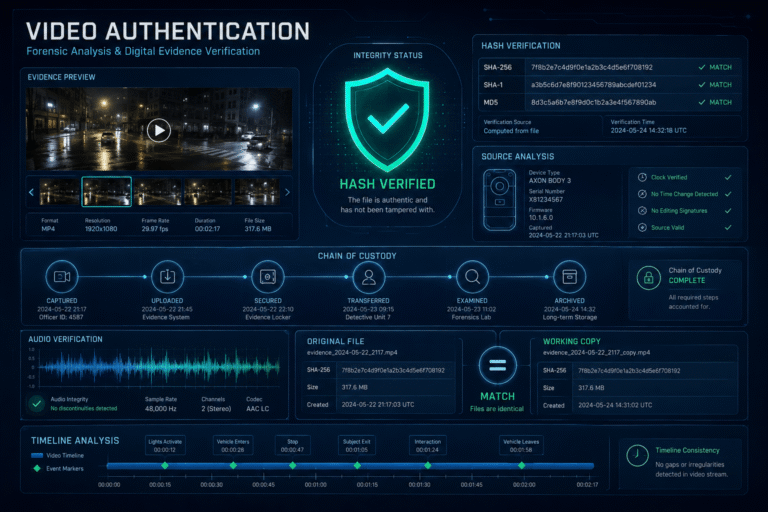
Video authentication is the forensic process of substantiating whether a digital video file is consistent with what it is claimed to be. That can mean testing whether a file is camera-original, identifying the device or software that created it, determining whether the encoded content was altered, and documenting whether the evidence remained unchanged during examination.
Authentication starts before visual analysis. If a potentially important file is repeatedly opened, converted, exported, renamed without documentation, or replaced by a social-media download, evidence about its original state can be lost. A defensible workflow therefore preserves the best available source, records acquisition details, establishes file integrity, creates a working copy, then examines source, structure, attributes, and content.
What Is Video Authentication?
The Scientific Working Group on Digital Evidence defines authentication as substantiating that data is an accurate representation of what it purports to be. In digital video authentication, the examiner evaluates whether the file’s content, context, and structure align with the information provided about it.
SWGDE groups common authentication questions into three broad outcomes:
These categories come from SWGDE’s Best Practices for Digital Video Authentication.
Video Authentication Is Not the Same as Video Authenticity
The terms sound similar but should own different search intents.
| Topic | Primary question | Typical user |
|---|---|---|
| Video authentication | Is this digital file consistent with its asserted source, structure, content history, and integrity? | Forensic examiner, investigator, legal team, security analyst, newsroom verification specialist |
| Video authenticity | Should I trust this clip and the claim attached to it? | General viewer, journalist, creator, researcher |
| Video verification | Can I confirm the source, time, place, claim, and surrounding context? | Fact-checker, journalist, investigator, public user |
| Video forensics | Which scientific and technical methods can be applied to analyze the file or media? | Technical investigator or analyst |
If the problem is whether a viral clip’s caption, date, location, or surrounding story can be trusted, the video authenticity guide owns that broader public-facing intent. This page stays focused on the authentication of the digital evidence itself.
Authentication Starts With a Question, Not a Tool
“Authenticate this video” is too broad for a rigorous examination.
Useful questions are narrower:
- Is this file consistent with a camera-original file from the claimed device?
- Has this video been re-encoded?
- Was content added, removed, or retimed?
- What software last interacted with the file?
- Is the current copy identical to the copy originally submitted for examination?
- Does the file structure match known reference files from the claimed recording system?
- Can the apparent source device be identified?
Different questions require different tests. SWGDE specifically notes that methods used to identify a video’s source may differ from methods used to determine whether its content was altered.
The Evidence Lifecycle: Preserve Before You Interpret
A technically sophisticated test cannot repair a weak evidence history. Preservation is part of authentication because the examiner must distinguish characteristics that existed in the submitted file from changes introduced during handling.
Preserve the Best Available Original
If a file may become evidence, preserve the best available version before editing, transcoding, enhancing, or uploading it elsewhere.
For removable media and forensic systems, SWGDE recommends read-only access or write-protection where appropriate. Its current digital forensic video analysis guidance also recommends creating a working copy, calculating hashes for the submitted evidence and working copy, and using the verified copy for assessment and analysis. See the SWGDE forensic video analysis guidance.
For ordinary newsroom or corporate investigations, you may not have a laboratory write blocker. The principle is still useful: preserve the source file, avoid unnecessary conversions, record what you received, and make analysis copies rather than casually modifying the only copy.
Hash the File to Establish an Integrity Baseline
A cryptographic hash is a value calculated from the bytes of a file. If two copies produce the same strong hash value, that supports the conclusion that their bytes are identical for practical integrity verification.
NIST recommends cryptographic hashing as part of digital-evidence preservation because even a one-bit change produces a different secure hash. Its preservation guidance also emphasizes documenting the source and maintaining chain-of-custody information. See NIST guidance on digital evidence preservation.
For example, on systems with a SHA-256 utility:
sha256sum evidence.mp4or on macOS:
shasum -a 256 evidence.mp4Record the output with the evidence identifier, filename, collection date, time zone, source, and person or system that performed the acquisition.
What a Matching Hash Proves, and What It Does Not
| A matching hash supports | A matching hash does not prove |
|---|---|
| The compared files contain the same bytes | The video was camera-original when first created |
| The working copy was not changed after the baseline, assuming the baseline is trustworthy | No manipulation occurred before the file entered your custody |
| The preserved evidence can be tied to a specific analyzed copy | The scene, statement, date, or caption is truthful |
This distinction is essential. Hashing protects the integrity of the evidence you have. It does not authenticate the historical truth of the content by itself.
Chain of Custody Records Who Controlled the Evidence
Chain of custody documents the movement and control of evidence through collection, safeguarding, transfer, analysis, and storage.
SWGDE’s current digital evidence collection guidance recommends maintaining chain-of-custody documentation throughout the life of a case and recording the evidence identifier, receipt time, transfers, and people taking possession. It also recommends recording hashes and collection details. See the SWGDE Best Practices for Digital Evidence Collection.
A minimal authentication record should preserve:
- unique evidence identifier
- original filename and extension
- source device, platform, sender, URL, or storage location
- date and time received, including time zone
- collector or recipient
- hash value
- transfers between people or systems
- tools and versions used during acquisition or examination
- working-copy filename and hash
Chain of Custody Is Not the Same as Provenance
These concepts overlap but solve different problems.
| Chain of custody | Media provenance |
|---|---|
| Tracks possession and handling of evidence after collection | Tracks origin and transformations across the media’s wider lifecycle |
| Who received, transferred, stored, or examined the item? | Who or what created, edited, exported, published, or derived the asset? |
| Commonly organizational or case documentation | Can come from source research, metadata, signed provenance, or version comparison |
| Protects evidentiary accountability | Explains media lineage |
If the central question is lineage across versions, publishers, edits, and claims, use the video provenance guide.
What Does “Camera Original” Mean?
A camera-original claim is testable, but it should be stated carefully.
In practice, an examiner asks whether the file is consistent with the output expected from the claimed recording device and whether there is evidence of subsequent processing.
That can involve:
- container type
- encoding profile
- resolution and frame rate
- GOP or coding structure
- metadata patterns
- device-specific identifiers
- file naming conventions
- track ordering
- software or encoder tags
- comparison with reference files from the same device
A file that matches expected camera output may be described as consistent with a camera-original workflow. The exact confidence depends on the available reference material and whether the device can be examined directly.
Reference Files Make Source Identification Much Stronger
Source identification is most effective when the questioned file can be compared with known exemplars.
SWGDE recommends obtaining reference videos from the alleged original device, or from a device and workflow that reflect the claimed generational history, when possible.
Good reference files should reproduce relevant settings:
- same camera model
- same firmware or software version when relevant
- same resolution and frame-rate mode
- same codec and recording mode
- same export path if the claim includes processing
One arbitrary reference clip is weaker than a small set that reflects the relevant device configurations.
The Four Technical Areas of File Authentication
SWGDE organizes important examination material into the container, structure, attributes, and content of the digital video file.
The video metadata guide covers ordinary attributes in detail. Authentication uses those fields as one part of a larger file examination.
Contextualization: How Did the File Reach Its Present State?
In SWGDE terminology, contextualization focuses on the file’s technical provenance or generational history.
Questions may include:
- Was the file exported through editing software?
- Was it transcoded?
- Does the structure suggest a social-media or messaging-app copy?
- Which application last interacted with the container?
- Does the metadata align with the claimed workflow?
A software tag does not prove deceptive editing. It can establish that the file likely passed through a particular software family or encoding path.
Content Authentication: What Changed Inside the Media?
Content authentication examines potential changes to the encoded and decoded streams.
SWGDE lists possible outcomes such as:
- recompression
- color-space changes
- missing content
- added content
- apparent image alteration
- changes to playback timing
The exact method depends on the suspected alteration. A timing cut requires different evidence from an inserted object or a face swap.
Global and Local Authentication Tests Answer Different Questions
| Scope | Example tests | Best for |
|---|---|---|
| Global analysis | File format, encoding structure, metadata, double compression, overall timing | Understanding the file as a whole |
| Local analysis | Specific frame range, face region, cloned object, lighting inconsistency, suspicious cut | Testing a defined alteration hypothesis |
SWGDE recommends using multiple applicable methods and cross-verifying results instead of relying on one analysis. That is also why the broader video forensics guide treats file, temporal, visual, audio, source, and provenance signals as separate evidence layers.
Recompression Does Not Mean the Video Is Fake
Recompression is one of the most common authentication findings and one of the easiest to overinterpret.
A video can be recompressed because it was:
- uploaded to a social network
- sent through a messaging app
- trimmed without deceptive intent
- exported from an editor
- converted to another format
- screen-recorded
- archived by a content-management system
The defensible statement is:
The current copy shows evidence of re-encoding.
Whether the re-encoding changed the meaning or visible content requires additional analysis.
Audio Must Be Treated as Separate Evidence
If the file contains audio, authenticating only the picture can leave a major gap.
A genuine video stream can be paired with substituted, dubbed, cloned, or edited audio. Conversely, authentic audio can accompany altered visuals.
SWGDE’s video authentication guidance specifically recommends audio authentication when a questioned multimedia file contains both audio and video streams.
Relevant cross-checks include:
- audio cuts around visible edits
- speech and lip timing
- room acoustics
- background-noise continuity
- speaker identity
- differences in encoding history between audio and video streams
Deepfakes Are One Authentication Problem, Not the Whole Field
AI manipulation has made video authentication more visible, but authentication existed long before generative AI.
A file may require authentication because of:
- traditional splicing
- frame deletion
- speed changes
- object insertion or removal
- audio substitution
- recompression
- face swapping
- fully generated video
Deepfake detection is therefore a specialized method inside the larger authentication process, not a replacement for source, structure, or evidence-preservation work.
Signed Provenance Can Strengthen Authentication, but It Changes the Evidence Model
Ordinary metadata can be useful but is generally editable. C2PA Content Credentials can add signed, tamper-evident provenance records when compatible tools and workflows preserve them.
A valid credential can help establish recorded origin or actions and whether the current asset still matches the protected provenance state.
It does not prove that a staged scene is unstaged, that a caption is accurate, or that media without credentials is fake.
The dedicated Content Credentials guide covers validation, trust, actions, ingredients, and missing-credential cases in detail.
Hashing, Chain of Custody and C2PA Solve Different Problems
| Mechanism | Main purpose |
|---|---|
| Cryptographic file hash | Show that two file states contain the same bytes or detect byte-level change |
| Chain of custody | Document who controlled and transferred the evidence after collection |
| C2PA Content Credentials | Cryptographically associate recorded provenance claims and actions with compatible media |
| Forensic authentication | Evaluate whether source, structure, attributes, content, and history support the asserted status of the file |
None of these mechanisms is a universal truth score. They become powerful when used for the question they were designed to answer.
Do Not Enhance the Only Evidence Copy
Upscaling, stabilization, denoising, color correction, deinterlacing, frame interpolation, and AI enhancement can help an examiner view details, but they also create a derivative file.
The safe model is:
- preserve the submitted evidence
- verify the working copy
- document the processing operation and tool version
- perform enhancement on a derivative copy
- retain the original and processed versions separately
Never analyze AI-generated enhancement detail as if it came directly from the evidence file.
A Practical Authentication Package
For serious investigations, the deliverable should be more than a screenshot of a detector result.
What Should a Video Authentication Conclusion Say?
Good conclusions describe the tested question and the evidence level.
| Example conclusion | Meaning |
|---|---|
| Consistent with the claimed camera-original workflow | Available source, structure, attributes, and reference comparisons support the asserted origin |
| Re-encoded copy | The current file has undergone another encoding stage, without necessarily establishing deceptive alteration |
| Content alteration supported | Applicable tests support a material change to the encoded or decoded content |
| Source device not established | Evidence is insufficient to attribute the file to the claimed device or system |
| Authentication inconclusive | Available evidence does not support a defensible determination for the question asked |
Avoid absolute language such as “100% authentic” when the examination only tested a subset of possible issues.
A Camera-Original File Can Still Show a Staged Event
This boundary is so important that it deserves its own section.
SWGDE explicitly notes that file-based video authentication cannot determine whether events depicted inside an accurate camera-original recording were scripted or reenacted.
For example:
- the camera may genuinely record a staged fight
- an authentic interview may contain a false statement
- camera-original footage may be uploaded with the wrong event description
- a real scene may be misidentified by location or date
File authentication answers questions about the digital evidence. Real-world claim verification requires external evidence.
What If the Only Copy Is From Social Media?
You can still examine it, but the scope changes.
A platform copy may have lost:
- original metadata
- source-device structure
- original bitrate
- camera-specific encoding characteristics
- Content Credentials
- fine visual evidence through recompression
Do not describe a social-media copy as “original” unless you have evidence for that claim.
Instead, authenticate what you actually possess: a downloaded or platform-derived copy. Then use source tracing to search for an earlier or less-processed version.
When DetectVideo AI Fits Into Authentication
DetectVideo AI can contribute technical media-analysis evidence when a supported video needs review for AI generation, manipulation, temporal inconsistency, compression, metadata, or related forensic signals.
It is not a chain-of-custody system and should not be presented as a substitute for preserving an evidentiary original, hashing a file, documenting acquisition, or obtaining reference material.
For evidentiary use, the strongest workflow is to preserve the original independently, document the evidence history, and treat automated analysis as one examination layer within the broader authentication process.
Video Authentication Checklist
- Define the exact authentication question.
- Preserve the best available source file.
- Document acquisition, source, time zone, and evidence identity.
- Calculate and record a cryptographic hash.
- Create and verify a working copy.
- Inspect container, structure, metadata, streams, and timing.
- Obtain reference files or the claimed source device when possible.
- Perform global and local content tests appropriate to the question.
- Examine audio separately when it matters.
- Check signed provenance if available.
- Document tools, versions, transformations, and limitations.
- Report the narrowest conclusion supported by the evidence.
Key Takeaway
Video authentication is the discipline of substantiating a digital video’s asserted source, structure, integrity, and content history while preserving the evidence needed to support that conclusion.
Preservation comes first. Hash the evidence, document custody, create a verified working copy, define the precise question, then examine the container, encoding structure, metadata, source characteristics, visual content, timing, audio, and provenance that are relevant to the case.
Do not confuse byte-level integrity with truth, recompression with deception, or camera-original status with an authentic real-world event. A defensible authentication report explains exactly what was tested, what was found, and what the evidence cannot establish.
FAQ About Video Authentication
What is video authentication?
Video authentication is the forensic process of evaluating whether a digital video file’s source, structure, attributes, content, and history are consistent with what the file is claimed to be.
How do you authenticate digital video evidence?
Preserve the best available original, document acquisition, hash the file, create a verified working copy, define the authentication question, inspect technical structure and content, compare reference material when available, and report the findings with limitations.
Does hashing authenticate a video?
A hash can substantiate file integrity between compared states. It does not prove that the video was never edited before the hash was created or that the depicted event is truthful.
What is chain of custody for video evidence?
Chain of custody is the documented record of who collected, received, transferred, stored, or examined the evidence, including relevant dates, times, identifiers, and purposes for transfer.
Can metadata prove a video is original?
No single metadata field proves originality. Metadata can support source and workflow analysis, but ordinary metadata is editable and should be interpreted with structure, content, reference files, and other evidence.
What does camera-original mean?
In an authentication context, camera-original means the file is consistent with direct output from the claimed recording device without an intervening generation that materially changed the file. Establishing that status can require reference files or source-device comparison.
Can a camera-original video still be misleading?
Yes. The file can be an authentic camera recording while the event is staged, the speaker is lying, or the footage is later presented with a false date, place, or caption.
Are Content Credentials the same as video authentication?
No. Content Credentials can provide signed provenance evidence for compatible media. Forensic authentication is broader and may examine file structure, source characteristics, content alteration, audio, timing, metadata, and reference material.
Can AI detectors authenticate video evidence?
AI detectors can contribute evidence about possible synthetic or manipulated content. They do not replace evidence preservation, hashing, chain of custody, source identification, or a complete authentication examination.