
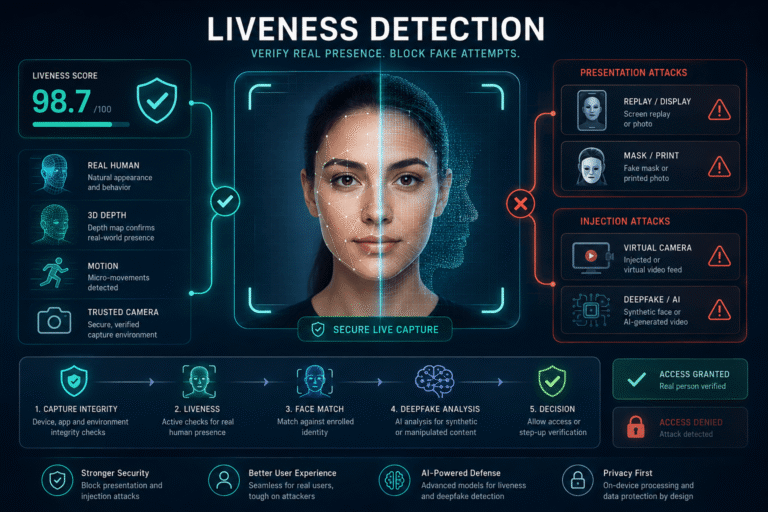
Liveness detection is essential for remote identity verification, but it is not a complete deepfake defense. It is very good at answering one question: is a real, physically present person or biometric source being presented to the capture system? The harder 2026 question is what happens when an attacker bypasses that presentation entirely and injects forged video into the verification pipeline.
If you work with KYC, account opening, account recovery, age assurance, payments, or other high-risk identity flows, this distinction changes how you should design and buy fraud controls. A printed photo, a replayed video on a phone, a 3D mask, a real-time face swap displayed to a camera, and a synthetic stream injected through a virtual camera are not the same attack. They do not fail for the same reasons, and one “liveness score” should not be expected to stop all of them.
Liveness Detection and Deepfake Detection Solve Different Problems
The most important distinction is not active versus passive liveness. It is where the attack enters the system.
| Control | Main question | Best at detecting | Important gap |
|---|---|---|---|
| Liveness / Presentation Attack Detection | Is a bona fide live subject being presented at capture? | Printed photos, screens, replays, masks and other presentation attacks | Does not by itself prove the video stream came from a genuine sensor |
| Deepfake detection | Does the media contain evidence of synthetic generation or manipulation? | Face swaps, generated faces, synthetic frames and other forged media patterns | Does not prove identity or physical presence |
| Capture / injection integrity | Did the media originate from the expected camera and trusted capture path? | Virtual cameras, emulators, stream injection and tampered capture environments | Does not replace biometric matching or media analysis |
| Face verification | Does the live facial sample match the identity evidence? | Identity mismatch and impostor attempts | A matching face can still be replayed or synthetically injected |
This is also why the phrase “deepfake vs liveness detection” should not be framed as a choice between two competing tools. They cover different parts of the same identity attack surface.
The Attack Boundary: In Front of the Camera or Inside the Pipeline?
This boundary is not marketing terminology. ISO/IEC 30107-3:2023 defines testing and reporting for biometric Presentation Attack Detection and explicitly scopes its attacks to those occurring at the biometric capture device. Other attacks are outside that standard’s scope. See the ISO/IEC 30107-3:2023 overview.
That means an identity vendor can have strong PAD performance and still need separate controls for digital injection. Certification against presentation attacks should never be interpreted as proof that every possible synthetic stream injection is covered.
What Liveness Detection Actually Measures
In biometric identity proofing, liveness detection is a subset of Presentation Attack Detection. It tries to establish that the biometric sample was captured from a living subject who is genuinely present at the point of capture.
Depending on the system, that decision may use a combination of:
- depth and three-dimensional facial structure
- texture and image formation cues
- motion across frames
- light and reflection behavior
- challenge-response behavior
- camera and sensor characteristics
- capture timing and session integrity
None of these signals should be treated as a universal “deepfake tell.” Their value comes from how they are measured and tested in the real capture system.
Active vs Passive Liveness: The Real Tradeoff
Active and passive liveness are user-experience strategies as much as security strategies.
Active liveness
Active liveness asks the user to perform an action, such as turning the head, changing gaze, moving closer to the camera, or following an unpredictable prompt.
It can be useful when the system needs fresh interaction that a simple static photo or prerecorded replay cannot easily reproduce. The downside is friction. Long or repetitive challenges increase abandonment, accessibility problems, and retry rates.
Passive liveness
Passive liveness evaluates the capture without asking the user to perform an obvious challenge. This can improve conversion because the user simply looks at the camera while the system analyzes the session.
But “passive” does not mean “weak,” and “active” does not mean “deepfake-proof.” A sophisticated injected stream can be generated in real time and respond to expected prompts. The security result depends on the entire capture architecture, not only whether the user was asked to blink.
A better pattern: passive first, step up when risk increases
For many products, the best balance is a low-friction passive flow for ordinary users with additional challenge, capture integrity checks, or manual review only when the session becomes risky or uncertain.
This avoids punishing every legitimate user for attacks that affect a small fraction of sessions.
Can Liveness Detection Detect Deepfakes?
Sometimes, but the answer depends on how the deepfake reaches the system.
| Deepfake delivery method | Can liveness help? | What else is needed? |
|---|---|---|
| Deepfake video replayed on another screen | Yes. Strong PAD may detect display, replay, depth or capture inconsistencies. | Face match and normal fraud controls |
| Real-time face swap shown physically to the camera | Potentially. The attack still passes through the genuine sensor. | Deepfake analysis can add another signal |
| Prerecorded synthetic stream injected through a virtual camera | Not reliably by liveness alone | Capture integrity, injection detection and forged-media analysis |
| Interactive real-time deepfake injected into the stream | Traditional challenges may be insufficient | Trusted sensor path, device controls, deepfake analysis and risk orchestration |
| Recorded identity proof video submitted after capture | Not a live-session problem anymore | Video verification and manipulation analysis |
If you need to analyze the synthetic media itself rather than the live identity session, the deepfake detection guide covers that forensic problem separately.
What an Advanced Deepfake Liveness Detection Add-On Should Actually Add
The Search Console query “deepfake liveness detection add-on” points to a real architecture question: what should you add if your current identity stack already has liveness?
The useful answer is not “another liveness score.” A deepfake add-on should close a different gap.
Layer 1: Capture integrity
The application should have reasonable confidence that the media is coming from the intended sensor and capture path. Depending on the environment, this can include controls for virtual cameras, rooted or jailbroken devices, emulators, modified runtimes, instrumentation, and unexpected camera behavior.
Layer 2: Presentation Attack Detection
PAD addresses physical or sensor-facing spoofs. It should be tested against realistic attack species rather than only one printed photograph.
Layer 3: Identity matching
The captured face still has to match the validated identity evidence. Liveness does not establish who the person is.
Layer 4: Forged-media or deepfake analysis
This layer evaluates whether the media itself contains synthetic or manipulation evidence. It is especially useful when attacks can be generated or injected digitally.
Layer 5: Risk orchestration
Do not collapse every signal into one unexplained score. Decide what happens when the liveness result is strong but the device is suspicious, when the face matches but the stream looks injected, or when deepfake analysis is uncertain. High-risk combinations can trigger a second capture, stronger challenge, document recheck, manual review, or another authentication factor.
NIST Now Treats PAD and Injection Defense as Separate Requirements
The 2025 NIST Digital Identity Guidelines are particularly useful because they reflect the modern attack surface directly.
For remote biometric collection, NIST SP 800-63A-4 requires Presentation Attack Detection that meets an Impostor Attack Presentation Accept Rate below 0.07, with PAD testing conformant to ISO/IEC 30107-3:2023. NIST also requires controls that increase confidence that remote digital media is being produced by a genuine sensor, including detection of risks such as virtual cameras, device emulators and jailbroken devices.
NIST explicitly notes that live capture and PAD provide some protection from injection and forged media but are not sufficient for every injection scenario. See the current NIST SP 800-63A-4 identity proofing requirements.
This gives buyers a useful procurement rule: if a vendor says “we are ISO 30107-3 tested, therefore we solve deepfake injection,” ask for separate evidence of injection resistance.
Standards and Certifications Worth Knowing
You do not need to become a biometric standards expert, but several references are useful when evaluating liveness claims.
| Reference | What it is useful for | What it does not prove |
|---|---|---|
| ISO/IEC 30107-3:2023 | Testing and reporting of Presentation Attack Detection mechanisms | Full system security against digital injection outside capture |
| ISO/IEC 30107-4:2024 | PAD testing profile for mobile devices and integrated biometric modules | That every remote KYC architecture is secure end to end |
| NIST SP 800-63A-4 | Current U.S. federal identity proofing guidance, including PAD and injection controls | Commercial certification of a vendor product |
| FIDO biometric certification | Independent lab evaluation of biometric performance and PAD under defined requirements | Protection against every future attack outside the evaluated scope |
FIDO’s biometric certification program uses accredited laboratories and includes biometric recognition performance plus Presentation Attack Detection. Its current program documentation also distinguishes face verification for remote identity verification and PAD testing. See the FIDO Biometric Certification overview.
Do Not Buy Liveness on an “Accuracy” Number
A single percentage such as “99.9% accurate” is nearly meaningless unless you know what was measured, against which attacks, at what threshold, on which devices and under which operating conditions.
IAPAR
Impostor Attack Presentation Accept Rate measures how often impostor presentation attacks are incorrectly accepted. NIST’s current remote biometric requirement uses IAPAR below 0.07 for PAD.
False rejects and acquisition failures
Security is only useful if legitimate users can complete the flow. Track how often bona fide users are rejected, how often the camera cannot acquire a usable sample, and how many retries are needed.
Attack-species coverage
Ask for results by attack type. A system can perform well against printed photos and still be weak against high-quality screens, masks, projections, real-time face swaps, or injected synthetic streams.
Operational completion rate
Measure real production outcomes by device class, network quality, browser or SDK version, region and user population. Lab performance and field performance are different questions.
Latency
A security layer that adds several seconds to every session can increase abandonment. Record both median and tail latency, especially if deepfake analysis runs in addition to liveness.
Advanced Liveness Detection for Deepfakes Should Be Tested as a System
A model can be excellent in isolation and still fail in the product.
Test the end-to-end identity journey:
- How is camera permission established?
- Can a virtual camera become the capture source?
- Can an emulator or modified device submit prerecorded frames?
- Can the challenge be predicted or replayed?
- What happens when the user’s connection drops frames?
- What happens when the face is partly occluded?
- How does the system react when liveness, device integrity and deepfake analysis disagree?
NIST’s current guidance makes the same system-level point: PAD makes forged-media injection harder, but it does not cover all cases, so the capture path itself needs additional technical controls.
How to Evaluate a Liveness Vendor in 2026
Instead of asking “Do you detect deepfakes?”, ask questions that force the vendor to describe the threat model.
Which attacks are inside your certified scope?
Ask for the exact attack species and testing standard. Presentation attack certification is valuable, but it should not be stretched beyond its documented scope.
How do you handle digital injection?
Ask whether the product can identify virtual cameras, emulators, tampered devices, synthetic feeds or other non-genuine capture paths. Ask whether those protections are in the SDK, server, both, or handled by a separate product.
How recent are your deepfake tests?
Deepfake models change quickly. Ask when the attack set was last refreshed and whether evaluation includes unseen generation methods rather than only models used during training.
Can you show independent test results?
Third-party laboratory testing and recognized certification are stronger than a vendor’s own “accuracy” slide. FIDO, ISO-conformant evaluations and transparent test methodology make procurement evidence easier to compare.
How do you handle uncertainty?
A mature system needs a safe middle state. Borderline sessions should not be silently approved or permanently rejected. Ask how risk is escalated, retried, reviewed and audited.
False Rejects Are a Security Problem Too
Teams often tune liveness until fraud drops, then discover that legitimate users are being rejected or abandoning onboarding.
False rejects can increase when users have:
- low-quality or older front cameras
- poor or uneven lighting
- limited bandwidth
- glasses, face coverings or mobility limitations
- devices with aggressive image processing
- conditions that make active challenge gestures difficult
A high-friction system can create pressure on support teams to bypass security manually, which creates a new fraud path.
The better pattern is to improve capture guidance, keep the default flow short, and route only uncertain sessions into a stronger step-up process.
Test Demographic Performance, Not Just Global Average Performance
Biometric error rates can vary across user groups, so one global acceptance number is not enough.
NIST SP 800-63A-4 requires biometric performance evaluation across relevant demographic groups and uses a fixed operating threshold. ISO/IEC 19795-10:2024 specifically addresses how to quantify and report performance variation across demographic groups, including failure-to-acquire, comparison-score shifts and recognition error rates. See the ISO/IEC 19795-10:2024 overview.
For product teams, the operational question is simple: who is getting rejected more often, on which devices, and under what capture conditions?
A Practical Architecture for Deepfake-Resistant Identity Proofing
You do not need every user to pass through the maximum-security flow. You need a system that knows when to escalate.
This risk-based design is usually better for both fraud loss and conversion than applying the most disruptive challenge to every applicant.
Where Recorded Video Verification Fits
Liveness is a real-time capture control. Once a customer sends you a prerecorded proof video, a social clip or an archived verification recording, you are dealing with a different problem.
For recorded media, you need source, provenance and manipulation analysis rather than a pure live-presence decision. The video verification guide covers that recorded-media workflow.
This distinction is important for audit and dispute teams. A video that once passed a liveness session may later be exported, transcoded or separated from the original capture evidence. The archived file alone should not be expected to recreate every security signal available during the live session.
Where DetectVideo AI Fits, and Where It Does Not
DetectVideo AI analyzes supported recorded video for available evidence associated with AI generation or manipulation. That can be useful when reviewing a suspicious proof clip, investigating an incident, or examining media that arrived outside the live identity session.
It should not be described as a replacement for real-time liveness, PAD, trusted camera capture or identity matching.
If your use case is building a live KYC control, you need a dedicated identity-verification architecture. If your use case is investigating whether a stored or submitted video was synthetically altered, recorded-video analysis becomes relevant.
Implementation Checklist for Product and Fraud Teams
Key Takeaway
Modern liveness detection is a necessary identity control, but deepfake-resistant identity proofing needs more than liveness.
Use PAD to defend the capture point against presentation attacks. Use capture and device integrity controls to make software-level injection harder. Use face verification to bind the applicant to the identity evidence. Add deepfake or forged-media analysis where synthetic content is a realistic risk. Then combine those signals in a decision system that can step up uncertain sessions without blocking legitimate users unnecessarily.
The question to ask a vendor is no longer simply, “Do you have liveness?” Ask: “Which attack path are you proving is genuine, and what happens when the attacker bypasses it?”
FAQ About Liveness Detection and Deepfakes
What is liveness detection?
Liveness detection is a biometric anti-spoofing control used to establish that a living subject is genuinely present at the capture point. In standards language, it is part of Presentation Attack Detection.
What is the difference between liveness detection and deepfake detection?
Liveness detection focuses on genuine presence during biometric capture. Deepfake detection analyzes media for evidence of synthetic generation or manipulation. They overlap in some attacks but do not solve the same problem.
Can liveness detection stop deepfakes?
It can stop many deepfake presentation attacks when the fake is shown to the real camera. It is not sufficient by itself when a synthetic stream is injected digitally and bypasses the genuine camera path.
What is a deepfake liveness detection add-on?
It should be an additional defense layer that addresses synthetic-media or injection risks not covered by conventional PAD. A useful add-on complements capture integrity, liveness and face matching rather than replacing them.
What is advanced liveness detection for deepfakes?
In practice, “advanced” should mean a layered system that combines PAD with trusted capture, device integrity, injection controls, deepfake analysis and risk-based step-up decisions. It should not simply mean a harder blink or head-turn challenge.
What is a presentation attack?
A presentation attack places an artifact or manipulated biometric presentation at the capture device to interfere with a biometric system. Examples include photos, replay screens, masks and other spoofs presented to the sensor.
What is a digital injection attack?
A digital injection attack inserts forged or manipulated media into the identity verification process through a software or device path, potentially bypassing the genuine camera capture entirely.
Does ISO/IEC 30107-3 cover deepfake injection attacks?
ISO/IEC 30107-3:2023 covers PAD attacks at the biometric capture device. The standard explicitly states that other attacks are outside its scope, so injection resistance requires separate system-level controls and testing.
What does IAPAR mean?
IAPAR stands for Impostor Attack Presentation Accept Rate. It measures the proportion of impostor presentation attacks that are incorrectly accepted. NIST SP 800-63A-4 requires IAPAR below 0.07 for remote biometric PAD in the covered identity-proofing context.
Is passive liveness better than active liveness?
Neither is universally better. Passive liveness usually reduces friction. Active challenges can add fresh interaction. The right design depends on the threat model, capture environment and user population, and many systems use step-up challenges only when risk increases.
Can active challenges stop real-time deepfakes?
Not reliably by themselves. A real-time injected deepfake may respond to predictable or generated challenges. Capture integrity and other anti-injection controls are still needed.
How should I evaluate a liveness vendor?
Ask what attacks are in scope, which standards and independent tests apply, how injection is handled, when deepfake testing was last refreshed, which metrics are reported, how performance varies across devices and user groups, and what happens when signals conflict.
What metrics matter besides liveness accuracy?
Useful metrics include IAPAR, false rejection or non-match rates, failure-to-acquire rate, attack-species performance, retry rate, completion rate, latency and demographic performance variation.
Do I need liveness for prerecorded identity videos?
Liveness is designed for live capture. If you only receive a prerecorded video, you need recorded-media verification, provenance and manipulation analysis rather than relying on a liveness decision that was never made during capture.