
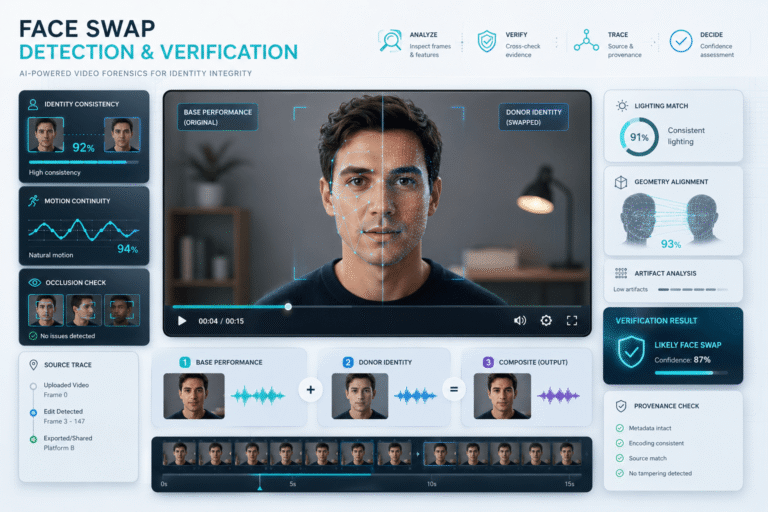
A face swap video changes who appears to be performing an action without necessarily changing the performance itself. The body may be real. The camera may be real. The room, timing, gestures, and even the original voice may all be real. What changes is the identity viewers attach to that performance.
That is what makes face swaps different from many other forms of synthetic video. A convincing swap can preserve most of the original footage while replacing only the facial identity. If you focus only on whether the whole clip “looks AI-generated,” you can miss the more precise question: does this face genuinely belong to the person who performed the scene?
What Is a Face Swap Video?
A face swap video is footage in which one person’s facial identity is replaced with another identity while some or most of the underlying performance remains intact.
The underlying source can be a normal camera recording, a previously published video, a live performance, or a synthetic scene. The replacement face can come from photographs, video references, a trained identity model, or another generative workflow.
The crucial idea is that a face swap usually separates identity from performance.
This distinction is more useful than calling every altered face a generic “AI video.” It tells you exactly what the manipulation is attempting to transfer.
The Anatomy of a Face Swap: Base, Donor and Composite
Media-forensics research often needs precise language for manipulated media. NIST’s Open Media Forensics Challenge uses the concepts of a base, a donor, and a resulting probe when describing manipulation datasets. NIST also evaluates video deepfake detection as a separate forensic task. See the NIST OpenMFC media forensics framework.
For a face swap, you can translate that model into a simple identity map:
This gives you a better verification question:
“Which parts of this clip come from the base performance, and which parts may come from the donor identity?”
What a Face Swap Changes, and What It Often Preserves
| Video element | Often preserved from the base | Often generated or modified |
|---|---|---|
| Body and clothing | Usually | Not necessarily |
| Background and camera movement | Usually | Sometimes in hybrid edits |
| Head pose | Underlying motion often comes from the base performer | Facial rendering must adapt to that pose |
| Facial identity | No | Core target of the swap |
| Expressions | Timing often comes from the base | Identity-specific appearance is regenerated |
| Voice | May remain completely authentic | Can also be cloned or replaced in a hybrid deepfake |
| Mouth movement | May follow the base performance | Can also be regenerated by a lip-sync system |
This is why a person can look like a celebrity while walking with someone else’s body language, or why a synthetic face can appear over completely authentic audio and scenery.
Face Swap vs Facial Reenactment vs AI Lip Sync
These techniques are related but not interchangeable.
| Technique | What changes | Main viewer illusion |
|---|---|---|
| Face swap | Facial identity | A different person performed the scene |
| Facial reenactment | Expression, gaze, head behavior, or facial performance | The person reacted or behaved differently |
| AI lip sync | Mouth movement and sometimes nearby facial regions | The person spoke different words |
| Voice cloning | Speech identity | The person said synthetic dialogue |
| Full synthetic video | Most or all of the visible scene | The depicted performance or event existed as recorded |
If the mouth rather than the identity is the main question, use the AI lip sync guide. If synthetic speech is involved, the voice deepfake guide covers that separate evidence layer.
Why Old Face-Swap Checklists Age Badly
Many older guides teach people to look for blinking mistakes, plastic skin, strange teeth, blurry ears, or a glowing jawline. Those defects still appear in weak edits, but they are not stable properties of face swapping.
The problem is two-sided:
- newer generation systems can reduce or eliminate artifacts that older systems produced regularly
- real video can create similar artifacts through compression, denoising, beauty filters, motion blur, low light, sharpening, or platform transcoding
So a strong face-swap article should not ask users to memorize yesterday’s model failures. It should teach them where identity replacement is under the greatest geometric, temporal, and contextual stress.
The Identity Stress Test: Where a Face Swap Has to Work Hardest
A face swap is easiest when the subject faces the camera, moves slowly, has even lighting, and nothing crosses the face. Verification becomes more informative when the scene gets harder.
A single failure is not proof. What matters is whether identity-specific inconsistencies appear repeatedly under the same kinds of stress.
Test Identity Continuity, Not Just Image Quality
One of the strongest conceptual checks is to ask whether the same person exists continuously through time.
Look for changes in:
- facial proportions during rotation
- distance between facial features
- shape of cheeks and jaw under expression
- identity-specific marks such as moles, wrinkles, scars, or facial hair
- how glasses or hair interact with the face
- the relationship between face size and head shape
Do not freeze on one unusual frame and declare a deepfake. Scrubbing through several seconds is more useful because face swapping is a temporal transformation.
Occlusion Is More Informative Than the Hairline
When an object crosses a real face, the camera records a simple physical event: the object is in front and the face is behind it.
A face-swap system has a harder problem. It must decide which pixels belong to the face, which belong to the foreground object, and how the synthetic identity should disappear and reappear.
Watch moments such as:
- a hand touching the cheek or mouth
- hair moving across the forehead
- a microphone crossing the lower face
- glasses catching reflections
- another person briefly blocking part of the subject
Repeated segmentation mistakes, unnatural reconstruction, or sudden identity changes around occlusion can be useful evidence. But ordinary video compression can also damage edges, so interpret the pattern across multiple frames.
Geometry Matters More Than “Perfect Skin”
Texture has become a weak universal clue because video filters and generation models can both produce smooth faces.
Geometry is more fundamental.
Ask whether the synthetic face fits the physical head:
| Geometry check | What should remain consistent |
|---|---|
| Face width | Should change naturally with perspective and head rotation |
| Jaw and chin | Should align with the head and neck through motion |
| Eyes and nose | Feature placement should remain stable under expression |
| Ears and side profile | Should remain compatible with the head pose and identity |
| Forehead and hair boundary | Should follow real depth and occlusion rather than a fixed mask |
This does not mean you can authenticate a face by geometry alone. It gives you a better place to look when the claimed identity matters.
Lighting Should Follow the Head, Not the Replacement Face
A good swap has to synthesize facial appearance under the illumination of the original scene.
Instead of asking whether “the lighting looks strange,” compare specific relationships:
- does the face darken when the head turns away from the main light?
- do highlights move across the forehead, cheeks, and nose consistently?
- does skin color remain plausible under changing exposure?
- do shadows cast by glasses, hair, or nearby objects behave continuously?
A mismatch that persists across motion is more useful than a single bright forehead or unusual shadow.
Face Swap Detection Is Stronger When You Have a Real Reference
If the video claims to show a known person, you have an advantage: authentic reference material may already exist.
Compare the suspicious clip with several genuine sources and look beyond surface resemblance.
Stable facial structure
Does the face maintain the same proportions as authentic recordings from similar angles?
Identity-specific detail
Are recurring features such as facial hair, smile lines, eyelid shape, scars, moles, or teeth consistent?
Expression style
Does the person usually form certain expressions the same way? Treat this as supporting context, not biometric proof.
Source continuity
Can the suspicious clip be traced to a genuine interview, livestream, speech, or earlier video featuring a different face?
That final check can be decisive. If you locate the same underlying performance with another identity, you have much stronger evidence than any visual artifact.
Finding the Base Video Can Solve the Case
Because a face swap often preserves the underlying scene, the base video may still be searchable.
Useful search targets include:
- background landmarks
- clothing
- body pose
- hand gestures
- on-screen captions
- camera framing
- distinctive objects
Extract several frames and search them. The face may differ, but the rest of the frame can match an older source.
If source tracing is the main task, use the video verification guide rather than relying on appearance alone.
Face Swap vs Lookalike vs Filter
Not every surprising resemblance is a face swap.
| Case | What may be happening |
|---|---|
| Lookalike or impersonator | A real person physically resembles the claimed identity |
| Beauty or face filter | The same person’s appearance is modified without replacing identity |
| Traditional VFX makeup or compositing | Non-generative production techniques change appearance |
| Face swap | One identity is transferred onto another performance |
| Full synthetic character | The face and possibly the entire person are generated rather than swapped |
The correct label matters. Calling every filter a face swap makes verification less precise and weakens the usefulness of the conclusion.
Face Swap vs Deepfake
A face swap is one form of deepfake, but deepfake is the broader category.
Deepfakes can include face replacement, facial reenactment, voice cloning, synthetic lip movement, object manipulation, or several techniques at once.
The broader taxonomy is covered in the deepfake video guide. The dedicated deepfake detection guide focuses on detection methods rather than the face-swap category itself.
When a Face Swap Becomes an Impersonation Problem
A face swap can be harmless entertainment when the context is clear and the people involved consent. The risk changes when the synthetic identity is presented as authentic.
High-impact cases include:
When the main issue is the misuse of identity rather than the media technique, use the AI impersonation guide. If the face swap is part of a fraudulent offer or payment funnel, the scam videos guide is the more relevant fraud workflow.
Disclosure Changes the Meaning of the Same Face Swap
The same technical edit can have a very different meaning depending on disclosure and context.
A clearly labeled parody, film effect, translation experiment, or consent-based creative project does not make the same claim as a video presented as authentic evidence.
YouTube currently requires creators to disclose realistic AI content that meaningfully alters a real person so they appear to say or do something they did not actually say or do. YouTube can also surface AI-origin information in the “How this content was made” area. See the YouTube altered and synthetic content guidance.
A disclosure is useful evidence about the production method. It does not automatically settle questions about consent, rights, factual context, or whether an external claim is misleading.
If the Face Is Yours: Platform Likeness Protection Matters
Face swapping is not only a detection problem for viewers. It can be an identity-protection problem for the person whose likeness was used.
YouTube allows people to request review of realistic altered or synthetic content that looks or sounds like them. Its privacy process considers factors such as whether the content is synthetic, whether it is disclosed, whether the person is uniquely identifiable, realism, public-interest value, and sensitive behavior. See YouTube’s identity and synthetic-likeness guidance.
If you are targeted, preserve the source URL, uploader, publication date, caption, and best available copy before requesting removal or publishing a correction.
Can Content Credentials Reveal a Face Swap?
Sometimes provenance can answer questions that pixels cannot.
C2PA Content Credentials can record tamper-evident information about how compatible media was created or modified. Current C2PA implementation guidance includes ways to communicate AI-generated and AI-modified content in signed provenance records. See the C2PA guidance for synthetic and modified content.
If a compatible credential records an AI modification, that can be strong evidence about the documented workflow.
But three limits matter:
- not every video has Content Credentials
- provenance may be lost or unavailable in a redistributed copy
- provenance does not independently prove whether the external caption or claim is true
The detailed checker workflow belongs in the Content Credentials guide.
When Technical Deepfake Detection Adds Value
Technical analysis becomes useful when you cannot resolve the identity through source, provenance, or direct comparison.
A good analysis should look for evidence across time rather than a single screenshot. Depending on the system, useful signal groups can include:
- temporal identity consistency
- face-region behavior under pose change
- spatial blending and local manipulation
- compression differences
- audio-video relationships
- metadata and source evidence
NIST’s OpenMFC separates video manipulation detection from video deepfake detection, which is a useful reminder that “manipulated” and “face-swapped” are not identical forensic claims.
Where DetectVideo AI Fits
DetectVideo AI can add a technical evidence layer when a supported video may contain AI generation or manipulation.
For a suspected face swap, the useful questions are:
- Does suspicious evidence concentrate around the face or identity layer?
- Does the signal persist across time or appear in only one degraded frame?
- Do visual and temporal evidence agree?
- Could normal editing, filters, or compression explain the same anomaly?
- Does technical analysis agree with the source and provenance history?
A detector result should not be converted directly into “this person’s face was swapped.” That conclusion requires the evidence to support the specific identity-replacement hypothesis.
The Face Swap Evidence Matrix
| Evidence found | What it supports | What it does not prove alone |
|---|---|---|
| Earlier base video with a different face | Strong evidence of identity replacement in the later copy | Which tool created the swap |
| Repeated identity drift under motion | Possible face-region manipulation | That a specific person was deliberately impersonated |
| Valid AI-modification provenance | Documented synthetic editing in the compatible workflow | The exact manipulated region unless the record specifies it |
| YouTube altered-content disclosure | The uploader or platform indicates meaningful AI alteration | That the video is deceptive or harmful |
| Detector flags deepfake evidence | The clip deserves deeper technical and source investigation | Face-swap identity by itself |
| No obvious artifacts | The clip may be high quality or simply visually consistent | That the identity is authentic |
A Better Face Swap Verification Workflow
Use Precise Verdicts
Face-swap investigations are clearer when the conclusion describes the actual evidence.
| Verdict | Meaning |
|---|---|
| Authentic identity supported | Source and media evidence support that the visible person performed the scene |
| Face swap confirmed by source comparison | An earlier or authoritative base version establishes that a different identity occupied the performance |
| Face-region manipulation supported | Evidence indicates local facial alteration, but the exact technique or donor identity may remain unresolved |
| AI-altered and disclosed | Synthetic facial modification is transparently identified |
| Suspicious identity, unverified | The claimed identity cannot be established with the available evidence |
“Looks fake” is not a useful final verdict. Neither is “no artifacts found.”
What to Do If You Find a Harmful Face Swap
If a face swap is being used for fraud, impersonation, harassment, or misinformation:
- Preserve the source. Save the URL, account, caption, date, and best available copy.
- Find the authentic reference. Preserve the original video or authoritative source if one exists.
- Document the difference. Explain which identity, statement, or performance was changed.
- Report the content through the relevant platform process.
- Correct the claim without unnecessarily amplifying the manipulated clip.
If the clip is merely an obvious, disclosed entertainment edit, the correct response may be no response at all. Context matters.
Key Takeaway
A face swap video is best understood as identity replacement layered onto a performance.
That gives you a more durable way to verify it. Do not depend on blinking rules, perfect teeth, or one blurry hairline. Ask what came from the base video, which identity was introduced, whether that identity survives motion and occlusion, whether an authentic reference or earlier source exists, and whether provenance or technical analysis supports the same conclusion.
The strongest face-swap evidence often comes from reconstructing the identity history of the clip, not from finding the ugliest frame.
FAQ About Face Swap Videos
What is a face swap video?
A face swap video replaces the facial identity in an existing or generated performance while preserving some or most of the underlying body movement, camera, scene, and timing.
Is a face swap the same as a deepfake?
A face swap is one type of deepfake. Deepfake is a broader category that can also include facial reenactment, voice cloning, AI lip sync, and other synthetic or AI-altered media.
How can I detect a face swap video?
Start with source comparison. Then review identity consistency across head turns, occlusion, fast motion, expression changes, and lighting changes. Use provenance and technical deepfake analysis when the source does not resolve the case.
What is the strongest proof of a face swap?
Finding an authoritative or earlier base video that shows the same performance with a different identity is often stronger than visual artifacts because it directly establishes identity replacement.
Can a face swap have completely real audio?
Yes. The original body, scene, timing, and voice can remain authentic while only the facial identity is replaced.
Can a face swap also use a cloned voice?
Yes. Hybrid deepfakes can combine face replacement with cloned speech, regenerated mouth movement, or other synthetic layers.
Are blinking and strange teeth reliable face-swap signs?
They can appear in weak edits, but they are not reliable universal rules. Modern systems can avoid many older artifacts, while compression and filters can create similar defects in genuine video.
Why are head turns useful for checking a face swap?
Large pose changes force the synthetic identity to remain geometrically consistent across a wider range of facial views. Instability during those transitions can provide useful supporting evidence.
Why is occlusion useful for detecting face replacement?
Objects crossing the face force the system to separate foreground objects from the synthetic face and reconstruct the identity when it becomes visible again. Repeated failures in that process can indicate manipulation.
Does a YouTube AI label prove the video is a face swap?
No. It can indicate meaningful AI generation or alteration, but it does not necessarily specify that face swapping was the technique used.
Can Content Credentials prove a face was swapped?
Content Credentials can record compatible AI-modification provenance. Whether they identify a face swap specifically depends on what the production workflow recorded in the credential.
What should I do if someone uses my face in a swap without permission?
Preserve the source and evidence, use the platform’s privacy or synthetic-likeness reporting process where available, and document any fraud, harassment, or reputational harm connected to the content.