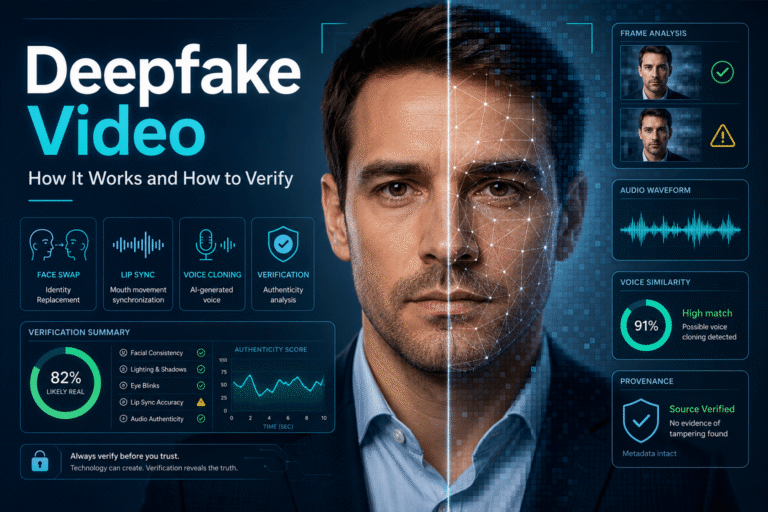
A deepfake video is synthetic or AI-manipulated media that changes how a person, identity, action, or event appears to viewers. The best-known examples replace a face or clone a voice, but modern deepfakes can also alter facial expressions, mouth movements, body performance, or several media layers at the same time.
What makes deepfakes difficult in 2026 is not that every fake looks perfect. It is that the category has become broader and the production quality has improved. A convincing clip may contain mostly real footage with only one manipulated region. Another may combine an authentic face with cloned speech. A third may be fully synthetic but designed to impersonate a real person.
What Is a Deepfake Video?
The term deepfake originally became associated with deep-learning systems that replaced or manipulated faces. Today, it is used more broadly for realistic synthetic media that can make a real person appear to say or do something they did not actually say or do.
NIST notes that “deepfake” is now used across news, technical, scientific and legal discussions, and that synthetic or manipulated media can have creative, beneficial, deceptive, harmful, or ambiguous uses. That context matters because the technology itself does not tell you the creator’s intent.
A useful definition for everyday verification is:
A deepfake video is realistic media in which AI materially changes a person’s identity, voice, performance, or representation in a way that can affect what viewers believe happened.
That definition is intentionally narrower than “any video made with AI.” A fictional landscape generated from a text prompt is an AI-generated video, but it is not necessarily a deepfake unless it impersonates or misrepresents a real person, event, or identity.
The Five Main Types of Deepfake Video
For dedicated coverage of speech impersonation, see the voice deepfake guide. For mouth replacement and synthetic dialogue alignment, the AI lip sync guide covers that narrower technique.
Deepfake Video vs AI-Generated Video vs Edited Video
These terms are often used as if they mean the same thing. They do not.
| Media type | What changed? | Typical purpose |
|---|---|---|
| Deepfake video | Identity, voice, performance, or realistic representation is synthetically changed | Impersonation, dubbing, entertainment, fraud, satire, misinformation or creative production |
| Fully AI-generated video | Most or all of the scene is synthesized | Creative generation, advertising, visualization, fiction or deceptive representation |
| AI-edited real video | Selected objects, regions, backgrounds or properties are generated or replaced | Editing, effects, localization or manipulation |
| Conventional edited video | Cuts, crops, color, speed, subtitles, audio or sequencing are changed without generative AI | Normal production or deceptive editing |
| Authentic video with false context | The media may be untouched, but the caption, date, location or identity is wrong | Misinformation, misunderstanding or deliberate deception |
This distinction matters because a video can be misleading without being a deepfake, and a deepfake can be transparently disclosed without being deceptive.
How Deepfake Videos Are Made
You do not need to understand model architecture to understand the production chain. Most deepfake workflows combine several conceptual stages.
Reference material establishes identity
A model needs information about the person it is meant to imitate. Depending on the technique, that can come from photographs, video, speech samples, or other recordings.
A source performance supplies behavior
Many deepfakes preserve a real performance underneath the synthetic layer. A different actor may provide head motion and expressions. A new voice track may provide the words. A genuine interview can provide the entire body and camera movement while only the face or mouth is changed.
The AI system generates the altered layer
The model predicts what the target identity should look or sound like under the source performance. Modern systems may generate faces, expressions, speech, mouth motion, or larger portions of the scene.
The synthetic result is blended into the final video
Color, lighting, motion, edges, audio, compression and other production choices can be adjusted so the manipulated region fits the surrounding footage.
This is why “look for a pasted-on face” is no longer a useful definition of deepfake quality. The manipulation can be distributed across several layers and may be difficult to isolate visually.
Why Modern Deepfakes Are Harder to Recognize
Older detection advice often focused on blinking, strange teeth, warped ears, plastic skin or obvious face edges. Those artifacts can still appear, but they are not stable rules.
Modern generation systems are specifically improving the areas that once gave them away: identity consistency, motion, lighting, high-resolution detail, speech and temporal coherence. At the same time, normal video processing can create many of the same visual problems that people mistakenly associate with AI.
A real video may look suspicious because of:
- heavy social-media compression
- low light or motion blur
- beauty filters
- frame interpolation
- background replacement
- video-call processing
- poor audio synchronization
- aggressive denoising or sharpening
The result is important: deepfake verification should move away from visual folklore and toward multiple independent evidence layers.
What a Deepfake Can Change Without Changing the Whole Video
A deepfake does not need to synthesize the entire frame to change the meaning of a recording.
| Manipulated layer | What may remain authentic | What viewers may wrongly believe |
|---|---|---|
| Face only | Body, camera, background and audio | A different person performed the action |
| Mouth only | Most facial appearance and original footage | The person spoke new words |
| Voice only | Entire visual recording | The visible person said the synthetic dialogue |
| Background or object | Person and much of the original scene | The event occurred in a different environment or involved a different object |
| Several layers | Parts of the source footage | A complete synthetic performance is authentic |
This partial-authenticity problem is one reason binary labels such as “real video” and “fake video” can be misleading.
Deepfake Does Not Automatically Mean Malicious
The same underlying techniques can be used for very different purposes.
The technology is not the verdict. Consent, disclosure, context, intent and downstream harm determine how a deepfake should be evaluated.
Why Deepfake Video Matters Beyond Social Media
Deepfakes are often discussed as viral-video misinformation, but the risk extends into ordinary identity and trust systems.
A manipulated video can affect:
- financial scams and fake investment endorsements
- business impersonation
- family emergency fraud
- political and public-interest communication
- brand reputation
- journalism and evidence verification
- remote identity proofing
- harassment and personal safety
FTC data released in June 2026 shows people reported losing $3.5 billion to imposter scams in 2025. That figure covers all forms of impersonation fraud rather than deepfakes alone, but it illustrates the economic value attackers can extract from trusted identities. See the FTC imposter scam data.
For fraud patterns where synthetic video is used to push a payment, investment or urgent action, use the scam video guide.
How to Verify a Suspected Deepfake Video
A reliable verification process asks four different questions. It does not start by hunting for one visual glitch.
Define what would have to be fake
If a politician appears to make a statement, the face may be real while the voice is synthetic. If a celebrity appears in an advertisement, the body and voice might come from different sources. If a viral clip shows an arrest, the entire scene could be generated or the video could be genuine footage with a false caption.
You cannot choose the right verification method until you know which claim matters.
Find the strongest source
Look for the full interview, original upload, official account, longer recording or publication page. A high-quality original can reveal context and preserve provenance that disappears in a repost.
Compare with authentic material
If identity is the issue, compare the clip with known authentic video and audio from the same person. Look for source-level contradictions, not just appearance.
Use technical detection when the media remains uncertain
The detailed detection workflow belongs in the dedicated deepfake detection guide. That separation matters: this page explains the deepfake category and verification model, while the detection page owns frame, temporal, audio and forensic detection methods.
Can You Detect a Deepfake Just by Looking?
Sometimes, but not reliably enough for a high-stakes conclusion.
Low-quality deepfakes may contain obvious visual or audio failures. High-quality manipulations may not. Real media can also contain unusual artifacts because of compression, editing or capture conditions.
A useful visual observation sounds like this:
“The facial region becomes unstable during head turns and does not match the surrounding compression.”
A weak conclusion sounds like this:
“The eyes look strange, therefore it is a deepfake.”
The difference is evidence quality and restraint.
Why Deepfake Detectors Can Be Wrong
Deepfake detectors infer patterns from media. They do not have direct access to the truth of how every video was created.
NIST’s 2026 deepfake evaluation program highlights a major challenge: current detection systems can suffer roughly 45% to 50% performance degradation when moving from academic evaluation to operational deployment. NIST is building adversarial benchmarks specifically because real-world deepfake detection requires more difficult and representative testing. See NIST GenAI: Deepfakes 2026.
Detector performance can change because of:
- new generation models
- video compression
- cropping and resizing
- filters and denoising
- short clip duration
- unseen manipulation techniques
- mixed real and synthetic content
That is why a detector score should be treated as one evidence layer, not an automatic verdict.
How Provenance Changes Deepfake Verification
Detection asks the media to reveal signs of manipulation. Provenance asks whether a trustworthy creation history is available.
Content Credentials can record information about compatible media in cryptographically signed manifests. Depending on the workflow, provenance may describe AI generation, AI modification, source media, editing actions or other production information.
C2PA’s July 2026 implementation guidance specifically addresses how Content Credentials can communicate AI-generated, AI-modified and non-synthetic content. See the C2PA implementation guide.
The important limitation is simple: provenance tells you about the documented media history. It does not automatically prove that a caption, statement or real-world claim is true.
For the checker workflow itself, use the Content Credentials verification guide.
Deepfake Labels on YouTube: What They Mean
YouTube currently requires creators to disclose realistic content that is meaningfully generated or altered with AI when it makes a real person appear to say or do something they did not, changes footage of a real event or place, or creates a realistic event that did not occur.
YouTube can also automatically apply AI labels to content made with its own generative tools, content containing C2PA metadata, or media identified by its internal systems. The current policy is documented in YouTube’s GenAI disclosure guidance.
A platform label is useful evidence, but it needs careful interpretation:
- a label can confirm meaningful AI generation or alteration is disclosed or detected
- it does not tell you that the video is deceptive
- it does not necessarily identify which exact model created the media
- absence of a label does not prove the clip is authentic
A Deepfake Can Be Real, Synthetic and Misleading at the Same Time
This sounds contradictory until you separate the layers.
| Layer | Possible state |
|---|---|
| Base footage | Authentic camera recording |
| Face | AI-replaced |
| Voice | Authentic or cloned |
| Caption | False or misleading |
| Platform disclosure | Present, absent or incomplete |
This layered model is much more accurate than asking whether the entire file is “real” or “fake.”
Deepfake Video Examples: Learn Patterns Without Treating Them as Rules
Examples are useful for understanding how deepfakes are used, but they are poor universal fingerprints.
A celebrity endorsement scam teaches you about impersonation. A synthetic political speech teaches you about false attribution. A face-swapped entertainment clip teaches you about identity replacement. None of them proves that the next deepfake will fail in the same visual way.
For a dedicated taxonomy and real-world pattern library, see the deepfake examples guide.
What to Do When a Deepfake Targets You or Your Organization
If a deepfake impersonates you, a colleague, executive, brand or public representative, speed matters, but evidence preservation matters too.
- Preserve the original post. Save URLs, account names, timestamps, screenshots and the best available copy.
- Find the strongest authentic reference. Locate the real speech, video, announcement or official communication if one exists.
- Publish a correction from a trusted channel. Explain exactly what is false rather than simply calling the clip “fake.”
- Report impersonation or synthetic-media abuse to the platform.
- Warn affected users directly when money, credentials or safety are involved.
- Retain evidence for legal, security or fraud teams when the impact is significant.
Do not amplify the manipulated video unnecessarily when a still frame, link or description is enough to explain the problem.
How DetectVideo AI Fits Into Deepfake Verification
DetectVideo AI can add a technical evidence layer when you have supported video and need to investigate potential AI generation or manipulation.
Depending on the media, available analysis may examine visual, temporal, audio-video, compression, metadata, source and manipulation evidence.
The most useful way to interpret a result is not:
“The tool says 72%, therefore the video is fake.”
Instead ask:
- Which evidence groups were available?
- Do several independent signals agree?
- Is suspicious evidence localized to the face, mouth or audio?
- Could compression or normal editing explain the same result?
- Does the technical analysis agree with the source and provenance evidence?
When the answer remains uncertain, preserve the uncertainty. A responsible verdict can be unverified.
A Better Deepfake Video Verdict
Use the narrowest conclusion that the evidence supports.
| Verdict | What it means |
|---|---|
| Authentic media | Strong source and media evidence supports the recording as presented |
| AI-generated and disclosed | Synthetic media is present and transparently identified |
| Deepfake manipulation supported | Evidence supports synthetic identity, voice, performance or event manipulation |
| Authentic base, manipulated layer | Part of the recording is genuine while one or more layers are synthetically changed |
| Authentic video, false context | The file may be genuine but the surrounding claim is wrong |
| Unverified | The available evidence is insufficient or conflicting |
This vocabulary is more informative than “real” or “fake” because it describes what was actually established.
Deepfake Video Verification Checklist
For a broader investigation that includes date, location, source tracing and contextual claims, use the video verification guide.
Key Takeaway
Deepfake video is no longer best understood as a face-swap trick with a few predictable visual flaws. It is a category of synthetic media that can alter identity, speech, performance or the apparent reality of an event while preserving large portions of authentic footage.
The most useful way to think about a suspicious clip is layer by layer. What is real? What may have been generated? What does the source establish? Is provenance available? Does technical detection agree with the other evidence?
That approach remains useful even as generation quality improves, because it does not depend on one model making the same mistake forever.
FAQ About Deepfake Video
What is a deepfake video?
A deepfake video is realistic media in which AI materially changes a person’s identity, voice, performance or representation. It can use face replacement, facial reenactment, lip synchronization, voice cloning or several techniques together.
Is every AI-generated video a deepfake?
No. A fully synthetic fictional scene can be AI-generated without impersonating a real person. Deepfake usually refers more specifically to realistic identity, performance or event manipulation.
How are deepfake videos made?
At a high level, a workflow uses reference material for the target identity, a source performance or script, AI synthesis, compositing and final video production. Different techniques modify different layers of the media.
Can a deepfake use real video?
Yes. Many deepfakes preserve most of a genuine recording and change only the face, mouth, voice or another important region. The result can therefore contain both authentic and synthetic evidence.
Can I detect a deepfake just by looking at it?
Sometimes low-quality manipulations are visually obvious, but appearance alone is not reliable enough for high-stakes verification. Use source, provenance, comparison and technical analysis together.
What is the difference between a face swap and a deepfake?
A face swap is one type of deepfake technique. Deepfake is the broader category and can also include facial reenactment, cloned speech, AI lip sync and hybrid identity manipulation.
Can deepfake detectors make mistakes?
Yes. Performance can change with new generators, compression, editing and real-world conditions. A detector result should be interpreted as supporting evidence rather than absolute proof.
Do Content Credentials prove a video is not a deepfake?
Content Credentials can provide strong provenance about compatible media, including recorded AI generation or modification. They do not automatically prove the external story attached to the video is true.
Does YouTube label deepfake videos?
YouTube requires disclosure for realistic content that is meaningfully generated or altered with AI and can also apply labels automatically in some cases. Missing disclosure should not be treated as proof that a video is authentic.
Can a voice clone be a deepfake even if the video is real?
Yes. Authentic visual footage combined with cloned speech can create a deepfake impersonation because the visible person is made to appear to say words they did not say.
What should I do if I think a viral video is a deepfake?
Do not rely on one visual clue. Preserve the source, find the original or longer version, compare authentic references, check provenance and platform disclosure, and use technical analysis if the media remains uncertain.
What if I cannot prove whether the video is a deepfake?
Use an unverified conclusion. Do not label the video authentic or fake when the available evidence is insufficient.